
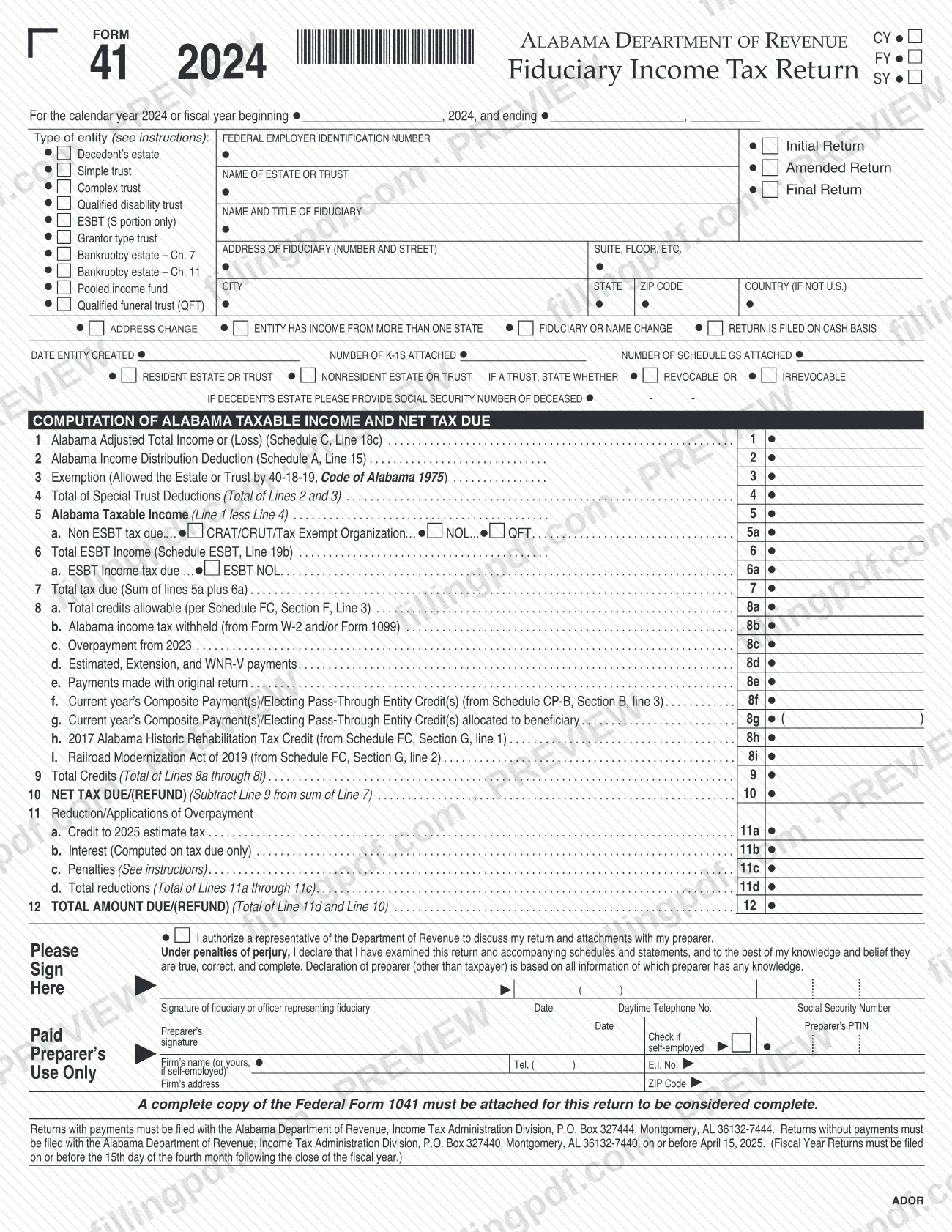
Alabama Form 41 is the fiduciary income tax return that the Alabama Department of Revenue (ADOR) uses for estates and trusts for tax year 2024. Fiduciaries of resident and nonresident trusts, decedents' estates and several special trust types report income, the income distribution deduction, credits and the tax due or refund on it. On FillingPDF you can fill out the form online and download or print the completed PDF; the return reaches ADOR only through the mailing and payment channels it describes, and the official PDF is published on the ADOR website.
Last updated
What is 41?
Form 41, the Alabama Fiduciary Income Tax Return, is the Alabama Department of Revenue form on which the fiduciary of an estate or trust computes Alabama taxable income and the net tax due or refund for the year.
The return is built around a short computation on page 1: Alabama adjusted total income (line 1), the Alabama income distribution deduction (line 2), the exemption allowed by Section 40-18-19, Code of Alabama 1975 (line 3), taxable income (line 5), tax due (lines 5a to 7), credits and payments (lines 8a to 9) and the net tax due or refund (lines 10 to 12). Supporting schedules sit behind it:
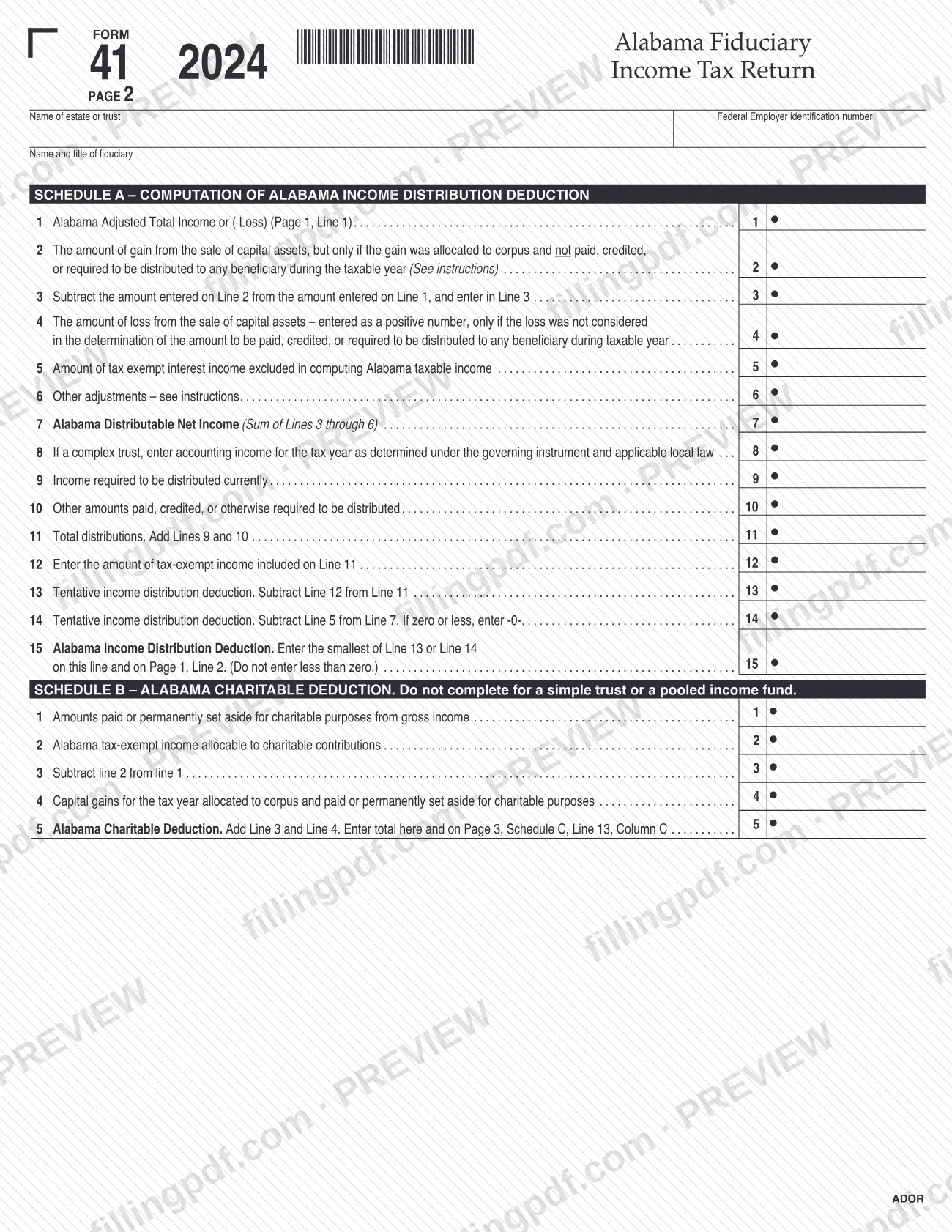
- Schedule A: Alabama income distribution deduction.
- Schedule B: Alabama charitable deduction, not completed for a simple trust or a pooled income fund.
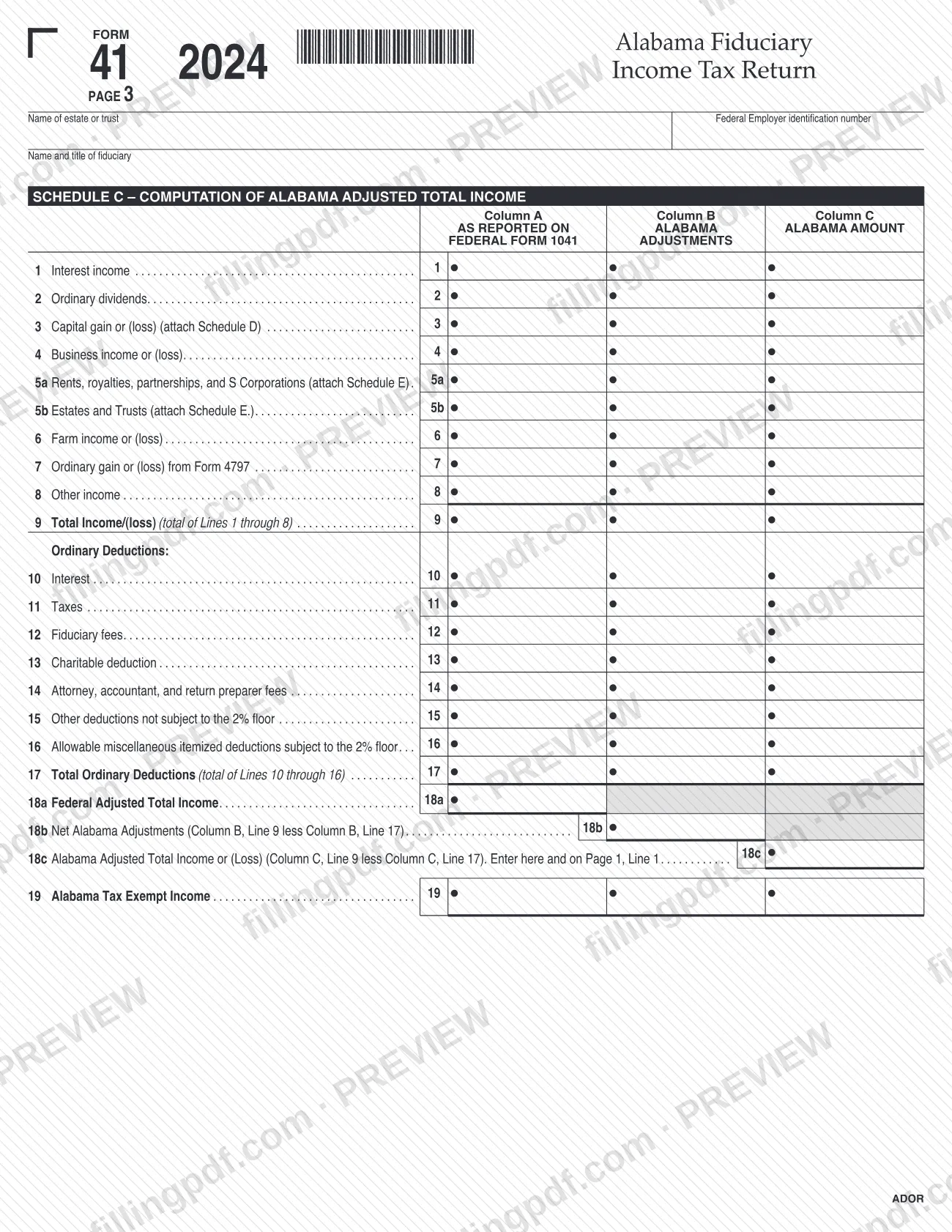
- Schedule C: Alabama adjusted total income, comparing federal Form 1041 amounts with Alabama adjustments.
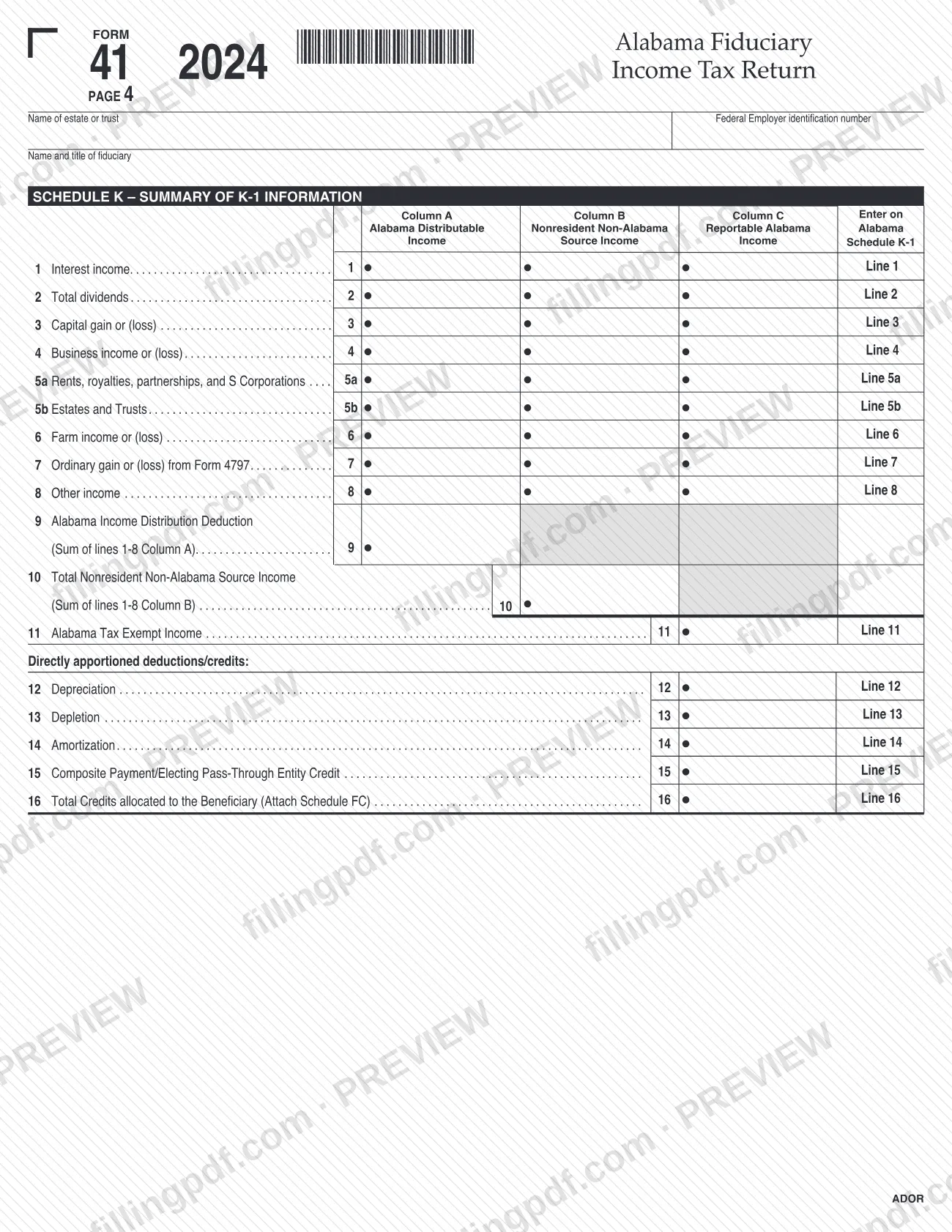
- Schedule K: summary of Alabama Schedule K-1 information for beneficiaries.
The form's entity boxes cover decedent's estates, simple, complex, grantor type and qualified disability trusts, ESBTs (S portion only), Chapter 7 and Chapter 11 bankruptcy estates, pooled income funds and qualified funeral trusts. Alabama applies the Subchapter J rules to income and deductions determined under Alabama law. The return is not complete without a full copy of federal Form 1041, U.S. Income Tax Return for Estates and Trusts.
Who needs to file 41?
Fiduciaries who meet the filing rules in Section 40-18-29(a), as the ADOR instructions describe them, file Form 41:
- All resident trusts with net income over $1,500 for the year.
- All nonresident trusts with any Alabama derived net income after deductions.
- Any trust, resident or nonresident, claiming a qualifying net operating loss; it must file in the year of the loss to qualify for credit on future years' returns.
Grantor trusts have a return filing requirement under Sections 40-18-25(g) and 40-18-29. They complete the top of page 1, check the grantor type trust box, enter zeroes on page 1 (lines 1 to 7), page 2 (lines 1 to 15) and page 3 (lines 1 to 19), and complete Alabama Schedule G, Grantor's Statement of Income, Deductions, and Other Items. Schedule C is not required for a grantor trust.
Fiduciaries of a CRAT, CRUT or tax exempt organization follow the standard instructions for lines 1 through 5, enter zero on line 5a and check the box identifying the entity type.
For a decedent's estate, the form asks for the deceased person's Social Security number. The fiduciary or an officer representing the fiduciary signs the return.
When to file 41
Calendar year returns are due on or before April 15 following the close of the year, so the 2024 return is due on or before April 15, 2025. Fiscal year and short year returns are due on or before the 15th day of the fourth month after the fiscal or short year closes. If the due date falls on a Saturday, Sunday or holiday, the return is due the next business day.
An extension of time to file that is allowed for federal purposes is recognized by Alabama, but it does not extend the time to pay: the tax must be paid by the original due date. For tax years beginning on or after January 1, 2016, the due date for tax exempt organizations is the same as the federal return's due date.
Estimated payments are not required by Alabama law; voluntary payments can be sent with Form FDT-V. A late-filing penalty applies even when the return shows a refund or a zero balance, and interest runs from the due date without extension; see the line 11b and 11c instructions.
Documents you need
- A complete copy of federal Form 1041, U.S. Income Tax Return for Estates and Trusts, with all federal K-1s, statements and attachments; without it the return is not complete. Voluminous depreciation schedules may be omitted if you attach a list of them.
- A properly completed Alabama Schedule K-1 or Schedule G for each person or tax entity that was a beneficiary at any time during the taxable year.
- Form FDT-V, enclosed with the check or money order when you mail a payment with the return.
- A copy of Form W-2 or Form 1099, if you claim Alabama income tax withheld on line 8b.
- Schedule FC, if you claim credits on line 8a, 8h or 8i.
- Schedule CP-B, if you claim Composite Payment(s) or Electing Pass-Through Entity Credit(s) on line 8f.
- Schedule ESBT, if the trust is an electing small business trust (line 6); also Schedule NOL-F85A if you check the ESBT NOL box.
- A computation schedule, if you check the CRAT/CRUT or NOL box on line 5a.
- A complete explanation of each adjustment entered on Schedule A, line 6.
- Alabama Schedule D, Schedule E and, if the estate or trust operated a business or a farm, federal Schedule C or Schedule F, as the Schedule C lines direct.
- Supporting documents for Schedule C, Column B adjustments, and an explanation of the items reported on Schedule C, line 19.
How to fill out 41
Enter the tax year and entity type
Check CY, FY or SY and, for a fiscal year, enter the beginning and ending dates. Check the type of entity (for example Decedent's estate, Simple trust, Complex trust or Grantor type trust) and any Initial Return, Amended Return or Final Return box.
Complete the fiduciary identification block
Enter the federal employer identification number, the name of the estate or trust, the name and title of the fiduciary and the fiduciary's address. Use the estate's or trust's own FEIN, not that of the accounting firm, trustee, attorney's firm or an interest payor.
Answer the status boxes and counts
Check any address change, income from more than one state, fiduciary or name change and cash basis boxes that apply. Enter the date the entity was created, the number of K-1s attached and the number of Schedule GS attached.
Mark residency and trust details
Check Resident or Nonresident estate or trust, and for a trust state whether it is revocable or irrevocable. For a decedent's estate enter the deceased person's Social Security number.
Compute taxable income on lines 1 to 5
Line 1 is Schedule C, line 18c; line 2 is Schedule A, line 15; line 3 is the exemption; line 4 is lines 2 and 3 together; line 5 is line 1 less line 4. Do this after completing Schedules A and C.
Figure the tax on lines 5a to 7
On line 5a enter the total income tax due from the Tax Computation Worksheet, checking the CRAT/CRUT/Tax Exempt Organization, NOL or QFT box when it applies. For an ESBT, enter Schedule ESBT line 19b on line 6, 5% of it on line 6a, and the sum of 5a and 6a on line 7.
Enter credits and payments on lines 8a to 9
Enter credits from Schedule FC (8a), Alabama tax withheld (8b), the 2023 overpayment (8c), estimated, extension and WNR-V payments (8d), payments made with the original return (8e), composite payments (8f), the amount allocated to a beneficiary as a negative number (8g), and lines 8h and 8i. Line 9 totals lines 8a through 8i.
Compute net tax due or refund
Line 10 is line 7 less line 9: a positive number is tax owed and a negative number is an overpayment. On line 11 enter any credit to 2025 estimated tax (11a), interest (11b) and penalties (11c), total them on 11d, and add 11d and line 10 on line 12.
Complete Schedule A distribution deduction
Work lines 1 to 7 to reach Alabama Distributable Net Income, then lines 8 to 13 for the distributions (line 8 applies to complex trusts only). Line 15 is the smallest of lines 13 or 14, not less than zero, and goes to page 1, line 2.
Complete Schedule B if it applies
Do not complete Schedule B for a simple trust or a pooled income fund. Enter charitable amounts on lines 1 to 4; line 5 is the Alabama charitable deduction and also goes on Schedule C, line 13, Column C.
Fill in Schedule C by column
For lines 1 to 17 enter federal Form 1041 amounts in Column A, Alabama adjustments in Column B (increases positive, decreases negative) and the Alabama amount in Column C. Lines 18a, 18b and 18c give the federal, adjustment and Alabama adjusted totals; line 18c must match page 1, line 1.
Summarize K-1 data on Schedule K
For each income line enter the Alabama distributable income (Column A), nonresident non-Alabama source income (Column B) and the Alabama reportable amount (Column C). Complete lines 9 to 16 for the totals, tax exempt income, depreciation, depletion, amortization and credits allocated to the beneficiary.
Sign, review and download the PDF
Sign and date as fiduciary and add the daytime telephone number; a paid preparer completes the preparer block. Check that the federal Form 1041 and required schedules will be attached, then download or print the completed PDF from FillingPDF.
How to submit 41
Form 41 is filed by mail to ADOR, with electronic and mailed options for paying any tax due. The address depends on whether a payment is enclosed.
- Returns with payments: Alabama Department of Revenue, Income Tax Administration Division, Alabama Form 41, P.O. Box 327444, Montgomery, AL 36132-7444. Make the check or money order payable to Alabama Department of Revenue and enclose Form FDT-V.
- Returns without payments: Alabama Department of Revenue, Income Tax Administration Division, Alabama Form 41, P.O. Box 327440, Montgomery, AL 36132-7440.
- Electronic payment: direct debit through approved e-file software vendors, or My Alabama Taxes (MAT) at www.myalabamataxes.alabama.gov with a Sign On Id and Access Code. Taxpayers without an ADOR account can use the non-logged-in MAT option from www.revenue.alabama.gov (Under Payments, click Make a Payment); have your banking information, filing period, payment type and FEIN or Alabama Tax Account Number ready. For MAT payment help call 1-800-322-4106, option 5, or 334-242-1170, option 5, 8:00 am to 5:00 pm Central.
Attach the complete federal Form 1041 package and the required Alabama schedules, or ADOR will not treat the return as complete. If you paid electronically, check the indicator box at line 12. FillingPDF lets you fill out and download the PDF; submission follows the channels above.
Common mistakes to avoid
- Filing without a complete copy of federal Form 1041 with all federal K-1s, statements and attachments; the return is then treated as a delinquent return.
- Leaving out an Alabama Schedule K-1 or Schedule G for a beneficiary who held an interest at any time during the taxable year.
- Mailing a return with a payment to P.O. Box 327440, or a return without payment to P.O. Box 327444, instead of the address the form gives for each case.
- Sending a payment without Form FDT-V when mailing a check or money order.
- Assuming a federal extension also extends the time to pay; the tax is still due by the original due date.
- Using the Employer Identification Number of the accounting firm, trustee, attorney's firm or an interest payor instead of the estate's or trust's own FEIN.
- Completing Schedule C or entering amounts on lines 1 to 7 of a grantor trust return; those lines take zeroes and Schedule G is completed instead.
- Entering a CRAT, CRUT or tax exempt organization's tax on line 5a instead of a zero with the entity box checked.
- Entering Schedule A, line 6 adjustments without a complete explanation for each one.
- Entering the ESBT amount on line 6a without multiplying line 6 by 5% as the instructions direct.
Frequently asked questions
What is the Alabama fiduciary income tax return?
It is Alabama Form 41, the return on which the fiduciary of an estate or trust reports Alabama adjusted total income, deductions, credits and the resulting tax due or refund. The Alabama Department of Revenue requires a complete copy of federal Form 1041 with it.
Who has to file Alabama Form 41?
Resident trusts with net income over $1,500 for the year, nonresident trusts with any Alabama derived net income after deductions, and any trust claiming a qualifying net operating loss, which must file in the year of the loss. Grantor trusts also have a filing requirement.
When is the 2024 Form 41 due?
April 15, 2025, for calendar year returns. Fiscal year and short year returns are due on the 15th day of the fourth month after the year closes. A federal extension is recognized, but the tax must still be paid by the original due date.
Where do I mail Alabama Form 41?
With a payment, mail it to Alabama Department of Revenue, Income Tax Administration Division, P.O. Box 327444, Montgomery, AL 36132-7444. Without a payment, use P.O. Box 327440, Montgomery, AL 36132-7440.
What do I attach to Form 41?
A complete copy of federal Form 1041 with all federal K-1s, statements and attachments, plus an Alabama Schedule K-1 or Schedule G for each beneficiary. Add Form FDT-V with a mailed payment and any credit, ESBT or NOL schedules your lines require.
How do I complete Form 41 for a grantor trust?
Complete the upper part of page 1 and check the grantor type trust box, enter zeroes on page 1 lines 1 to 7, page 2 lines 1 to 15 and page 3 lines 1 to 19, and complete Alabama Schedule G. Schedule C is not required.
Can I pay the tax due electronically?
Yes. The instructions allow direct debit through approved e-file software vendors or payment through My Alabama Taxes (MAT), including a non-logged-in option for taxpayers without an ADOR account. If you pay electronically, check the indicator box at line 12.
Can I fill out Form 41 online on FillingPDF?
Yes. You can fill out the fillable PDF online on FillingPDF and download or print it. FillingPDF is an independent service, not the Alabama Department of Revenue, and it does not file the return; you submit it through the ADOR channels above.
Ready to fill out 41?
Fill out 41 now