
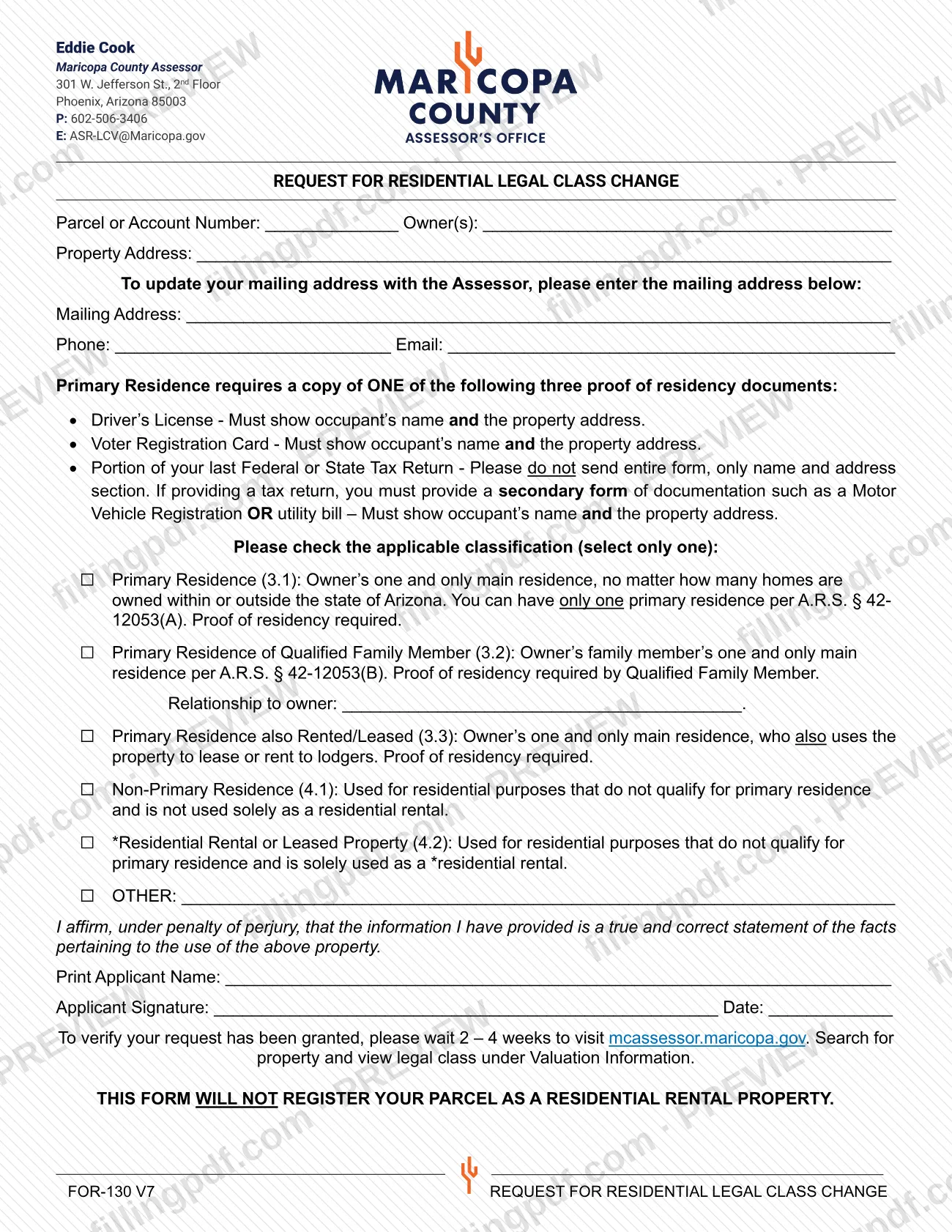
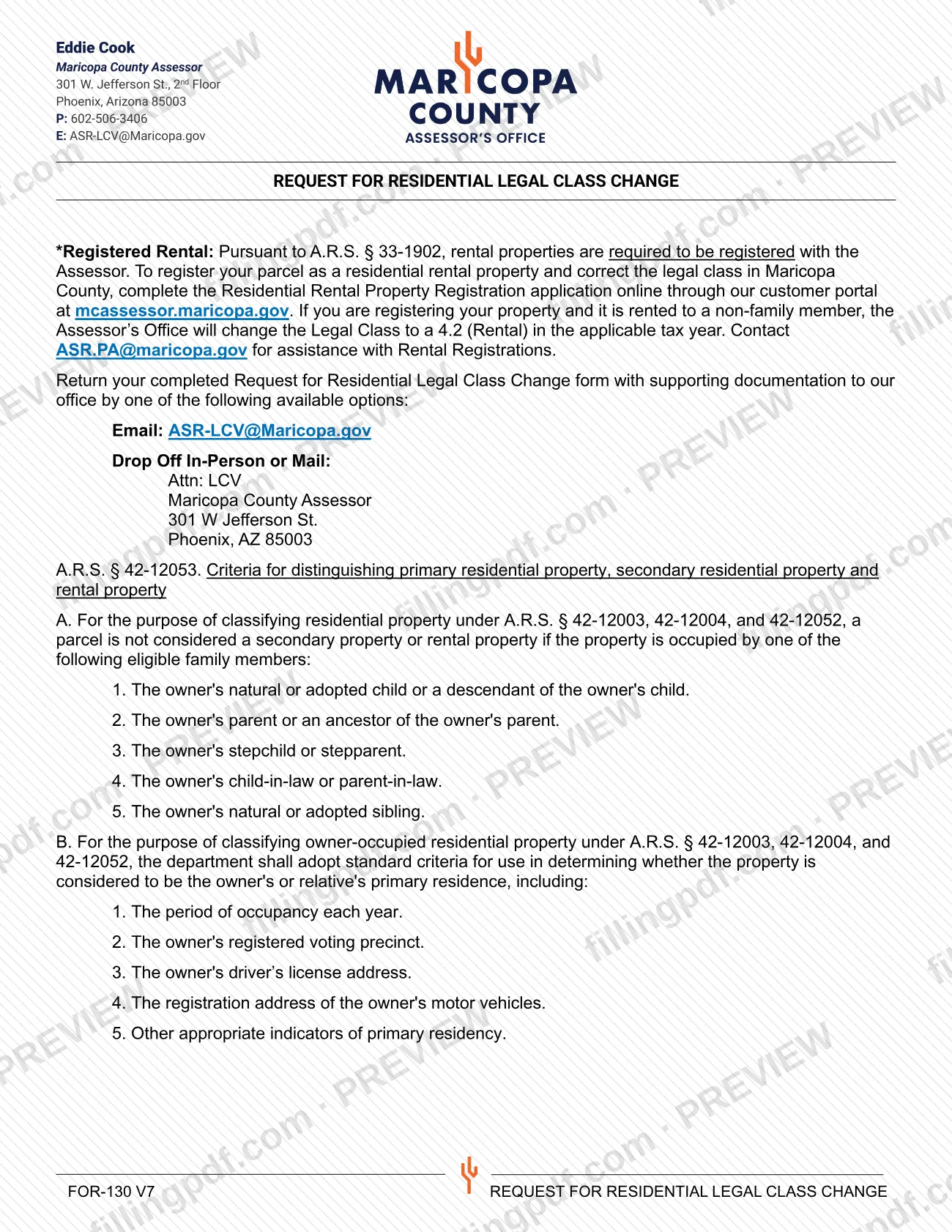
The Request for Residential Legal Class Change (FOR-130) is the Maricopa County Assessor's form for asking that a residential parcel be placed in a different legal class, such as Primary Residence (3.1) or Non-Primary Residence (4.1). It is one of the Maricopa County property tax forms published by the Assessor, and it is not the form that registers a rental. On this page you can fill out the form online on FillingPDF and download or print the completed PDF; the Assessor receives it by email, mail or drop-off, as described below.
Last updated
What is FOR-130?
The Request for Residential Legal Class Change (form FOR-130, version V6) is the Maricopa County Assessor form on which a property owner identifies a parcel and asks the Assessor to assign it one residential legal class, supported by a signed statement and, for primary residence classes, proof of residency.
The form offers six choices, of which you select only one:
- Primary Residence (3.1): the owner's one and only main residence, however many homes the owner has in or outside Arizona. Only one primary residence is allowed under A.R.S. § 42-12053 (A).
- Primary Residence of Qualified Family Member (3.2): a family member's one and only main residence under A.R.S. § 42-12053 (B). The form asks for the relationship to the owner.
- Primary Residence also Rented/Leased (3.3): the owner's main residence, also used to lease or rent to lodgers.
- Non-Primary Residence (4.1): residential use that does not qualify as primary residence and is not used solely as a residential rental.
- Residential Rental or Leased Property (4.2): residential use that does not qualify as primary residence and is used solely as a residential rental.
- OTHER: a free-text line.
The applicant affirms, under penalty of perjury, that the information is a true and correct statement of the facts about the use of the property. The form does not register a parcel as a residential rental property; the Assessor handles that through a separate Residential Rental Property Registration.
Who needs to file FOR-130?
Owners of residential parcels in Maricopa County who want the Assessor to change or confirm the legal class of a parcel use this form. The applicant prints their name and signs the affirmation at the bottom.
How the form's classes apply:
- 3.1: the owner lives in the property as their one and only main residence.
- 3.2: a qualified family member lives there as their one and only main residence. Under A.R.S. § 42-12053 (A), the eligible family members are the owner's natural or adopted child or a descendant of the child; parent or an ancestor of the parent; stepchild or stepparent; child-in-law or parent-in-law; and natural or adopted sibling.
- 3.3: the owner's main residence that is also rented or leased to lodgers.
- 4.1, 4.2 or OTHER: uses that do not qualify as primary residence.
Do not use this form to register a rental. The form states that it will not register your parcel as a residential rental property. Rental registration under A.R.S. § 33-1902 is completed online through the Assessor's customer portal at mcassessor.maricopa.gov, and the Assessor lists [email protected] for help with rental registrations.
When to file FOR-130
The form prints no deadline. You submit it when you want the Assessor to change the residential legal class of your parcel, with the supporting documentation if you choose a primary residence class.
After you send it, the form tells you to wait 2 to 4 weeks and then check whether the request was granted: go to mcassessor.maricopa.gov, search for the property and view the legal class under Valuation Information.
If you are registering a rental instead, the Assessor's note on the form says that a parcel registered as rented to a non-family member has its legal class changed to 4.2 (Rental) in the applicable tax year. That registration is a separate online application and not this form.
Documents you need
- For Primary Residence (3.1), (3.2) or (3.3): a copy of ONE of three proofs of primary residency: a driver's license, a voter registration card or a portion of your last federal or state tax return.
- Driver's license: must show the occupant's name and the property address.
- Voter registration card: must show the occupant's name and the property address.
- Portion of your last federal or state tax return: send only the name and address section, not the entire return.
- If you use a tax return as proof: a secondary document such as a motor vehicle registration or a utility bill, showing the occupant's name and the property address.
- For Primary Residence of Qualified Family Member (3.2): the proof of residency is that of the qualified family member, the occupant.
How to fill out FOR-130
Identify the parcel and owners
Enter the Parcel or Account Number, the Owner(s) and the Property Address at the top of the form.
Add contact and mailing details
If you also want to update your mailing address with the Assessor, enter it on the Mailing Address line. Enter your Phone and Email.
Select one classification
Check only one box: Primary Residence (3.1), Primary Residence of Qualified Family Member (3.2), Primary Residence also Rented/Leased (3.3), Non-Primary Residence (4.1), Residential Rental or Leased Property (4.2) or OTHER.
State the family relationship for 3.2
If you check 3.2, write the occupant's relationship to the owner on the Relationship to owner line. Proof of residency is required from the qualified family member.
Describe OTHER if it applies
If none of the listed classes fits, check OTHER and write the description on the line provided.
Choose your proof of residency
For 3.1, 3.2 or 3.3, prepare a copy of ONE of: driver's license, voter registration card, or part of your last tax return plus a motor vehicle registration or utility bill.
Print your name, sign and date
Print the applicant name, sign and enter the date under the affirmation made under penalty of perjury.
Review and download the completed PDF
Check that only one box is marked and the parcel number and address are correct. Download or print the completed PDF from FillingPDF and send it with your proof of residency as described under How to submit.
How to submit FOR-130
Return the completed form with supporting documentation to the Maricopa County Assessor by email, by mail or by dropping it off in person.
- Email: [email protected]
- Mail or in-person drop-off: Attn: LCV, Maricopa County Assessor, 301 W Jefferson St., Phoenix, AZ 85003.
Include the copy of your proof of primary residency when you select 3.1, 3.2 or 3.3. About 2 to 4 weeks after sending, check the result on mcassessor.maricopa.gov by searching the property and viewing the legal class under Valuation Information. The Assessor's forms page also lists a DocuSign version of this form. FillingPDF lets you fill out and download the PDF; submission follows the channels above.
Common mistakes to avoid
- Checking more than one classification; the form says to select only one.
- Choosing 3.1, 3.2 or 3.3 without enclosing a copy of one proof of primary residency.
- Sending a driver's license or voter registration card that does not show the occupant's name and the property address.
- Sending an entire tax return; the form asks only for the name and address section.
- Using a tax return as proof without a secondary document such as a motor vehicle registration or a utility bill.
- Sending this form to register a rental property; it will not register your parcel as a residential rental property.
- Leaving the Relationship to owner line blank when requesting Primary Residence of Qualified Family Member (3.2).
- Omitting the printed applicant name, signature or date under the penalty-of-perjury affirmation.
Frequently asked questions
What is the Request for Residential Legal Class Change?
It is form FOR-130 from the Maricopa County Assessor, used to ask that a residential parcel be assigned a legal class such as 3.1 Primary Residence or 4.1 Non-Primary Residence. It is one of the Maricopa County property tax forms the Assessor publishes and requires a signed affirmation.
Can I use FOR-130 to register my rental property?
No. The form states it will not register your parcel as a residential rental property. Rental registration under A.R.S. § 33-1902 is done online through the Assessor's customer portal at mcassessor.maricopa.gov; [email protected] handles questions.
What proof of residency do I need for a primary residence?
A copy of one of three documents: a driver's license, a voter registration card, or a portion of your last federal or state tax return. Each must show the occupant's name and the property address. A tax return also needs a motor vehicle registration or utility bill.
Where do I send the Request for Residential Legal Class Change?
Email it to [email protected], or drop it off or mail it to Attn: LCV, Maricopa County Assessor, 301 W Jefferson St., Phoenix, AZ 85003, with your supporting documentation.
How do I know if my legal class was changed?
Wait 2 to 4 weeks after sending the form, then go to mcassessor.maricopa.gov, search for your property and view the legal class under Valuation Information.
Who counts as a qualified family member for class 3.2?
Under A.R.S. § 42-12053 (A), as printed on the form: the owner's natural or adopted child or a child's descendant, parent or a parent's ancestor, stepchild or stepparent, child-in-law or parent-in-law, and natural or adopted sibling.
Can I fill out FOR-130 online on FillingPDF?
Yes. You can fill out the PDF online on FillingPDF and download or print it. FillingPDF is independent of the Maricopa County Assessor and does not submit the form; you send it through the Assessor's channels.
Ready to fill out FOR-130?
Fill out FOR-130 now