
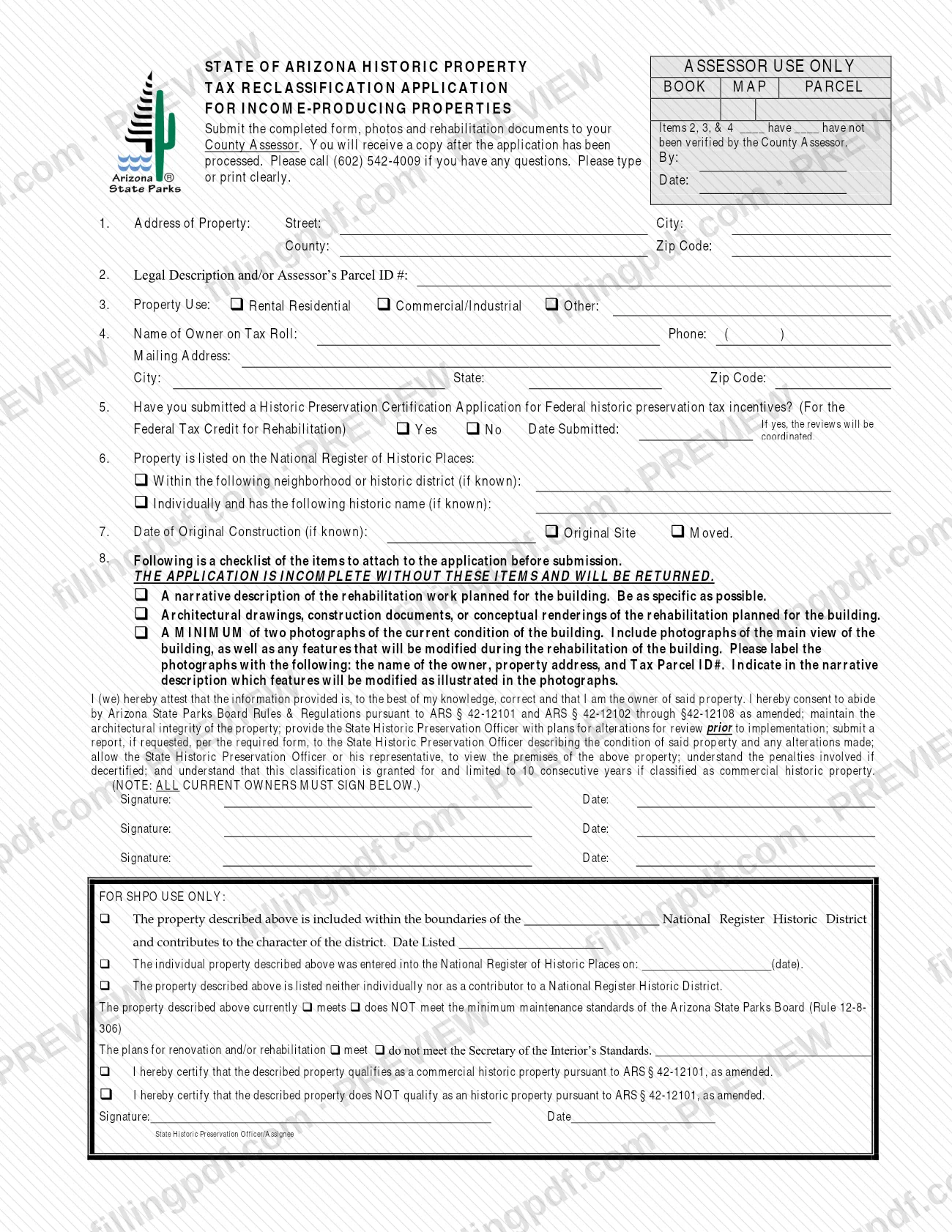
The Historic Application, Income Producing Properties is the State of Arizona Historic Property Tax Reclassification Application for Income-Producing Properties, published by the Maricopa County Assessor. It is one of the Maricopa County property tax forms listed on the Assessor's historic property tax reclassification page, next to a separate application for owner-occupied properties. On this page you can fill out the form online on FillingPDF and download or print the completed PDF; the official PDF is hosted on the Maricopa County Assessor's website.
Last updated
What is Historic Application, Income Producing Properties – Maricopa County, AZ?
The Historic Application, Income Producing Properties is the State of Arizona Historic Property Tax Reclassification Application for Income-Producing Properties, the form an owner submits to the County Assessor to request historic property tax reclassification of a rental residential, commercial/industrial or other income-producing property.
The form identifies the property (address, legal description or Assessor's Parcel ID, use, owner on the tax roll), says whether a Historic Preservation Certification Application for Federal historic preservation tax incentives has been submitted, and records any National Register of Historic Places listing and the date of original construction. It also carries a checklist of the rehabilitation materials that must be attached.
By signing, the owner attests that the information is correct and agrees to abide by Arizona State Parks Board Rules & Regulations pursuant to ARS § 42-12101 and ARS § 42-12102 through §42-12108, as amended. The owner also agrees to maintain the architectural integrity of the property and to send the State Historic Preservation Officer plans for alterations for review before they are carried out. The form states that a classification as commercial historic property is granted for, and limited to, 10 consecutive years.
Two blocks are not for the applicant: an Assessor-use box at the top, which records whether items 2, 3 and 4 have been verified by the County Assessor, and a For SHPO Use Only section in which the State Historic Preservation Officer (SHPO) certifies whether the property qualifies under ARS § 42-12101.
The Assessor's forms library lists this application together with a separate Historic Application, Owner-Occupied Properties and a DocuSign Version of each.
Who needs to file Historic Application, Income Producing Properties – Maricopa County, AZ?
Owners of income-producing property who want it considered for historic property tax reclassification use this form. Item 3 lets you mark the property use as Rental Residential, Commercial/Industrial or Other.
- Owners. The signature statement says you are the owner of the property, and the note on the form says all current owners must sign; there are three signature lines.
- Properties on the National Register of Historic Places. Item 6 asks whether the property is listed within a historic district or individually, with its historic name, if known. Item 5 asks whether you have also submitted a Historic Preservation Certification Application for the Federal Tax Credit for Rehabilitation; if you have, the reviews will be coordinated.
Owners of owner-occupied property should look at the separate Historic Application, Owner-Occupied Properties that the Maricopa County Assessor lists in the same historic tax category of its forms library. The form does not describe who may sign on an owner's behalf.
When to file Historic Application, Income Producing Properties – Maricopa County, AZ
The form prints no due date. It is submitted when you are ready to hand the County Assessor the full package: the completed application, photographs and rehabilitation documents. The checklist asks for a description of rehabilitation work planned, drawings or renderings of the rehabilitation planned and photographs of the building's current condition, so the application is prepared around work that is being planned.
The signature statement also commits the owner to give the State Historic Preservation Officer plans for alterations for review before they are carried out. An application missing any checklist item is incomplete and will be returned. For timing questions, call the number printed on the form, (602) 542-4009.
Documents you need
- A narrative description of the rehabilitation work planned for the building, as specific as possible; the form says the application is incomplete and will be returned without it.
- Architectural drawings, construction documents, or conceptual renderings of the rehabilitation planned for the building.
- A minimum of two photographs of the current condition of the building, including the main view and any features that will be modified during the rehabilitation.
- Labels on each photograph with the owner's name, property address and Tax Parcel ID#; the narrative must indicate which features shown in the photographs will be modified.
How to fill out Historic Application, Income Producing Properties – Maricopa County, AZ
Leave the Assessor-use box blank
The top-right box (Book, Map, Parcel, and the verification of items 2, 3 and 4) is for the County Assessor. Type or print clearly in the rest of the form.
Enter the property address
Item 1: street, city, county and zip code of the property.
Give the legal description or parcel ID
Item 2: enter the legal description and/or the Assessor's Parcel ID #.
Mark the property use
Item 3: check Rental Residential, Commercial/Industrial or Other; if Other, write the use on the line.
Enter the owner on the tax roll
Item 4: the name of the owner on the tax roll, phone, mailing address, city, state and zip code.
Answer the federal certification question
Item 5: check Yes or No for a submitted Historic Preservation Certification Application for the Federal Tax Credit for Rehabilitation, and enter the date submitted if Yes.
Report the National Register listing
Item 6: if the property is listed, check whether it is within a neighborhood or historic district or listed individually, and write the district or historic name if known.
Enter the date of construction
Item 7: the date of original construction, if known, and check Original Site or Moved.
Complete the item 8 checklist
Check each item you attach: narrative description of the planned rehabilitation, drawings or renderings, and at least two labeled photographs.
Have every current owner sign
Sign and date on the signature lines; the form says all current owners must sign. Leave the For SHPO Use Only section blank.
Review and download the completed PDF
Check each item against your documents, then download or print the completed PDF from FillingPDF and assemble the package described under How to submit.
How to submit Historic Application, Income Producing Properties – Maricopa County, AZ
The form tells you to submit the completed application, photos and rehabilitation documents to your County Assessor; for Maricopa County that is the Maricopa County Assessor. The form names no street address, mailing address or online portal.
- Package: the signed application (all current owners), the narrative description of the planned rehabilitation work, architectural drawings, construction documents or conceptual renderings, and at least two labeled photographs of the building's current condition.
- Questions: call (602) 542-4009, the number printed on the form.
- Forms and contacts: the Assessor's historic property tax reclassification forms are listed at https://mcassessor.maricopa.gov/forms/historic_tax/.
- After processing: the form says you will receive a copy once the application has been processed.
Type or print clearly, and leave the Assessor-use and SHPO-use areas blank. FillingPDF lets you fill out and download the PDF; submission follows the channels above.
Common mistakes to avoid
- Submitting the application without the narrative description, the drawings or renderings, or the photographs; the form says it is incomplete without them and will be returned.
- Attaching only one photograph; the form requires a minimum of two photographs of the current condition of the building.
- Sending photographs that are not labeled with the owner's name, property address and Tax Parcel ID#.
- Not indicating in the narrative description which features will be modified as illustrated in the photographs.
- Signing with only one owner when there are several; the form says all current owners must sign.
- Writing in the Assessor-use box or the For SHPO Use Only section, which are completed by the Assessor and the State Historic Preservation Officer.
- Giving a mailing address other than the owner's name and address as it appears on the tax roll in item 4.
- Carrying out alterations before giving the State Historic Preservation Officer the plans for review, which the signature statement requires.
Frequently asked questions
What is the Historic Application, Income Producing Properties?
It is the State of Arizona Historic Property Tax Reclassification Application for Income-Producing Properties. Owners submit it to the County Assessor, here the Maricopa County Assessor, with photos and rehabilitation documents to request historic property tax reclassification.
What do I have to attach to the historic application?
A narrative description of the planned rehabilitation, architectural drawings, construction documents or conceptual renderings, and at least two labeled photographs of the building's current condition. The form says the application is incomplete without these items and will be returned.
How do I label the photographs?
Label each photograph with the owner's name, property address and Tax Parcel ID#. Include the main view of the building and any features that will be modified, and indicate in the narrative which features will be modified as illustrated.
Who has to sign the application?
All current owners must sign; the form has three signature lines with dates. By signing, the owner attests the information is correct and that they own the property, and agrees to the conditions in the statement above the signatures.
How long does the historic classification last?
The form states that the classification is granted for, and limited to, 10 consecutive years if the property is classified as commercial historic property. The For SHPO Use Only section records whether the property qualifies under ARS § 42-12101.
Where do I send the historic application?
Submit it with the photos and rehabilitation documents to your County Assessor; in Maricopa County, the Maricopa County Assessor. The form prints no mailing address or portal. It gives (602) 542-4009 for questions.
Is there a separate form for owner-occupied property?
Yes. The Maricopa County Assessor lists a separate Historic Application, Owner-Occupied Properties in the same historic tax category of its forms library. This page covers the income-producing version only.
Can I fill out this historic application online on FillingPDF?
Yes. You can fill out the PDF online on FillingPDF and download or print it. FillingPDF is an independent service, not connected to the Maricopa County Assessor, and does not file the application; you submit it to the Assessor.
Ready to fill out Historic Application, Income Producing Properties – Maricopa County, AZ?
Fill out Historic Application, Income Producing Properties – Maricopa County, AZ now