
Form ADOR 82520A, the 2026 AZ Agricultural Business Personal Property Statement, is the confidential statement of an agricultural business's personal property that is returned to the Mohave County Assessor for tax year 2026. It is one of the Mohave County property tax forms, and it is built for farms and ranches that list additions, deletions and leasehold improvements by acquisition cost and year acquired. On FillingPDF you can fill out the form online and download or print the completed PDF; the form itself is published by the Mohave County Assessor at mohave.gov.
Last updated
What is ADOR 82520A?
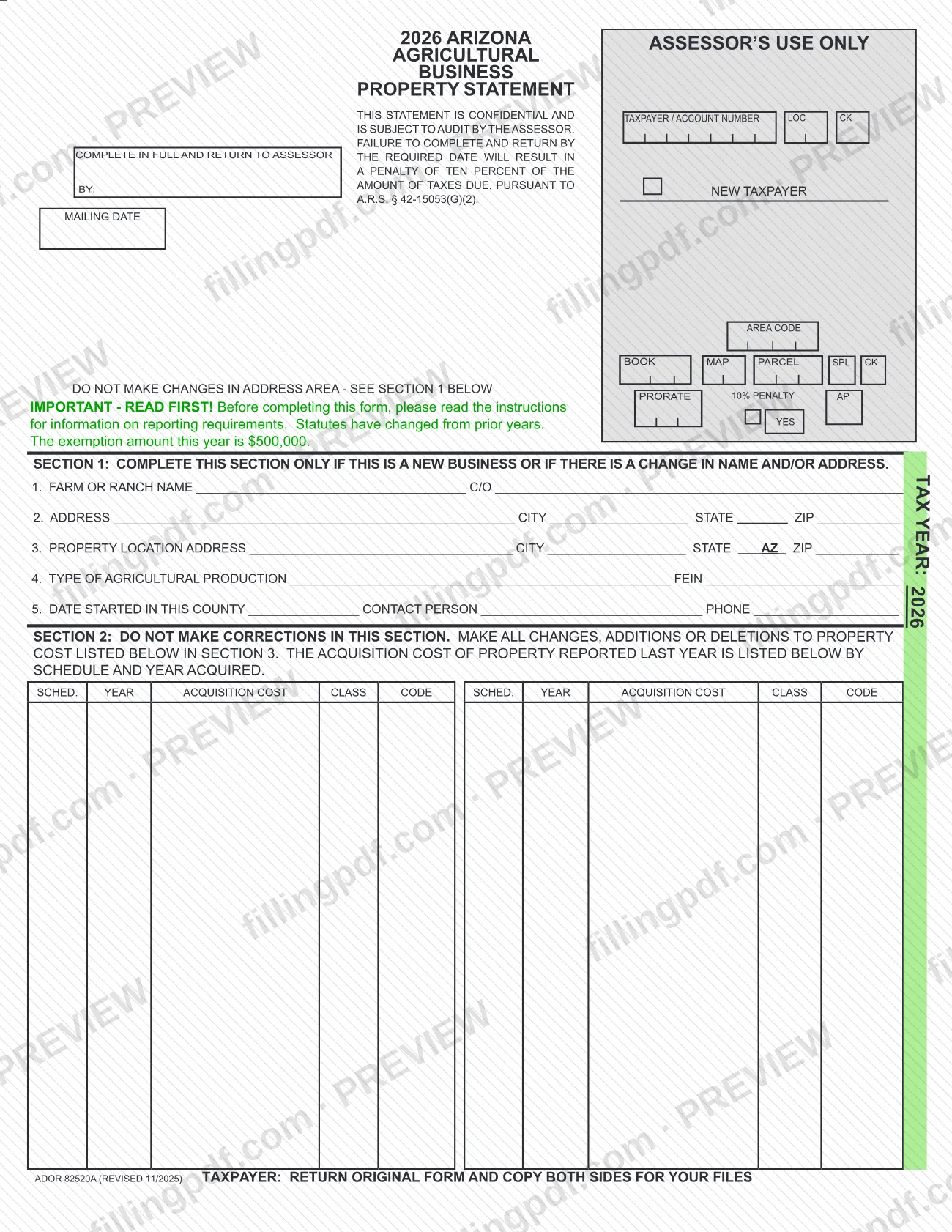
Form ADOR 82520A, the 2026 AZ Agricultural Business Personal Property Statement (printed on the form as the 2026 Arizona Agricultural Business Property Statement) is the statement in which a farm or ranch reports the acquisition cost of its business personal property to the County Assessor for tax year 2026.
The form is confidential and subject to audit by the Assessor. It is organized in four sections:
- Section 1 identifies the farm or ranch and is completed only for a new business or a change in name or address.
- Section 2 lists, by schedule and year acquired, the acquisition cost of property reported last year. You do not correct it.
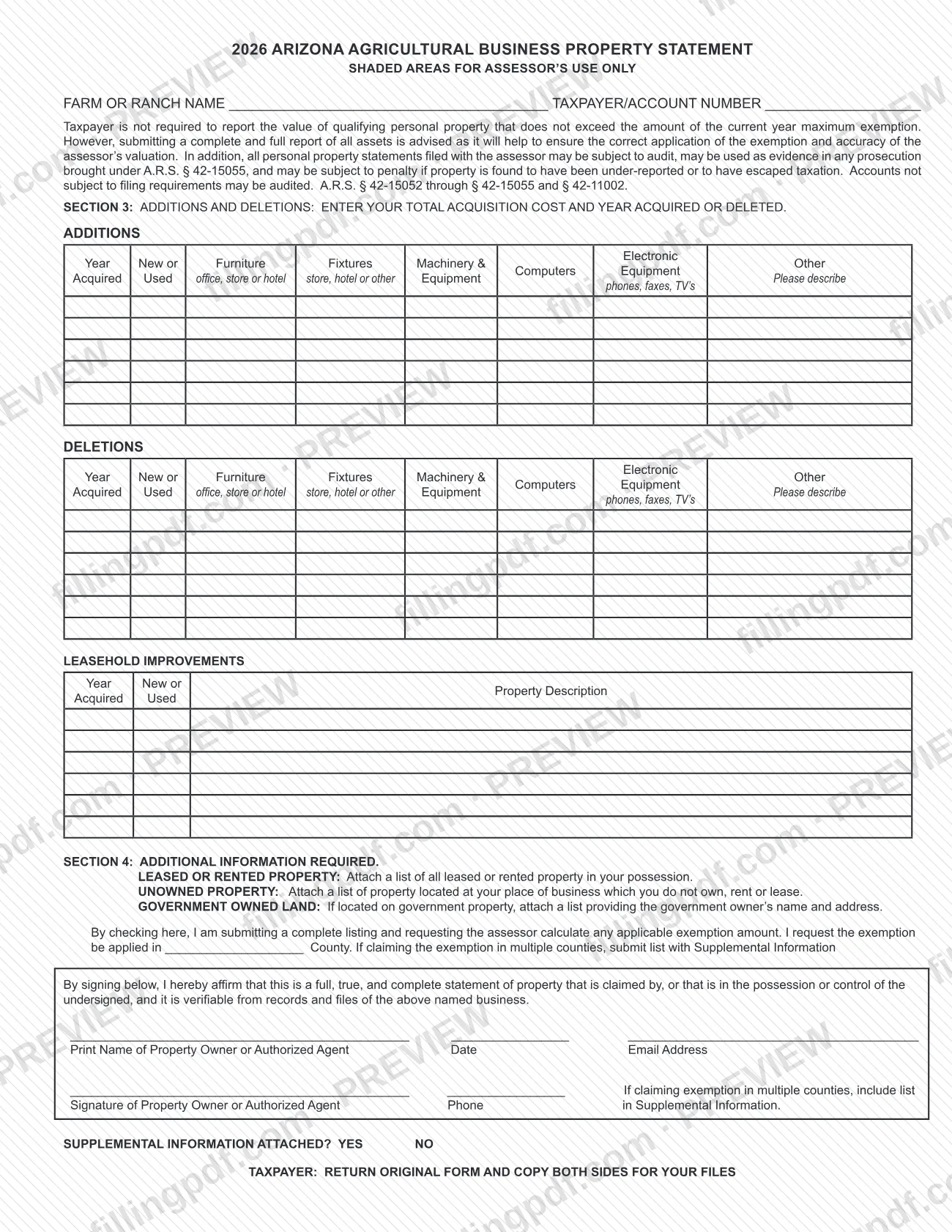
- Section 3 is where you report additions, deletions and leasehold improvements, with the year acquired, whether the item was new or used, and the total acquisition cost by category: furniture, fixtures, electronic equipment, machinery and equipment, and other.
- Section 4 collects additional information: lists of leased or rented property, unowned property at your place of business and property on government-owned land, plus a request that the Assessor calculate any applicable exemption.
The form states that statutes have changed from prior years and tells you to read the instructions before completing it. Shaded areas and the boxes at the top (taxpayer/account number, loc ck, book, map, parcel, area code and similar) are for the Assessor's use only. The form carries the designation ADOR 82520A and the revision date 11/2025.
Who needs to file ADOR 82520A?
Owners of agricultural businesses, meaning farms and ranches, that hold taxable business personal property in Mohave County use this statement to report it. The owner or an authorized agent signs it.
- New businesses and businesses that changed name or address complete Section 1, lines 1 to 5. Everyone else leaves Section 1 alone.
- Businesses with property at or below the exemption. The form says a taxpayer is not required to report the value of qualifying personal property that does not exceed the current-year maximum exemption. It still advises reporting all assets, because that helps the Assessor apply the exemption correctly and value the property accurately.
- Businesses claiming the exemption. Check the box in Section 4 and name the county where you want it applied. If you claim it in more than one county, submit a list with the Supplemental Information.
Accounts that are not subject to filing requirements may still be audited. The form is not for correcting last year's reported costs: those changes are made in Section 3.
When to file ADOR 82520A
Return the statement by the date the Assessor sets in the box at the top of the form, labeled "Complete in full and return to Assessor by." The form also prints a mailing date and a "New Taxpayer" box for the Assessor's use. It covers tax year 2026.
Failure to complete and return it by the required date results in a penalty of ten percent of the amount of taxes due, under A.R.S. § 42-15053(G)(2). The form also warns that statements may be subject to penalty if property is found to have been under-reported or to have escaped taxation (A.R.S. § 42-15052 through § 42-15055 and § 42-11002).
The form prints no other deadline. If your property does not exceed the maximum exemption for the year, reporting is not required, but a complete report is advised.
Documents you need
- List of all leased or rented property in your possession, attached under Section 4 (Leased or rented property).
- List of property located at your place of business that you do not own, rent or lease, attached under Section 4 (Unowned property).
- List with the government owner's name and address, attached only if your business is located on government property (Government owned land).
- List of counties, included with the Supplemental Information, only if you claim the exemption in multiple counties.
- Supplemental Information, when you have it, with Supplemental information attached? marked Yes.
How to fill out ADOR 82520A
Read the instructions and header
Before you start, read the instructions on reporting requirements, as the form directs. Confirm TAX YEAR: 2026, and do not write in the shaded areas or the address area at the top.
Complete Section 1 if it applies
Fill in Section 1 only for a new business or a change in name or address. Enter the farm or ranch name and C/O (line 1), mailing address (line 2) and property location address (line 3), then the type of agricultural production and FEIN (line 4), and date started in this county, contact person and phone (line 5).
Review Section 2 without editing
Section 2 shows the acquisition cost reported last year by schedule and year acquired. Do not correct it; make all changes in Section 3.
Report additions in Section 3
On the second page, confirm the farm or ranch name and taxpayer/account number. Under ADDITIONS, enter the year acquired, mark new or used, and enter the total acquisition cost under furniture, fixtures, electronic equipment, machinery and equipment, or other (with a description).
Report deletions in Section 3
Under DELETIONS, enter the year acquired, new or used, and the total acquisition cost in the same categories for property you no longer have.
List leasehold improvements
Under LEASEHOLD IMPROVEMENTS, enter the year acquired, new or used, and a property description.
Complete the Section 4 lists
Attach the list of leased or rented property and the list of unowned property at your place of business. If you are on government land, attach a list with the government owner's name and address.
Request the exemption calculation
To ask the Assessor to calculate any applicable exemption, check the box in Section 4 and write the county in the blank. For multiple counties, submit the list with the Supplemental Information.
Sign and mark supplemental information
Print the name of the property owner or authorized agent, then enter the date, email address, phone and signature. Mark Yes or No for Supplemental information attached.
Review and download the completed PDF
Check that every entry sits in the right section and that the signature and date are complete. Download or print the completed PDF from FillingPDF, keep a copy of both sides, and return the original as described under How to submit.
How to submit ADOR 82520A
The form gives one delivery instruction: return it to the Assessor by the date printed at the top. It prints no mailing address, portal or appointment process, so confirm the delivery method with the Mohave County Assessor.
- Return the original. Send the original form, with both sides completed, to the Assessor. The form says "Taxpayer: return original form and copy both sides for your files."
- Keep a copy. Make a copy of both sides for your own records before you return it.
- Attach any lists. Section 4 requires a list of leased or rented property, a list of property at your place of business that you do not own, rent or lease, and, if you are on government property, a list with the government owner's name and address. If you claim the exemption in several counties, include the list of counties with the Supplemental Information and mark Supplemental information attached? Yes.
- Sign it. The property owner or authorized agent prints a name, signs, dates and gives a phone number and email address.
FillingPDF lets you fill out and download the PDF; submission follows the Assessor's channels described above.
Common mistakes to avoid
- Making corrections in Section 2. The form says not to; every change, addition or deletion to property cost goes in Section 3.
- Changing the address area at the top of the form instead of using Section 1, which is for a new business or a change of name or address.
- Returning the statement after the date the Assessor requires, which results in a penalty of ten percent of the taxes due.
- Leaving out the lists of leased or rented property, unowned property or government-owned land that Section 4 asks you to attach.
- Skipping the Section 4 exemption box or the county name when you want the Assessor to calculate the exemption.
- Claiming the exemption in several counties without including the list with the Supplemental Information.
- Submitting the form unsigned, or without the printed name, date, phone and email of the owner or authorized agent.
- Returning the form without keeping a copy of both sides, which the form tells you to retain for your files.
- Assuming a statement that you were not required to file cannot be audited; the form says such accounts may be audited.
Frequently asked questions
What is the 2026 AZ Agricultural Business Personal Property Statement?
It is Form ADOR 82520A, the statement a farm or ranch returns to the Mohave County Assessor to report its business personal property for tax year 2026. It lists additions, deletions and leasehold improvements by acquisition cost and year acquired, and it is confidential and subject to audit.
Do I have to file if my property is under the exemption amount?
No. The form says a taxpayer is not required to report qualifying personal property that does not exceed the current-year maximum exemption. It still advises a complete report so the Assessor applies the exemption correctly, and accounts not required to file may be audited.
What is the penalty for filing the property statement late?
The form states that failing to complete and return it by the required date results in a penalty of ten percent of the amount of taxes due, under A.R.S. § 42-15053(G)(2). The return date is printed at the top of the form by the Assessor.
Can I fill out ADOR 82520A online?
Yes. You can fill out the PDF online on FillingPDF and download or print it. FillingPDF is independent of the Mohave County Assessor and does not file the statement; you return the original to the Assessor yourself.
What do I attach to the agricultural property statement?
Section 4 asks for a list of leased or rented property and a list of unowned property at your place of business. If you are on government land, add a list with the owner's name and address. Claiming the exemption in several counties needs a county list with the Supplemental Information.
Do I fill in Section 1 and Section 2 every year?
Section 1 is only for a new business or a change in name or address. Section 2 is never filled in or corrected by you: it shows last year's reported cost, and all changes go in Section 3.
Who can sign the statement?
The property owner or an authorized agent signs. By signing you affirm that the statement is full, true and complete for property claimed by you or in your possession or control, and that it is verifiable from the business's records and files.
How do I claim the exemption on this form?
Check the box in Section 4 saying you are submitting a complete listing and requesting that the assessor calculate any applicable exemption, then write the county where you want it applied. If you claim it in multiple counties, submit a list with the Supplemental Information.
Ready to fill out ADOR 82520A?
Fill out ADOR 82520A now