
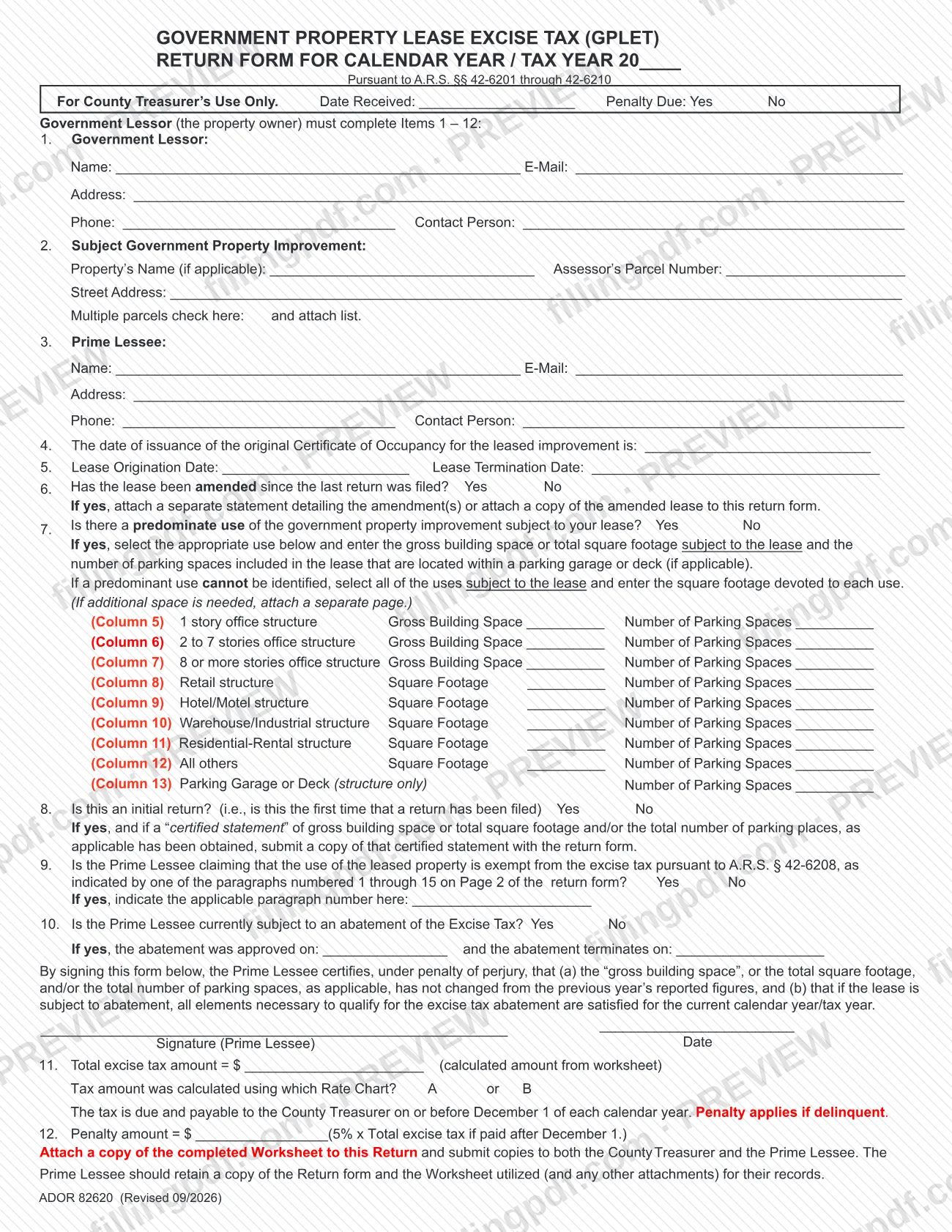
Form ADOR 82620 is the Government Property Lease Excise Tax (GPLET) Return Form, filed with the Mohave County Treasurer for each calendar year or tax year. It is one of the Mohave County property tax forms listed on the Treasurer's forms page, and it reports the lease, the improvement, the use of the space and the excise tax figured from the worksheet. On this page you can fill out the form online on FillingPDF and download or print the completed PDF; the form itself is published by the county at mohave.gov.
Last updated
What is ADOR 82620?
Form ADOR 82620, the Government Property Lease Excise Tax (GPLET) Return Form, is the annual return on which a government lessor and its prime lessee report a leased government property improvement and the excise tax due on it to the County Treasurer, under A.R.S. §§ 42-6201 through 42-6210.
The form is built in numbered items. Items 1 to 3 identify the Government Lessor (the property owner), the subject government property improvement with its Assessor's Parcel Number, and the Prime Lessee. Items 4 and 5 give the Certificate of Occupancy date and the lease origination and termination dates. Items 6 to 10 ask whether the lease was amended, what the predominant use is (with gross building space or square footage and parking spaces by use), whether this is an initial return, whether an exemption under A.R.S. § 42-6208 is claimed, and whether an abatement applies.
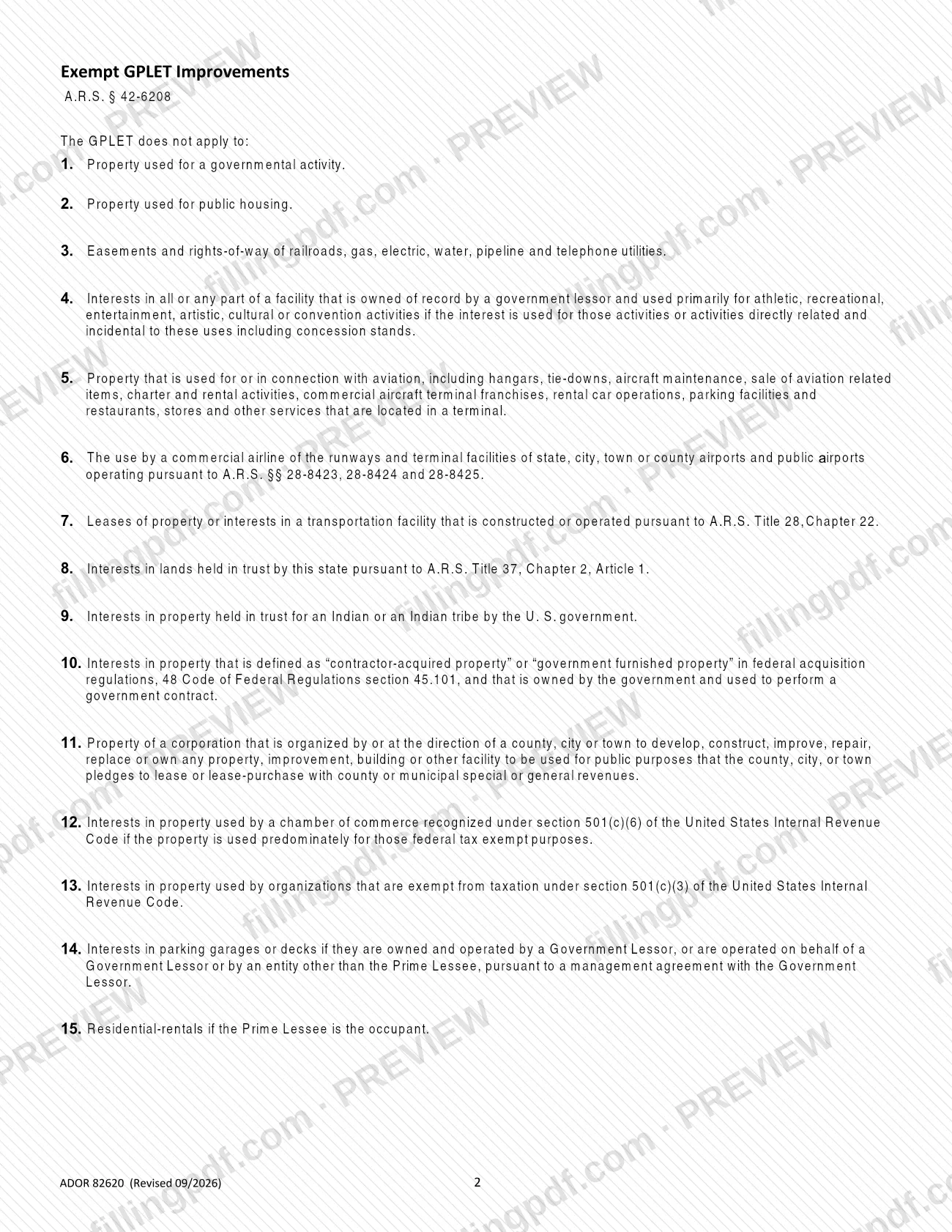
The Prime Lessee signs a certification under penalty of perjury. Item 11 records the total excise tax from the worksheet and the Rate Chart used, A or B, and item 12 records any penalty. Page 2 lists the 15 exempt GPLET improvements under A.R.S. § 42-6208. The top box, "For County Treasurer's Use Only", is completed by the Treasurer's office, not by the filer.
Who needs to file ADOR 82620?
The Government Lessor (the property owner) completes Items 1 to 12 of the return, and the Prime Lessee signs the certification. The return concerns a government property improvement that is leased, so it is used by the parties to such a lease in Mohave County.
Check whether the use is exempt before you calculate tax. Page 2 lists the improvements to which the GPLET does not apply under A.R.S. § 42-6208. They include:
- property used for a governmental activity or for public housing;
- railroad, utility and similar easements and rights-of-way;
- facilities used primarily for athletic, recreational, entertainment, artistic, cultural or convention activities;
- property used for or in connection with aviation, and commercial airline use of airport runways and terminals;
- interests in property used by organizations exempt under section 501(c)(3), or by a chamber of commerce recognized under section 501(c)(6) if used predominately for those purposes;
- certain parking garages or decks, and residential rentals if the Prime Lessee is the occupant.
If the Prime Lessee claims an exemption, Item 9 asks for the paragraph number, 1 through 15, from page 2. Read the full wording of each paragraph on the form, because several have conditions.
When to file ADOR 82620
The tax is due and payable to the County Treasurer on or before December 1 of each calendar year, and the Mohave County Treasurer's forms page asks that the GPLET form be completed and returned by December 1st of each year. The return is made for a calendar year or tax year, entered at the top as 20____.
A penalty applies if the tax is delinquent. Item 12 calculates it on the total excise tax when payment is made after December 1.
Item 8 asks whether this is an initial return, meaning the first time a return has been filed for the lease. Item 6 asks whether the lease has been amended since the last return was filed, so each later year's return builds on the previous one. Item 10 covers an abatement, with the dates it was approved and when it terminates.
Documents you need
- A list of the parcels, attached if you check the multiple parcels box in Item 2.
- For Item 6, if the lease was amended since the last return: a separate statement detailing the amendment(s), or a copy of the amended lease.
- For Item 8, if this is an initial return and a certified statement of gross building space, total square footage or parking spaces has been obtained: a copy of that certified statement.
- For Item 7, a separate page if additional space is needed to show uses, square footage or parking spaces.
- The worksheet figure for Item 11 supports the total excise tax; the form refers to it as the calculated amount from the worksheet.
How to fill out ADOR 82620
Enter the tax year
At the top, write the calendar year or tax year in the 20____ space. Leave the County Treasurer's Use Only box blank.
Complete Item 1, Government Lessor
Enter the Government Lessor's name, e-mail, address, phone and contact person. The Government Lessor (the property owner) completes Items 1 to 12.
Describe the improvement in Item 2
Enter the property's name if applicable, the Assessor's Parcel Number and the street address. Check the multiple parcels box and attach a list if there is more than one parcel.
Complete Item 3, Prime Lessee
Enter the Prime Lessee's name, e-mail, address, phone and contact person.
Enter certificate and lease dates
Item 4: the date of issuance of the original Certificate of Occupancy for the leased improvement. Item 5: the Lease Origination Date and the Lease Termination Date.
Answer the amendment question
Item 6: check Yes or No for whether the lease was amended since the last return. If Yes, attach a separate statement of the amendment(s) or a copy of the amended lease.
Report the use of the space
Item 7: check Yes or No for a predominate use. If Yes, select the use among Columns 5 to 13 and enter the gross building space or square footage and the number of parking spaces; if no predominant use can be identified, select all uses and enter the square footage for each.
State whether it is an initial return
Item 8: check Yes or No. If Yes and a certified statement of gross building space, square footage or parking places has been obtained, submit a copy with the return.
Answer the exemption question
Item 9: check Yes or No for whether the Prime Lessee claims an exemption under A.R.S. § 42-6208. If Yes, enter the paragraph number from page 2.
Answer the abatement question
Item 10: check Yes or No for a current abatement of the Excise Tax. If Yes, enter the approval date and the termination date.
Sign the certification
The Prime Lessee signs and dates under the certification that the figures have not changed from the previous year and, if the lease is abated, that the abatement requirements are satisfied for the current year.
Enter the tax and penalty
Item 11: enter the total excise tax calculated on the worksheet and check Rate Chart A or B. Item 12: enter the penalty if the tax is paid after December 1.
Review and download the PDF
Check each item and the attachments, then download or print the completed PDF from FillingPDF and submit it as described under How to submit.
How to submit ADOR 82620
The form says the tax is payable to the County Treasurer, and the Mohave County Treasurer's forms page says to complete and return the GPLET form by December 1st each year. The form prints no mailing address, portal or other channel.
- Return to the Treasurer: send or deliver the signed return to the Mohave County Treasurer. Confirm the current address and accepted methods with the Treasurer's office through the county's website at https://www.mohave.gov/departments/treasurer/general-use/treasurer-forms/.
- Attachments: include a list of parcels if you checked the multiple parcels box, a statement or the amended lease if the lease was amended (Item 6), a copy of the certified statement for an initial return if one was obtained (Item 8), and a separate page if Item 7 needs more space.
- Payment: the tax shown on Item 11 is paid to the County Treasurer on or before December 1. The Treasurer's office can tell you how to pay; the amount comes from the worksheet and Rate Chart.
FillingPDF lets you fill out and download the PDF; submission follows the channels above.
Common mistakes to avoid
- Filing or paying after December 1, when a penalty applies under Item 12.
- Leaving the Prime Lessee signature and date blank; the certification under penalty of perjury is made by that signature.
- Claiming an exemption in Item 9 without entering the paragraph number, 1 through 15, from page 2.
- Checking multiple parcels in Item 2 without attaching the list of parcels.
- Answering Yes to the amended lease question in Item 6 without a statement of the amendment(s) or a copy of the amended lease.
- Selecting a single use in Item 7 when no predominant use can be identified; the form says to select all uses subject to the lease and enter the square footage for each.
- Not stating which Rate Chart, A or B, was used to calculate the Item 11 tax.
- Writing in the "For County Treasurer's Use Only" box for date received and penalty due, which is for the Treasurer.
Frequently asked questions
What is Form ADOR 82620?
Form ADOR 82620 is the Government Property Lease Excise Tax (GPLET) Return Form, filed with the County Treasurer for a calendar year or tax year. It reports the lease, the improvement, its use and the excise tax calculated under A.R.S. §§ 42-6201 through 42-6210.
Is the GPLET return a Mohave County property tax form?
The Mohave County Treasurer lists GPLET forms on its Treasurer Forms page and collects the tax. The form itself calls the charge a government property lease excise tax under A.R.S. §§ 42-6201 through 42-6210.
When is the GPLET return due in Mohave County?
By December 1 of each year. The form says the tax is due and payable to the County Treasurer on or before December 1, and the Treasurer asks that the form be returned by December 1st. A penalty applies if the tax is delinquent.
Who completes and signs Form ADOR 82620?
The Government Lessor (the property owner) completes Items 1 to 12. The Prime Lessee signs and dates the certification made under penalty of perjury that the figures are unchanged and, if the lease is abated, that the abatement requirements are met.
Which improvements are exempt from the GPLET?
Page 2 lists 15 exempt improvements under A.R.S. § 42-6208, such as property used for a governmental activity, public housing, aviation use and property used by 501(c)(3) organizations. If you claim one, enter its paragraph number in Item 9.
What do I attach to the GPLET return?
Attach a parcel list if you check multiple parcels, an amendment statement or the amended lease if Item 6 is Yes, and a copy of any certified statement of square footage or parking spaces for an initial return. Add a separate page if Item 7 needs more space.
Can I fill out Form ADOR 82620 online?
You can fill out the PDF online on FillingPDF and download or print it. FillingPDF is an independent service, not the Mohave County Treasurer, and it does not file the return; you submit it through the Treasurer's channels.
Ready to fill out ADOR 82620?
Fill out ADOR 82620 now