
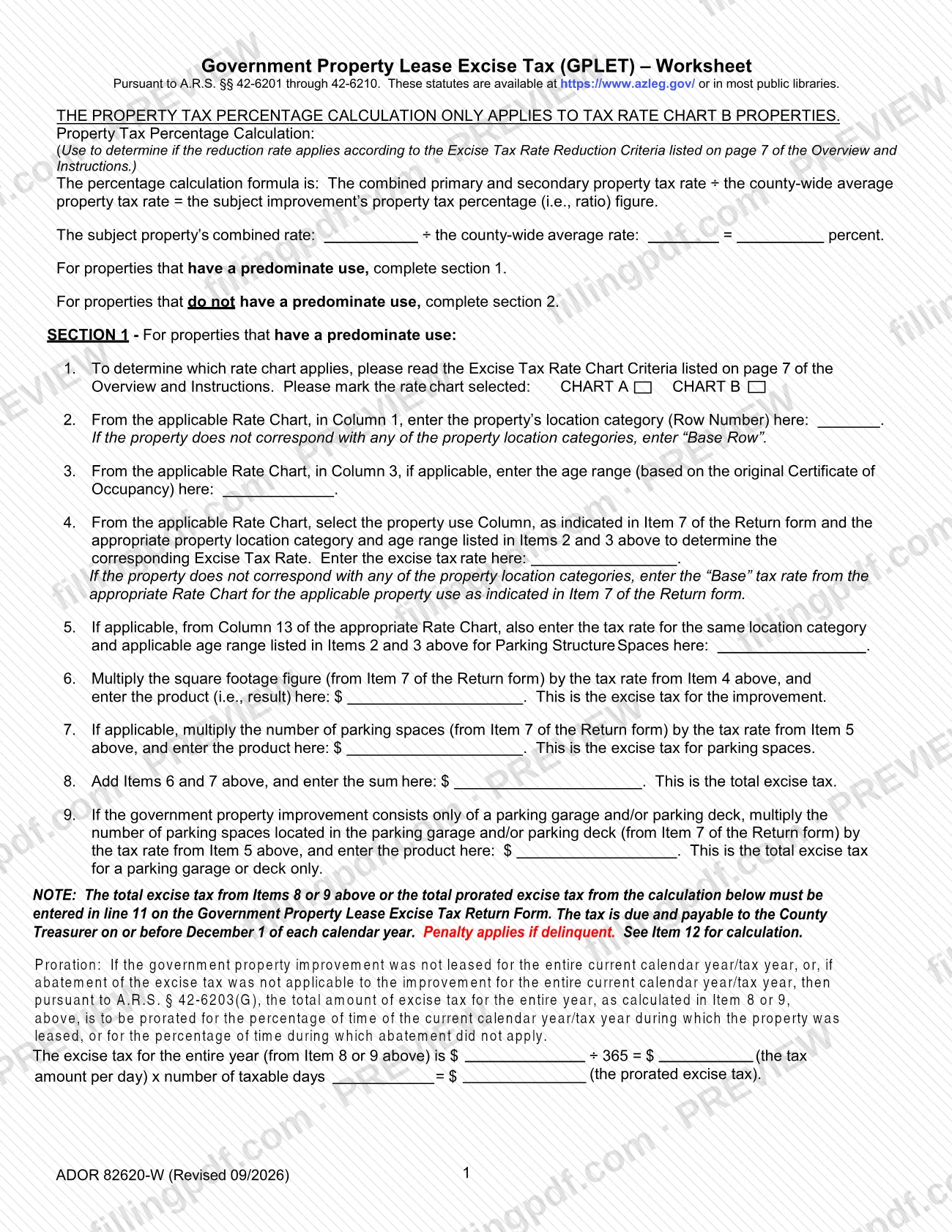
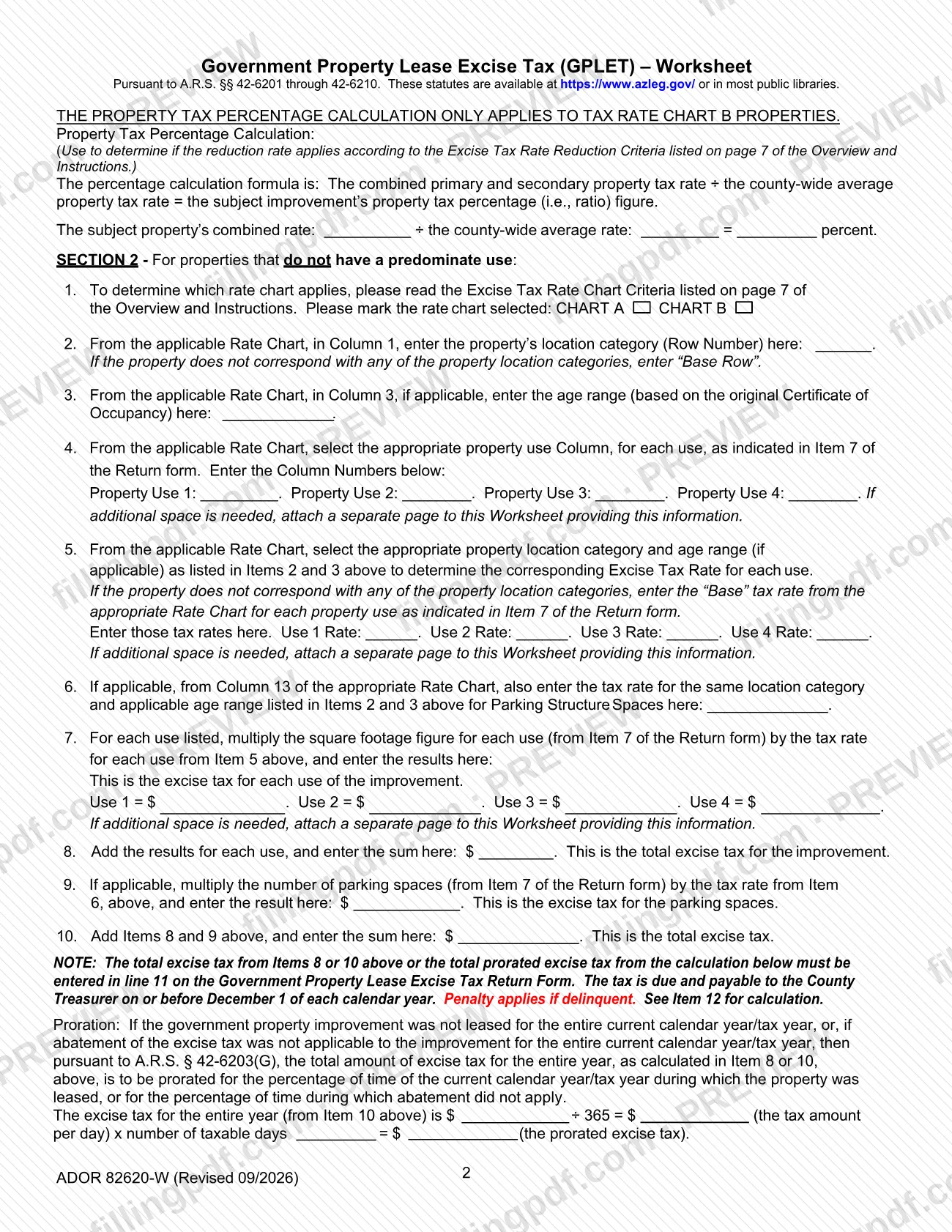
The Government Property Lease Excise Tax (GPLET) Worksheet, form ADOR 82620-W, is the calculation sheet that the Mohave County Treasurer posts on its Treasurer Forms page for the GPLET return. It is one of the forms people reach when searching for Mohave County property tax information, but it computes an excise tax from rate charts, not a property tax bill. On this page you can fill out the form online on FillingPDF and download or print the completed PDF; the worksheet total is then entered on the GPLET return and returned to the County Treasurer by December 1.
Last updated
What is ADOR 82620-W?
Government Property Lease Excise Tax (GPLET) – Worksheet, form ADOR 82620-W, is the calculation worksheet for the excise tax on a government property improvement under A.R.S. §§ 42-6201 through 42-6210; its total goes on line 11 of the Return Form.
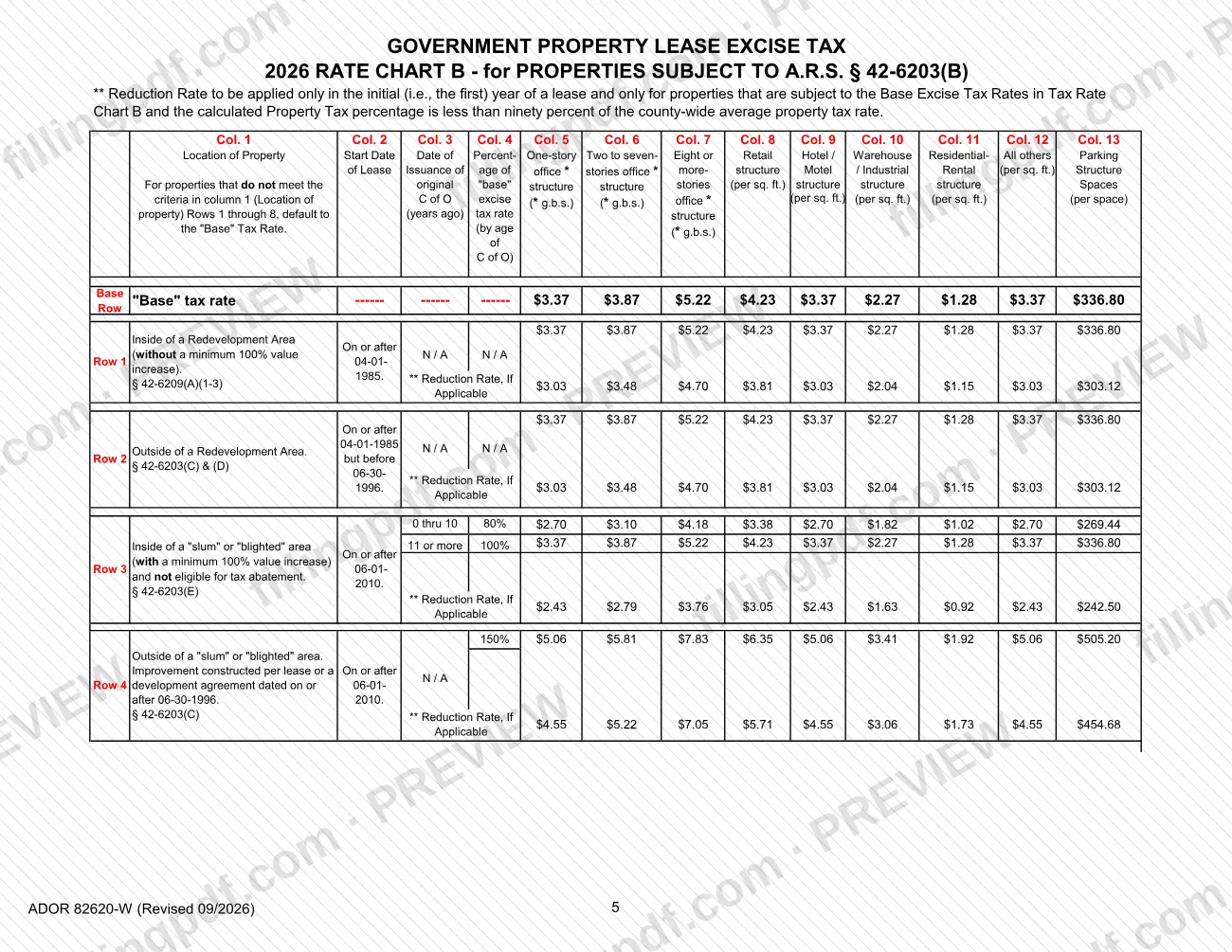
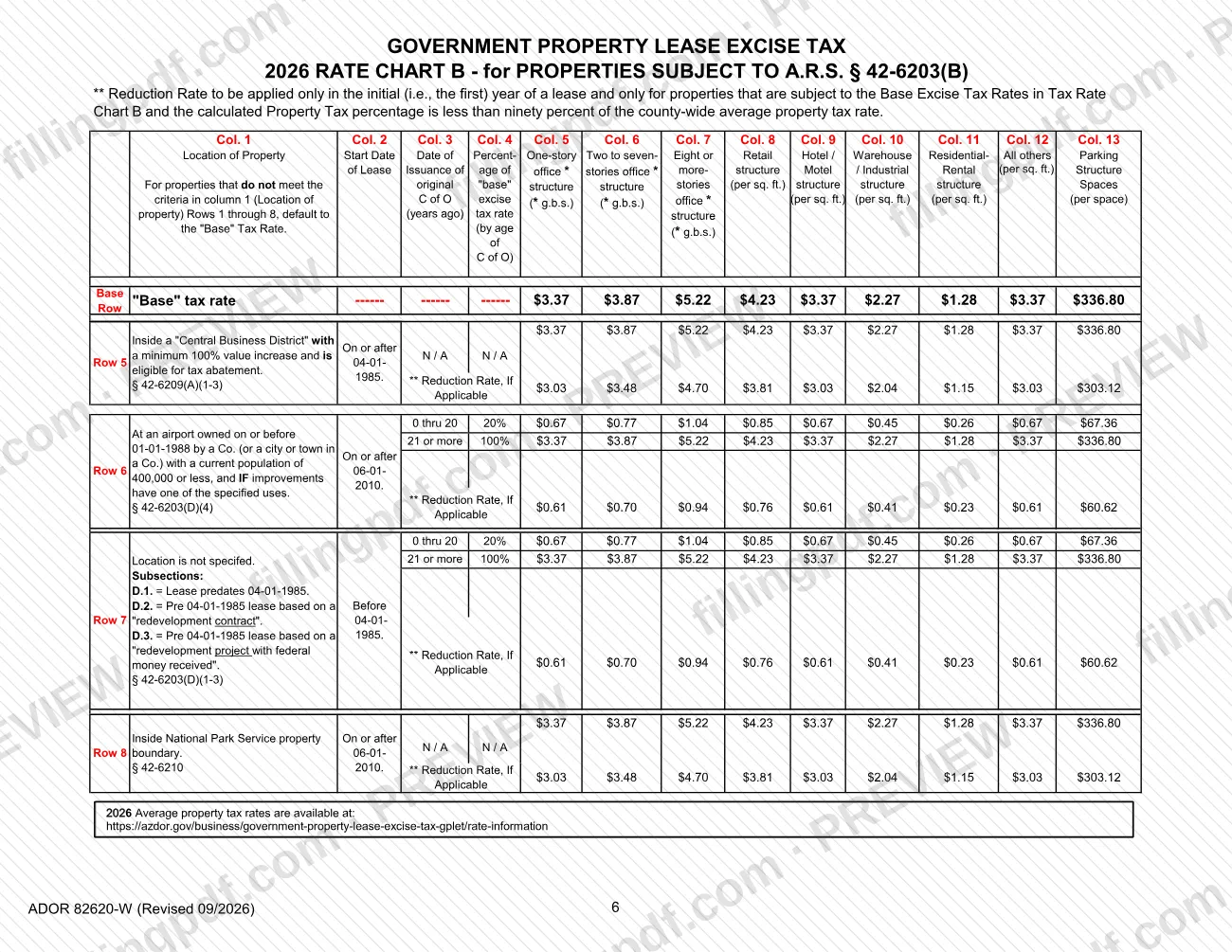
The worksheet has two sections. Section 1 is for properties that have a predominate use. Section 2 is for properties that do not, and it figures the tax separately for up to four uses. Both sections walk you through the same logic: pick a rate chart, find the property's location category (Row Number) and age range in the chart, read the excise tax rate, multiply it by the square footage or the number of parking spaces from Item 7 of the Return form, and add the results.
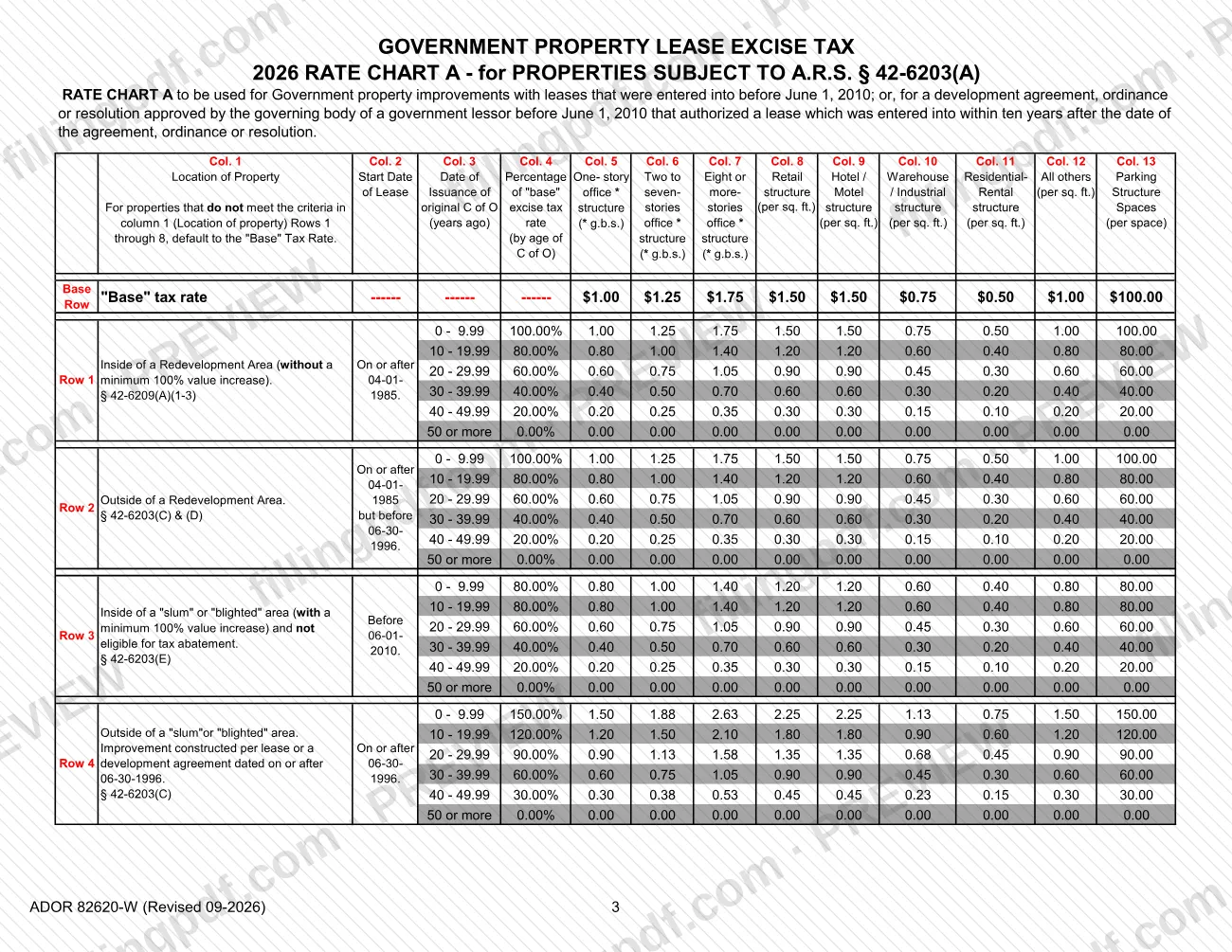
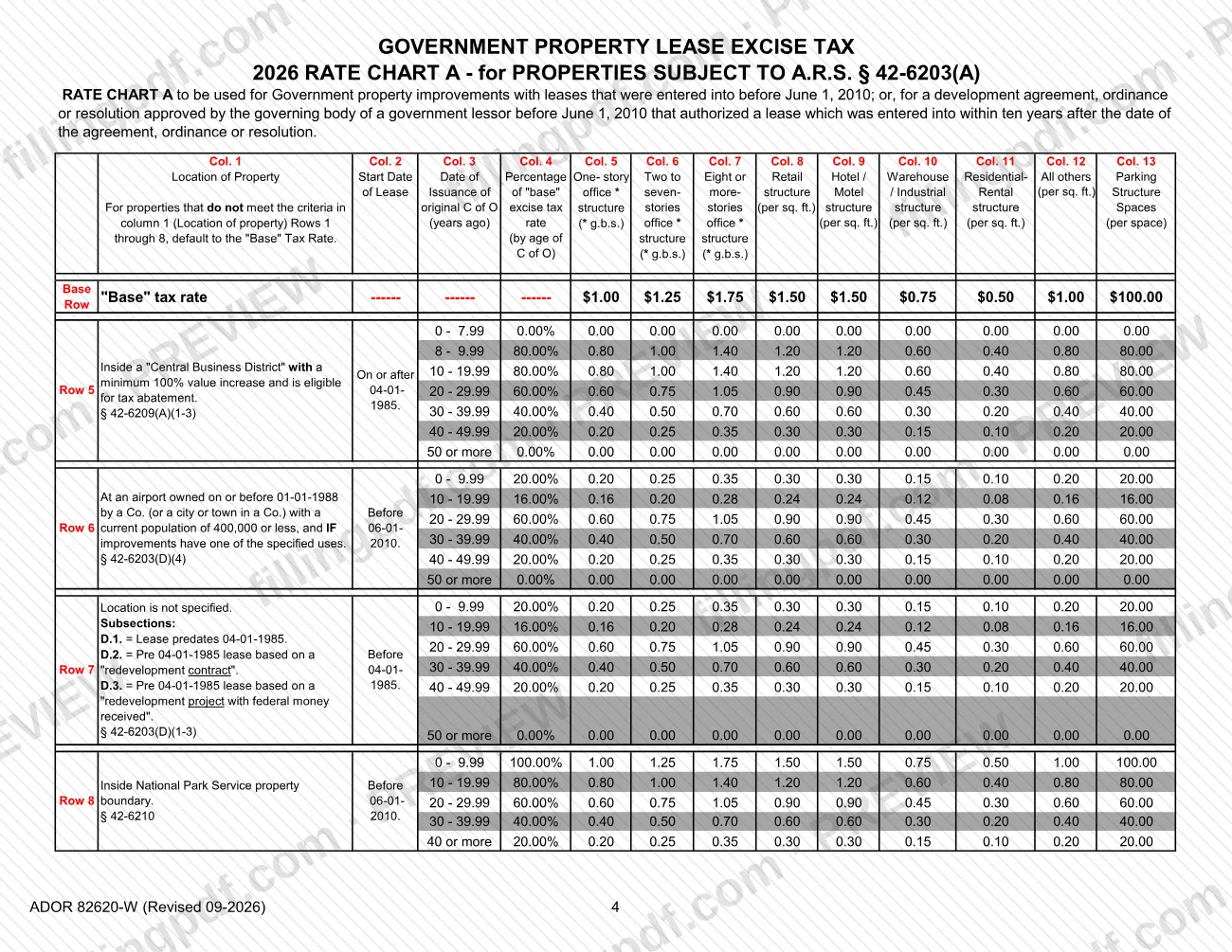
The printed 2026 rate charts follow the worksheet. Rate Chart A applies to properties subject to A.R.S. § 42-6203(A), generally leases entered into before June 1, 2010. Rate Chart B applies to properties subject to A.R.S. § 42-6203(B). A Property Tax Percentage Calculation, which compares the combined primary and secondary property tax rate with the county-wide average rate, applies only to Chart B properties.
A proration calculation at the end of each section covers a year in which the improvement was not leased, or abatement did not apply, for the whole year, as A.R.S. § 42-6203(G) provides. The Mohave County Treasurer lists the GPLET forms on its Treasurer Forms page, next to its ACH and wire instructions, information request and refund request forms.
Who needs to file ADOR 82620-W?
Anyone completing the Government Property Lease Excise Tax Return Form for a government property improvement uses this worksheet to work out the excise tax that goes on line 11 of that return.
How the worksheet divides its users:
- Section 1: properties that have a predominate use.
- Section 2: properties that do not have a predominate use. It lets you enter up to four property uses and tells you to attach a separate page if more space is needed.
- Rate Chart A or Rate Chart B: you choose one by reading the Excise Tax Rate Chart Criteria on page 7 of the Overview and Instructions. Chart A is for improvements with leases entered into before June 1, 2010, or authorized by a development agreement, ordinance or resolution approved before that date.
- Property Tax Percentage Calculation: only for Chart B properties. If your property is on Chart A, skip it.
The worksheet does not say who must file the return or who may sign it. Check the Overview and Instructions and the return itself, or ask the Mohave County Treasurer, for those rules.
When to file ADOR 82620-W
The GPLET tax is due and payable to the County Treasurer on or before December 1 of each calendar year, so the worksheet is completed before that date. The Mohave County Treasurer's forms page repeats the instruction: complete and return the GPLET form by December 1st of each year.
A penalty applies if the tax is delinquent; the worksheet refers you to Item 12 of the return for the calculation.
Timing also affects the amount. If the improvement was not leased for the whole calendar year/tax year, or abatement did not apply for the whole year, you prorate the year's tax using the number of taxable days. The Chart B Reduction Rate applies only in the first year of a lease, and only when the calculated property tax percentage is less than ninety percent of the county-wide average property tax rate.
Documents you need
- Government Property Lease Excise Tax Return Form: the worksheet draws the square footage, parking spaces and property use from Item 7 of the Return form, and the result goes on line 11.
- A separate page attached to the worksheet, only if Section 2 needs more than four property uses or rates.
- The original Certificate of Occupancy date, needed only to pick the age range in Column 3 of the rate chart when the chart asks for one.
How to fill out ADOR 82620-W
Figure the property tax percentage
For Chart B properties only, divide the subject property's combined primary and secondary rate by the county-wide average rate and enter the percent. Use it to decide whether the Reduction Rate criteria on page 7 of the Overview and Instructions are met.
Choose Section 1 or Section 2
Complete Section 1 if the property has a predominate use. Complete Section 2 if it does not.
Mark the rate chart
In Item 1, read the Excise Tax Rate Chart Criteria on page 7 of the Overview and Instructions and mark CHART A or CHART B.
Enter location category and age range
Item 2: enter the Row Number from Column 1 of the chart, or "Base Row" if none applies. Item 3: enter the age range from Column 3, based on the original Certificate of Occupancy, if applicable.
Select the property use rate
Section 1, Item 4: enter the excise tax rate for the use shown in Item 7 of the Return form. Section 2, Items 4 and 5: enter the Column numbers and rates for Property Use 1 to 4.
Enter the parking structure rate
If applicable, enter the Column 13 rate for Parking Structure Spaces for the same location category and age range (Item 5 in Section 1, Item 6 in Section 2).
Calculate the excise tax
Multiply square footage by the rate for each use, and parking spaces by the parking rate, then add the results. Section 1 uses Items 6 to 8, with Item 9 for a parking garage or deck only; Section 2 uses Items 7 to 10.
Prorate a partial year
If the improvement was not leased, or abatement did not apply, for the entire year, divide the full-year tax by 365 and multiply by the number of taxable days.
Carry the total to line 11
Enter the total excise tax, or the total prorated excise tax, on line 11 of the Government Property Lease Excise Tax Return Form.
Review and download the completed PDF
Check the chart, row, age range and each multiplication, and attach a separate page if you listed more than four uses. Download or print the completed PDF from FillingPDF and submit it with the return as described under How to submit.
How to submit ADOR 82620-W
The worksheet has no separate filing channel: its result is entered on the Government Property Lease Excise Tax Return Form, and the tax is payable to the County Treasurer.
- Worksheet total: enter the total excise tax (Item 8 or 9 in Section 1, Item 8 or 10 in Section 2) or the total prorated excise tax on line 11 of the Return Form.
- Where it goes: the Mohave County Treasurer asks that the GPLET form be completed and returned by December 1st of each year. The worksheet and the Treasurer's forms page at https://www.mohave.gov/departments/treasurer/general-use/treasurer-forms/ print no mailing address, portal or appointment rule, so contact the Treasurer's office for how to deliver the return and pay.
- Extra uses: if Section 2 needs more room than four property uses, attach a separate page to the worksheet.
The amount of tax depends on the rate charts, and the 2026 average property tax rates are posted at https://azdor.gov/business/government-property-lease-excise-tax-gplet/rate-information. FillingPDF lets you fill out and download the PDF; submission follows the channels above.
Common mistakes to avoid
- Completing the Property Tax Percentage Calculation for a Chart A property; the worksheet says it applies only to Tax Rate Chart B properties.
- Filling in both sections instead of choosing Section 1 for a predominate use or Section 2 when there is none.
- Leaving the location category blank instead of entering "Base Row" when the property fits none of the listed categories.
- Using the Chart B Reduction Rate after the first year of a lease, or when the calculated property tax percentage is not below ninety percent of the county-wide average.
- Entering the full-year excise tax on line 11 of the Return when proration applies, instead of the prorated amount.
- Figuring a parking garage or deck only improvement by square footage; Item 9 multiplies the number of parking spaces by the Column 13 rate.
- Choosing the age range from something other than the original Certificate of Occupancy.
- Missing the December 1 due date, which can bring a penalty for delinquent tax.
Frequently asked questions
What is the GPLET worksheet, form ADOR 82620-W?
It is the worksheet for calculating the Government Property Lease Excise Tax on a government property improvement under A.R.S. §§ 42-6201 through 42-6210. The total from it is entered on line 11 of the Government Property Lease Excise Tax Return Form.
When is the GPLET due in Mohave County?
On or before December 1 of each calendar year. The worksheet says the tax is payable to the County Treasurer by that date and that a penalty applies if it is delinquent; the Mohave County Treasurer's forms page asks for the GPLET form by December 1st.
Is this worksheet used for Mohave County property tax bills?
No. It figures the Government Property Lease Excise Tax from rate charts. Property tax rates appear only in the Property Tax Percentage Calculation for Chart B properties. For other Mohave County property tax questions, contact the Mohave County Treasurer.
Should I use Rate Chart A or Rate Chart B?
Read the Excise Tax Rate Chart Criteria on page 7 of the Overview and Instructions. Chart A is for properties subject to A.R.S. § 42-6203(A), such as leases entered into before June 1, 2010. Chart B is for properties subject to A.R.S. § 42-6203(B).
Do I use Section 1 or Section 2 of the worksheet?
Use Section 1 if the property has a predominate use, and Section 2 if it does not. Section 2 figures the tax for each use separately, up to four, and asks for a separate attached page if more space is needed.
How do I prorate the excise tax for part of a year?
If the improvement was not leased, or abatement did not apply, for the whole year, divide the full-year tax by 365 and multiply by the number of taxable days. The result is the prorated tax you enter on line 11 of the Return.
Can I fill out the GPLET worksheet online?
Yes. You can fill out the PDF online on FillingPDF and download or print it. FillingPDF is an independent service and does not file the form or pay the tax; you return it to the County Treasurer through the Treasurer's channels.
What do I enter if my property fits no location category?
Enter "Base Row" for the location category, and use the "Base" tax rate from the chart you selected for the property use shown in Item 7 of the Return form.
Ready to fill out ADOR 82620-W?
Fill out ADOR 82620-W now