
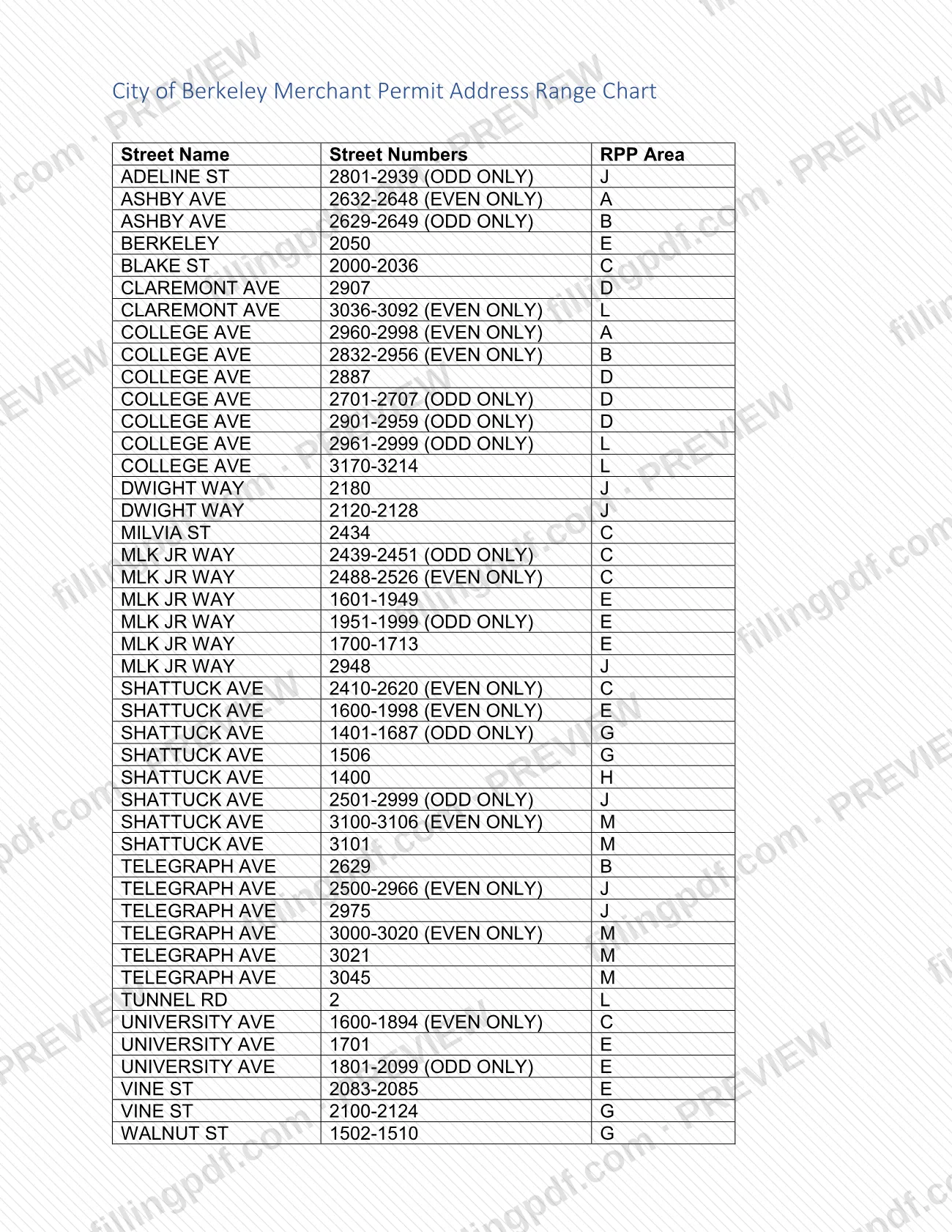
Merchant Permit Parking Eligibility is the City of Berkeley Merchant Permit Address Range Chart, which lists the streets, street-number ranges and Residential Preferential Parking (RPP) areas where a business can qualify for a merchant permit. It is one of the Berkeley parking permit options for businesses: an eligible business can buy one merchant permit to park near work without a two-hour time limit. On this page you can fill out the PDF online on FillingPDF and download or print it; the chart and the permit application belong to the City of Berkeley at berkeleyca.gov.
Last updated
What is Merchant Permit Parking Eligibility – Berkeley, CA?
Merchant Permit Parking Eligibility is the City of Berkeley Merchant Permit Address Range Chart: a table of streets, street-number ranges and Residential Preferential Parking (RPP) areas that shows which business addresses are eligible for a merchant parking permit.
The City's Business Parking Permits page states the rule the chart supports: a business is eligible for a merchant parking permit if it is located in one of the merchant permit address ranges. An eligible business can purchase one merchant permit to park near the business without the two-hour time limit. The agency listed for the document is the City of Berkeley Police Department.
The chart has three columns: Street Name, Street Numbers and RPP Area. Some ranges carry the note (ODD ONLY) or (EVEN ONLY), and several entries are single street numbers. Streets listed include Adeline St, Ashby Ave, College Ave, Shattuck Ave, Telegraph Ave and University Ave, each tied to an RPP area letter.
The chart decides eligibility only. It does not issue a permit, and the application is made separately. The same city page describes two other programs that this chart does not govern: Neighborhood Serving Community Facilities (NSCF) permits for schools, religious institutions, senior centers and drug and alcohol rehabilitation centers, and Elmwood SmartSpace employee parking permits for businesses in the Elmwood District.
Who needs to file Merchant Permit Parking Eligibility – Berkeley, CA?
Businesses located in Berkeley that want a merchant parking permit use this chart to check whether their address is eligible. A business is eligible if it is located in one of the merchant permit address ranges, and each eligible business can purchase one merchant permit.
How to read your result:
- Match your street name and street number to a row. Where a row says (ODD ONLY) or (EVEN ONLY), it covers only that side of the street.
- Note the RPP area letter on the row.
- If your address is not in any range, the city's rule is that the business is not eligible for a merchant permit; the city also offers an online zone map to look up an address.
The chart is not the tool for the other programs on the city's page. Schools, religious institutions, senior centers and drug and alcohol rehabilitation centers apply for NSCF permits on behalf of their staff, and employees cannot apply individually for those. Elmwood District businesses seeking SmartSpace employee permits follow a separate email process; those permits are purchased in addition to the merchant permit.
When to file Merchant Permit Parking Eligibility – Berkeley, CA
Check the chart before you apply for a merchant permit, because eligibility depends on your business address being in one of the listed ranges. The chart has no due date of its own and nothing is filed with it.
Merchant permits are valid from March 1 – February 28, so the permit year runs between those dates. The city page tells businesses to visit the Customer Service Center to apply; it does not print a separate application deadline for merchant permits. For questions about timing or renewal of a merchant permit, write to [email protected], the address the city gives for merchant parking permit questions.
How to fill out Merchant Permit Parking Eligibility – Berkeley, CA
Open the address range chart
Open the City of Berkeley Merchant Permit Address Range Chart. It has the columns Street Name, Street Numbers and RPP Area.
Find your street name
Look for your business street in the Street Name column; several streets, such as Shattuck Ave and Telegraph Ave, have more than one row.
Compare your street number
Check whether your number falls inside a printed range, or equals a single printed number. Rows marked (ODD ONLY) or (EVEN ONLY) cover only that side of the street.
Note the RPP area letter
Record the RPP Area letter on the matching row, since it identifies the Residential Preferential Parking area for your address.
Confirm in the online zone map
If you are unsure, look up your address in the city's online zone map, which the Business Parking Permits page offers for checking merchant permit eligibility.
Apply at the Customer Service Center
If your address is in a range, visit the Customer Service Center to apply for the merchant permit; one permit is available per eligible business.
Review and download the PDF
Check that you matched the right street, number and side of the street, then download or print the PDF from FillingPDF to keep with your application records.
How to submit Merchant Permit Parking Eligibility – Berkeley, CA
Nothing is submitted with the chart itself. You use it to confirm eligibility, then apply for the permit through the City of Berkeley.
- In person: visit the Customer Service Center to apply for a merchant permit, as the city's Business Parking Permits page directs. The page gives no street address for it, so confirm the location with the city.
- Online lookup: you can also check whether your address is eligible in the city's online zone map, available from the Business Parking Permits page at https://berkeleyca.gov/city-services/parking/business-parking-permits.
- Email: questions about merchant parking permits can be sent to [email protected].
A fee applies to a merchant permit; the city page states it, so ask the city or read that page for the current amount. FillingPDF lets you fill out and download the PDF; submission follows the City of Berkeley channels above.
Common mistakes to avoid
- Assuming your business is eligible without finding its street and number in a listed range; the city says eligibility depends on the address being in a merchant permit address range.
- Ignoring the (ODD ONLY) or (EVEN ONLY) note and applying with an address on the other side of the street.
- Reading a single-number row, such as one printed for just one street number, as covering the whole block.
- Requesting more than one merchant permit for one business; the city page says an eligible business can purchase one.
- Using this chart for an NSCF permit or an Elmwood SmartSpace permit; those are separate programs with their own rules.
- Assuming a merchant permit is valid after February 28; permits run March 1 – February 28.
- Skipping the online zone map when your address is close to a listed range and you want to confirm the RPP area.
Frequently asked questions
How do I know if my business qualifies for a Berkeley parking permit?
Your business qualifies for a merchant parking permit if its address is in one of the ranges on the City of Berkeley Merchant Permit Address Range Chart. Match your street and number, respect any ODD ONLY or EVEN ONLY note, or look the address up in the city's online zone map.
What does a Berkeley merchant parking permit allow?
It lets an eligible business park close to work without the two-hour time limit. The city page says an eligible business can purchase one merchant permit to park near its business, and it is valid from March 1 – February 28.
What do ODD ONLY and EVEN ONLY mean on the chart?
They limit a range to one side of the street. For example, a row marked (EVEN ONLY) covers only even street numbers in that range, so an odd-numbered address on the same street is not covered by that row.
How do I apply for a merchant permit in Berkeley?
Visit the Customer Service Center to apply, as the City of Berkeley's Business Parking Permits page directs. Check the chart or the online zone map first. Questions about merchant permits can go to [email protected].
Is there a fee for a Berkeley merchant permit?
Yes, the city page lists a cost for the merchant permit, charged for each permit year. This page does not give the amount; check the city's Business Parking Permits page or ask the city for the current fee.
Does this chart apply to NSCF or Elmwood SmartSpace permits?
No. The chart covers merchant permit eligibility only. Schools, religious institutions, senior centers and rehabilitation centers use NSCF permits, and Elmwood District businesses use SmartSpace permits, each with separate rules described on the city's page.
Can I fill out Merchant Permit Parking Eligibility online?
You can fill out the PDF online on FillingPDF and download or print it. FillingPDF is independent of the City of Berkeley and does not issue permits or file applications; you apply through the city's Customer Service Center.
Where do I find the official chart?
The City of Berkeley publishes it as a PDF on berkeleyca.gov, linked from this page. It sits alongside the city's Business Parking Permits page, which explains merchant permits, NSCF permits and SmartSpace permits.
Ready to fill out Merchant Permit Parking Eligibility – Berkeley, CA?
Fill out Merchant Permit Parking Eligibility – Berkeley, CA now