
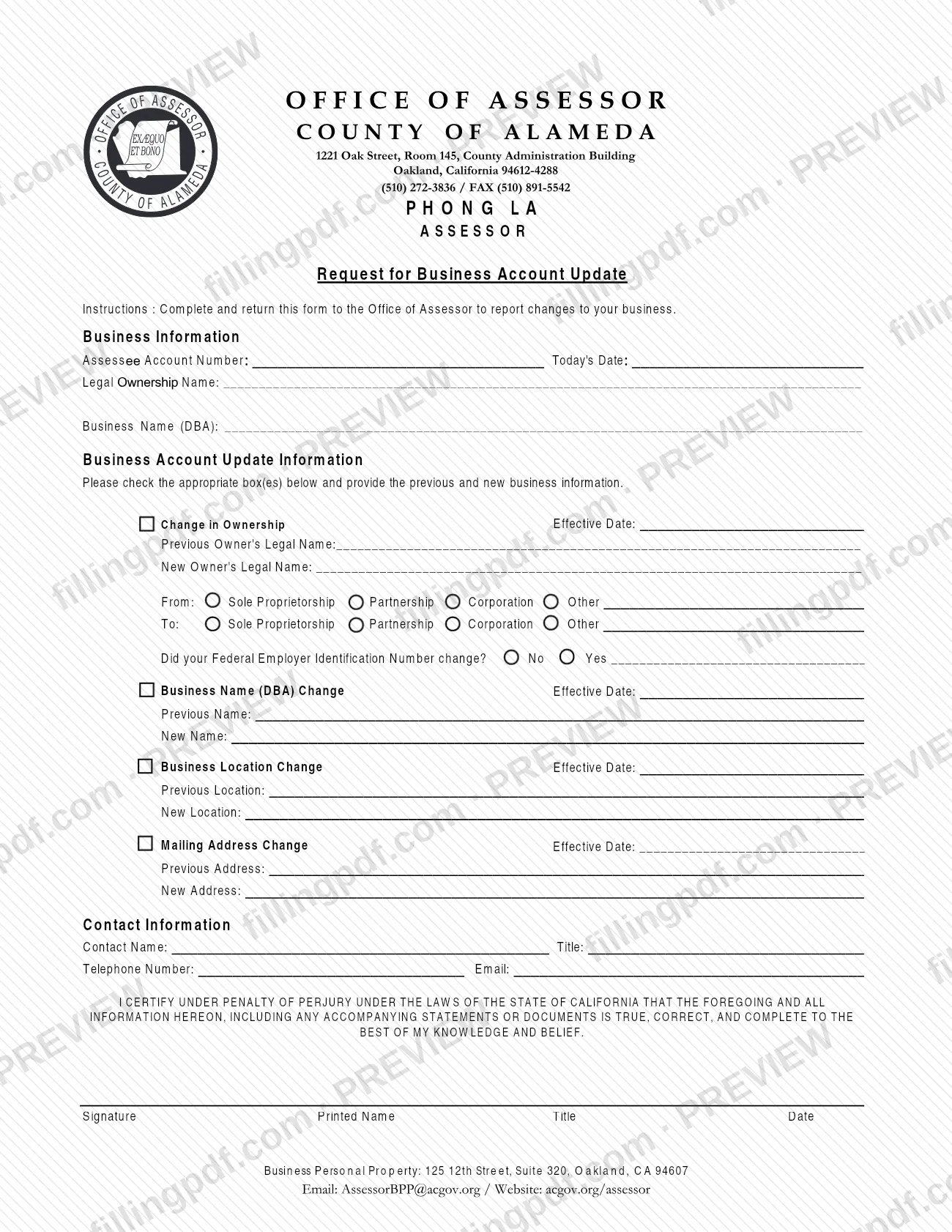
The Request For Business Account Update Form is the Alameda County Assessor's form for reporting changes to a business account, and it is one of the Alameda County property tax forms listed on the Assessor's forms page. A business owner or its contact person uses it to tell the Office of Assessor about a change in ownership, a new business name (DBA), a new business location or a new mailing address. On this page you can fill out the form online on FillingPDF and download or print the completed PDF. The Assessor publishes the original PDF at the official source link.
Last updated
What is Request For Business Account Update Form – Alameda County, CA?
The Request for Business Account Update is the form the Office of Assessor, County of Alameda, provides for reporting changes to your business. Its printed instructions say to complete it and return it to the Office of Assessor, and the Assessor lists it among its forms as the Request For Business Account Update Form.
The form identifies the account first: the Assessee Account Number, today's date, the legal ownership name and the business name (DBA). It then lets you check one or more kinds of change and give the previous and the new information for each:
- Change in Ownership, with an effective date, the previous and new owner's legal names, the type of business entity before and after (Sole Proprietorship, Partnership, Corporation or Other) and whether the Federal Employer Identification Number (FEIN) changed.
- Business Name (DBA) Change, with an effective date and the previous and new names.
- Business Location Change, with an effective date and the previous and new locations.
- Mailing Address Change, with an effective date and the previous and new addresses.
The form ends with contact information and a certification, signed under penalty of perjury under the laws of the State of California. The footer lists the Business Personal Property contact. The form has no form number printed on it.
Who needs to file Request For Business Account Update Form – Alameda County, CA?
The owner of a business with an account at the Alameda County Assessor's office uses this form when something about that business changes. A person authorized to act for the business may also complete it, since the form asks for a contact name and title and a signature with the signer's printed name and title.
You would use it when any of these has happened:
- the business has a new owner, or the business changed from one entity type to another (sole proprietorship, partnership, corporation or other);
- the business name (DBA) changed;
- the business moved to a new location;
- the mailing address changed.
The Assessor's forms page notes that every California county has its own set of forms. If the property is located in another county, contact that county's Assessor's Office instead. The form does not describe any other eligibility rule or who else may sign for the owner.
When to file Request For Business Account Update Form – Alameda County, CA
Complete this form when one of the changes it covers takes effect: a change in ownership, a business name (DBA) change, a business location change or a mailing address change. Each section asks for its own effective date, so have those dates ready. No deadline for returning the form is printed on it, and the Assessor's forms page sets none either. That page asks you to fill out the form as completely as possible for quicker processing, and warns that the Assessor may not be able to process a form if the requested contact details are missing.
How to fill out Request For Business Account Update Form – Alameda County, CA
Enter the account details
Under Business Information, write the Assessee Account Number and today's date.
Enter the owner and business name
Write the Legal Ownership Name and the Business Name (DBA) as they currently stand on the account.
Check each change that applies
Under Business Account Update Information, check the box for every change you are reporting and give the previous and new information for each.
Complete the change in ownership
Enter the effective date, the Previous Owner's Legal Name and the New Owner's Legal Name. Mark the entity type From and To (Sole Proprietorship, Partnership, Corporation or Other, with a description if Other), and answer whether the FEIN changed, adding the detail if Yes.
Complete the business name change
Enter the Effective Date, the Previous Name and the New Name for the DBA change.
Complete the location change
Enter the Effective Date, the Previous Location and the New Location of the business.
Complete the mailing address change
Enter the Effective Date, the Previous Address and the New Address.
Add your contact information
Write the Contact Name, Title, Telephone Number and Email of the person the Assessor can reach about this update.
Sign the certification
Read the certification under penalty of perjury, then enter your signature, printed name, title and date.
Review and download the completed PDF
Check that every change has previous and new information and an effective date. Download or print the completed PDF from FillingPDF and return it to the Assessor as described under How to submit.
How to submit Request For Business Account Update Form – Alameda County, CA
The form says to return the completed form to the Office of Assessor. It does not name one single channel, so use the contact points the Assessor prints:
- Assessor's Office: Alameda County Assessor's Office, 1221 Oak Street, Room 145, Oakland, CA 94612 (the form's letterhead gives ZIP+4 94612-4288). Phone (510) 272-3787 on the forms page, or (510) 272-3836 on the form.
- Business Personal Property: the form's footer lists 125 12th Street, Suite 320, Oakland, CA 94607, email [email protected] and the website acgov.org/assessor.
- General email: [email protected], as listed on the Assessor's forms page.
If you mail it, the Assessor asks you to write the work unit or topic on the envelope, for example Personal Property or Change of Address. Also give your name or business name, mailing address, business location, parcel number if known and a telephone number, because without them the form may not be processed. The form lists no fee. FillingPDF lets you fill out and download the PDF; submission follows the Assessor's channels above.
Common mistakes to avoid
- Checking a change box but giving only the new information; the form asks for both the previous and the new name, owner, location or address.
- Leaving out an effective date; each change section has its own Effective Date line.
- Skipping the FEIN question in the ownership section instead of answering No or Yes and entering the number change.
- Omitting the certification signature, printed name, title or date; the form is certified under penalty of perjury.
- Leaving out your name or business name, mailing address, business location or telephone number, which the Assessor says may keep it from processing the form.
- Mailing the form without the work unit or topic, such as Personal Property or Change of Address, on the envelope.
- Sending the form to the Alameda County Assessor when the property is in another California county; each county has its own forms.
Frequently asked questions
What is the Request for Business Account Update form?
It is the Alameda County Assessor's form for reporting changes to a business account: a change in ownership, a business name (DBA) change, a business location change or a mailing address change. The instructions say to complete it and return it to the Office of Assessor.
Can I report more than one change on the same form?
Yes. The form tells you to check the appropriate box or boxes and to give the previous and new information for each change. Ownership, DBA, location and mailing address each have their own effective date and previous and new lines.
Where do I send the business account update form in Alameda County?
Return it to the Alameda County Office of Assessor, 1221 Oak Street, Room 145, Oakland, CA 94612. The form's footer also lists Business Personal Property at 125 12th Street, Suite 320, Oakland, CA 94607, and the email [email protected].
Is there a deadline to return the form?
No deadline is printed on the form or on the Assessor's forms page. Each change section asks for an effective date, and the Assessor asks you to complete the form as fully as possible so it can be processed more quickly.
What happens if I leave out my contact details?
The Assessor's forms page says it may not be able to process a form that lacks your name or business name, mailing address, business location, parcel number if known, or telephone number. Complete the Contact Information section too.
Do I need a signature on the form?
Yes, the form ends with a certification under penalty of perjury under the laws of the State of California. It has lines for the signature, printed name, title and date, and the certification covers any accompanying statements or documents.
Can I fill out the Request for Business Account Update Form online?
Yes. You can fill out the PDF online on FillingPDF and download or print it. FillingPDF is an independent service and does not file anything with the Assessor; you return the form through the Assessor's channels.
What do I do if my business is in another California county?
Contact that county's Assessor's Office. The Alameda County Assessor's forms page states that every California county has its own set of forms, and this form is issued by the Alameda County Office of Assessor.
Ready to fill out Request For Business Account Update Form – Alameda County, CA?
Fill out Request For Business Account Update Form – Alameda County, CA now