
Form LLC-4/7 is the Certificate of Cancellation that a limited liability company (LLC) files with the California Secretary of State to cancel its registration. It covers both California LLCs and out-of-state LLCs registered in California, and it asks for the exact LLC name, the 12-digit entity number, a dissolution statement and the signatures of the people authorized to sign. On this page you can fill out the form online on FillingPDF and download or print the completed PDF; the agency publishes the original at bpd.cdn.sos.ca.gov and accepts filings through its own channels.
Last updated
What is LLC-4/7?
Certificate of Cancellation (Form LLC-4/7) is the California Secretary of State form that cancels the registration of a limited liability company (LLC) in California, ending the powers, rights and privileges the LLC holds there.
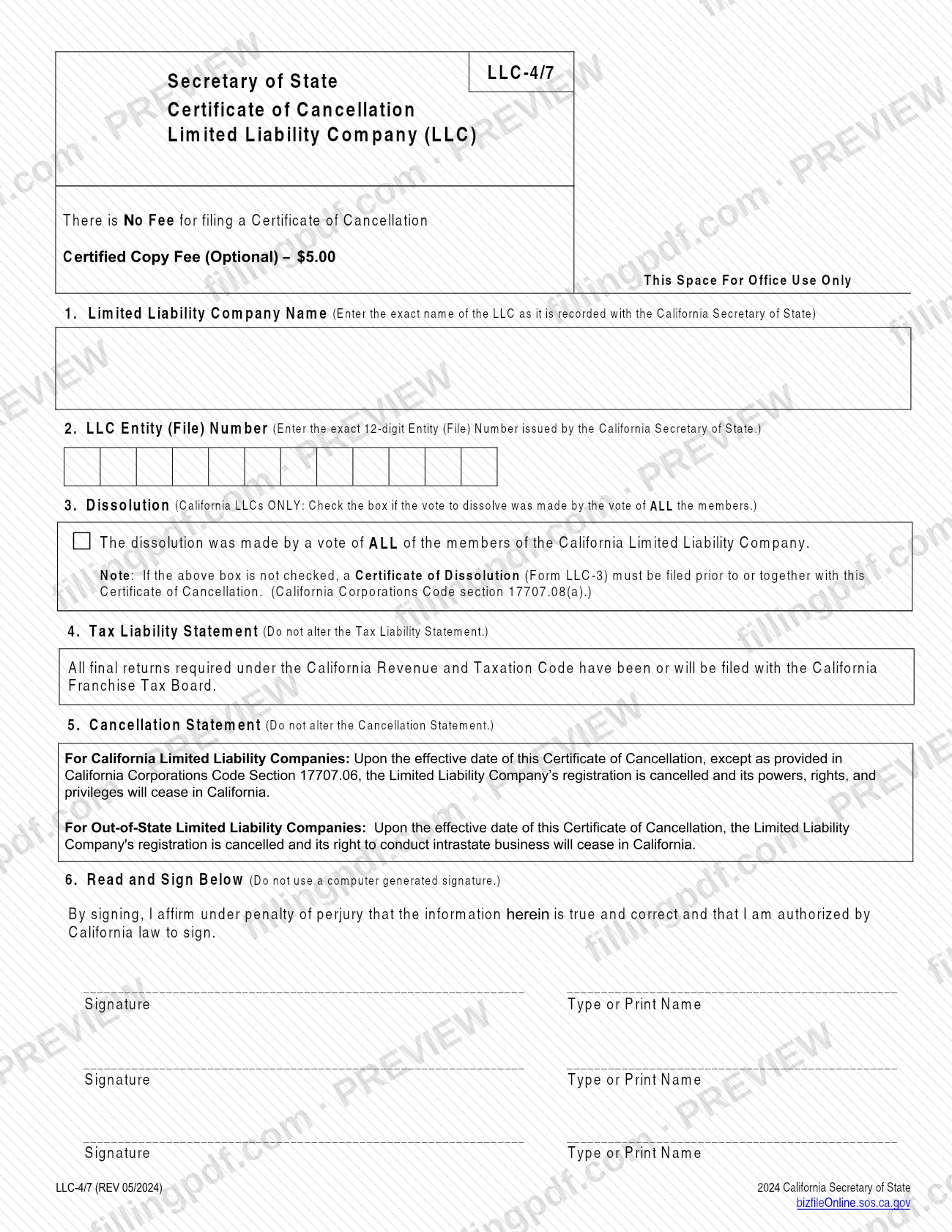
The form has six numbered items: the exact LLC name (item 1), the 12-digit LLC entity (file) number (item 2), a dissolution box for California LLCs (item 3), a fixed Tax Liability Statement (item 4), a fixed Cancellation Statement (item 5) and the signature block (item 6). The statements in items 4 and 5 must not be altered.
Item 5 has two versions. For California LLCs, the registration is cancelled and the LLC's powers, rights and privileges cease in California on the effective date of the certificate, except as provided in California Corporations Code Section 17707.06. For out-of-state LLCs, the registration is cancelled and the right to conduct intrastate business in California ceases.
The Secretary of State's Business Entities office lists the form among its Foreign LLC forms, and the form itself says there is no fee for filing a Certificate of Cancellation. A Certificate of Dissolution (Form LLC-3) is a different form: the cancellation form says it must be filed before or together with this one when the item 3 box is not checked. The form is not a Statement of Information and does not replace any final tax return.
Who needs to file LLC-4/7?
Limited liability companies registered with the California Secretary of State that are ending that registration use Form LLC-4/7. The form serves two groups, because item 5 gives separate wording for each:
- California LLCs. Check the item 3 box only if the vote to dissolve was made by the vote of ALL the members. If the box is not checked, file a Certificate of Dissolution (Form LLC-3) before, or together with, this certificate (California Corporations Code section 17707.08(a)).
- Out-of-state LLCs registered in California. Their cancellation ends the right to conduct intrastate business in California. Item 3 is marked "California LLCs ONLY."
The signers affirm under penalty of perjury that the information is true and that they are authorized by California law to sign. The form has room for three signatures and printed names.
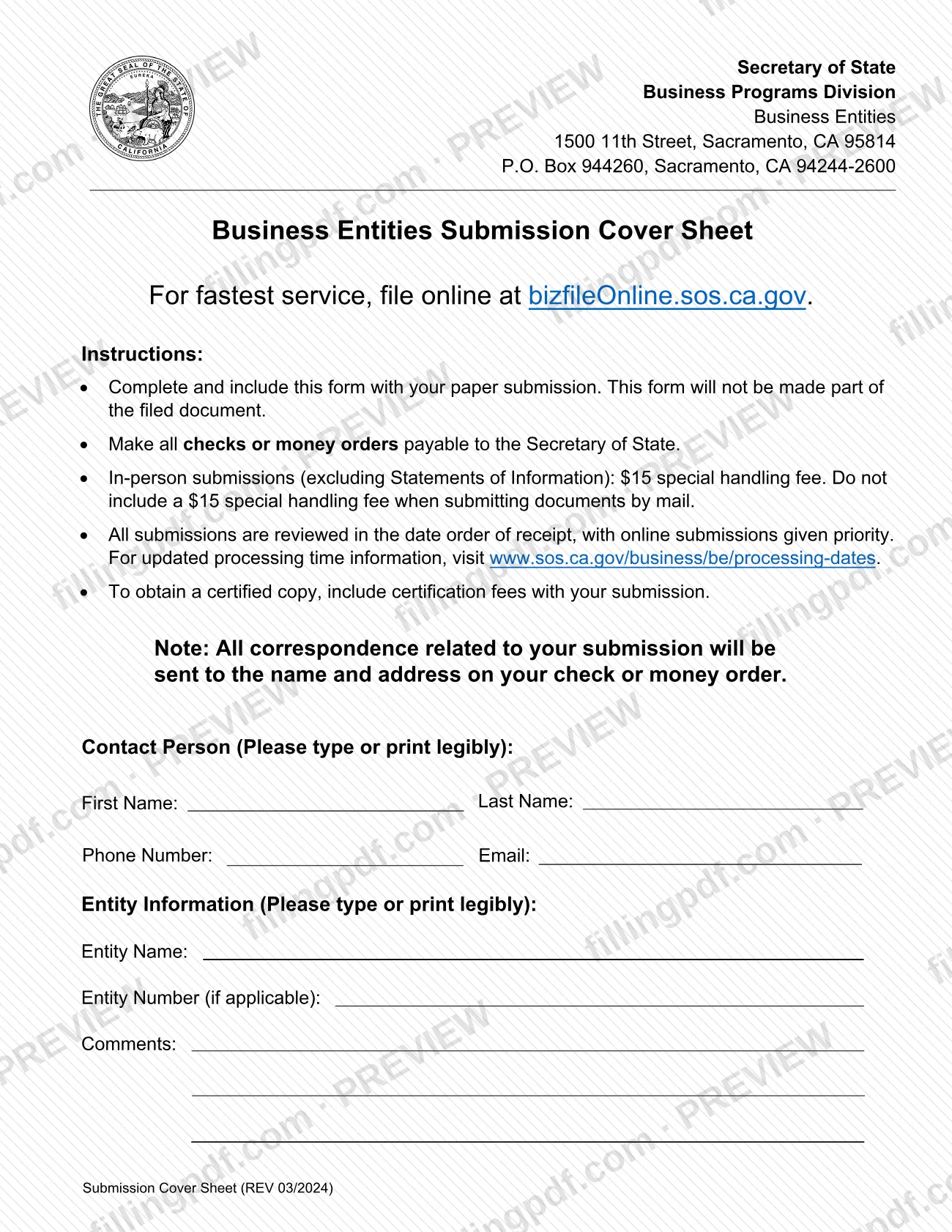
Anyone sending the form on paper also completes the Business Entities Submission Cover Sheet that comes with it.
When to file LLC-4/7
File Form LLC-4/7 when the LLC is ready to cancel its California registration. The form prints no due date of its own. Two conditions on the form affect timing: the Tax Liability Statement says all final returns required under the California Revenue and Taxation Code have been or will be filed with the California Franchise Tax Board, and a California LLC that does not check the item 3 box must file Form LLC-3 before or together with this certificate.
The cancellation takes effect on the effective date of the certificate. For processing speed, the Secretary of State's page for Foreign LLC forms lists 5 days or less for online submissions and 10+ days for PDF forms. The cover sheet says all submissions are reviewed in date order of receipt, with online submissions given priority, and points to www.sos.ca.gov/business/be/processing-dates for updated processing times.
Documents you need
- Business Entities Submission Cover Sheet: include it with a paper submission; it is not made part of the filed document.
- Certificate of Dissolution (Form LLC-3): required for a California LLC if the item 3 box is not checked, filed before or together with the Certificate of Cancellation.
- Certified copy fee: include the certification fee with your submission only if you want an optional certified copy.
- Check or money order payable to the Secretary of State: needed only if you pay a fee such as the certified copy fee or the in-person special handling fee.
How to fill out LLC-4/7
Complete the cover sheet contact details
If you file on paper, type or print the contact person's first name, last name, phone number and email on the Business Entities Submission Cover Sheet. The cover sheet is not part of the filed document.
Enter entity information on the cover sheet
Write the entity name and, if applicable, the entity number, plus any comments. Make checks or money orders payable to the Secretary of State.
Enter the LLC name in item 1
Type the exact name of the LLC as it is recorded with the California Secretary of State.
Enter the entity number in item 2
Enter the exact 12-digit Entity (File) Number issued by the California Secretary of State.
Decide on the dissolution box
In item 3, California LLCs only: check the box if the vote to dissolve was made by the vote of ALL the members. If you leave it unchecked, file Form LLC-3 before or together with this certificate.
Read the Tax Liability Statement
Item 4 states that all final returns required under the California Revenue and Taxation Code have been or will be filed with the California Franchise Tax Board. Do not alter it.
Read the Cancellation Statement
Item 5 gives separate wording for California LLCs and out-of-state LLCs. Do not alter it.
Sign and print names in item 6
Each authorized signer signs by hand and types or prints a name on one of the three lines. Do not use a computer-generated signature.
Review and download the completed PDF
Check the name, the 12-digit number, the item 3 box and the signatures, then download or print the completed PDF from FillingPDF and send it through one of the channels described under How to submit.
How to submit LLC-4/7
You can file Form LLC-4/7 online through bizfile Online or on paper.
- Online: the Secretary of State says to file online for the fastest service at bizfileOnline.sos.ca.gov. Filing online requires Basic/Full Access to the entity's record; if you do not have it, you must establish it before you can complete the action online.
- On paper: include the Business Entities Submission Cover Sheet with the form. The cover sheet will not be made part of the filed document. It lists the Business Entities office at 1500 11th Street, Sacramento, CA 95814 and a mailing address of P.O. Box 944260, Sacramento, CA 94244-2600.
There is no fee for filing a Certificate of Cancellation. A special handling fee applies to in-person submissions, but the cover sheet says not to include it when you submit by mail. An optional certified copy carries its own certification fee, which you include with your submission. Make any check or money order payable to the Secretary of State; the agency sends all correspondence to the name and address on the check or money order. Ask the Secretary of State for current amounts.
FillingPDF lets you fill out and download the PDF; submission follows the channels above.
Common mistakes to avoid
- Leaving the item 3 box unchecked and not filing a Certificate of Dissolution (Form LLC-3) before or together with the cancellation.
- Checking the item 3 box when the vote to dissolve was not made by the vote of ALL the members, or checking it for an out-of-state LLC (the box is for California LLCs only).
- Altering the Tax Liability Statement (item 4) or the Cancellation Statement (item 5); the form says not to alter either.
- Using a computer-generated signature in item 6; the form says not to.
- Entering a name that differs from the LLC's record, or an entity number that is not the exact 12-digit number issued by the Secretary of State.
- Including the special handling fee with a mailed submission; the cover sheet says not to include it when submitting by mail.
- Sending the paper form without the Business Entities Submission Cover Sheet.
- Omitting the certification fee when ordering a certified copy with the filing.
Frequently asked questions
What is Form LLC-4/7 used for?
Form LLC-4/7 is the Certificate of Cancellation an LLC files with the California Secretary of State to cancel its registration. For California LLCs it ends their powers, rights and privileges in California; for out-of-state LLCs it ends the right to conduct intrastate business there.
Is there a fee to file the LLC-4/7 Certificate of Cancellation?
No. The form states there is no fee for filing a Certificate of Cancellation. An optional certified copy has its own certification fee, and in-person submissions carry a special handling fee that should not be included when mailing. Ask the Secretary of State for current amounts.
Do I need to file Form LLC-3 before the LLC-4/7?
Only if you are a California LLC and do not check the item 3 box. The form says a Certificate of Dissolution (Form LLC-3) must then be filed before or together with the cancellation (California Corporations Code section 17707.08(a)).
Can I file Form LLC-4/7 online?
Yes. The Secretary of State says terminations may be filed online through bizfile Online for the fastest processing. You need Basic/Full Access to the entity's record; if you lack it, you must establish it first.
Where do I mail Form LLC-4/7?
The Business Entities Submission Cover Sheet lists a mailing address of P.O. Box 944260, Sacramento, CA 94244-2600 and a street address of 1500 11th Street, Sacramento, CA 95814. Include the cover sheet with your paper submission.
How long does it take to process a Certificate of Cancellation?
The Secretary of State's page for Foreign LLC forms lists 5 days or less for online submissions and 10+ days for PDF forms. Submissions are reviewed in date order, online first; updated times are at www.sos.ca.gov/business/be/processing-dates.
Who has to sign the LLC-4/7?
Signers must be authorized by California law to sign, and they affirm under penalty of perjury that the information is true and correct. The form has three signature lines with printed names, and it says not to use a computer-generated signature.
Can I fill out the LLC-4/7 form online on FillingPDF?
Yes. You can fill out the PDF online on FillingPDF and download or print it. FillingPDF is an independent service and does not file the form with the California Secretary of State; you submit it through the agency's channels.
Can an out-of-state LLC use Form LLC-4/7?
Yes. Item 5 has separate wording for out-of-state LLCs: their registration is cancelled and their right to conduct intrastate business in California ceases. The item 3 dissolution box is for California LLCs only.
Ready to fill out LLC-4/7?
Fill out LLC-4/7 now