
FL-170 is the Judicial Council of California declaration that a spouse or domestic partner signs to ask the court to enter a judgment of dissolution or legal separation without a hearing, either because the other party defaulted or because the parties agree. It works together with the proposed Judgment (form FL-180) and, depending on your case, the disclosure, property and income forms it lists. On this page you can fill out the form online on FillingPDF and download or print the completed PDF; the court's own filing rules and the official PDF stay with the Judicial Council of California.
Last updated
What is FL-170?
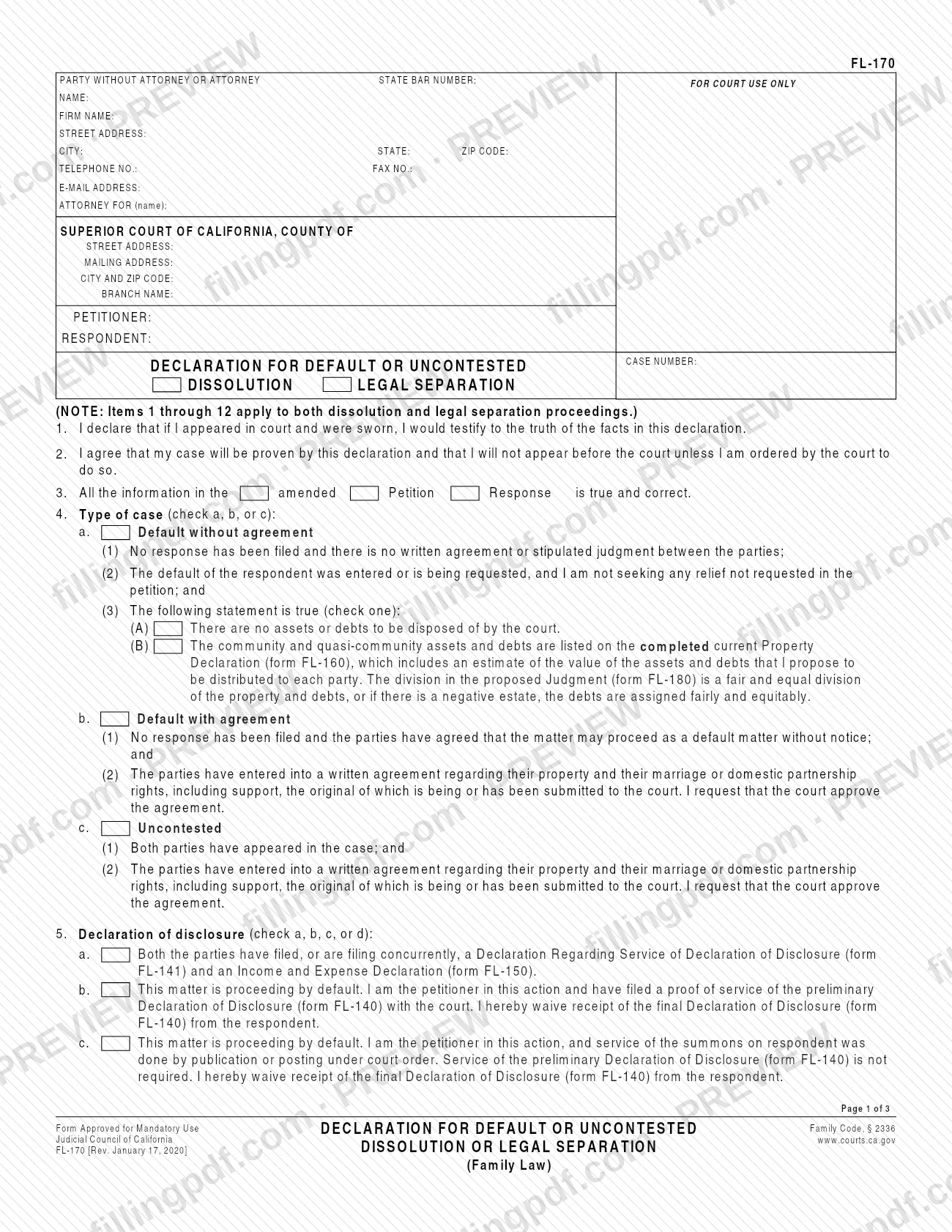
Declaration for Default or Uncontested Dissolution or Legal Separation (Family Law), form FL-170, is a Judicial Council of California form in which one party to a family law case swears to the facts that support a judgment of dissolution or legal separation by default or by agreement, so the court can decide on paper.
By signing, the declarant states that they would testify to the same facts if sworn, and agrees that the case will be proven by the declaration and that they will not appear in court unless the court orders it. Item 14 adds that a commissioner sitting as a temporary judge may review the declaration and decide whether to grant the request or require an appearance, under Family Code section 2336.
The form is organized around three kinds of case in item 4:
- Default without agreement: no response has been filed and there is no written agreement or stipulated judgment.
- Default with agreement: no response has been filed, but the parties agreed the matter may proceed as a default without notice and signed a written agreement.
- Uncontested: both parties have appeared and have a written agreement.
Items 5 through 12 cover disclosure, custody and parenting time, child support, spousal or partner support, parentage, attorney fees, a nunc pro tunc judgment and restoration of a former name. Items 1 through 12 apply to both dissolution and legal separation. Items 15 through 17 apply only to dissolutions, and item 18 applies only to legal separations. The court's orders are set out in the proposed Judgment (form FL-180), which this declaration refers to throughout. A Spanish version of FL-170 is also available from the California Courts self-help site.
Who needs to file FL-170?
The party who asks the court for a judgment of dissolution of marriage or domestic partnership, or of legal separation, in a default or uncontested case completes and signs FL-170. The form is written in the first person, and some items refer to the declarant as the petitioner (for example, item 5b and 5c), so it fits a petitioner requesting a default judgment as well as a party presenting an agreement.
Which parts apply depends on the case:
- Default without agreement: no response has been filed and no written agreement exists (item 4a).
- Default with agreement or uncontested: the parties have a written agreement about property and their marriage or domestic partnership rights, including support, and the original is being or has been submitted to the court (items 4b and 4c).
- Dissolution: complete items 15 through 17; item 12 on restoring a former name is for dissolution or nullity of marriage only.
- Legal separation: complete item 18. The form states that a judgment of legal separation does not end the marriage or domestic partnership.
If you ask for a status-only judgment (item 17), the declaration covers only the end of marital or domestic partner status and asks the court to reserve all other issues. If you request support or attorney fees, the form says to submit an Income and Expense Declaration (form FL-150) unless a current one is on file.
When to file FL-170
FL-170 is completed when you are ready to ask the court to enter a judgment by default or on an uncontested basis. In a default case, item 4a states that the respondent's default was entered or is being requested. The form prints no filing deadline of its own.
It is submitted together with the proposed Judgment (form FL-180), which items 16 and 18 ask the court to adopt. Item 5 ties it to disclosure: both parties have filed or are filing concurrently the Declaration Regarding Service of Declaration of Disclosure (form FL-141) and Income and Expense Declaration (form FL-150), or one of the default or waiver options applies.
For a dissolution of a marriage or domestic partnership created in another state, item 15 states that the petitioner or respondent must have lived in the county for at least three months and in California for at least six months continuously, immediately before the petition was filed. The current revision is dated January 17, 2020.
Documents you need
- Proposed Judgment (form FL-180): the declaration asks the court to make the orders set out in it (items 6 through 12, 16 and 18).
- Original written agreement on property and marriage or domestic partnership rights, including support: in default-with-agreement and uncontested cases (items 4b and 4c).
- Property Declaration (form FL-160): if you check item 4a(3)(B) because community and quasi-community assets and debts must be divided.
- Declaration Regarding Service of Declaration of Disclosure (form FL-141) and Income and Expense Declaration (form FL-150): if you check item 5a.
- Proof of service of the preliminary Declaration of Disclosure (form FL-140): if you check item 5b as petitioner in a default case.
- Stipulation and Waiver of Final Declaration of Disclosure (form FL-144), or another waiver signed by both parties under penalty of perjury: if you check item 5d.
- Updated Declaration Under UCCJEA (form FL-105): only if the information has changed since it was last filed (item 6a).
- Income and Expense Declaration (form FL-150): if you request a support order or attorney fees, unless a current form is already on file.
- Spousal or Partner Support Declaration Attachment (form FL-157) or Attachment 8d: if you check item 8d.
- Voluntary declaration of parentage or paternity, or the parties' written agreement on parentage (Attachment 9b): if you check item 9a or 9b.
- Request for Attorney's Fees and Costs Attachment (form FL-319): if you rely on it for item 10.
- Attachments 6c, 6d and 7a(3): when you check the matching boxes in items 6 and 7.
How to fill out FL-170
Complete the caption at the top
Enter your name, address, telephone and e-mail in the top block, the name of the Superior Court and its county, the petitioner and respondent names, and the case number. Repeat the case number and party names at the top of pages 2 and 3.
Read items 1 through 3
These statements are printed: you would testify to the facts if sworn, you agree the case is proven by the declaration and you will not appear unless ordered, and the amended Petition Response is true and correct.
Choose the type of case in item 4
Check a, b or c: default without agreement, default with agreement, or uncontested. Under 4a also check (A) if there are no assets or debts, or (B) if they are listed on a current Property Declaration (form FL-160).
Select the disclosure option in item 5
Check a, b, c or d depending on whether both parties filed Forms FL-141 and FL-150, you waive the final disclosure as petitioner in a default, service was by publication or posting, or the parties mutually waived final disclosure.
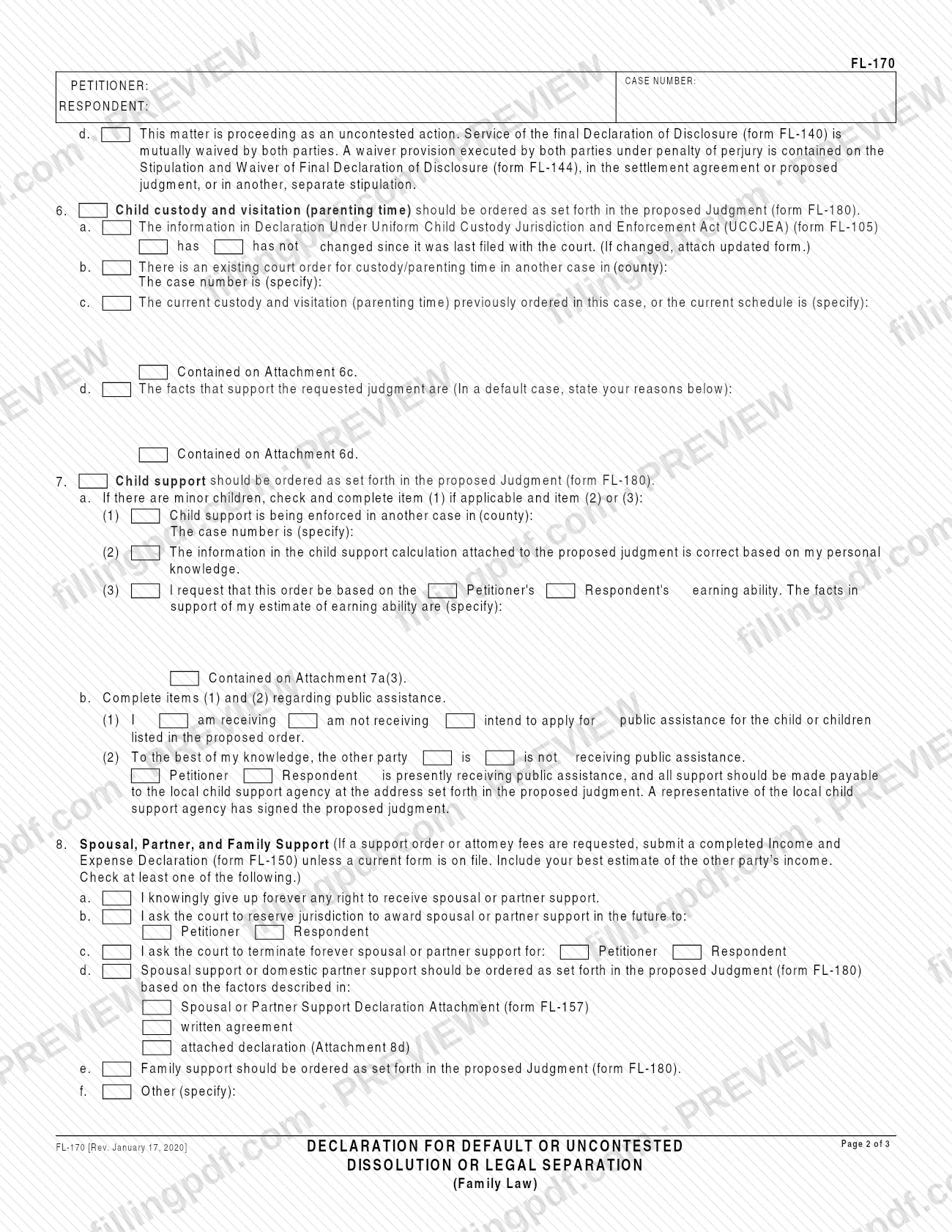
Complete custody items in item 6
State in 6a whether the UCCJEA information (form FL-105) has or has not changed, give any other-county custody case in 6b, and describe the current schedule and supporting facts in 6c and 6d or on Attachments 6c and 6d.
Complete child support in item 7
If there are minor children, complete 7a(1), (2) or (3) as applicable, then answer 7b on public assistance for yourself and, to your knowledge, the other party.
Check your support choices in item 8
Check at least one of 8a through 8f: give up spousal or partner support, reserve jurisdiction, terminate support, request an order, request family support, or describe another request.
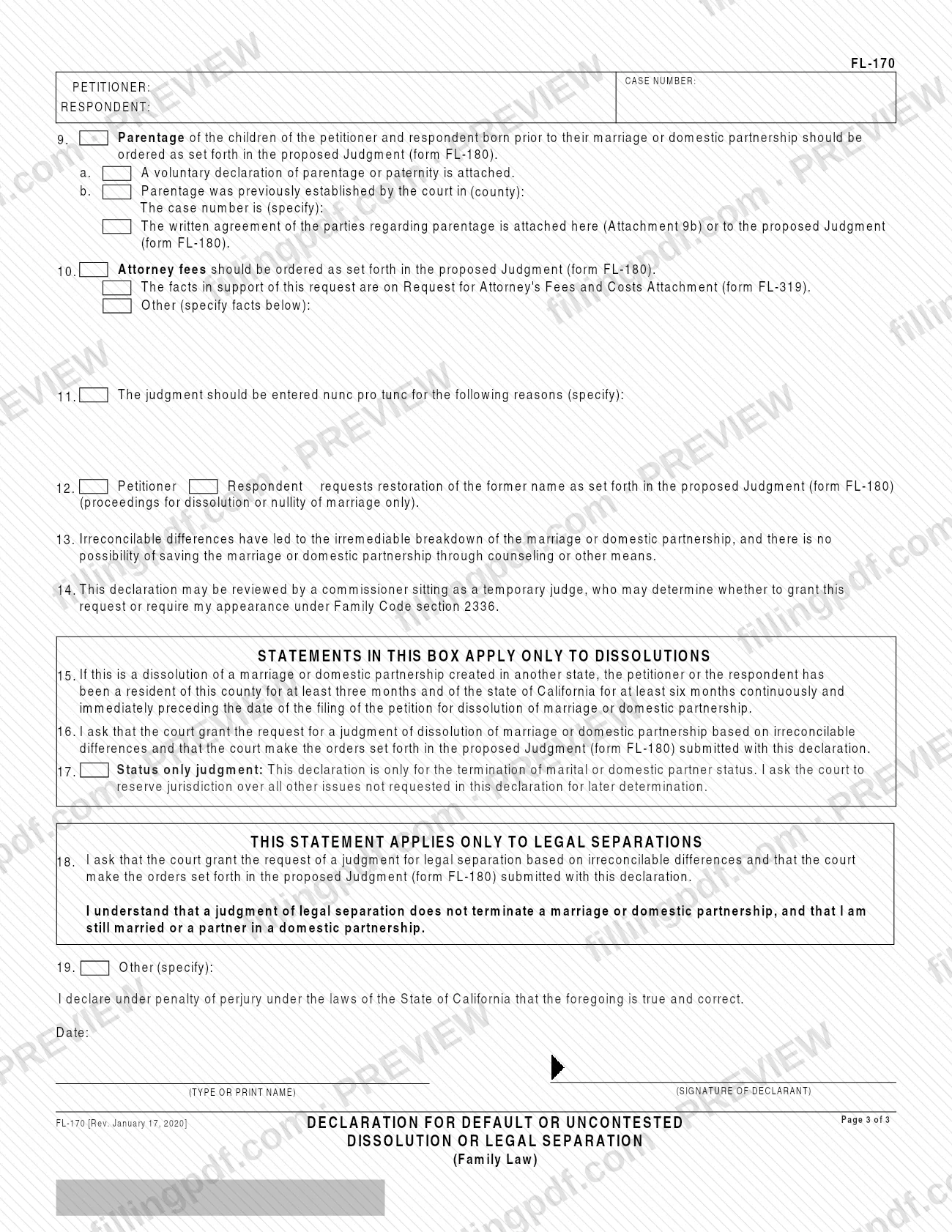
Address parentage, fees, dates and name
Use item 9 for parentage of children born before the marriage or domestic partnership, item 10 for attorney fees, item 11 if you want the judgment entered nunc pro tunc, and item 12 for restoration of a former name (dissolution or nullity only).
Review items 13 and 14
Item 13 states the irreconcilable differences ground. Item 14 acknowledges that a commissioner sitting as a temporary judge may review the declaration under Family Code section 2336.
Complete the dissolution or separation box
For a dissolution, use items 15 through 17 (residency, request for judgment, and status-only judgment if wanted). For a legal separation, use item 18 only. Use item 19 for any other request.
Sign, date and download the PDF
Enter the date, type or print your name and sign above the declaration under penalty of perjury. Check the attachments you referenced, then download or print the completed PDF from FillingPDF.
How to submit FL-170
FL-170 is submitted to the Superior Court of California in the county where your case is pending; the court name and case number go in the caption at the top of page 1. The form itself prints no mailing address, e-filing portal or in-person instructions, so follow the filing rules of that court.
What goes with it, according to the form:
- Proposed Judgment (form FL-180): items 16 and 18 refer to it as submitted with this declaration.
- Written agreement: in default-with-agreement and uncontested cases, the original is being or has been submitted to the court (items 4b and 4c).
- Attachments and companion forms: the forms and attachments you check in items 4 through 10, such as FL-160, FL-141, FL-150, FL-157 or FL-319.
The California Courts self-help page for FL-170 links to divorce how-to instructions and form packets. Sign and date the declaration before filing. FillingPDF lets you fill out and download the PDF; submission follows the court's channels above.
Common mistakes to avoid
- Checking item 4a, default without agreement, when a response has been filed or a written agreement exists; item 4a requires that neither be true.
- Leaving item 8 with no box checked; the form says to check at least one of the spousal, partner or family support options.
- Requesting support or attorney fees without submitting an Income and Expense Declaration (form FL-150) when no current one is on file.
- Completing items 15 through 17 in a legal separation case, or item 18 in a dissolution; each applies only to its own type of case.
- Using item 12 to ask for restoration of a former name in a legal separation; the form limits it to dissolution or nullity of marriage.
- Checking an item that refers to an attachment, such as 6c, 6d, 7a(3) or 8d, and not attaching the page.
- Checking item 5b or 5c as a respondent; both are for the petitioner in a default matter.
- Submitting the declaration without the proposed Judgment (form FL-180) it asks the court to adopt.
- Signing without entering the date, or without typing or printing your name beside the signature.
Frequently asked questions
What is the FL-170 form?
FL-170 is the Judicial Council of California's Declaration for Default or Uncontested Dissolution or Legal Separation (Family Law). One party signs it under penalty of perjury so the court can enter a judgment of dissolution or legal separation on paper, without an appearance.
Who signs form FL-170?
The declarant, meaning the party asking for the judgment, types or prints their name, signs and dates it under penalty of perjury. Items 5b and 5c are written for the petitioner in a default case, while other items let you indicate whether the petitioner or respondent is involved.
Do I have to appear in court if I file FL-170?
Item 2 says you agree your case will be proven by the declaration and you will not appear unless the court orders you to. Item 14 notes that a commissioner may review it and decide whether to grant the request or require your appearance.
Is FL-170 used for both divorce and legal separation?
Yes. Items 1 through 12 apply to both. Items 15 through 17 apply only to dissolutions, and item 18 applies only to legal separations. A legal separation judgment does not end the marriage or domestic partnership, as item 18 states.
What forms go with FL-170?
The proposed Judgment (form FL-180) is central. Depending on the boxes you check, you may also need FL-160, FL-141, FL-150, FL-140 proof of service, FL-144, FL-105, FL-157 or FL-319, plus the original written agreement in agreed cases.
Is there a residency requirement on FL-170?
For a dissolution of a marriage or domestic partnership created in another state, item 15 states that the petitioner or respondent has lived in the county at least three months and in California at least six months continuously before the petition was filed.
Can I fill out FL-170 online?
Yes. You can fill out the FL-170 PDF online on FillingPDF and download or print it. FillingPDF is an independent service and does not file the form; you submit it to the Superior Court through the court's channels.
Is there a Spanish version of FL-170?
Yes. The California Courts self-help page for FL-170 offers the form in Spanish as well as English. The page lists the effective date as January 17, 2020, the same as the revision printed on the English form.
Ready to fill out FL-170?
Fill out FL-170 now