
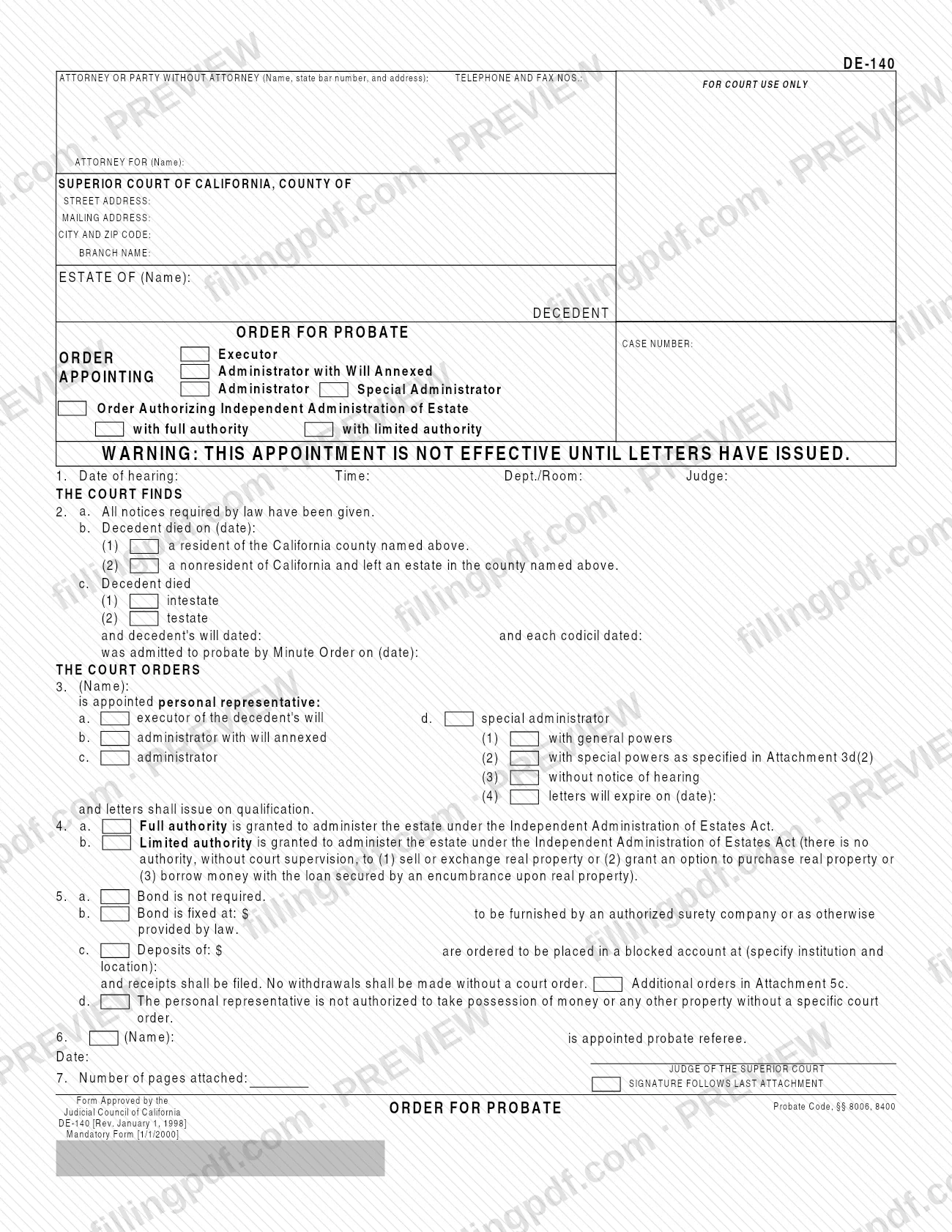
DE-140 is the Order for Probate, a Judicial Council of California form on which a Superior Court records its decision appointing the personal representative of a decedent's estate. It names the executor, administrator with will annexed, administrator or special administrator, sets the powers granted, and fixes any bond. You can fill out the form online on FillingPDF and download or print the completed PDF. The official PDF and the court's self-help description are published by the California courts.
Last updated
What is DE-140?
Form DE-140, Order for Probate, is the Judicial Council of California form that states the court's decision appointing the personal representative of an estate: the executor of a decedent's will, or the administrator the court appoints to manage the estate of a person who died without a will.
The form is captioned for the Superior Court of California, County of the estate, and carries the estate name and case number. It is a court order, so it ends with the date and the signature line for the judge of the Superior Court. It cites Probate Code, §§ 8006, 8400, and the Judicial Council marks it as a Mandatory Form.
The order has seven numbered items:
- Item 1: the date, time, department or room, and judge of the hearing.
- Item 2: the court's findings on notice, the decedent's date of death and residence, and whether the decedent died intestate or testate.
- Item 3: the appointment of the personal representative and the type of appointment.
- Item 4: full or limited authority under the Independent Administration of Estates Act.
- Item 5: bond, blocked accounts and limits on taking possession of property.
- Item 6: the appointment of a probate referee.
- Item 7: the number of pages attached.
The form carries a warning that the appointment is not effective until letters have issued.
Who needs to file DE-140?
The form belongs to probate cases in a California Superior Court in which the court appoints someone to administer a decedent's estate. The heading has a block for the attorney or party without an attorney, so it is prepared by the person who handles the case for the estate, and the judge makes it the court's order by signing it.
It covers four kinds of appointment, each marked on the form:
- an executor named in the decedent's will;
- an administrator with will annexed;
- an administrator, when the decedent died intestate;
- a special administrator.
The form also records an Order Authorizing Independent Administration of Estate, with full authority or with limited authority. The estate may be that of a California resident, or of a nonresident who left an estate in the county named on the form.
The form is not a petition and not the letters themselves. The warning printed on it says the appointment is not effective until letters have issued.
When to file DE-140
The order is tied to the court hearing on the appointment: Item 1 records the date, time, department or room and judge of that hearing, and the judge's findings and orders are entered with the hearing in mind. The form prints no separate due date.
An appointment under this order is not effective until letters have issued, and the form says letters issue on qualification. If the court sets an expiration, Item 3(4) records the date on which the letters expire. Where the court grants a special administrator powers without a notice of hearing, Item 3(3) records that.
Check the court's local procedures for when a proposed order is lodged before or at the hearing; the form does not say.
Documents you need
- Attachment 3d(2): attach it if the court appoints a special administrator with special powers, since Item 3d(2) refers to the powers specified there.
- Attachment 5c: attach it if the court gives additional orders about a blocked account under Item 5c.
- Any other attached pages, whose total you enter in Item 7; the judge's signature follows the last attachment.
How to fill out DE-140
Complete the heading and case caption
Enter the attorney or party without attorney (name, state bar number, address, telephone and fax), the attorney for, the Superior Court county, street and mailing addresses, city and ZIP code, branch name, the estate name, and the case number.
Mark the type of order
In the ORDER APPOINTING box, check Executor, Administrator with Will Annexed, Administrator or Special Administrator. Check Order Authorizing Independent Administration of Estate with full authority or with limited authority where it applies.
Enter the hearing details in Item 1
Write the date of hearing, time, Dept./Room and judge.
Record the findings in Item 2
Check Item 2a on notice. In 2b enter the decedent's date of death and check county resident or nonresident. In 2c check intestate or testate and, if testate, enter the will and codicil dates and the Minute Order date of admission to probate.
Name the personal representative in Item 3
Enter the appointee's name and check executor, administrator with will annexed, administrator or special administrator. For a special administrator, check general powers, special powers with Attachment 3d(2), without notice of hearing, and/or the letters expiration date.
Choose the authority in Item 4
Check Item 4a for full authority or Item 4b for limited authority under the Independent Administration of Estates Act.
Set bond and deposits in Item 5
Check 5a if bond is not required, or 5b and enter the bond amount. Use 5c for blocked-account deposits, naming the institution and location, and 5d if the representative may not take possession of property without a specific court order.
Name the probate referee in Item 6
Enter the name of the person appointed probate referee.
Add the date, pages and judge's signature
Enter the order date and the number of pages attached in Item 7. The judge of the Superior Court signs after the last attachment.
Review and download the PDF
Check that the checked boxes match the order the court intends, that attachments are numbered as the form requires, then download or print the completed PDF from FillingPDF.
How to submit DE-140
The form prints no filing channel, address, portal or fee. It is captioned for a specific Superior Court of California and county, and it has a space marked FOR COURT USE ONLY, so it is handled by that court in the estate's case.
Enter the court's county, street and mailing address, branch name and case number in the heading as they appear on your case papers. Then follow the filing channels of that Superior Court for the case.
If your order has more than one page of attachments, state the number of pages in Item 7. The judge's signature follows the last attachment, so attach any pages before the signature line.
FillingPDF lets you fill out and download the PDF; submission follows the court's channels.
Common mistakes to avoid
- Treating the appointment as effective when the order is signed; the form warns that it is not effective until letters have issued.
- Checking special powers under Item 3d(2) without attaching Attachment 3d(2), which is where the powers are specified.
- Marking limited authority under Item 4b and then assuming the representative may sell or exchange real property, grant an option to purchase it, or borrow against it without court supervision.
- Ordering a blocked account in Item 5c without naming the institution and location.
- Leaving the number of pages in Item 7 blank when pages are attached, or placing attachments after the judge's signature.
- Entering will and codicil dates under Item 2c(2) when the decedent died intestate under Item 2c(1).
Frequently asked questions
What is Form DE-140 used for?
Form DE-140 is the Order for Probate. It records the Superior Court's decision appointing the personal representative of an estate, whether an executor, administrator with will annexed, administrator or special administrator, and lists the powers, bond and other orders.
Is the appointment effective as soon as the judge signs DE-140?
No. The form carries a warning that the appointment is not effective until letters have issued, and Item 3 says letters shall issue on qualification.
What is the difference between full and limited authority on DE-140?
Item 4a grants full authority under the Independent Administration of Estates Act. Item 4b grants limited authority, with no authority without court supervision to sell or exchange real property, grant an option to purchase real property, or borrow money secured by an encumbrance on real property.
Does DE-140 always require a bond?
No. Item 5a states that bond is not required; Item 5b fixes a bond to be furnished by an authorized surety company or as otherwise provided by law, and Item 5c can order deposits placed in a blocked account.
Who signs Form DE-140?
The judge of the Superior Court signs the order, with the date, after the last attachment. The heading identifies the attorney or party without attorney associated with the case.
Can I fill out DE-140 online?
You can fill out the DE-140 PDF online on FillingPDF and download or print it. FillingPDF is an independent service and does not file the order with the court; submission follows the Superior Court's channels.
What revision of Form DE-140 is this?
The form shows Rev. January 1, 1998, and is marked Mandatory Form [1/1/2000] by the Judicial Council of California. The court's self-help page lists the effective date as January 1, 1998.
Ready to fill out DE-140?
Fill out DE-140 now