
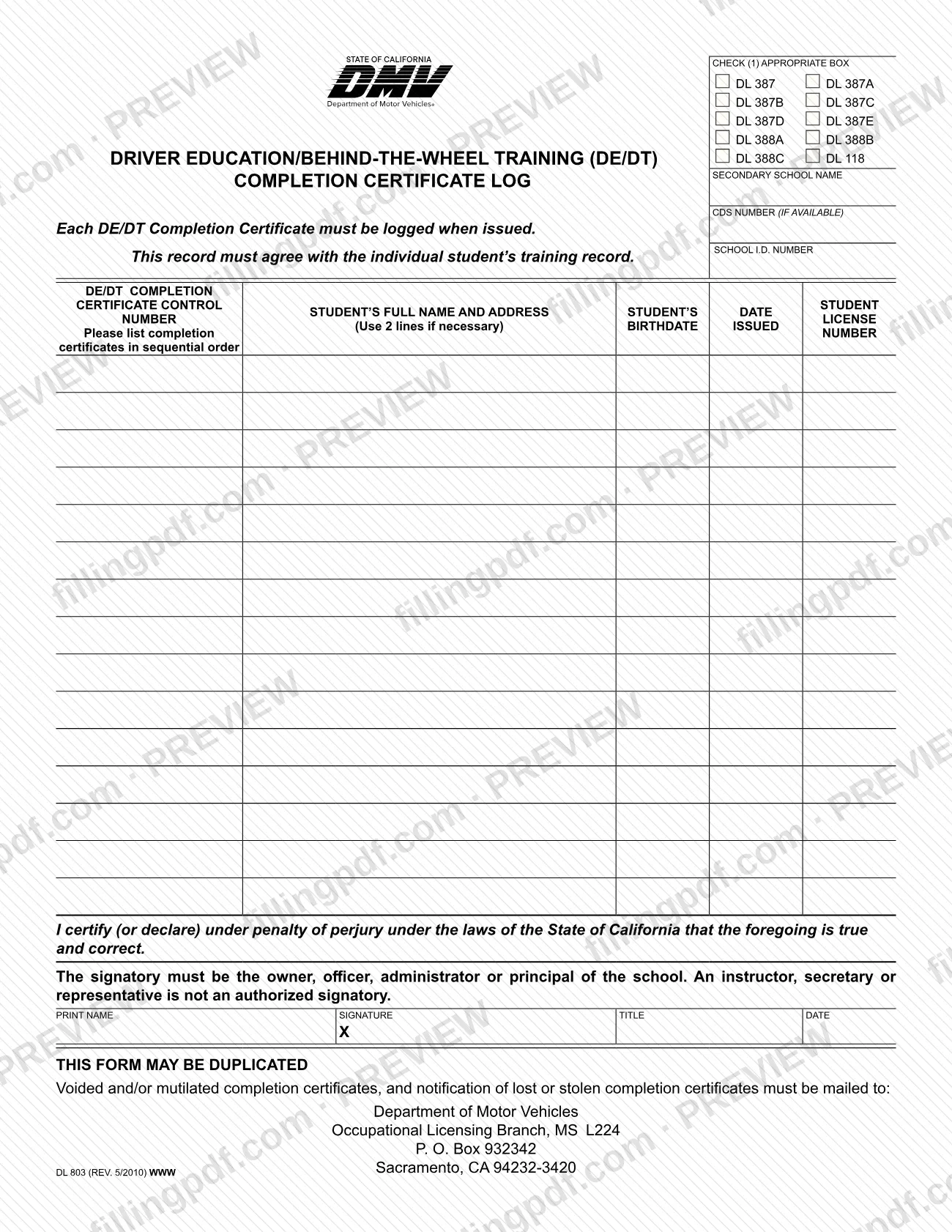
Form DL 803 is the Driver Education/Behind-the-Wheel Training (DE/DT) Completion Certificate Log published by the California Department of Motor Vehicles (DMV). A school uses it to record each DE/DT completion certificate at the time the certificate is issued, with the student's name, address, birthdate and license number. On this page you can fill out the form online on FillingPDF and download or print the completed PDF; the form itself is published by the DMV at its forms page.
Last updated
What is DL 803?
Form DL 803, the Driver Education/Behind-the-Wheel Training (DE/DT) Completion Certificate Log, is the California DMV record on which a secondary school lists every DE/DT completion certificate it issues, in sequential order, together with the student details tied to each certificate.
The form states its own rules. Each DE/DT Completion Certificate must be logged when it is issued, and the log must agree with the individual student's training record. At the top, the school checks the box for the type of certificate being logged. The boxes printed on the form are DL 387, DL 387A, DL 387B, DL 387C, DL 387D, DL 387E, DL 388A, DL 388B, DL 388C and DL 118. The school also enters its secondary school name, its CDS number (if available) and its school I.D. number.
The log table has columns for the DE/DT completion certificate control number, the student's full name and address (two lines may be used if necessary), the student's birthdate, the date issued and the student license number.
The log ends with a certification made under penalty of perjury under the laws of the State of California. The form says it may be duplicated, so a school can copy a blank log when it needs more pages. Form DL 803 also gives the DMV address to which voided or mutilated certificates, and notices of lost or stolen certificates, must be mailed.
Who needs to file DL 803?
Form DL 803 is for a secondary school that issues DE/DT completion certificates and must log each one. The school checks the box that matches the certificate type it is logging (DL 387, DL 387A through DL 387E, DL 388A, DL 388B, DL 388C or DL 118).
Who may sign is limited by the form. The signatory must be the owner, officer, administrator or principal of the school. An instructor, secretary or representative is not an authorized signatory, so a school should not have one of them sign the certification.
The form is not a student document: students are listed on it, but the school completes it. The log must agree with each student's individual training record, so the person who prepares it needs access to those records. A school that fills more than one page may duplicate the form, and a school that issues several certificate types checks the box that applies to the log it is keeping.
When to file DL 803
Log each DE/DT completion certificate on Form DL 803 when the certificate is issued; the form says so directly. List the certificates in sequential order and make sure the entries agree with the student's individual training record. No separate due date is printed on the form.
Voided or mutilated certificates, and notification of lost or stolen certificates, are handled separately: the form says they must be mailed to the DMV address given under How to submit. It sets no deadline for that mailing.
How to fill out DL 803
Check the certificate type box
Under CHECK (1) APPROPRIATE BOX, mark the one that matches the certificates in this log: DL 387, DL 387A, DL 387B, DL 387C, DL 387D, DL 387E, DL 388A, DL 388B, DL 388C or DL 118.
Enter the school identification
Fill in the secondary school name, the CDS number (if available) and the school I.D. number at the top of the form.
Enter the certificate control number
In the DE/DT completion certificate control number column, write the number of each certificate as you issue it. List certificates in sequential order.
Enter the student's name and address
In the student's full name and address column, write the full name and address of the student. Use two lines if necessary.
Enter birthdate and license number
Fill in the student's birthdate and the student license number for each certificate, in the columns provided.
Enter the date issued
Write the date each certificate was issued in the date issued column. Log it when it is issued, and check that every entry agrees with the student's training record.
Print the signatory's details
In the certification block, print the name and title of the signer. The signatory must be the owner, officer, administrator or principal of the school; an instructor, secretary or representative cannot sign.
Sign and date the certification
The signer signs on the line marked X and enters the date. The certification is made under penalty of perjury under the laws of the State of California.
Review and download the completed PDF
Check every entry against the training records, then download or print the completed PDF from FillingPDF. Duplicate the form if you need extra pages.
How to submit DL 803
The only channel printed on Form DL 803 is mail, and it applies to voided or mutilated completion certificates and to notices of lost or stolen certificates. Mail them to:
- Department of Motor Vehicles
- Occupational Licensing Branch, MS L224
- P. O. Box 932342
- Sacramento, CA 94232-3420
The form prints no mailing address, portal or appointment rule for delivering the completed log itself. Ask the DMV Occupational Licensing Branch, or check the DMV forms page, about how the log is to be provided.
Keep the log consistent with each student's training record. FillingPDF lets you fill out and download the PDF; submission follows the DMV's channels.
Common mistakes to avoid
- Having an instructor, secretary or other representative sign; the form says only the owner, officer, administrator or principal of the school may sign.
- Logging certificates after the fact in a different order; the form says to log each certificate when issued and list them in sequential order.
- Entering student details that do not match the student's individual training record; the log must agree with that record.
- Leaving the certificate type box unchecked at the top; the form asks you to check the appropriate box (DL 387 through DL 388C or DL 118).
- Squeezing a long student name and address onto one line instead of using the second line the form allows.
- Mailing voided, mutilated, lost or stolen certificate notices anywhere other than the Occupational Licensing Branch, MS L224, P. O. Box 932342, Sacramento, CA 94232-3420.
- Leaving the certification unsigned or without the printed name, title and date.
Frequently asked questions
What is Form DL 803 used for?
Form DL 803 is the California DMV's DE/DT Completion Certificate Log. A school uses it to record each Driver Education/Behind-the-Wheel Training completion certificate it issues, with the control number, student details and date issued.
Who is allowed to sign the DL 803?
Only the owner, officer, administrator or principal of the school. The form states that an instructor, secretary or representative is not an authorized signatory, and the signature is made under penalty of perjury under California law.
When do I log a completion certificate on DL 803?
When the certificate is issued. The form says each DE/DT Completion Certificate must be logged when issued, in sequential order, and the log must agree with the individual student's training record.
Which certificate types does Form DL 803 cover?
The form has boxes for DL 387, DL 387A, DL 387B, DL 387C, DL 387D, DL 387E, DL 388A, DL 388B, DL 388C and DL 118. Check the box that matches the certificates you are logging.
Where do I mail voided or lost completion certificates?
Mail voided or mutilated certificates, and notification of lost or stolen certificates, to the Department of Motor Vehicles, Occupational Licensing Branch, MS L224, P. O. Box 932342, Sacramento, CA 94232-3420.
Can I copy the DL 803 for extra pages?
Yes. The form states that it may be duplicated, so you can copy a blank log when you need more space. Each copy still needs the certificate type box, school details and, for the final certification, the authorized signature.
Can I fill out DL 803 online on FillingPDF?
You can fill out the DL 803 PDF online on FillingPDF and download or print it. FillingPDF is an independent service: it does not submit the log or mail anything to the DMV, so you follow the DMV's channels yourself.
Ready to fill out DL 803?
Fill out DL 803 now