
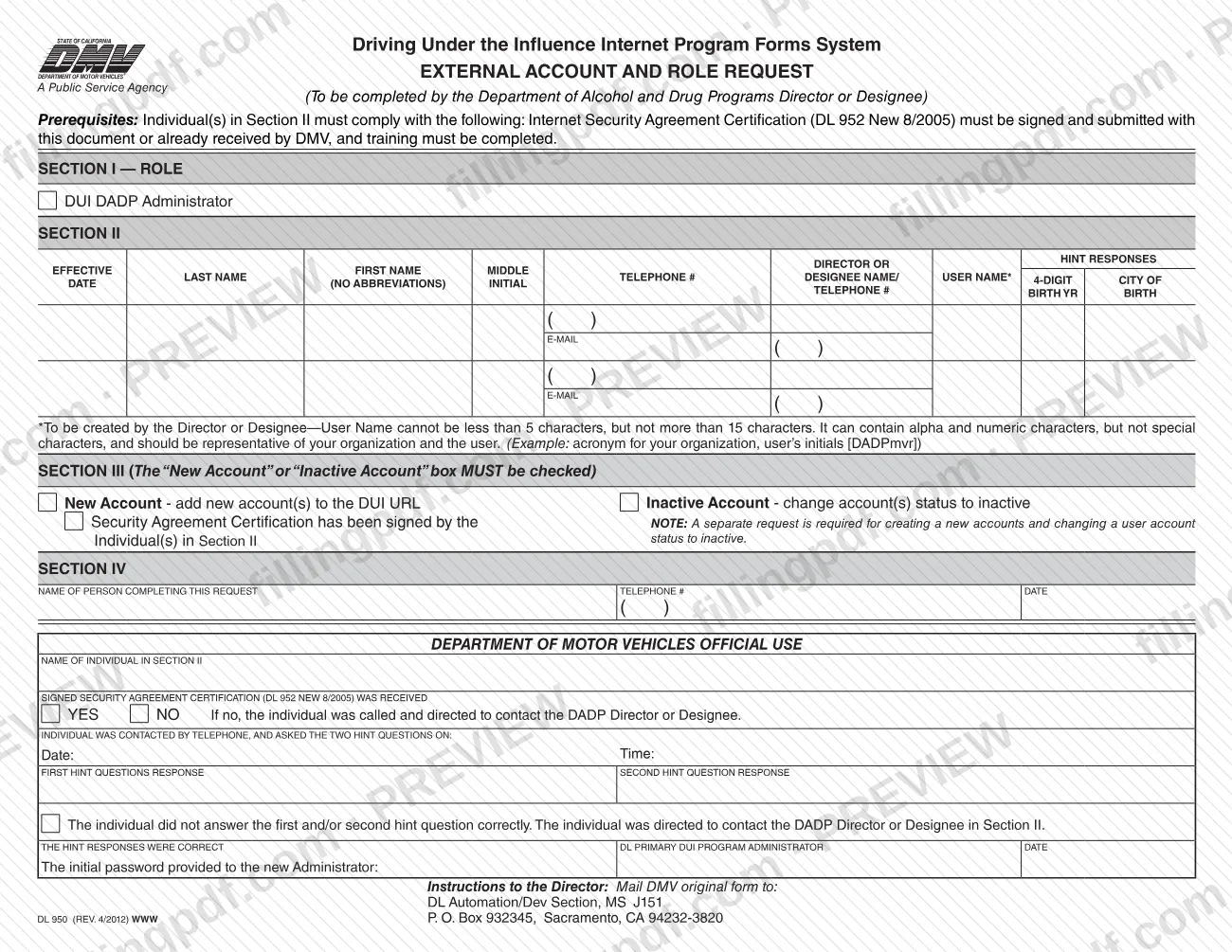
DL 950 is the External Account and Role Request used with the Driving Under the Influence Internet Program Forms System of the California Department of Motor Vehicles (DMV). The director of the Department of Alcohol and Drug Programs (DADP) or a designee completes it to create a new DUI DADP Administrator account or to change an existing account to inactive. On this page you can fill out the form online on FillingPDF and download or print the completed PDF; the DMV receives the original only by mail at the address printed on the form.
Last updated
What is DL 950?
DL 950, External Account and Role Request, is the California DMV form used to ask for a new account, or for an account to be made inactive, for an individual who holds the DUI DADP Administrator role in the Driving Under the Influence Internet Program Forms System. The form is headed "To be completed by the Department of Alcohol and Drug Programs Director or Designee."
The form has four sections. Section I names the role, DUI DADP Administrator. Section II identifies the individual: effective date, first name, middle initial, last name, telephone number, a user name created by the director or designee, and hint responses (a 4-digit birth year and the city of birth, with no abbreviations) that the DMV uses to verify the person. Section III is where the request type is marked, either New Account (add new account(s) to the DUI URL) or Inactive Account (change account(s) status to inactive). Section IV records who completed the request, with a telephone number and date.
The lower part of the page, headed Department of Motor Vehicles Official Use, is for DMV staff. It records whether the signed Security Agreement Certification was received, the telephone call in which the individual is asked two hint questions, the result, and the initial password given to a new administrator.
The form depends on a companion document, the Internet Security Agreement Certification (DL 952 New 8/2005).
Who needs to file DL 950?
The Department of Alcohol and Drug Programs (DADP) director or a designee completes DL 950 when an individual needs a DUI DADP Administrator account created, or an existing account changed to inactive.
Conditions the form attaches to the individual named in Section II:
- The Internet Security Agreement Certification (DL 952 New 8/2005) must be signed and submitted with DL 950, or already received by the DMV.
- The individual's training must be completed.
The user name in Section II is created by the director or designee, not by the individual or by the DMV.
The form is not for DMV staff to complete: the Department of Motor Vehicles Official Use block is the DMV's. It also covers only one kind of change per request. The form notes that a separate request is required for creating new accounts and for changing a user account status to inactive, so the two cannot be combined on one form.
When to file DL 950
Submit DL 950 when a DUI DADP Administrator account needs to be created or changed to inactive. No separate due date is printed on the form.
Before you send it, the form requires that the individual in Section II has signed the Internet Security Agreement Certification (DL 952 New 8/2005), which is submitted with DL 950 or has already been received by the DMV, and that training has been completed.
A separate request is required for creating new accounts and for changing a user account status to inactive, so file one DL 950 for each type of change.
Section II includes an effective date for the individual's account, so enter the date the request is meant to take effect.
Documents you need
- Internet Security Agreement Certification (DL 952 New 8/2005), signed by the individual in Section II and submitted with DL 950, unless the DMV has already received it.
How to fill out DL 950
Confirm the prerequisites
Check that the individual in Section II has signed the Internet Security Agreement Certification (DL 952 New 8/2005) and that training is completed. The certification is submitted with DL 950 or must already be on file with the DMV.
Confirm the role in Section I
Section I names the role, DUI DADP Administrator. Read it to confirm it matches the account you are requesting.
Enter the individual's name and date
In Section II, enter the effective date and the individual's first name, middle initial and last name, plus the telephone number and e-mail the section asks for.
Create the user name
Enter a user name of 5 to 15 characters, using letters and numbers only and no special characters. It should represent the organization and the user, for example an organization acronym plus the user's initials.
Enter the hint responses
Enter the individual's 4-digit birth year and city of birth, written out with no abbreviations. The DMV uses these hint responses to verify the individual by telephone.
Mark the request type in Section III
Check New Account to add new account(s) to the DUI URL, or Inactive Account to change account(s) status to inactive. Check only one, because a separate request is required for each type.
Confirm the security agreement box
In Section III, indicate that the Security Agreement Certification has been signed by the individual(s) named in Section II.
Complete Section IV
Enter the name of the person completing the request, with a telephone number and the date.
Leave the DMV block blank
Do not write in the Department of Motor Vehicles Official Use area; DMV staff record the security agreement, the hint-question call and the initial password there.
Review and download the completed PDF
Check the user name, the checked request type and every name and date. Download or print the completed PDF from FillingPDF, then mail the original as described under How to submit.
How to submit DL 950
The form gives one channel: mail the DMV original form to the DMV (the instructions to the director printed on the form).
- By mail: DL Automation/Dev Section, MS J151, P.O. Box 932345, Sacramento, CA 94232-3820.
Send the original, not a copy, and include the signed Internet Security Agreement Certification (DL 952 New 8/2005) unless the DMV has already received it. Do not complete the Department of Motor Vehicles Official Use block: the DMV fills it in when it verifies the individual by telephone with the two hint questions and issues the initial password to a new administrator.
The form prints no fee, portal or in-person option. FillingPDF lets you fill out and download the PDF; submission follows the mailing channel above.
Common mistakes to avoid
- Leaving both the New Account and Inactive Account boxes unchecked in Section III; the form says one of them MUST be checked.
- Asking for a new account and an inactive status change on the same form; the form requires a separate request for each.
- Sending DL 950 without the signed Internet Security Agreement Certification (DL 952 New 8/2005) when the DMV has not already received it.
- Submitting the request before the individual's training is completed, which the form lists as a prerequisite.
- Creating a user name shorter than 5 or longer than 15 characters, or one that contains special characters; only letters and numbers are allowed.
- Abbreviating the city of birth in the hint responses; the form says no abbreviations.
- Writing in the Department of Motor Vehicles Official Use block, which the DMV completes.
- Mailing a copy instead of the DMV original form, or sending it to an address other than the DL Automation/Dev Section P.O. box.
Frequently asked questions
What is DL 950 used for?
DL 950, External Account and Role Request, is the California DMV form used to create a new DUI DADP Administrator account in the Driving Under the Influence Internet Program Forms System, or to change an existing account to inactive. The DADP director or a designee completes it.
Who completes the DL 950 form?
The Department of Alcohol and Drug Programs (DADP) director or a designee completes it, as the form's heading states. The individual named in Section II does not fill it in, though that person must sign the Internet Security Agreement Certification (DL 952).
Do I need DL 952 with DL 950?
Yes, unless the DMV already has it. The Internet Security Agreement Certification (DL 952 New 8/2005) must be signed and submitted with DL 950 or already received by the DMV. The form also requires the individual's training to be completed.
Can one DL 950 create an account and deactivate another?
No. The form says a separate request is required for creating new accounts and for changing a user account status to inactive. Check New Account or Inactive Account in Section III, and use a second form for the other change.
What are the user name rules on DL 950?
The user name must be 5 to 15 characters, using letters and numbers but no special characters. The director or designee creates it, and it should represent the organization and the user, such as an organization acronym with the user's initials.
Where do I mail DL 950?
Mail the DMV original form to DL Automation/Dev Section, MS J151, P.O. Box 932345, Sacramento, CA 94232-3820. The form lists no other submission channel, and you should include the signed DL 952 if the DMV has not received it.
What happens after I send DL 950?
The DMV section of the form shows its steps. DMV staff check whether the signed DL 952 arrived, call the individual and ask the two hint questions, and give a new administrator an initial password. Failed answers send the person back to the DADP director or designee.
Can I fill out DL 950 online on FillingPDF?
Yes. You can fill out the PDF online on FillingPDF and download or print it. FillingPDF is an independent service and does not send the request to the DMV; you mail the original to the address printed on the form.
Ready to fill out DL 950?
Fill out DL 950 now