
FL-120, Response—Marriage/Domestic Partnership (Family Law), is the Judicial Council of California form a respondent files to answer a petition and to tell the court which orders to make about custody, support, property and other issues. It is used by the spouse or domestic partner who received the summons and petition in a dissolution (divorce), legal separation or nullity case. On FillingPDF you can fill out the form online and download or print the completed PDF; the court receives it only through the filing steps described below, and the official PDF is published at courts.ca.gov.
Last updated
What is FL-120?
Form FL-120, Response—Marriage/Domestic Partnership (Family Law), is the Judicial Council of California form a respondent uses to answer a petition for divorce, legal separation or nullity of a marriage or domestic partnership and to state the orders the court should make.
The form is adopted for mandatory use under Family Code, § 2020. The Judicial Council's self-help page describes its purpose as telling the court and your spouse or domestic partner that you are responding to the summons and petition, and describing the orders you want the court to make in the case.
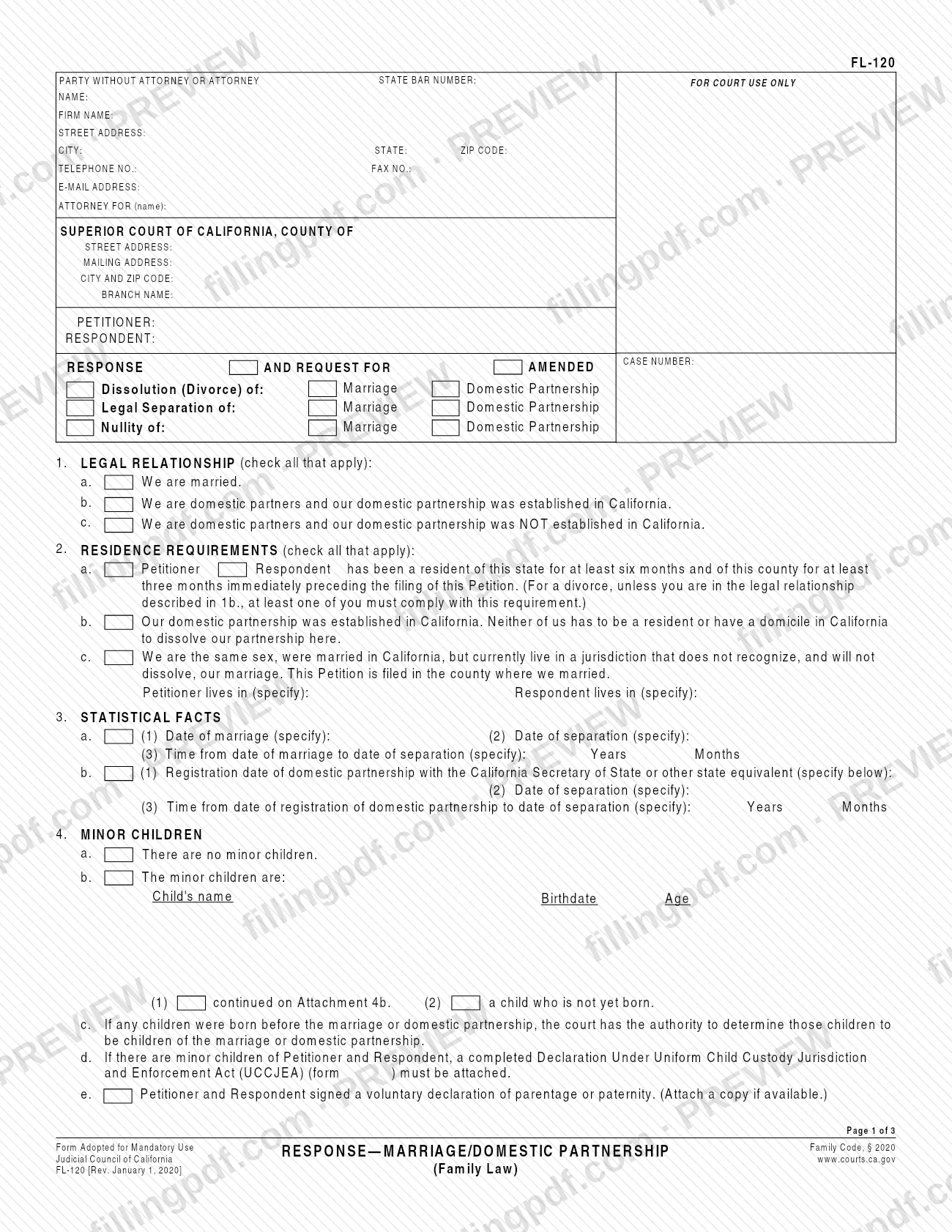
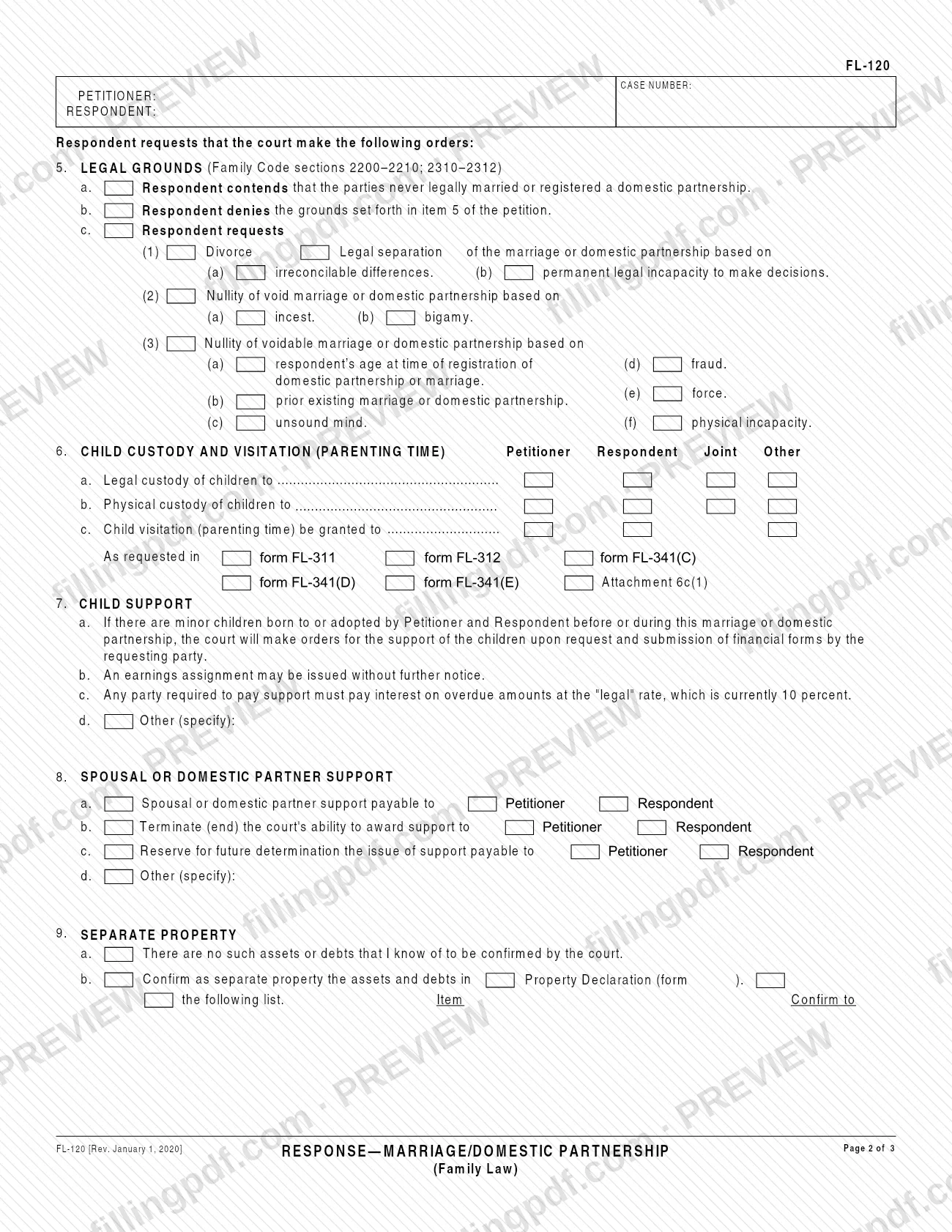
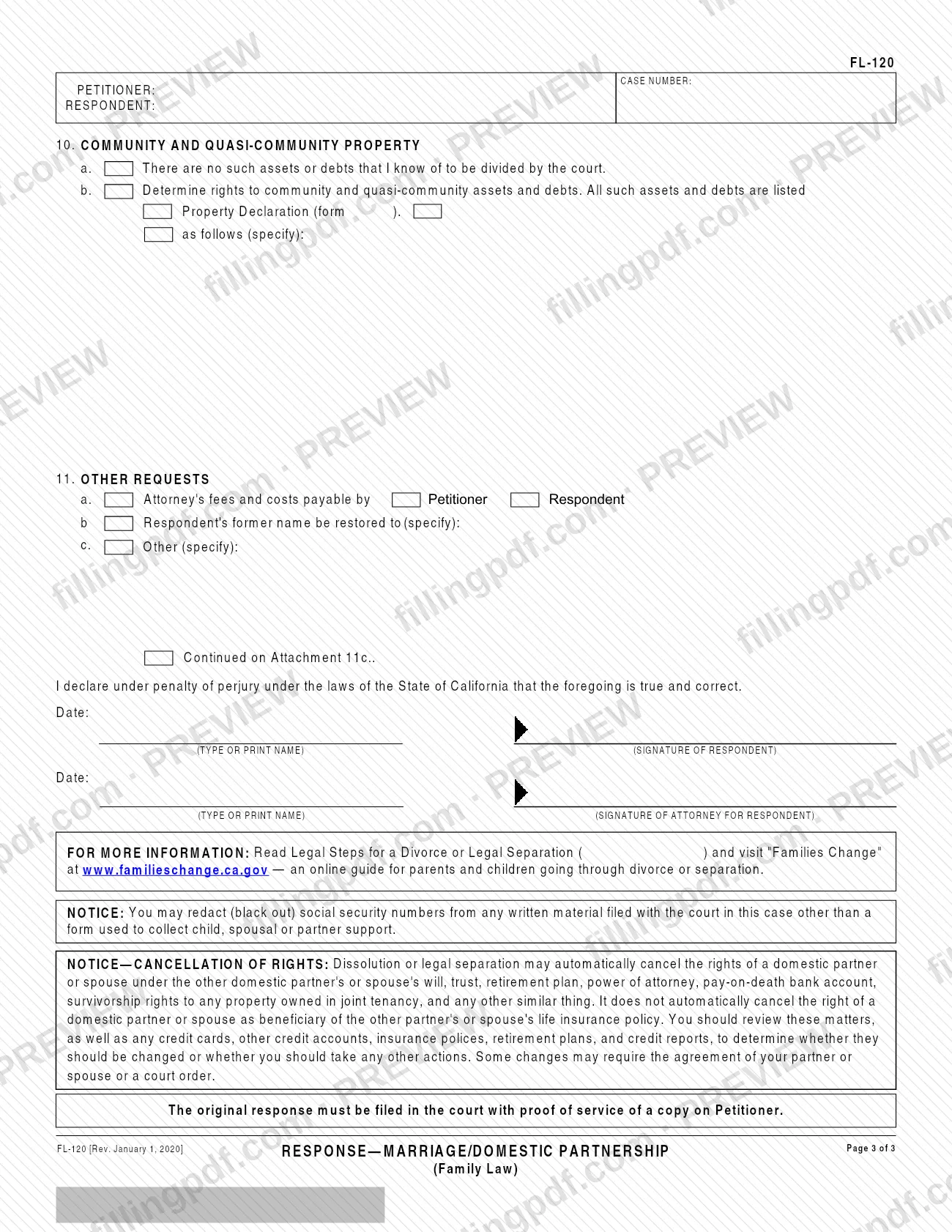
The form is built around the case caption (court, petitioner, respondent, case number) and eleven numbered items:
- Items 1 to 4: legal relationship, residence requirements, statistical facts (dates of marriage or registration and of separation) and minor children.
- Item 5: legal grounds, including whether you deny the grounds in item 5 of the petition or request a divorce, legal separation or nullity yourself.
- Items 6 to 8: child custody and visitation (parenting time), child support, and spousal or domestic partner support.
- Items 9 to 11: separate property, community and quasi-community property, and other requests such as attorney's fees and costs or restoring a former name.
It ends with a declaration under penalty of perjury under California law. The form also carries a notice that dissolution or legal separation may automatically cancel a spouse's or domestic partner's rights under the other's will, trust, retirement plan, power of attorney, pay-on-death bank account and joint tenancy survivorship rights, but not the right to be beneficiary of a life insurance policy. The Judicial Council offers FL-120 in Arabic, Chinese Simplified, Korean, Spanish and Vietnamese on its self-help page.
Who needs to file FL-120?
The main user is the respondent: the spouse or domestic partner who has been named in a petition for dissolution (divorce), legal separation or nullity of a marriage or domestic partnership and who is responding to the summons and petition. The form says "Respondent requests that the court make the following orders," so it is the respondent's document.
It works for married couples and for domestic partners, whether or not the partnership was established in California. Item 1 asks you to check each legal relationship that applies.
You can complete it yourself as a party without an attorney, or an attorney for the respondent can complete it. The signature block has a line for the respondent and a separate line for the attorney for the respondent.
The petitioner does not use this form to start the case; it answers a petition that already exists and refers to its case number. If you disagree that you were ever legally married or registered as domestic partners, item 5a lets you say so. If you disagree with the grounds in the petition, item 5b lets you deny them.
When to file FL-120
File Form FL-120 when you respond to the summons and petition served on you in a marriage or domestic partnership case. The form prints no due date of its own, so the time for responding is not stated on it.
The original response is filed in the court together with proof of service of a copy on the petitioner. Have the dates you will need before you start: the date of marriage or domestic partnership registration, the date of separation, and the birthdates of any minor children.
Because the response is where you request orders on custody, support, property and other matters, decide what you are asking for before you file. Review the notice on page 3 about cancellation of rights as well.
Documents you need
- Proof of service of a copy of the response on Petitioner, filed with the original response in court; the form states the original must be filed with it.
- Form FL-105, Declaration Under Uniform Child Custody Jurisdiction and Enforcement Act (UCCJEA): must be attached if there are minor children of Petitioner and Respondent (item 4d).
- A copy of the voluntary declaration of parentage or paternity, if you and the other party signed one and a copy is available (item 4e).
- Attachment 4b, if the minor children do not all fit in the space on item 4b.
- Form FL-311, FL-312, FL-341(C), FL-341(D) or FL-341(E), or Attachment 6c(1): only the one you check in item 6c to state the requested visitation (parenting time).
- Property Declaration (form FL-160) or Attachment 9b: only if you ask the court to confirm separate property assets and debts in item 9b.
- Property Declaration (form FL-160) or Attachment 10b: only if you ask the court to determine community and quasi-community property rights in item 10b.
- Attachment 11c: only if your other requests in item 11c do not fit on the form.
How to fill out FL-120
Complete the caption and contact block
Enter your name, firm name if any, address, telephone, fax, e-mail and who you are the attorney for, if applicable. Then enter the Superior Court of California county, court addresses and branch, the Petitioner and Respondent names and the case number.
Mark the type of case
Check Dissolution (Divorce), Legal Separation or Nullity, and check Marriage or Domestic Partnership for each one that applies.
Describe your legal relationship
In item 1, check all that apply: 1a we are married, 1b domestic partners with the partnership established in California, or 1c domestic partners with the partnership not established in California.
Complete residence requirements
In item 2, indicate whether Petitioner or Respondent has lived in the state at least six months and in the county at least three months before the Petition was filed (2a), or check 2b or 2c if it applies. Enter where Petitioner and Respondent live.
Enter the statistical facts
For a marriage, complete item 3a: date of marriage, date of separation and the years and months between them. For a domestic partnership, complete item 3b with the registration date and the same separation details.
List minor children
In item 4, check 4a if there are no minor children, or list each child's name, birthdate and age under 4b, using Attachment 4b if needed. Check 4e if a voluntary declaration of parentage or paternity was signed.
State the legal grounds
In item 5, check 5a if you contend the parties never legally married or registered a domestic partnership, or 5b to deny the grounds in item 5 of the petition. Under 5c, request divorce, legal separation or nullity and select the ground.
Request custody and visitation
In item 6, mark Petitioner, Respondent, Joint or Other for legal custody (6a), physical custody (6b) and visitation (parenting time) (6c). In 6c, check the form or attachment that sets out the schedule.
Address child and spousal support
Read item 7 on child support and use 7d for other requests. In item 8, choose whether support is payable to Petitioner or Respondent (8a), whether to end the court's ability to award it (8b), whether to reserve the issue (8c), or write another request (8d).
Complete the property items
In item 9, check 9a if there is no separate property to confirm, or confirm assets and debts by FL-160, Attachment 9b or a list. In item 10, check 10a if there is nothing to divide, or ask the court to determine community and quasi-community property rights.
Add other requests
In item 11, check attorney's fees and costs payable by Petitioner or Respondent (11a), restoration of your former name (11b) and any other request (11c), noting Attachment 11c if needed.
Sign, review and download the PDF
Enter the date, print your name and sign as Respondent; an attorney for Respondent signs on the second line. Check every item against your case, then download or print the completed PDF from FillingPDF and file it with proof of service as described under How to submit.
How to submit FL-120
The form gives one route: the original response is filed in the court that is handling your case, with proof of service of a copy on the petitioner.
- Court filing: The caption at the top of page 1 names the Superior Court of California, County of, with its street address, mailing address, branch name and your case number. File the original there. The form prints no separate address, portal or e-filing instruction.
- Proof of service: The form states that the original response must be filed with proof of service of a copy on Petitioner. Serve the copy as required before you file.
- Attachments: Add any attachments and companion forms your answers call for, as listed under required documents.
The Judicial Council self-help page for the form is at https://selfhelp.courts.ca.gov/jcc-form/FL-120. The form itself does not mention a fee, so ask the court clerk about any filing fee. You may black out (redact) Social Security numbers from written material filed with the court, other than a form used to collect child, spousal or partner support. FillingPDF lets you fill out and download the PDF; submission follows the court's channels above.
Common mistakes to avoid
- Filing the original response without proof of service of a copy on Petitioner, which the form requires.
- Leaving out Form FL-105 (UCCJEA declaration) when there are minor children of Petitioner and Respondent, as item 4d requires.
- Misreading the residence rule in item 2a, which looks at six months in the state and three months in the county immediately preceding the filing of the Petition.
- Checking only one box in item 1 when more than one legal relationship applies; the item says to check all that apply.
- Ticking Property Declaration (form FL-160) or an attachment in item 9b or 10b without attaching it.
- Requesting custody or visitation in item 6 without choosing the form or attachment in item 6c that sets out the visitation (parenting time).
- Skipping the declaration under penalty of perjury: leaving the date, printed name or respondent's signature blank.
- Assuming that dissolution or legal separation will automatically end a spouse's or partner's right as life insurance beneficiary; the form's notice says it does not.
Frequently asked questions
What is Form FL-120?
Form FL-120, Response—Marriage/Domestic Partnership (Family Law), is the Judicial Council of California form a respondent files to answer a petition for divorce, legal separation or nullity. It tells the court you are responding to the summons and petition and lists the orders you want.
Who has to file an FL-120?
The respondent: the spouse or domestic partner named in the petition who is responding to the summons and petition. The petitioner starts the case and does not use this response. A party without an attorney can complete it, or an attorney for the respondent can.
Where do I file the FL-120 form?
File the original in the Superior Court of California, County of the case, named in the form's caption, and include proof of service of a copy on Petitioner. The form prints no separate address or e-filing portal, so confirm local filing details with the court clerk.
What do I have to attach to FL-120?
Proof of service of a copy on Petitioner always goes with the original. If there are minor children of both parties, attach Form FL-105 (UCCJEA). Attach FL-160 or attachments only for the items where you refer to them, and a copy of any parentage declaration if available.
Can I fill out FL-120 online?
Yes. You can fill out the FL-120 PDF online on FillingPDF and download or print it. FillingPDF is independent of the Judicial Council and does not file the response with a court; you file it through the court's channels.
Is there a Spanish version of FL-120?
Yes. The Judicial Council self-help page lists FL-120 in Spanish, Arabic, Chinese Simplified, Korean and Vietnamese. The English form is the one filed with the court in this page's source, so check with the court clerk about using a translation.
Can I use FL-120 to disagree with the petition?
Yes. Item 5a lets you say the parties never legally married or registered a domestic partnership, and item 5b lets you deny the grounds in item 5 of the petition. Item 5c lets you request your own divorce, legal separation or nullity.
Does divorce cancel a spouse's rights under a will or insurance policy?
The form's notice says dissolution or legal separation may automatically cancel rights under the other person's will, trust, retirement plan, power of attorney, pay-on-death bank account and joint tenancy survivorship rights. It does not automatically cancel beneficiary rights under a life insurance policy.
Can I black out my Social Security number on FL-120 filings?
Yes. The form's notice says you may redact (black out) Social Security numbers from written material filed with the court in the case, except a form used to collect child, spousal or partner support.
Ready to fill out FL-120?
Fill out FL-120 now