
FL-160 is the Property Declaration, a Judicial Council of California family law form that lists your assets and debts and proposes how to divide them. Parties in a California family law case use it as an attachment to a Petition or Response, in place of a Schedule of Assets and Debts (form FL-142) when serving disclosures on the other party, or when the court asks for it with a default or judgment request. On this page you can fill out the form online on FillingPDF and download or print the completed PDF; the official PDF is published by the Judicial Council at courts.ca.gov.
Last updated
What is FL-160?
Property Declaration (form FL-160) is a multipurpose Judicial Council of California form on which a party to a family law case lists property and debts, with values, and proposes how each item should be divided or confirmed.
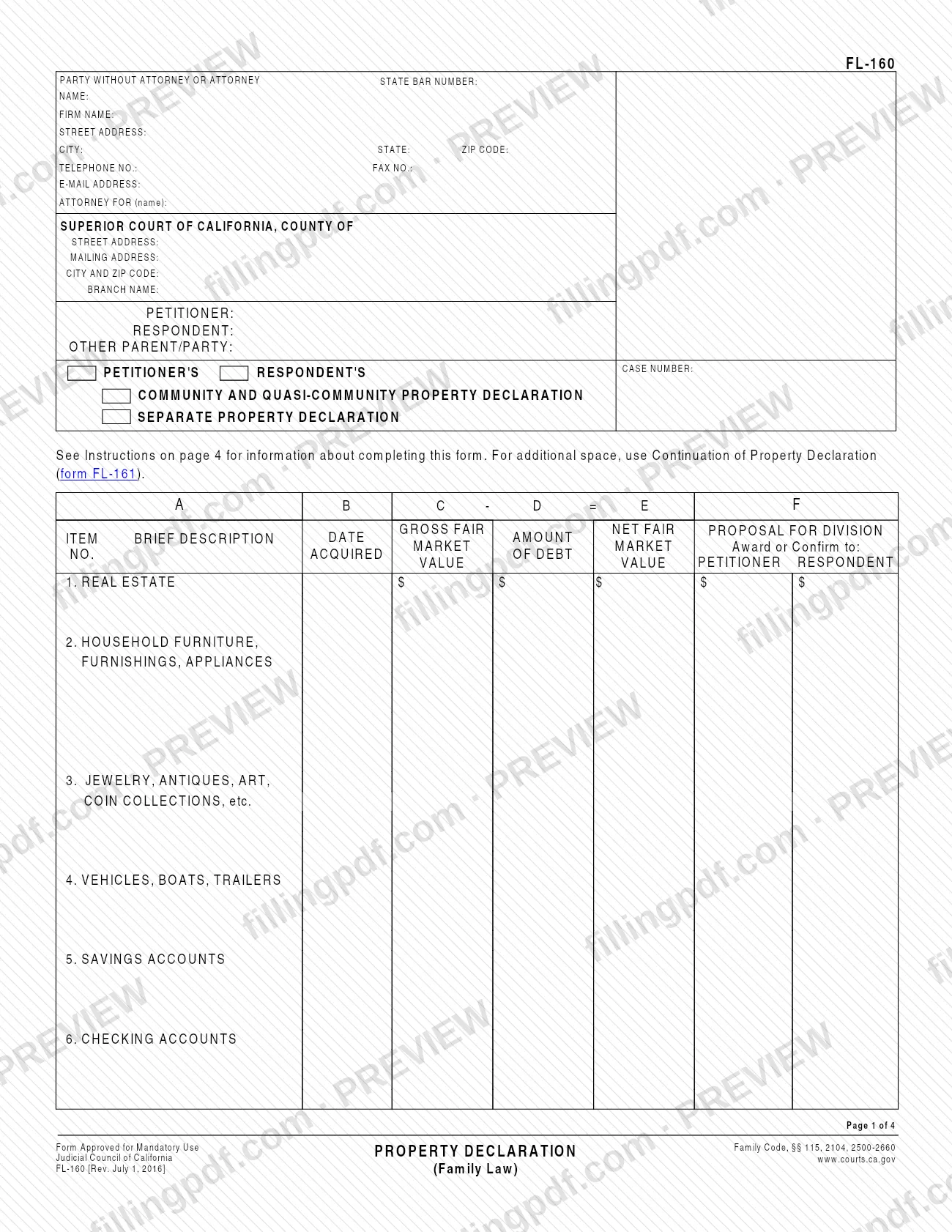
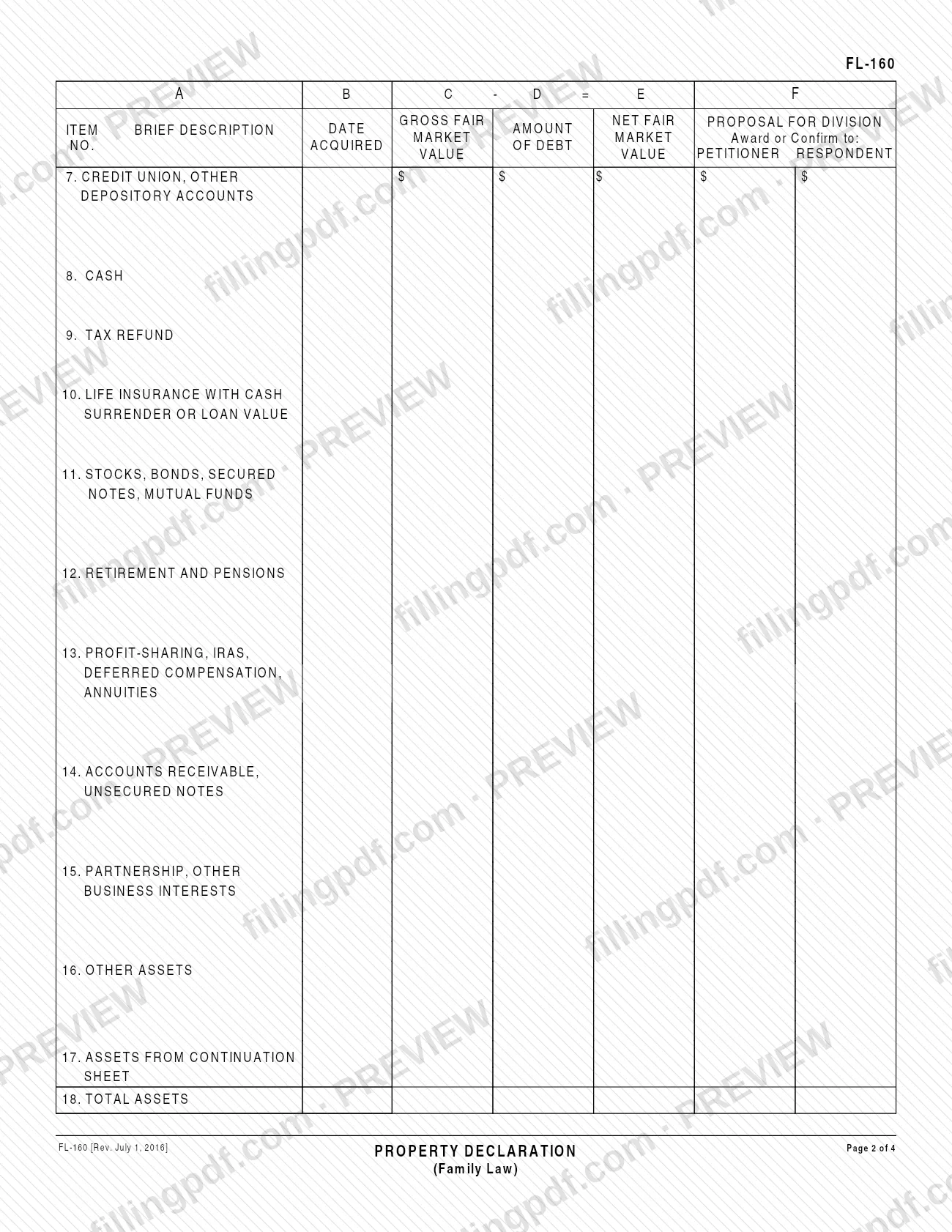
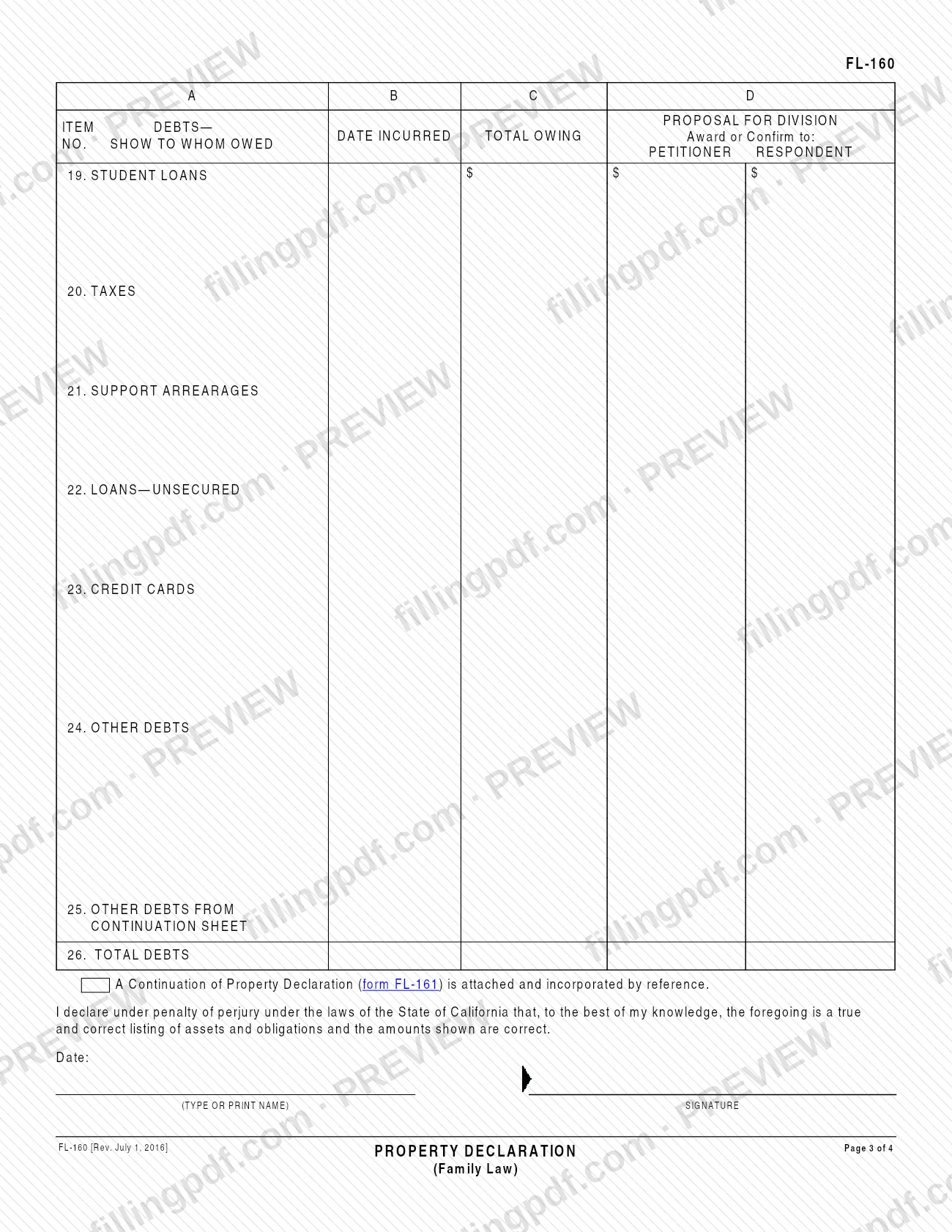
The form is approved for mandatory use and cites Family Code, §§ 115, 2104 and 2500-2660. It has four pages: pages 1 and 2 list assets in items 1 to 18 (real estate, furniture, jewelry and art, vehicles, bank and other depository accounts, cash, tax refund, life insurance, stocks and funds, retirement, business interests and other assets), and page 3 lists debts in items 19 to 26 (student loans, taxes, support arrearages, loans, credit cards and other debts). Page 4 holds the instructions.
You check one of two boxes on page 1: Community and Quasi-Community Property Declaration or Separate Property Declaration. The two are never combined on one form. Quasi-community property is property you own outside California that would be community property if it were located in California.
FL-160 can be filed with the court as an attachment to a Petition or Response, or served on the other party as an attachment to Declaration of Disclosure (form FL-140) in place of Schedule of Assets and Debts (form FL-142). When more space is needed, Continuation of Property Declaration (form FL-161) is attached. The Judicial Council also offers a Spanish version of the form.
Who needs to file FL-160?
Parties in a California family law case who must list their property and debts use FL-160. The form's header has spaces for the Petitioner, the Respondent and an Other Parent/Party. The instructions describe three situations:
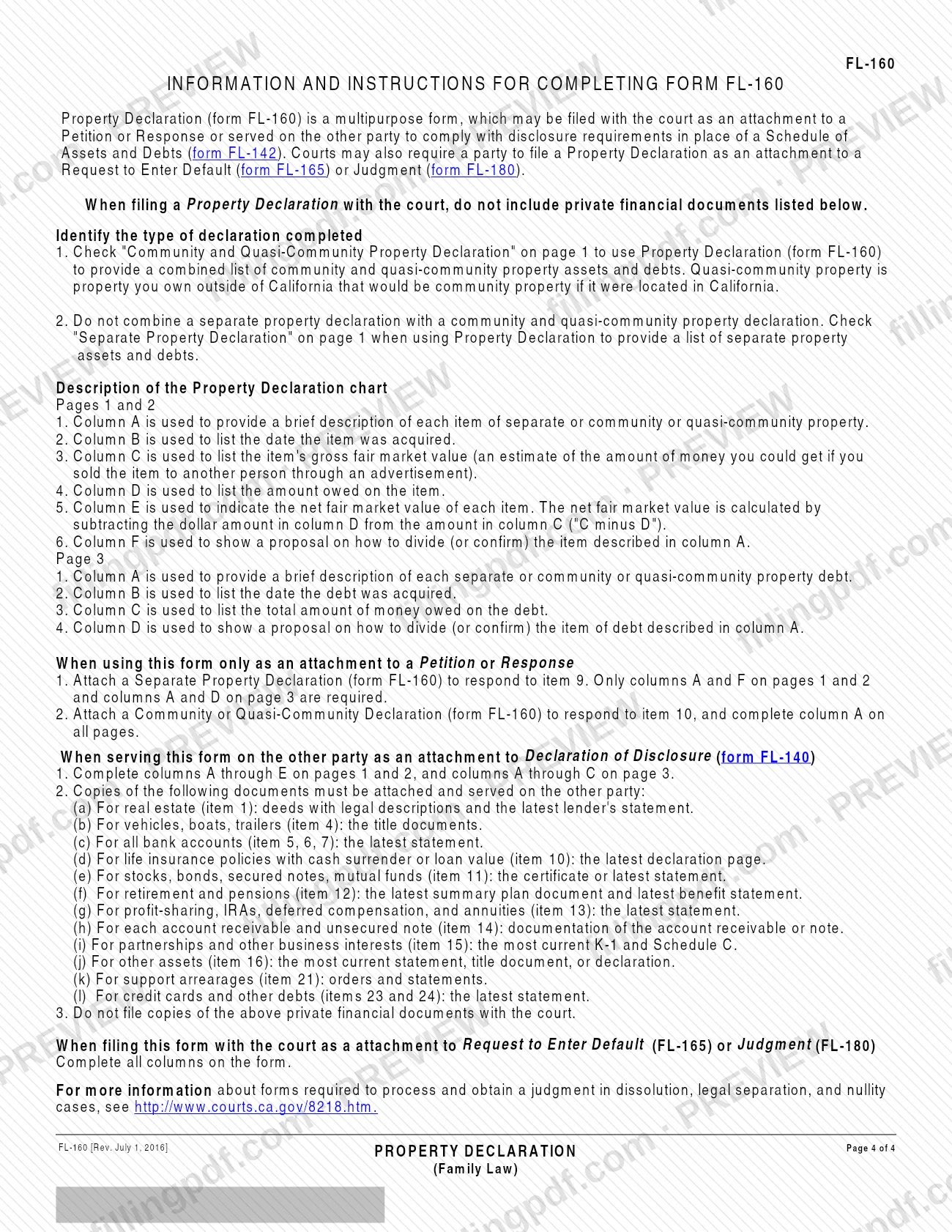
- Attachment to a Petition or Response: attach a Separate Property Declaration to respond to item 9, and a Community or Quasi-Community Declaration to respond to item 10.
- Disclosure to the other party: serve FL-160 as an attachment to Declaration of Disclosure (form FL-140), as an alternative to Schedule of Assets and Debts (form FL-142).
- Default or judgment: a court may require a Property Declaration as an attachment to a Request to Enter Default (form FL-165) or Judgment (form FL-180).
Do not combine a separate property declaration with a community and quasi-community property declaration; complete a different form for each. When filing with the court, do not include the private financial documents the instructions list.
When to file FL-160
You complete FL-160 when it is needed as an attachment: with a Petition or Response that calls for it, when you serve your disclosures on the other party with Declaration of Disclosure (form FL-140), or when a court requires it with a Request to Enter Default (form FL-165) or Judgment (form FL-180). The form prints no due date of its own, so it travels with the document it accompanies. When it is used for disclosure, it replaces Schedule of Assets and Debts (form FL-142), so you do not need both. The Judicial Council's self-help page lists this version as effective July 1, 2016. The columns you must complete depend on the use; see the steps below.
Documents you need
- Real estate (item 1), when serving with Form FL-140: deeds with legal descriptions and the latest lender's statement.
- Vehicles, boats, trailers (item 4), when serving with Form FL-140: the title documents.
- Savings, checking and other depository accounts (items 5, 6, 7), when serving with Form FL-140: the latest statement for each account.
- Life insurance with cash surrender or loan value (item 10), when serving: the latest declaration page.
- Stocks, bonds, secured notes and mutual funds (item 11), when serving: the certificate or latest statement.
- Retirement and pensions (item 12), when serving: the latest summary plan document and latest benefit statement.
- Profit-sharing, IRAs, deferred compensation and annuities (item 13), when serving: the latest statement.
- Accounts receivable and unsecured notes (item 14), when serving: documentation of each account receivable or note.
- Partnerships and other business interests (item 15), when serving: the most current K-1 and Schedule C.
- Other assets (item 16), when serving: the most current statement, title document or declaration.
- Support arrearages (item 21), when serving: the orders and statements.
- Credit cards and other debts (items 23 and 24), when serving: the latest statement for each.
- Continuation of Property Declaration (form FL-161), only if you need additional space; attach it and check the box on page 3.
How to fill out FL-160
Enter party and court details
At the top of page 1, enter your name, address, telephone, fax and e-mail, the attorney you represent if any, and the Superior Court of California, County of, with its address. Then mark whether you are Petitioner, Respondent or Other Parent/Party and enter the case number.
Choose the type of declaration
Check Community and Quasi-Community Property Declaration or Separate Property Declaration on page 1. Do not combine the two on one form.
Describe each asset in column A
On pages 1 and 2, give a brief description of each item of property in column A, next to the matching item number (items 1 to 16). Use item 17 for assets carried over from a continuation sheet.
Enter the date acquired
In column B, list the date each item was acquired.
Enter gross value and amount owed
In column C, enter the gross fair market value, an estimate of what you could get by selling the item to another person through an advertisement. In column D, enter the amount owed on the item.
Calculate net fair market value
In column E, enter column C minus column D for each item. Enter the total of the assets on item 18.
Propose the division of assets
In column F, show under Petitioner or Respondent who should be awarded or confirmed each item.
List your debts on page 3
For items 19 to 24 (student loans, taxes, support arrearages, unsecured loans, credit cards, other debts), describe each debt and show to whom it is owed in column A. Enter the date incurred in column B and the total owing in column C.
Propose who pays each debt
In column D, show under Petitioner or Respondent who should be awarded or confirmed each debt. Use item 25 for debts from a continuation sheet and enter the total of the debts on item 26.
Match the columns to your use
Attached to a Petition or Response: for a separate declaration only columns A and F (pages 1 and 2) and A and D (page 3) are required; for a community declaration complete column A on all pages. Served with Form FL-140: columns A to E on pages 1 and 2 and A to C on page 3. Attached to Form FL-165 or FL-180: all columns.
Add a continuation sheet if needed
If you need more space, complete Continuation of Property Declaration (form FL-161), enter its totals in items 17 and 25, and check the box on page 3 stating that it is attached and incorporated by reference.
Sign, date and download the PDF
Type or print your name, sign and date the declaration under penalty of perjury. Check every entry, then download or print the completed PDF from FillingPDF and assemble any documents to be served.
How to submit FL-160
FL-160 reaches the other side in two ways: filed with the court or served on the other party.
- Filed with the court: attach it to a Petition or Response, or, when the court requires it, to a Request to Enter Default (form FL-165) or Judgment (form FL-180). The court is the Superior Court of California, County of the county written in the form's heading. Do not include the private financial documents with a court filing.
- Served on the other party: attach it to Declaration of Disclosure (form FL-140) and serve it with copies of the supporting documents listed in the instructions. Do not file those copies with the court.
- Extra space: if you attach Continuation of Property Declaration (form FL-161), check the box on page 3 saying it is attached and incorporated by reference.
The form prints no mailing address, portal or filing rules; more information on the forms needed for a judgment in dissolution, legal separation and nullity cases is at http://www.courts.ca.gov/8218.htm. FillingPDF lets you fill out and download the PDF; submission follows the channels above.
Common mistakes to avoid
- Combining a separate property declaration with a community and quasi-community property declaration on one form; the instructions say to use a different form for each.
- Filing copies of private financial documents (bank statements, deeds, titles, K-1s) with the court; they are only attached and served on the other party.
- Completing only columns A and F when serving the form with Form FL-140; that use requires columns A through E on pages 1 and 2 and A through C on page 3.
- Entering the wrong figure in column E; net fair market value is column C minus column D.
- Leaving out columns on a form attached to a Request to Enter Default (FL-165) or Judgment (FL-180); that use requires all columns.
- Attaching Form FL-161 without checking the box on page 3 that it is attached and incorporated by reference.
- Attaching a Community or Quasi-Community Declaration to answer item 9 of a Petition or Response, or a Separate Property Declaration to answer item 10; item 9 takes the separate one and item 10 the community one.
- Leaving the declaration unsigned or undated; the perjury statement above the signature line has a date and a signature.
Frequently asked questions
What is the FL-160 form used for?
FL-160, Property Declaration, is the California Judicial Council form on which you list community, quasi-community or separate property and debts, with values, and propose how to divide them. It is attached to a Petition or Response, served with disclosures, or attached to a default or judgment request when the court requires it.
What is the difference between FL-160 and FL-142?
Both list assets and debts for disclosure. The Judicial Council says FL-160 can be served as an attachment to Declaration of Disclosure (form FL-140), or you can use Schedule of Assets and Debts (form FL-142) instead. FL-160 also adds a proposed division of each item and can be attached to a Petition or Response.
Do I file FL-160 with the court or serve it on the other party?
Either, depending on the use. It may be filed with the court as an attachment to a Petition or Response, or served on the other party with Form FL-140. When you file it with the court, do not include the private financial documents; those are attached and served only.
Which columns of FL-160 must I complete?
It depends on the use. Served with Form FL-140: columns A through E on pages 1 and 2 and A through C on page 3. Attached to Form FL-165 or FL-180: all columns. Attached to a Petition or Response, a separate declaration needs columns A and F (A and D on page 3); a community declaration needs column A everywhere.
Can I list separate and community property on the same FL-160?
No. The instructions say not to combine a separate property declaration with a community and quasi-community property declaration. Check the matching box on page 1 and use a separate form for each type.
What is quasi-community property on FL-160?
It is property you own outside California that would be community property if it were located in California. It is listed with community property on a Community and Quasi-Community Property Declaration, not on a Separate Property Declaration.
What documents must I serve with FL-160?
When serving with Form FL-140, attach copies such as deeds and lender statements, vehicle titles, the latest account and benefit statements, K-1 and Schedule C for business interests, and support orders. Do not file those copies with the court.
What if I need more space on FL-160?
Use Continuation of Property Declaration (form FL-161). Its assets go on item 17 and its debts on item 25, and you check the box on page 3 stating that it is attached and incorporated by reference.
Can I fill out FL-160 online and is there a Spanish version?
You can fill out the FL-160 PDF online on FillingPDF and download or print it; FillingPDF does not file it with the court. The Judicial Council's self-help page also offers the form in Spanish.
Ready to fill out FL-160?
Fill out FL-160 now