
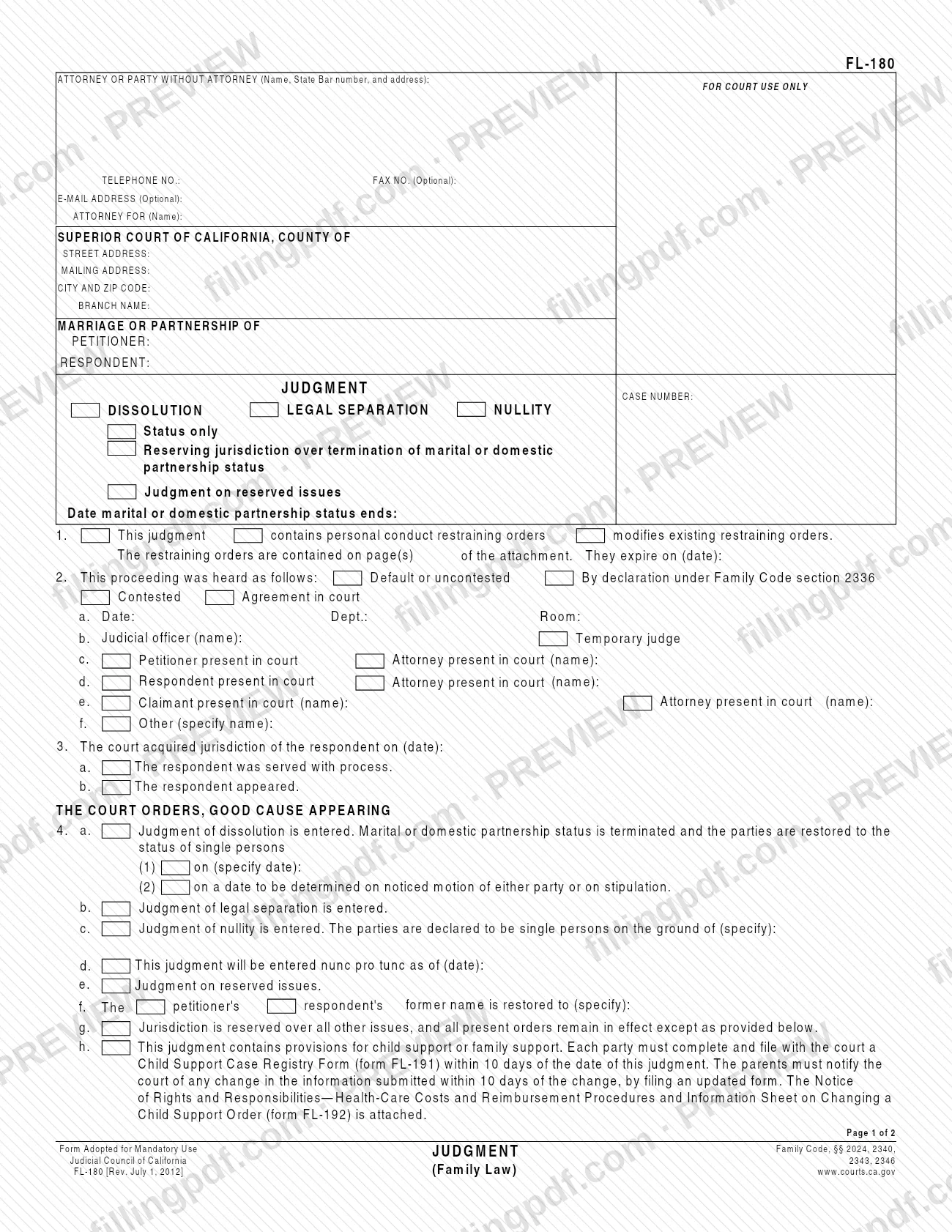
FL-180 is the Judgment form that the Judicial Council of California publishes for family law cases that end a marriage or domestic partnership, or that decide a legal separation or a nullity. The first page records the type of judgment, how the case was heard and the orders on status and name; custody, support, property and fee orders go in attachments. You can fill out the form online on FillingPDF and download or print the completed PDF; the official PDF is published by the California courts at courts.ca.gov.
Last updated
What is FL-180?
FL-180, Judgment, is the Judicial Council of California form that sets out the court's final judgment in a dissolution (divorce), legal separation or nullity case, with attachments for custody, support, property and attorney fee orders.
The California courts' self-help site describes it as the first pages of the final orders in a divorce, legal separation or annulment case. You or your attorney complete the first page, and the other final orders are made through attachments. The form is captioned for a Superior Court of California, with the petitioner, respondent and judgment case number, and it is marked "Form Adopted for Mandatory Use" under Family Code sections 2024, 2340, 2343 and 2346.
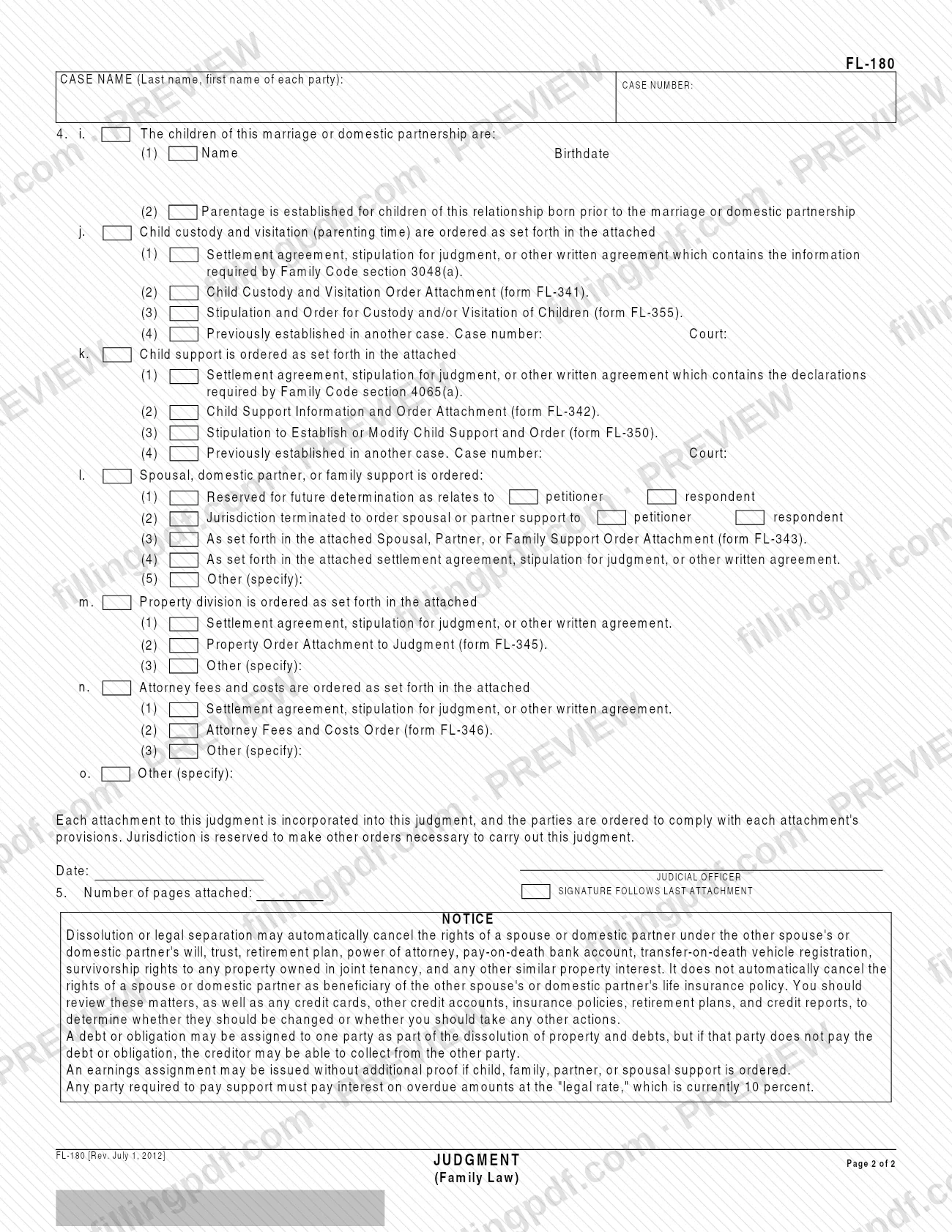
On the first page you mark whether the judgment is Dissolution, Legal Separation or Nullity, and whether it is Status only, Reserving jurisdiction over termination of marital or domestic partnership status, or Judgment on reserved issues. Item 1 covers restraining orders, item 2 records how the matter was heard, item 3 records jurisdiction over the respondent, and item 4 contains the court's orders. Page 2 lists the children and the attachments that carry custody, child support, spousal or partner support, property division and attorney fees orders, and ends with a notice to the parties.
The Judicial Council also publishes FL-180 in Chinese Simplified, Korean, Spanish and Vietnamese.
Who needs to file FL-180?
The parties to a California family law case, or their attorneys, use FL-180 when the case is ending in a judgment of dissolution, legal separation or nullity. The California courts' self-help page says you or your attorney complete the first page.
The form is built for several situations:
- A judgment that terminates marital or domestic partnership status, entered on a date you specify or on a date to be determined on noticed motion of either party or on stipulation (item 4a).
- A judgment that settles status only, or one that reserves jurisdiction over the termination of status or over other issues.
- A judgment on reserved issues (item 4e).
- A judgment that includes child custody and visitation, child support, spousal, domestic partner or family support, property division, attorney fees or other orders, each set out in an attachment.
- A judgment that restores a party's former name (item 4f).
A judicial officer signs the judgment; the signature follows the last attachment. If the judgment contains child support or family support, each party must also complete form FL-191. The form does not describe any separate role for a representative.
When to file FL-180
You complete FL-180 when your divorce, legal separation or nullity case reaches its final orders, since it is the judgment that records them. The form prints no due date of its own.
Some deadlines in the form run from the date of the judgment. If it contains provisions for child support or family support (item 4h), each party must complete and file with the court a Child Support Case Registry Form (form FL-191) within 10 days of the date of the judgment. The parents must then report any change in that information within 10 days of the change, by filing an updated form.
Item 4a(1) lets the court state the date on which the parties are restored to the status of single persons, and item 4a(2) lets that date be set later on noticed motion of either party or on stipulation. Item 4d allows the judgment to be entered nunc pro tunc as of a date you enter.
Documents you need
- Child Support Case Registry Form (form FL-191), completed and filed by each party within 10 days of the judgment date, when the judgment contains child support or family support provisions (item 4h).
- Notice of Rights and Responsibilities—Health-Care Costs and Reimbursement Procedures and Information Sheet on Changing a Child Support Order (form FL-192), attached when item 4h applies.
- For custody and visitation (item 4j): a written agreement containing the information required by Family Code section 3048(a), or form FL-341 or form FL-355, unless the orders were set in another case.
- For child support (item 4k): a written agreement containing the declarations required by Family Code section 4065(a), or form FL-342 or form FL-350, unless child support was set in another case.
- For spousal, domestic partner or family support (item 4l): form FL-343, or a settlement agreement, stipulation for judgment or other written agreement, when support is ordered by attachment.
- For property division (item 4m): a settlement agreement, stipulation for judgment or other written agreement, or form FL-345 (Property Order Attachment to Judgment).
- For attorney fees and costs (item 4n): a settlement agreement, stipulation for judgment or other written agreement, or form FL-346 (Attorney Fees and Costs Order).
- For restraining orders (item 1): the attachment pages that contain the orders, with their page numbers and expiration date entered on the form.
How to fill out FL-180
Enter attorney or party details
In the top block, enter the name, State Bar number and address of the attorney or party without an attorney, plus the telephone number. The fax number and e-mail address are optional. Enter the attorney's client in the ATTORNEY FOR (Name) line if you have one.
Complete the court and case caption
Enter the county of the Superior Court of California, its street address, mailing address, city and ZIP code, and branch name. Then enter the names of the petitioner and respondent and the judgment case number.
Select the type of judgment
Check Dissolution, Legal Separation or Nullity. Then check Status only, Reserving jurisdiction over termination of marital or domestic partnership status, or Judgment on reserved issues, and enter the date the marital or domestic partnership status ends.
Complete item 1 on restraining orders
Check whether the judgment contains personal conduct restraining orders or modifies existing ones. If so, enter the page number(s) of the attachment that holds the orders and the date they expire.
Record how the proceeding was heard
In item 2, check the type of hearing: default or uncontested, by declaration under Family Code section 2336, contested, or agreement in court. Enter the date, department and room (2a), the judicial officer and whether a temporary judge (2b), and who was present in court (2c through 2f).
Enter jurisdiction over the respondent
In item 3, enter the date the court acquired jurisdiction of the respondent and check whether the respondent was served with process (3a) or appeared (3b).
Complete the status orders in item 4
Check the order that applies in 4a (dissolution, with a date or a date to be determined), 4b (legal separation) or 4c (nullity, with the ground). Complete 4d (nunc pro tunc date), 4e (reserved issues), 4f (former name restored) and 4g (jurisdiction reserved) where they apply.
Address child support registry and children
Check 4h if the judgment has child or family support, so each party files form FL-191 within 10 days and form FL-192 is attached. On page 2, list each child's name and birthdate in 4i and check the parentage box if it applies.
Select custody and support attachments
In 4j, check the attachment for custody and visitation: a written agreement, form FL-341, form FL-355, or an order from another case with its case number and court. Do the same in 4k for child support (agreement, form FL-342, form FL-350, or another case), and in 4l for spousal, partner or family support.
Select property, fee and other orders
In 4m, check how property division is ordered (written agreement, form FL-345 or other). In 4n, do the same for attorney fees and costs (written agreement, form FL-346 or other). Use 4o for any other order you specify.
Enter pages attached and signature date
In item 5, enter the number of pages attached. The date and the JUDICIAL OFFICER signature follow the last attachment, so leave them for the court.
Review and download the completed PDF
Check that each box matches the attachments you are including and that the case number appears on page 2. Download or print the completed PDF from FillingPDF and prepare it with its attachments as described under How to submit.
How to submit FL-180
FL-180 is submitted to the superior court that is handling your case; the form prints no filing address, portal or fee of its own. The court is named in the caption at the top, SUPERIOR COURT OF CALIFORNIA, COUNTY OF, where you enter the county, street address, mailing address, city and ZIP code, and branch name. The box marked FOR COURT USE ONLY is reserved for the court, and the judicial officer signs the judgment after the last attachment. Ask the court named in the caption how it accepts filings and what fee, if any, applies.
Attach the orders that item 4 refers to. If the judgment contains child or family support, each party must also complete and file with the court a Child Support Case Registry Form (form FL-191) within 10 days of the date of the judgment, and form FL-192 is attached to the judgment. FillingPDF lets you fill out and download the PDF; submission follows the court's own channels.
Common mistakes to avoid
- Leaving the Child Support Case Registry Form (FL-191) unfiled when the judgment includes child or family support; each party must file it within 10 days of the judgment date.
- Checking item 4h without attaching form FL-192, which the form says is attached when child or family support is part of the judgment.
- Ordering custody, support, property or fees in an attachment without checking the matching box in items 4j through 4n, so the judgment does not point to the attachment.
- Not entering the number of pages attached in item 5, or placing the judicial officer's signature before the last attachment; the form says the signature follows the last attachment.
- Checking item 1 for restraining orders but leaving out the page numbers of the attachment or the date the orders expire.
- Assuming the judgment automatically ends a spouse's or partner's rights as beneficiary of a life insurance policy; the notice on page 2 says it does not.
- Assuming a debt assigned to one party can no longer be collected from the other; the notice warns that a creditor may be able to collect from the other party if the debt goes unpaid.
- Choosing both a date in item 4a(1) and the to-be-determined option in item 4a(2) instead of the one that fits the judgment.
Frequently asked questions
What is FL-180?
FL-180 is the Judgment form of the Judicial Council of California for divorce (dissolution), legal separation and nullity cases. It records the type of judgment, how the case was heard and the court's orders, and points to attachments for custody, support, property and attorney fees.
Who fills out FL-180?
According to the California courts' self-help site, you or your attorney complete the first page of FL-180. The judicial officer then signs the judgment, with the signature following the last attachment.
Can I fill out FL-180 online?
Yes. You can fill out the FL-180 PDF online on FillingPDF and download or print it. FillingPDF is independent of the California courts and does not file the judgment; it is submitted through the court's own channels.
What do I attach to FL-180?
It depends on the orders. Item 4 points to written agreements or to forms FL-341, FL-355, FL-342, FL-350, FL-343, FL-345 and FL-346 for custody, support, property and fees. If child or family support is ordered, form FL-192 is attached too.
Do I need to file form FL-191 with FL-180?
Only when the judgment contains child support or family support provisions (item 4h). In that case each party must complete and file the Child Support Case Registry Form (FL-191) within 10 days of the date of the judgment.
What does item 4a(2) mean on FL-180?
Item 4a(2) is used when the date on which the parties are restored to the status of single persons is to be determined on noticed motion of either party or on stipulation. Item 4a(1) is used when the judgment states a specific date.
Does a judgment cancel a spouse's rights as life insurance beneficiary?
No. The notice on page 2 says dissolution or legal separation may automatically cancel rights under a will, trust, retirement plan and similar interests, but not a spouse's or partner's rights as beneficiary of a life insurance policy. Review those items yourself.
Is FL-180 available in Spanish?
Yes. The California courts' self-help page lists FL-180 in Spanish, as well as in Chinese Simplified, Korean and Vietnamese. Filings are made on the form version the court accepts.
Ready to fill out FL-180?
Fill out FL-180 now