
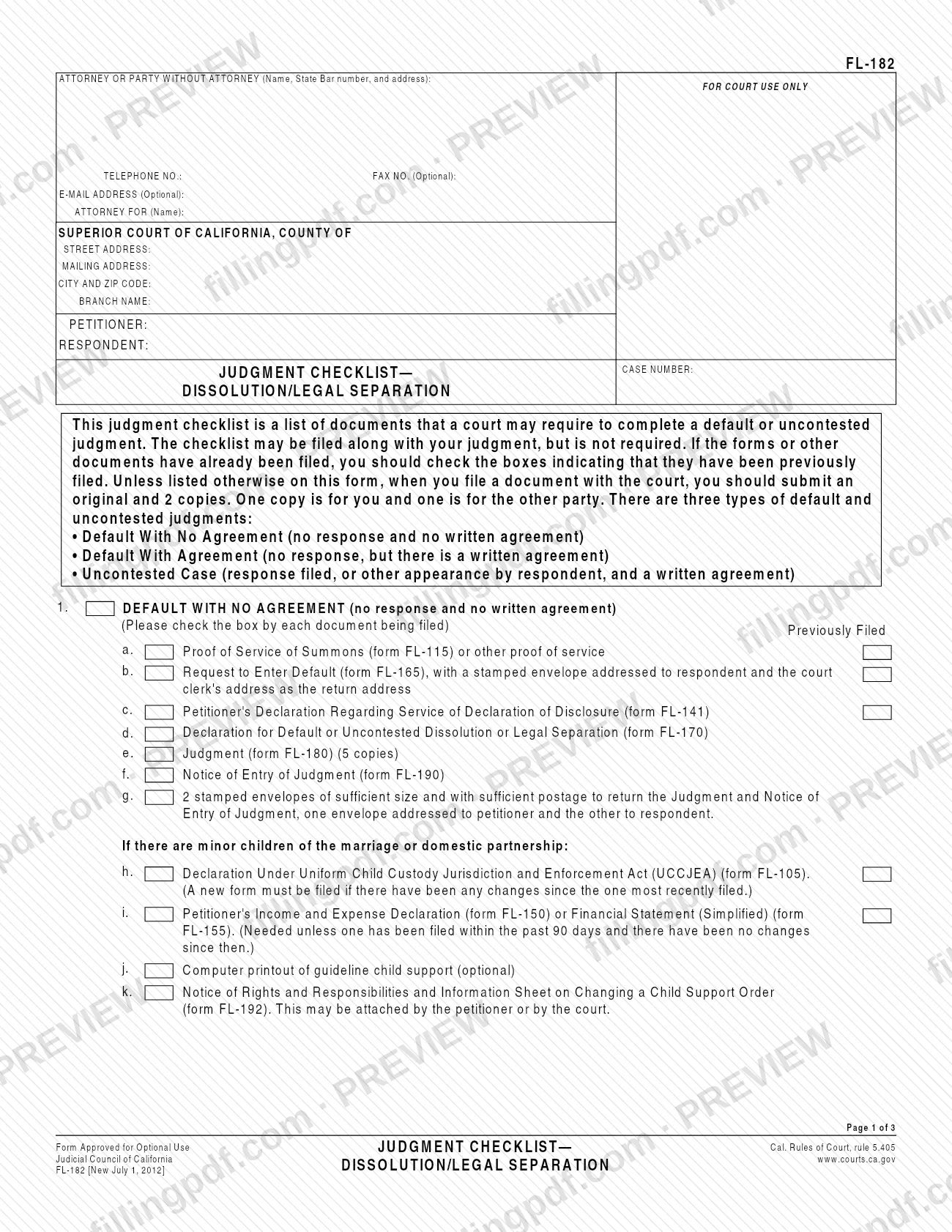
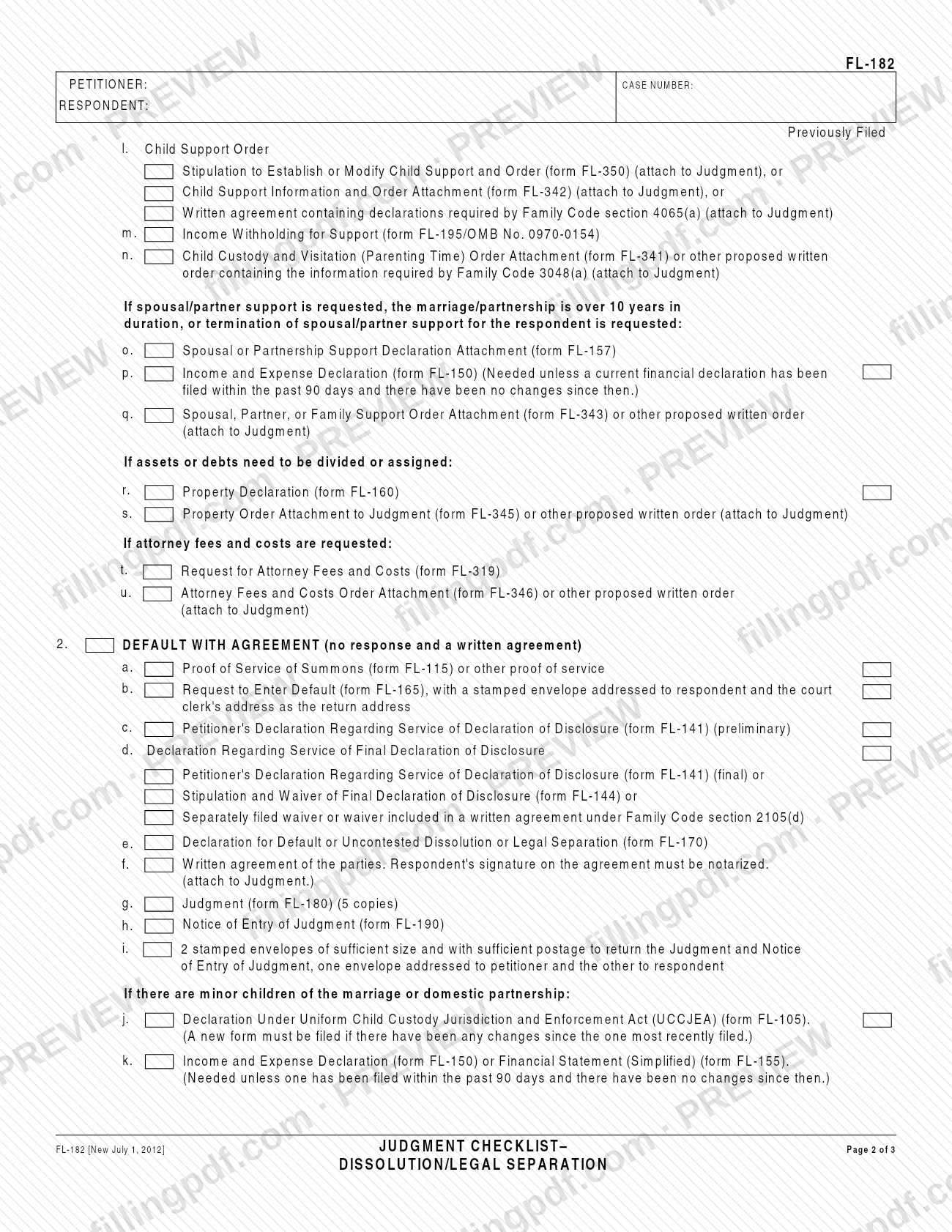
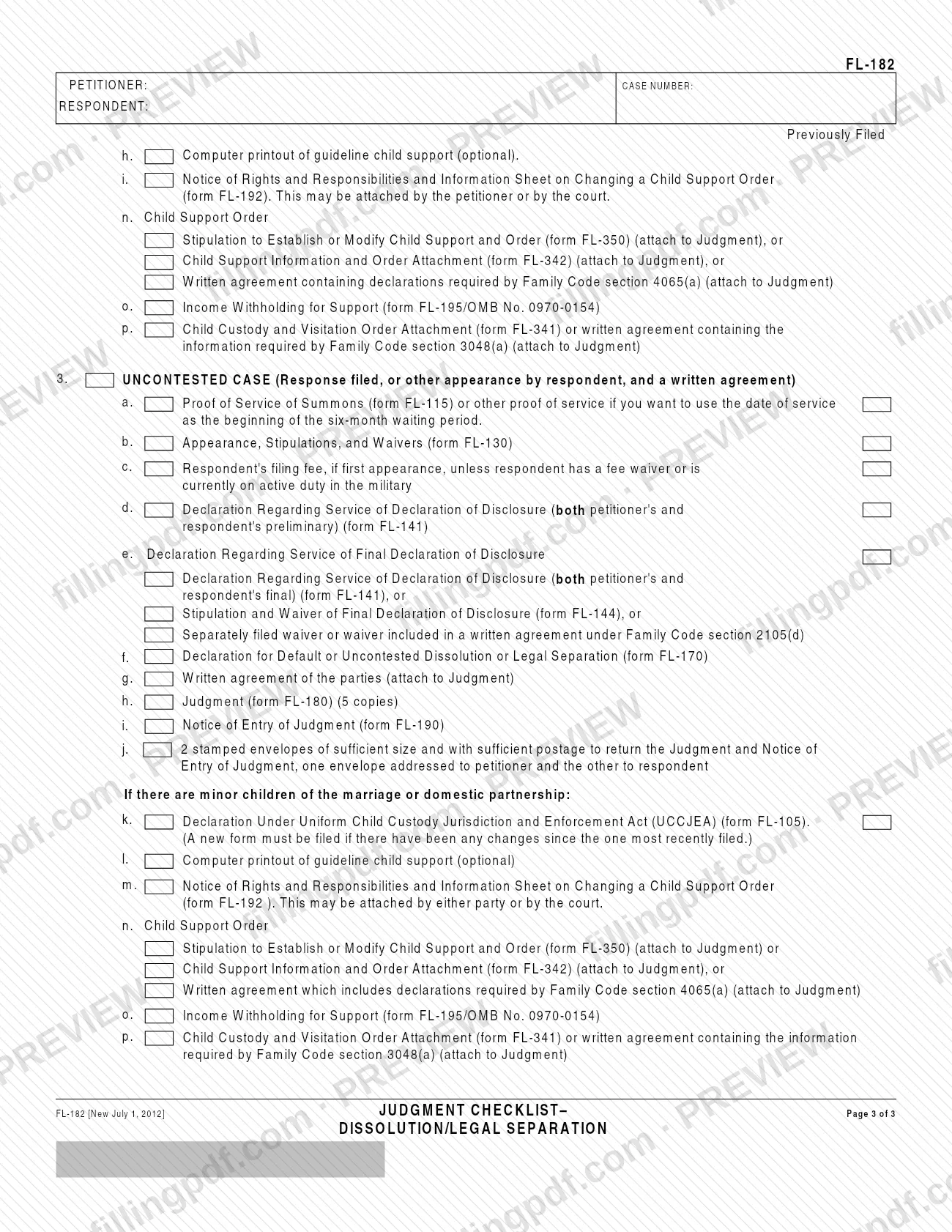
FL-182 is the Judgment Checklist—Dissolution/Legal Separation, a form from the Judicial Council of California that lists the documents a court may require to complete a default or uncontested judgment. It is for people in a California dissolution or legal separation case who are asking the superior court for one of the three kinds of judgment the checklist covers. On this page you can fill out the form online on FillingPDF and download or print the completed PDF. The official PDF and the court's self-help page for the form are published by the California courts.
Last updated
What is FL-182?
Form FL-182, Judgment Checklist—Dissolution/Legal Separation, is a Judicial Council of California form that lists the documents a superior court may require to complete a default or uncontested judgment of dissolution or legal separation.
The form is a cover list, not a request to the court. It is approved for optional use under California Rules of Court, rule 5.405. It may be filed along with your judgment, but filing it is not required. Each line names a document, usually by its Judicial Council form number, and has a Previously Filed box so you can show what is already in the court file.
The checklist is organized by the type of judgment:
- Section 1, Default With No Agreement: no response and no written agreement.
- Section 2, Default With Agreement: no response, but there is a written agreement.
- Section 3, Uncontested Case: a response was filed, or the respondent made another appearance, and there is a written agreement.
Within each section, further lines apply only in certain situations: minor children of the marriage or domestic partnership, spousal or partner support, division of assets or debts, and attorney fees and costs. The form names companion documents such as the Judgment (form FL-180), the Notice of Entry of Judgment (form FL-190) and the Declaration for Default or Uncontested Dissolution or Legal Separation (form FL-170). The California courts' self-help page describes FL-182 as the cover page listing the documents you give the court to ask for a default or uncontested judgment.
Who needs to file FL-182?
The main group is the petitioner, or the party's attorney, in a California dissolution or legal separation case who is asking the superior court for a default or uncontested judgment. The form lets you choose the section that matches your case.
- No response and no written agreement: use Section 1, Default With No Agreement.
- No response, but a written agreement: use Section 2, Default With Agreement.
- Response filed, or another appearance by the respondent, and a written agreement: use Section 3, Uncontested Case.
Some lines apply only if there are minor children of the marriage or domestic partnership, if spousal or partner support is requested, if the marriage or partnership lasted over 10 years, if termination of spousal or partner support for the respondent is requested, if assets or debts must be divided or assigned, or if attorney fees and costs are requested.
You do not have to use the checklist. The form says it may be filed along with your judgment but is not required. It is also not a list of what every case needs: it lists documents a court may require.
When to file FL-182
Use FL-182 when you prepare the papers for a default or uncontested judgment, because it is a list of the documents the court may require for that judgment. The form says it may be filed along with your judgment, but it is not required, and it prints no separate due date.
Timing details printed on the form relate to the documents it lists:
- In Section 3, line 3a, a proof of service of summons (form FL-115) or other proof of service is listed if you want to use the date of service as the beginning of the six-month waiting period.
- The Income and Expense Declaration (form FL-150) or Financial Statement (Simplified) (form FL-155) is needed unless one has been filed within the past 90 days and nothing has changed since then.
- A new Declaration Under Uniform Child Custody Jurisdiction and Enforcement Act (UCCJEA) (form FL-105) must be filed if anything has changed since the one most recently filed.
Documents you need
- Default With No Agreement (Section 1): Proof of Service of Summons (form FL-115) or other proof of service, and Request to Enter Default (form FL-165) with a stamped envelope addressed to the respondent and the court clerk's address as return address.
- Default With No Agreement: Petitioner's Declaration Regarding Service of Declaration of Disclosure (form FL-141), Declaration for Default or Uncontested Dissolution or Legal Separation (form FL-170), Judgment (form FL-180) in 5 copies and Notice of Entry of Judgment (form FL-190).
- Every section: 2 stamped envelopes with sufficient size and postage to return the Judgment and Notice of Entry of Judgment, one addressed to the petitioner and one to the respondent.
- Default With Agreement (Section 2): Proof of Service (form FL-115), Request to Enter Default (form FL-165), preliminary Declaration Regarding Service of Declaration of Disclosure (form FL-141), FL-170, FL-180 in 5 copies and FL-190.
- Default With Agreement: for the final disclosure, form FL-141 (final), or Stipulation and Waiver of Final Declaration of Disclosure (form FL-144), or a separately filed waiver or waiver in the written agreement under Family Code section 2105(d).
- Default With Agreement: the written agreement of the parties, attached to the Judgment. The respondent's signature on the agreement must be notarized.
- Uncontested Case (Section 3): Appearance, Stipulations, and Waivers (form FL-130); proof of service (form FL-115) only if you want the date of service to start the six-month waiting period; FL-170, FL-180 in 5 copies, FL-190 and the written agreement.
- Uncontested Case: the respondent's filing fee if it is the first appearance, unless the respondent has a fee waiver or is currently on active duty in the military. Ask the court clerk for the amount.
- Uncontested Case: preliminary form FL-141 for both petitioner and respondent, and for the final disclosure, FL-141 (final) for both, or form FL-144, or a waiver under Family Code section 2105(d).
- If there are minor children: Declaration Under UCCJEA (form FL-105), Notice of Rights and Responsibilities and Information Sheet on Changing a Child Support Order (form FL-192), and optionally a computer printout of guideline child support.
- If there are minor children: a child support order, either form FL-350, form FL-342 or a written agreement with the declarations required by Family Code section 4065(a), attached to the Judgment, plus Income Withholding for Support (form FL-195).
- If there are minor children: Child Custody and Visitation (Parenting Time) Order Attachment (form FL-341) or another written order or agreement with the information required by Family Code section 3048(a), attached to the Judgment.
- Default sections, if there are minor children: Petitioner's Income and Expense Declaration (form FL-150) or Financial Statement (Simplified) (form FL-155), unless one was filed within the past 90 days and nothing has changed.
- If spousal or partner support is requested, the marriage or partnership is over 10 years, or termination of support for the respondent is requested (Section 1): Spousal or Partnership Support Declaration Attachment (form FL-157), FL-150 and Spousal, Partner, or Family Support Order Attachment (form FL-343).
- Section 1 only: if assets or debts must be divided or assigned, Property Declaration (form FL-160) and Property Order Attachment to Judgment (form FL-345); if attorney fees and costs are requested, Request for Attorney Fees and Costs (form FL-319) and Attorney Fees and Costs Order Attachment (form FL-346).
How to fill out FL-182
Enter party and attorney details
In the top left block, enter the attorney or party without attorney's name, State Bar number and address, telephone number, optional fax number and e-mail address, and Attorney for (name).
Complete the court and case block
Enter the county of the Superior Court of California, the street address, mailing address, city and ZIP code, and branch name. Then enter the Petitioner, Respondent and Case Number.
Choose the judgment type
Decide whether your case is Default With No Agreement (item 1), Default With Agreement (item 2) or Uncontested Case (item 3), and use only that section.
Check each document you are filing
Mark the box by each document you are filing with the judgment. Respect the stated numbers, such as 5 copies of the Judgment (form FL-180) and 2 stamped envelopes.
Mark documents already filed
For any listed form already in the court file, check the Previously Filed box instead. Remember that a new UCCJEA declaration (form FL-105) is needed if anything has changed.
Complete the conditional lines
Mark the lines under the headings for minor children, spousal or partner support, property division, and attorney fees and costs only if they apply to your case.
Review and download the PDF
Check the case information and that each box matches the documents in your package. Download or print the completed PDF from FillingPDF and file it with the court as described under How to submit.
How to submit FL-182
The checklist is filed with the superior court handling your case, together with your judgment papers. The form prints no mailing address, portal or appointment rule of its own: the court named at the top of the form (Superior Court of California, County of your case) is where the documents it lists are filed.
- Copies: unless the form says otherwise, submit an original and 2 copies of each document. One copy is for you and one is for the other party. The Judgment (form FL-180) is listed with 5 copies.
- Envelopes: each section lists 2 stamped envelopes of sufficient size and postage to return the Judgment and Notice of Entry of Judgment, one addressed to the petitioner and the other to the respondent. Sections 1 and 2 also list a stamped envelope for the respondent with the court clerk's address as the return address, to go with the Request to Enter Default (form FL-165).
- Previously filed documents: check the Previously Filed box instead of filing a document again.
For the court's own filing rules, check with the clerk of the superior court where your case is pending. FillingPDF lets you fill out and download the PDF; submission follows the court's channels.
Common mistakes to avoid
- Choosing the wrong section: Section 1 is for no response and no written agreement, Section 2 for no response with an agreement, and Section 3 for a response or appearance with an agreement.
- Filing the Judgment (form FL-180) in fewer than the 5 copies the checklist lists.
- Leaving out the stamped envelopes for returning the Judgment and Notice of Entry of Judgment, one addressed to the petitioner and one to the respondent.
- Not checking the Previously Filed box for documents already in the court file, or filing a document again when the box applies.
- Submitting a written agreement in a default case without the respondent's notarized signature; Section 2 requires it to be notarized.
- Relying on an old Declaration Under UCCJEA (form FL-105) after something has changed; a new form must be filed.
- Omitting a current Income and Expense Declaration (form FL-150) or Financial Statement (Simplified) (form FL-155) when none was filed within the past 90 days or something has changed.
- Treating the checklist as required: the form says it may be filed with the judgment but is not required, and it lists only documents a court may require.
Frequently asked questions
What is form FL-182?
FL-182 is the Judgment Checklist—Dissolution/Legal Separation issued by the Judicial Council of California. It lists the documents a court may require to complete a default or uncontested judgment, sorted into three types of judgment.
Do I have to file the FL-182 judgment checklist?
No. The form says the checklist may be filed along with your judgment, but it is not required. It is approved for optional use under California Rules of Court, rule 5.405, and it lists documents a court may require.
What are the three types of judgment on the FL-182 form?
Default With No Agreement (no response and no written agreement), Default With Agreement (no response, but a written agreement), and Uncontested Case (a response or other appearance by the respondent, and a written agreement). Each has its own section.
How many copies do I file with the documents on FL-182?
Unless the form says otherwise, submit an original and 2 copies of each document: one for you and one for the other party. The Judgment (form FL-180) is the exception, listed with 5 copies.
What does the Previously Filed box mean on FL-182?
Check Previously Filed for a listed form that is already in the court file, so you do not need to file it again. Some forms must be refiled if circumstances changed, such as the UCCJEA declaration (form FL-105).
Does the respondent's signature on the agreement need to be notarized?
In a Default With Agreement case (Section 2, line f), yes: the respondent's signature on the written agreement must be notarized. Section 3, the uncontested case, prints only that the written agreement of the parties is attached to the Judgment.
Can I fill out FL-182 online?
Yes. You can fill out the FL-182 PDF online on FillingPDF and download or print it. FillingPDF is an independent service and does not file anything with the court; you file the checklist and your documents with the superior court.
Ready to fill out FL-182?
Fill out FL-182 now