
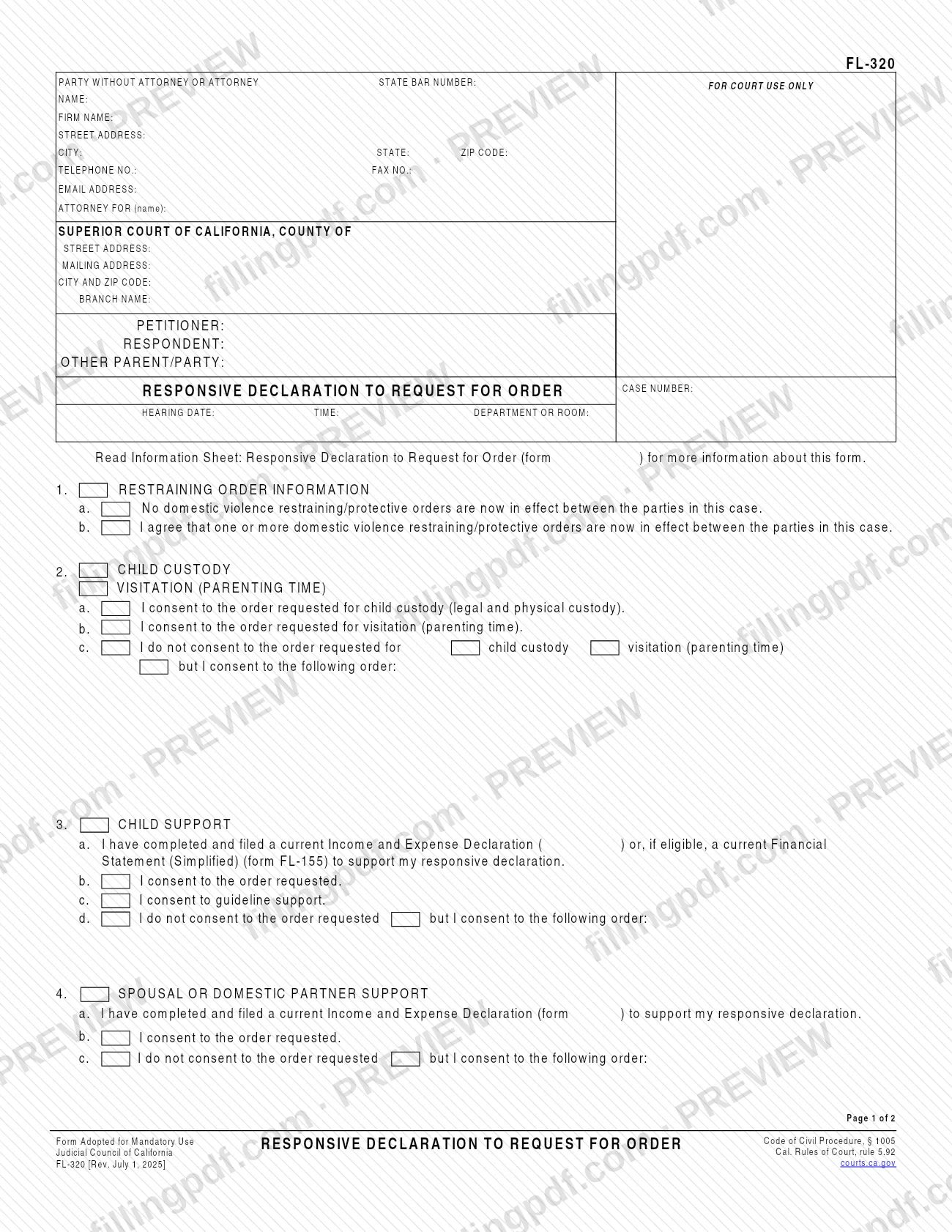
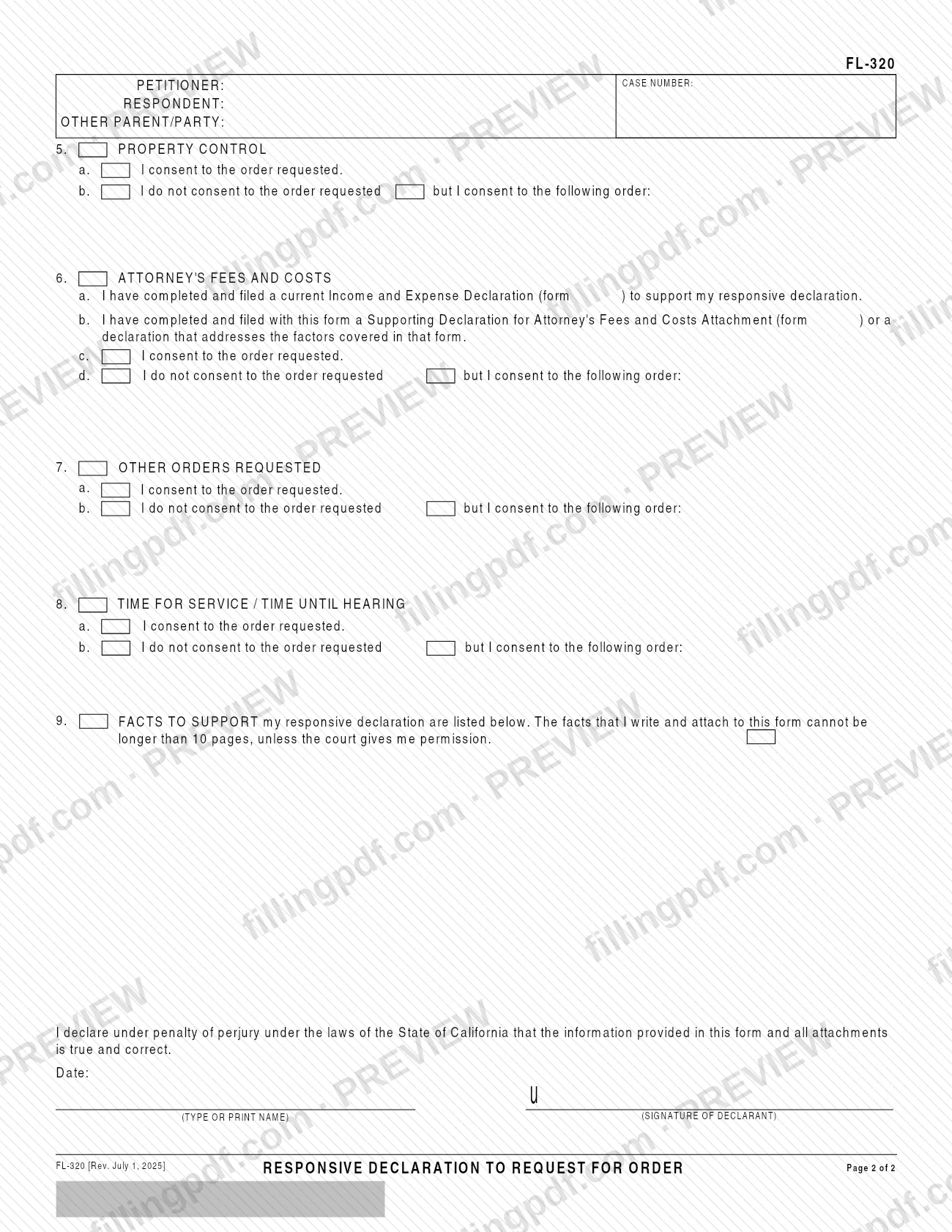
FL-320 is the Responsive Declaration to Request for Order, a Judicial Council of California form that tells the court and the other party whether you agree or disagree with the orders requested in a Request for Order (form FL-300). It also lets you describe the orders you want the court to make instead. On FillingPDF you can fill out the form online and download or print the completed PDF; the official PDF is published by the Judicial Council of California at https://www.courts.ca.gov/documents/fl320.pdf.
Last updated
What is FL-320?
Form FL-320, Responsive Declaration to Request for Order, is the Judicial Council of California form on which you tell the court and the other party whether you agree or disagree with the orders asked for in a Request for Order (form FL-300).
It is the response, not the request. The other party asks for orders with FL-300; you answer with FL-320, item by item, and you can describe the orders you want the court to make in their place. The form is adopted for mandatory use by the Judicial Council of California and cites Code of Civil Procedure, § 1005 and California Rules of Court, rule 5.92.
The two pages follow a fixed order. The header identifies the Superior Court of California county, the petitioner, respondent and other parent/party, the case number, and the hearing date, time and department or room. Then come eight response items, each with a consent option and, where you disagree, space for the order you would accept:
- Item 1: restraining order information.
- Item 2: child custody and visitation (parenting time).
- Item 3: child support.
- Item 4: spousal or domestic partner support.
- Item 5: property control.
- Item 6: attorney's fees and costs.
- Item 7: other orders requested.
- Item 8: time for service / time until hearing.
Item 9 holds the facts that support your response, and you sign the form under penalty of perjury under the laws of the State of California. The form points to the Information Sheet, form FL-320-INFO, and to forms FL-150, FL-155 and FL-158 for the items that rely on financial or fee declarations. The Judicial Council's self-help site also offers FL-320 in Chinese Simplified, Korean, Spanish and Vietnamese. The revision described here is dated July 1, 2025.
Who needs to file FL-320?
The person who is asked for orders in a Request for Order (form FL-300) and wants to answer them uses FL-320. The Judicial Council describes it as the way to tell the court and the other party whether you agree or disagree with the orders the other party asked for, and to describe the orders you want the court to make instead.
The header allows for the people in the case: the petitioner, the respondent and the other parent/party, and for a party without an attorney or an attorney who completes the top-left block. The declarant, the person whose name is typed or printed at the end, signs under penalty of perjury.
Which items you complete depends on what the other party requested. You answer the ones that match the requested orders: restraining order information, custody and visitation, child support, spousal or domestic partner support, property control, attorney's fees and costs, other orders, and time for service or time until hearing.
FL-320 is not the form for requesting orders; the request is made on FL-300. The form does not describe who else may sign for you, so ask the court if you need to respond through someone else.
When to file FL-320
Use FL-320 when another party has asked for orders in a Request for Order (form FL-300) and you want to respond. The header asks for the hearing date, time and department or room of that request, so the form is completed in relation to a hearing already set.
The form prints no due date of its own. The deadline for a response is not stated on the form or on the Judicial Council's FL-320 page, so check the Information Sheet, form FL-320-INFO, which the form tells you to read, and the court handling your case.
Current revision: Rev. July 1, 2025, the version the Judicial Council lists as effective July 1, 2025.
Documents you need
- Income and Expense Declaration (form FL-150): the form says to complete and file a current one if you check the box in item 3a (child support), 4a (spousal or domestic partner support) or 6a (attorney's fees and costs).
- Financial Statement (Simplified) (form FL-155): in item 3a, a current FL-155 may be filed instead of FL-150 for child support, if you are eligible.
- Supporting Declaration for Attorney's Fees and Costs Attachment (form FL-158), or a declaration that addresses the factors covered in that form: filed with this form if you check item 6b.
- Attachment 9: the facts supporting your responsive declaration, which cannot be longer than 10 pages unless the court gives you permission.
How to fill out FL-320
Complete the header and case details
Fill in your name, address, telephone, email and whether you are a party without an attorney or an attorney. Then enter the court, petitioner, respondent, other parent/party, case number, and the hearing date, time and department or room.
Answer item 1, restraining orders
Check 1a if no domestic violence restraining/protective orders are in effect between the parties, or 1b if you agree that one or more are in effect.
Respond on child custody and visitation
In item 2, check 2a to consent to custody, 2b to consent to visitation (parenting time), or 2c if you do not consent and then write the order you consent to.
Respond on child support
In item 3, check 3a if you filed a current FL-150 or, if eligible, FL-155. Then check 3b to consent, 3c to consent to guideline support, or 3d and write the order you consent to.
Respond on spousal or partner support
In item 4, check 4a if you filed a current FL-150, then 4b to consent or 4c to refuse the requested order and write the order you consent to.
Respond on property control
In item 5, check 5a to consent to the order requested, or 5b and write the order you consent to instead.
Respond on attorney's fees and costs
In item 6, check 6a for a filed FL-150 and 6b for FL-158 or an equivalent declaration. Then check 6c to consent, or 6d and write the order you consent to.
Respond on other orders and timing
In item 7 (other orders requested) and item 8 (time for service / time until hearing), check a to consent or b to state the order you consent to instead.
Write the facts in item 9
List the facts supporting your response, or check the Attachment 9 box and attach them. The facts you write and attach cannot be longer than 10 pages unless the court gives permission.
Sign and date the declaration
Enter the date, sign as declarant and type or print your name under the statement made under penalty of perjury under the laws of the State of California.
Review and download the completed PDF
Check every item against the Request for Order (form FL-300), then download or print the completed PDF from FillingPDF and handle it as described under How to submit.
How to submit FL-320
The form names no filing channel of its own: it is a response addressed to the court and to the other party in the Request for Order (form FL-300) case. Its header carries the Superior Court of California county, the court's street or mailing address and branch, the case number and the hearing date, time and department or room, so complete those lines for the court that is handling your case.
Because the Judicial Council describes the form as the way to tell the court and the other party your position, plan to give a completed copy to each. The form prints no address, portal, fee or appointment rule; for how your court accepts filings, read the Information Sheet, form FL-320-INFO, or contact the court.
The form also asks you to press the Clear This Form button after you print it, for your protection and privacy, which matters on a shared computer. FillingPDF lets you fill out and download the PDF; submission follows the court's channels.
Common mistakes to avoid
- Checking the FL-150 box in item 3a, 4a or 6a without having completed and filed a current Income and Expense Declaration to support your response.
- Checking the item 3a box for a Financial Statement (Simplified) (form FL-155) when you are not eligible to use it; the form allows it only if eligible.
- Checking "I do not consent to the order requested" without writing the order you would consent to on the lines that follow.
- Writing and attaching facts under item 9 that run longer than 10 pages without the court's permission.
- Checking item 6b without filing form FL-158 or a declaration that covers the factors in that form.
- Leaving the declaration under penalty of perjury undated or unsigned, or without the declarant's typed or printed name.
- Leaving the case number and hearing date, time and department or room blank, so the response is not tied to the Request for Order.
- Not pressing the Clear This Form button after printing on a shared computer, as the form asks for your protection and privacy.
Frequently asked questions
What is the FL-320 form used for?
The FL-320 form, Responsive Declaration to Request for Order, is how you tell the court and the other party whether you agree or disagree with the orders requested in a Request for Order (form FL-300). You can also describe the orders you want the court to make instead.
Can I fill out Form FL-320 online?
You can fill out the FL-320 PDF online on FillingPDF and download or print it. FillingPDF is an independent service and does not file the form; the court and the other party receive it only through the channels that apply to your case.
What do I do if I do not agree with the requested order?
Check the "I do not consent to the order requested but I consent to the following order" box for that item and write the order you would accept. Items 2 (custody and visitation), 3, 4, 5, 6, 7 and 8 each have that option.
Do I have to attach an Income and Expense Declaration?
Only if you check the box that says you have completed and filed one. Items 3a (child support), 4a (spousal support) and 6a (attorney's fees) refer to a current FL-150; item 3a also allows FL-155 if you are eligible.
How long can the facts attached to FL-320 be?
The facts you write and attach for item 9 cannot be longer than 10 pages, unless the court gives you permission. Keep them tied to the orders requested in the Request for Order.
What is the difference between FL-300 and FL-320?
FL-300 is the Request for Order, the form used to ask the court for orders. FL-320 is the Responsive Declaration to Request for Order, the form the other party uses to say which of those orders they consent to and to give their own facts.
Is there a Spanish version of FL-320?
Yes. The Judicial Council of California's self-help page lists FL-320 in Spanish, and also in Chinese Simplified, Korean and Vietnamese. This page covers the English form, Rev. July 1, 2025.
Do I have to sign Form FL-320?
Yes, the form ends with a declaration under penalty of perjury under the laws of the State of California. Enter the date, sign as declarant and type or print your name, covering the information in the form and all attachments.
Ready to fill out FL-320?
Fill out FL-320 now