
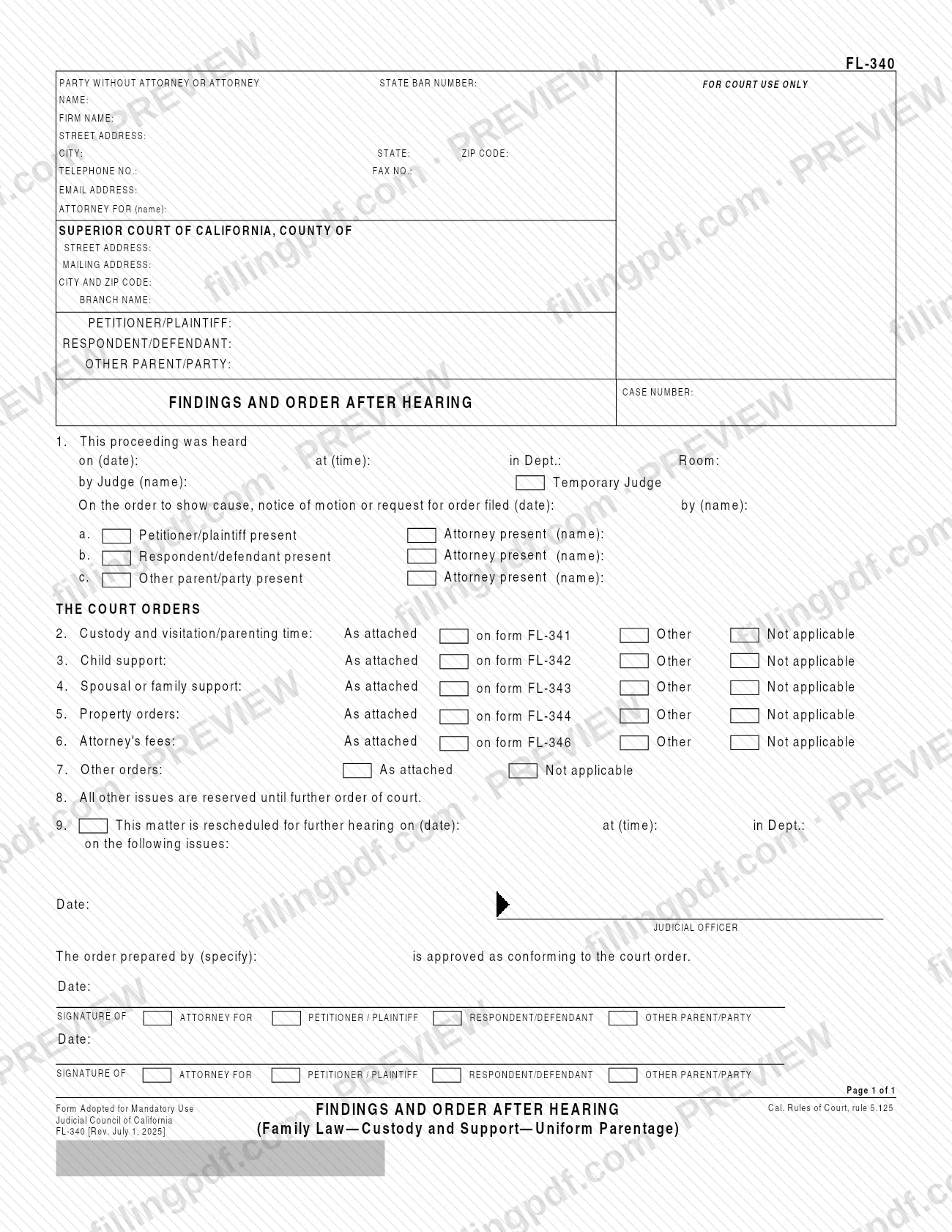
FL-340 is the Findings and Order After Hearing, a Judicial Council of California form that serves as the first page of the orders a judge makes after a hearing in a family law case. It records the hearing, who appeared and which orders were made on custody, support, property, attorney's fees and other issues, and it points to the attached forms FL-341, FL-342, FL-343, FL-344 and FL-346 for the details. On FillingPDF you can fill out the form online and download or print the completed PDF; the form itself is published by the Judicial Council at courts.ca.gov.
Last updated
What is FL-340?
Form FL-340, Findings and Order After Hearing, is the Judicial Council of California form used as the first page listing the decisions, called orders, that a court made after a hearing. The orders themselves are generally attached to this page.
The form is part of the Family Law—Custody and Support—Uniform Parentage group. It is adopted for mandatory use under California Rules of Court, rule 5.125, and the current revision is dated July 1, 2025.
Item 1 identifies the hearing: the date, time, department and room, the judge or temporary judge, the order to show cause, notice of motion or request for order that was heard, and who was present. The orders follow, each marked as attached on a companion form, handled in another way, or not applicable:
- Item 2, custody and visitation/parenting time: form FL-341.
- Item 3, child support: form FL-342.
- Item 4, spousal or family support: form FL-343.
- Item 5, property orders: form FL-344.
- Item 6, attorney's fees: form FL-346.
- Item 7, other orders, as attached.
Item 8 reserves all other issues until further order of the court, and item 9 sets a further hearing when the matter is rescheduled. The judicial officer signs and dates the form, and attorneys or parties can approve the order as conforming to the court order. The Judicial Council also offers FL-340 in Chinese Simplified, Korean, Spanish and Vietnamese.
Who needs to file FL-340?
The form is used by the court and the people in a California family law case that has had a hearing on custody, support or parentage matters. Its caption names the petitioner/plaintiff, the respondent/defendant and an other parent/party, and item 1 records which of them attended and whether an attorney appeared for each.
The judicial officer signs the order. The form also has signature lines for the attorney for the petitioner/plaintiff, the respondent/defendant or the other parent/party, who approve the order as conforming to the court order; it asks you to specify who prepared the order.
Use it when the hearing produced orders on one or more of these subjects: custody and visitation/parenting time, child support, spousal or family support, property, attorney's fees or other issues. Where an order does not apply, you mark Not applicable on that item rather than leaving it out. The Judicial Council's self-help page describes the form only as the first page that lists the court's decisions after a hearing, with the orders generally attached.
When to file FL-340
The form is completed after a hearing, to record the orders the court made on an order to show cause, notice of motion or request for order. Item 1 asks for the date the hearing took place and the date the underlying request was filed, so it follows that request rather than coming before it.
If the court sets another hearing, item 9 records the new date, time and department and the issues to be heard then; everything else is reserved until further order under item 8. The form prints no separate deadline for completing or signing it, so ask the court handling your case about any timing it requires.
Documents you need
- Form FL-341, when item 2 (custody and visitation/parenting time) is marked "As attached on form FL-341".
- Form FL-342, when item 3 (child support) is marked "As attached on form FL-342".
- Form FL-343, when item 4 (spousal or family support) is marked "As attached on form FL-343".
- Form FL-344, when item 5 (property orders) is marked "As attached on form FL-344".
- Form FL-346, when item 6 (attorney's fees) is marked "As attached on form FL-346".
- The attached pages for item 7, when other orders are marked "As attached".
- Attached pages or written orders for items 2 through 6 when you mark "Other" instead of the companion form.
How to fill out FL-340
Enter party or attorney information
In the top block, enter the name, State Bar number, firm name, address, telephone, fax, email and the party the attorney represents, or your own details if you have no attorney. Leave the For Court Use Only area blank.
Complete the court caption
Write the county of the Superior Court of California, the court's street and mailing address, city and ZIP code, and the branch name. Then enter the petitioner/plaintiff, respondent/defendant and other parent/party names and the case number.
Record the hearing in item 1
Enter the hearing date, time, department and room, and the judge's name; check Temporary Judge if it applies. Then give the filing date and name of the party who filed the order to show cause, notice of motion or request for order.
List who was present
For items 1a, 1b and 1c, check whether the petitioner/plaintiff, respondent/defendant and other parent/party were present, and enter the name of any attorney who appeared for each.
Mark custody and support items
For items 2, 3 and 4, check As attached on form FL-341, FL-342 or FL-343, Other, or Not applicable for custody and visitation/parenting time, child support, and spousal or family support.
Mark property and fee items
For items 5 and 6, check As attached on form FL-344 or FL-346, Other or Not applicable for property orders and attorney's fees.
Address other orders and reserved issues
For item 7, check As attached if other orders are attached, or Not applicable. Item 8 is preprinted and reserves all other issues until further order of the court.
Set any further hearing
If the matter is rescheduled, complete item 9 with the new date, time and department, and write the issues to be heard.
Add signatures and approvals
The judicial officer signs and dates the form. In the approval block, specify who prepared the order; the attorney for the petitioner/plaintiff, respondent/defendant or other parent/party signs and dates to approve it as conforming to the court order.
Review, download and attach forms
Check the caption, hearing details and every marked item against the court's orders, and gather the companion forms you marked. Download or print the completed PDF from FillingPDF.
How to submit FL-340
The form prints no mailing address, portal or other filing channel. Its header names the Superior Court of California, county and branch handling the case, and it carries the case number, so confirm with that court's clerk or self-help center how it wants the signed order delivered or filed.
Because the form is a court order, the judicial officer signs and dates it; attorneys or parties may also sign to approve it as conforming. Attach the companion forms you marked in items 2 through 7 (for example FL-341 or FL-342) so the package is complete. The form's printed note asks you to press the Clear This Form button after printing it, for your protection and privacy. FillingPDF lets you fill out and download the PDF; submission follows the court's channels.
Common mistakes to avoid
- Marking "As attached on form FL-341" (or FL-342, FL-343, FL-344, FL-346) without actually attaching that form to the order.
- Leaving an order item from 2 through 7 with no box marked instead of choosing the attached form, Other or Not applicable.
- Omitting the case number or the petitioner/plaintiff, respondent/defendant and other parent/party names in the caption.
- Forgetting to enter the date and time of the hearing and the date the order to show cause, notice of motion or request for order was filed in item 1.
- Using the wrong order for item 9: filling in a further hearing date without listing the issues to be heard.
- Leaving the "order prepared by" line blank when attorneys or parties are signing to approve the order as conforming.
- Using a different or older version instead of the Judicial Council's form adopted for mandatory use (Rev. July 1, 2025).
- Not pressing the Clear This Form button after printing, which the form recommends for your protection and privacy.
Frequently asked questions
What is form FL-340 used for?
FL-340, Findings and Order After Hearing, is the first page listing the orders a California court made after a hearing in a custody, support or parentage case. The orders themselves are generally attached to it, on forms such as FL-341 or FL-342.
Who signs the FL-340 form?
The judicial officer signs and dates the order. The form also has lines for the attorney for the petitioner/plaintiff, respondent/defendant or other parent/party to sign and date, approving the order as conforming to the court order, after you specify who prepared it.
Which forms attach to FL-340?
The form refers to FL-341 for custody and visitation/parenting time, FL-342 for child support, FL-343 for spousal or family support, FL-344 for property orders and FL-346 for attorney's fees. Item 7 covers other orders as attached pages.
Can I fill out FL-340 online?
Yes. You can fill out the FL-340 PDF online on FillingPDF and download or print it. FillingPDF is an independent service and does not file the form with the court; you follow the court's own instructions for delivering it.
Is FL-340 available in Spanish?
Yes. The Judicial Council's self-help page offers form FL-340 in Spanish, as well as Chinese Simplified, Korean and Vietnamese. Use the version the court requires; the page lists these as translated copies of the same form.
What does item 8 on FL-340 mean?
Item 8 is preprinted and states that all other issues are reserved until further order of court. Any issue not decided in the listed orders stays open, and item 9 lets the court set a further hearing on specific issues.
What revision of FL-340 is current?
The form lists FL-340 [Rev. July 1, 2025] and the Judicial Council's page shows it effective July 1, 2025. It is a form adopted for mandatory use under California Rules of Court, rule 5.125.
Ready to fill out FL-340?
Fill out FL-340 now