
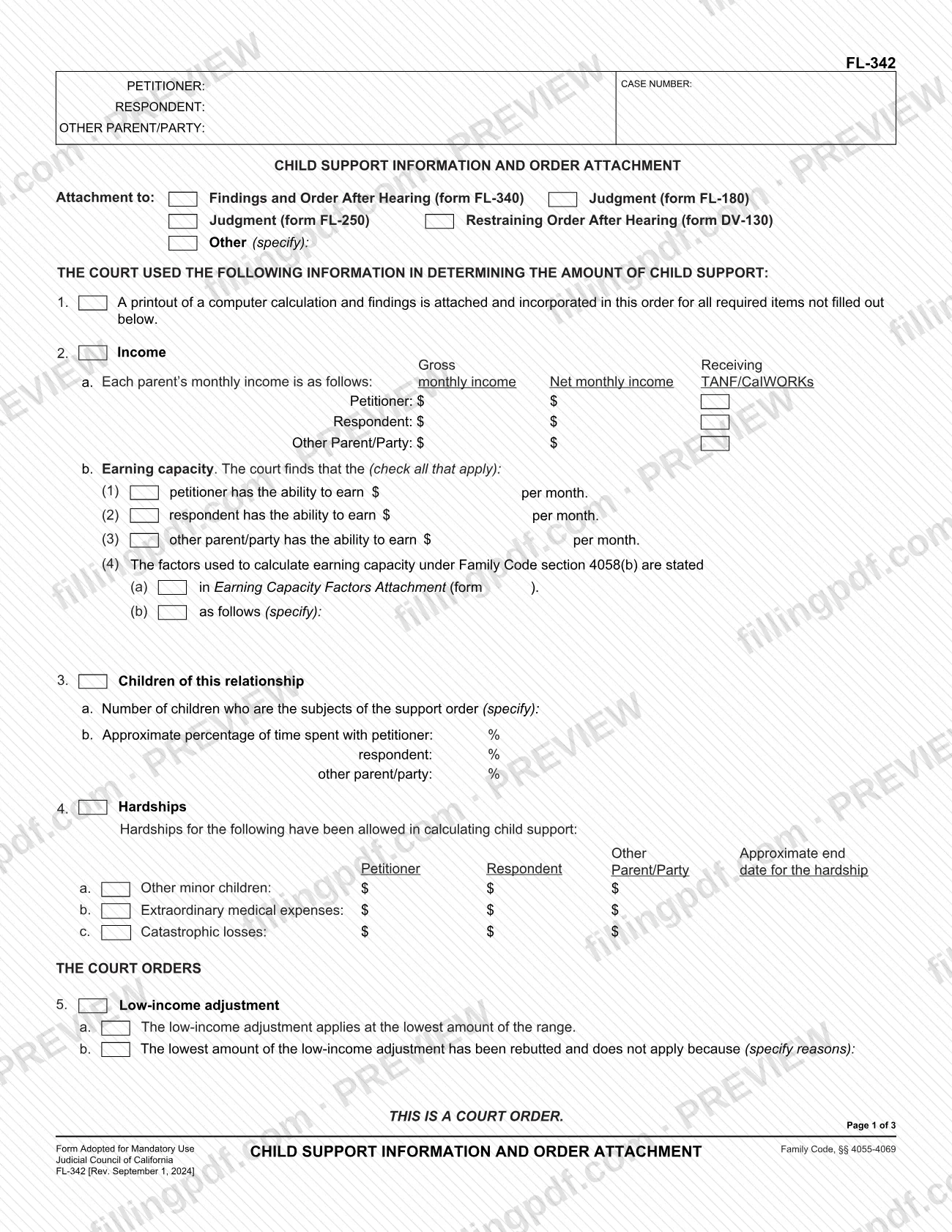
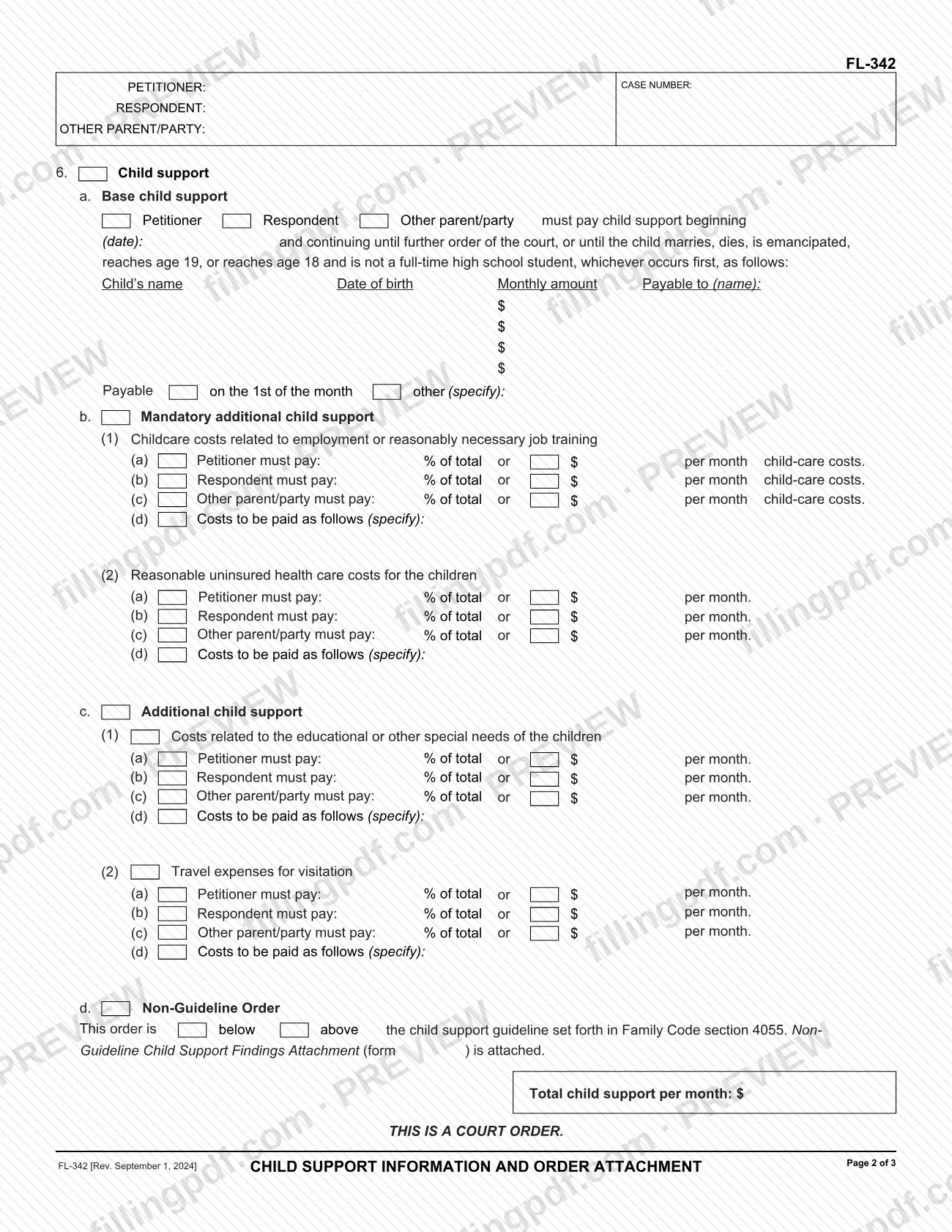
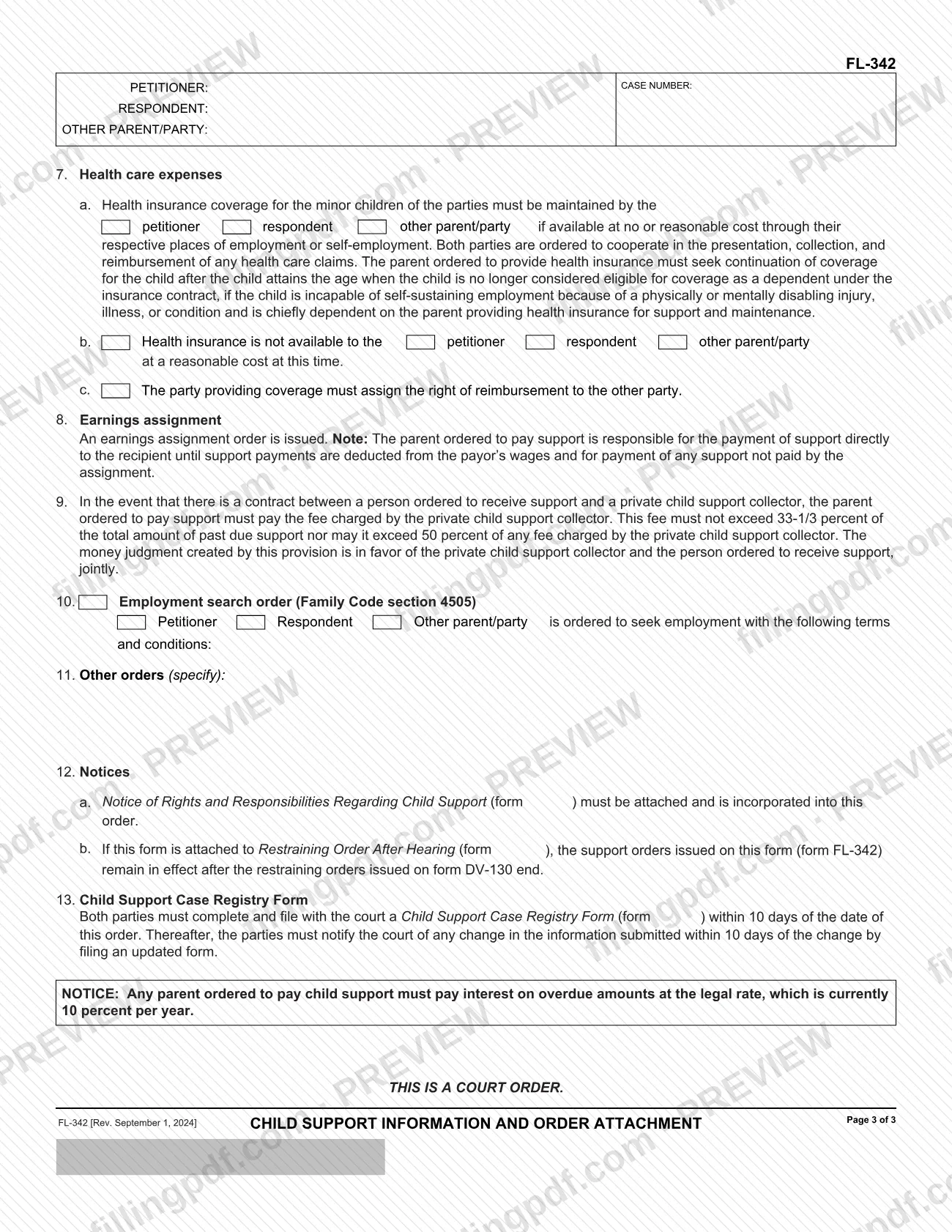
FL-342 is the Child Support Information and Order Attachment, a form adopted by the Judicial Council of California for mandatory use. It records the income, parenting-time and hardship information the court used to determine child support, and then sets out the support orders themselves. It is attached to another court document, such as Findings and Order After Hearing (form FL-340), a judgment (form FL-180 or FL-250) or Restraining Order After Hearing (form DV-130). On this page you can fill out the form online on FillingPDF and download or print the completed PDF; the official PDF and its translations are published by the California courts.
Last updated
What is FL-342?
FL-342, Child Support Information and Order Attachment, is the Judicial Council of California form that sets out the information a court used to calculate child support and the support orders the court makes, and that is attached to a larger order or judgment.
The form is divided into two parts. The first, headed "The court used the following information in determining the amount of child support," covers a computer calculation printout (item 1), each parent's income and any earning capacity finding (item 2), the children and the approximate percentage of time spent with each parent (item 3), and allowed hardships (item 4). The second, headed "The court orders," covers the low-income adjustment (item 5), base child support, mandatory additional child support, additional child support and any non-guideline order (item 6), health care expenses (item 7), an earnings assignment (item 8), the private child support collector fee (item 9), an employment search order (item 10), other orders (item 11), notices (item 12) and the Child Support Case Registry Form requirement (item 13).
Every page is marked "This is a court order." The form cites Family Code sections 4055-4069. It does not stand alone: it is an attachment to forms such as FL-340, FL-180, FL-250 or DV-130, or to another document the court specifies. The California courts also publish it in Chinese Simplified, Korean, Spanish and Vietnamese. If the order departs from the guideline, Non-Guideline Child Support Findings Attachment (form FL-342(A)) is attached.
Who needs to file FL-342?
FL-342 is used in California family court matters in which the court sets child support. The California courts' self-help page describes it as the form that states the court's decisions (orders) about child support, which can be attached to many other forms.
- Cases using Findings and Order After Hearing (form FL-340): FL-342 is attached to it to state the support findings and orders.
- Cases ending in a judgment (form FL-180 or FL-250): FL-342 is attached to the judgment.
- Domestic violence restraining order cases (form DV-130): FL-342 can be attached to Restraining Order After Hearing. When it is, the support orders on FL-342 remain in effect after the restraining orders on DV-130 end.
- Other court documents: the form has an "Other (specify)" line for any other order it is attached to.
The form has spaces for the petitioner, the respondent and an other parent/party, so it works for cases with a parent who is not one of the two named parties. Its text speaks for the court ("The court orders"), and it contains no instruction on who may sign for another person. No exclusions are printed on it.
When to file FL-342
FL-342 is prepared when the court makes or modifies a child support order, because it is attached to that order or judgment. It prints no due date of its own; it travels with the form it is attached to (FL-340, FL-180, FL-250, DV-130 or another document).
Support is ordered to begin on the date entered in item 6a and to continue until further order of the court, or until the child marries, dies, is emancipated, reaches age 19, or reaches age 18 and is not a full-time high school student, whichever occurs first.
Two related deadlines are printed on the form. Item 12a requires Notice of Rights and Responsibilities Regarding Child Support (form FL-192) to be attached. Under item 13, both parties must complete and file a Child Support Case Registry Form (form FL-191) with the court within 10 days of the date of the order, and must report any change in that information within 10 days of the change by filing an updated form.
Documents you need
- A printout of the computer calculation and findings, attached and incorporated under item 1 for all required items not filled out on the form.
- Earning Capacity Factors Attachment (form FL-302), only if you choose it under item 2b(4)(a) to state the factors used to calculate earning capacity under Family Code section 4058(b).
- Non-Guideline Child Support Findings Attachment (form FL-342(A)), attached when item 6d is marked as an order below or above the guideline in Family Code section 4055.
- Notice of Rights and Responsibilities Regarding Child Support (form FL-192), which item 12a says must be attached and is incorporated into the order.
- The main order or judgment the form attaches to: Findings and Order After Hearing (form FL-340), Judgment (form FL-180 or FL-250), Restraining Order After Hearing (form DV-130) or another document specified at the top.
How to fill out FL-342
Enter party names and case number
At the top of each page, enter the petitioner, respondent and other parent/party names and the case number. In the "Attachment to" box, check the form it is attached to (FL-340, FL-180, FL-250, DV-130) or check Other and specify.
Check the calculation printout box
Item 1: check the box if a printout of a computer calculation and findings is attached and incorporated for all required items not filled out on the form.
Enter each parent's income
Item 2a: for the petitioner, respondent and other parent/party, enter gross monthly income, net monthly income and the amount received monthly from TANF/CalWORKs.
Complete earning capacity findings
Item 2b: check each person the court finds able to earn a stated amount per month. Under item 2b(4), check form FL-302 or specify the Family Code section 4058(b) factors in the space provided.
Describe the children and time shares
Item 3a: specify the number of children who are the subjects of the order. Item 3b: enter the approximate percentage of time spent with the petitioner, respondent and other parent/party.
List allowed hardships
Item 4: enter the amounts allowed for other minor children (4a), extraordinary medical expenses (4b) and catastrophic losses (4c) for each person, with the approximate end date for the hardship.
Complete the low-income adjustment
Item 5: check 5a if the adjustment applies at the lowest amount of the range, or 5b if that amount was rebutted and does not apply, then specify the reasons.
Enter base child support
Item 6a: check who must pay, enter the start date, then list each child's name, date of birth and monthly amount, who the payment is payable to, and the payment date (the 1st of the month or another date you specify).
Complete additional child support items
Items 6b and 6c: for childcare, uninsured health care, educational or special needs and visitation travel, enter each person's percentage of the total or monthly dollar amount and how costs are paid. Item 6d: check below or above guideline, attach form FL-342(A) if it applies, and enter the total child support per month.
Complete health care and earnings assignment
Item 7: check who must maintain health insurance (7a), who lacks it at a reasonable cost (7b) and whether the right of reimbursement is assigned (7c). Item 8: check the box if an earnings assignment order is issued.
Add employment search and other orders
Item 10: check who is ordered to seek employment and state the terms and conditions. Item 11: specify any other orders.
Check the notices and registry items
Item 12a: attach form FL-192. Item 12b applies when the form is attached to DV-130. Item 13 requires both parties to file form FL-191 within 10 days of the date of the order.
Review and download the completed PDF
Check that every page carries the names and case number, the amounts are consistent and the attachments are ready. Download or print the completed PDF from FillingPDF and assemble it with the order it supplements.
How to submit FL-342
FL-342 has no filing channel of its own: it is attached to the order or judgment it supplements and goes wherever that document goes.
- With the main order: attach the completed FL-342 to Findings and Order After Hearing (form FL-340), Judgment (form FL-180 or FL-250), Restraining Order After Hearing (form DV-130) or the other document named in the "Attachment to" box at the top.
- With the required notice: item 12a says Notice of Rights and Responsibilities Regarding Child Support (form FL-192) must be attached to the order.
- With a computer printout: item 1 says a printout of the computer calculation and findings is attached and incorporated for all required items not filled out on the form.
- Separate registry form: under item 13, both parties file a Child Support Case Registry Form (form FL-191) with the court within 10 days of the date of the order.
The form prints no mailing address, portal or appointment rule. For where to file the main order, follow the court handling the case and the instructions for that form. FillingPDF lets you fill out and download the PDF; submission follows the channels above.
Common mistakes to avoid
- Leaving the "Attachment to" boxes unchecked, so the form does not show which order or judgment (FL-340, FL-180, FL-250, DV-130 or other) it belongs to.
- Skipping the computer printout in item 1 while leaving required items blank; the printout is attached for all required items not filled out below.
- Marking item 6d as a below- or above-guideline order without attaching Non-Guideline Child Support Findings Attachment (form FL-342(A)).
- Omitting the Notice of Rights and Responsibilities Regarding Child Support (form FL-192), which item 12a says must be attached.
- Not filing the Child Support Case Registry Form (form FL-191) within 10 days of the date of the order, or not updating it within 10 days of a change.
- Entering an earning capacity amount in item 2b without stating the Family Code section 4058(b) factors, either on form FL-302 or in the space for item 2b(4)(b).
- Naming no payor, start date or payee in item 6a, so the order does not say who pays whom or from when.
- Forgetting that support orders on FL-342 attached to form DV-130 remain in effect after the restraining orders end, and treating them as ending together.
Frequently asked questions
What is form FL-342 used for?
FL-342 states the court's child support decisions. It records the income, time-share and hardship information used to determine support, then sets out the orders for base support, additional support, health care and related matters. It is attached to another order or judgment.
Which forms can FL-342 be attached to?
The form lists Findings and Order After Hearing (form FL-340), Judgment (form FL-180), Judgment (form FL-250) and Restraining Order After Hearing (form DV-130). It also has an Other (specify) line for any other document the court uses.
Can I fill out the FL-342 form online?
Yes. You can fill out the FL-342 PDF online on FillingPDF and download or print it. FillingPDF is an independent service and does not file the form; it goes to the court with the order it is attached to.
What do I have to file within 10 days of an FL-342 order?
Item 13 requires both parties to complete and file a Child Support Case Registry Form (form FL-191) with the court within 10 days of the date of the order. Any later change in that information must be reported within 10 days by filing an updated form.
What is the difference between FL-342 and FL-342(A)?
FL-342 states the support information and orders. FL-342(A), Non-Guideline Child Support Findings Attachment, is attached to it only when item 6d marks the order as below or above the guideline set in Family Code section 4055.
When does child support end under FL-342?
Item 6a says support continues until further order of the court, or until the child marries, dies, is emancipated, reaches age 19, or reaches age 18 and is not a full-time high school student, whichever occurs first. The start date is the one entered in item 6a.
Do support orders on FL-342 end when a DV-130 restraining order ends?
No. Item 12b says that when FL-342 is attached to Restraining Order After Hearing (form DV-130), the support orders on FL-342 remain in effect after the restraining orders on DV-130 end.
Is FL-342 available in other languages?
Yes. The California courts' self-help page lists FL-342 in Chinese Simplified, Korean, Spanish and Vietnamese, in addition to the English form that carries the revision date Rev. September 1, 2024.
Ready to fill out FL-342?
Fill out FL-342 now