
FW-001 is the Request to Waive Court Fees, a Mandatory Form of the Judicial Council of California that you use to ask a California court to waive your court fees and costs. It serves people who receive public benefits, have a low income, or do not have enough income to pay for their household's basic needs and the court fees. On this page you can fill out the form online on FillingPDF and download or print the completed PDF. The Judicial Council publishes the form at courts.ca.gov.
Last updated
What is FW-001?
Form FW-001, Request to Waive Court Fees, is the Judicial Council of California form on which a person asks a California court to waive court fees and costs because they receive public benefits, have a low income, or cannot afford basic needs and court fees.
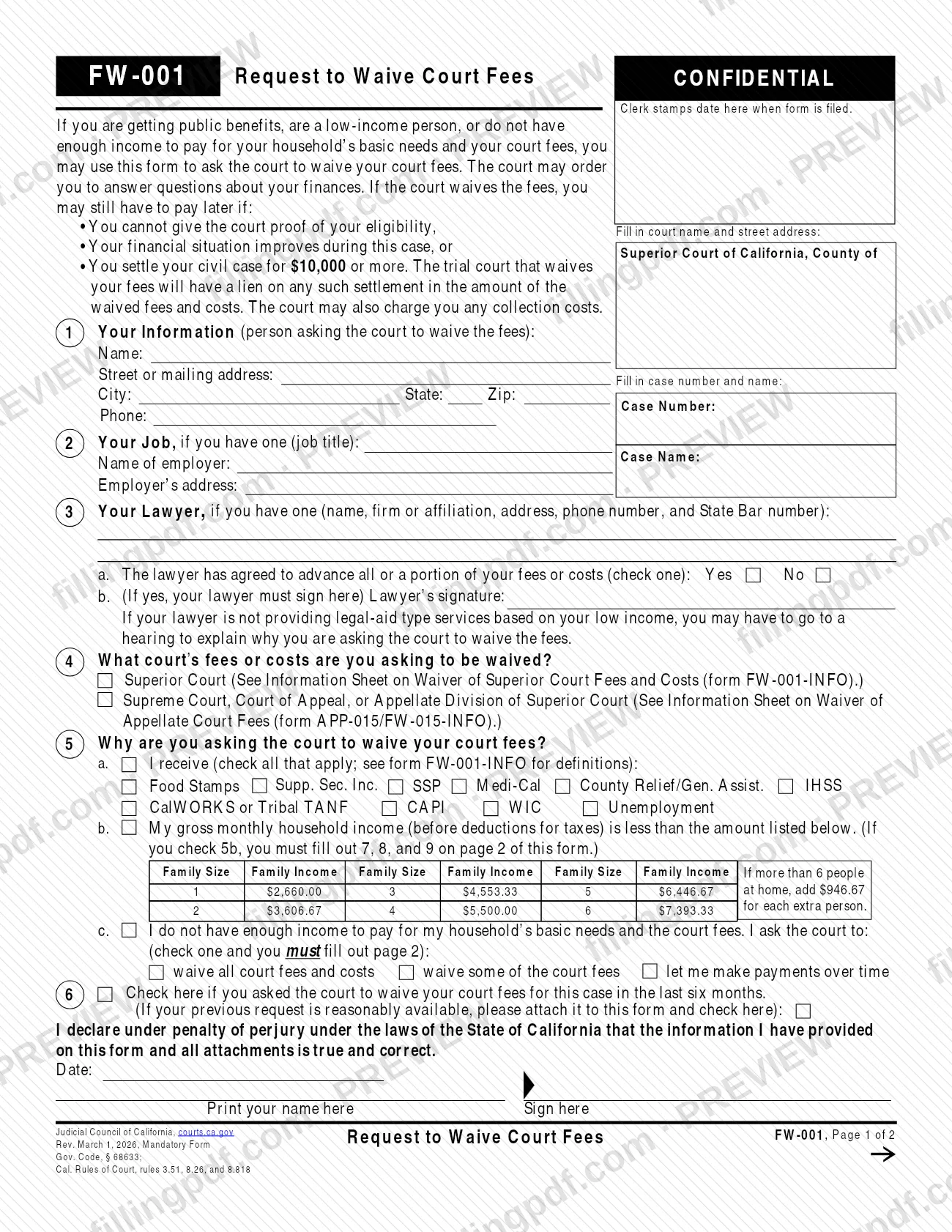
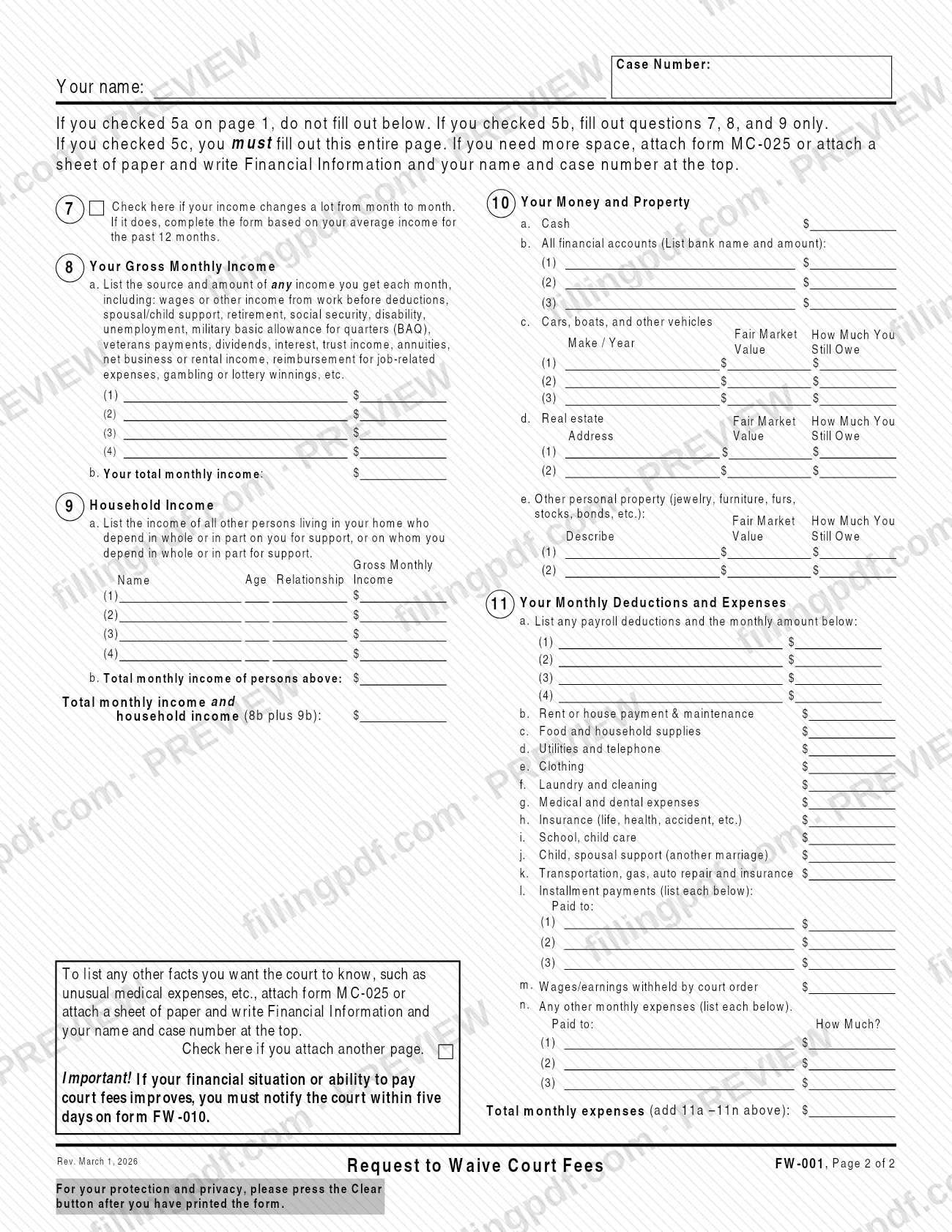
The Judicial Council of California issues it as a Mandatory Form, citing Gov. Code, § 68633 and Cal. Rules of Court, rules 3.51, 8.26, and 8.818. The form is marked CONFIDENTIAL. It has two pages. Page 1 identifies you, your job and your lawyer, names the court whose fees you want waived, and gives your reason for asking. Page 2 is a financial statement covering income, household income, money and property, and monthly deductions and expenses.
You choose one of three grounds in item 5: you receive listed public benefits (5a), your gross monthly household income is below the amount printed for your family size (5b), or you do not have enough income for basic needs and the fees (5c). Which part of page 2 you complete depends on that choice.
The form works with other Judicial Council documents it names. Form FW-001-INFO explains the waiver of Superior Court fees and costs, form APP-015/FW-015-INFO explains the waiver of appellate court fees, form MC-025 gives extra space, and form FW-010 is used to tell the court if your finances improve. The Judicial Council also offers FW-001 in Chinese Simplified, Korean, Spanish and Vietnamese.
Who needs to file FW-001?
You use Form FW-001 if you are getting public benefits, are a low-income person, or do not have enough income to pay for your household's basic needs and your court fees, and you want a court to waive those fees.
- Superior Court: check the first box in item 4. The form refers you to the Information Sheet on Waiver of Superior Court Fees and Costs (form FW-001-INFO).
- Supreme Court, Court of Appeal, or Appellate Division of Superior Court: check the second box in item 4. The form refers you to the Information Sheet on Waiver of Appellate Court Fees (form APP-015/FW-015-INFO).
If you have a lawyer, item 3 asks for the lawyer's details. If the lawyer has agreed to advance all or part of your fees or costs, the lawyer must sign in item 3b. When your lawyer is not providing legal-aid type services based on your low income, the form warns that you may have to go to a hearing to explain why you are asking the court to waive the fees.
The court may order you to answer questions about your finances. Even if fees are waived, you may have to pay later in the situations listed at the top of page 1.
When to file FW-001
You complete Form FW-001 when you want the court to waive the fees and costs in a case, and you file it in that case with the court named at the top of page 1. The form prints no separate due date.
Item 6 asks whether you requested a fee waiver for this case in the last six months. If you did and the previous request is reasonably available, attach it and check the box.
After the court acts, timing still matters. If your financial situation or ability to pay court fees improves, you must notify the court within five days on form FW-010. The form also warns that a waived fee may still become payable if you cannot give the court proof of your eligibility, if your finances improve during the case, or if you settle your civil case for the amount printed on the form or more.
Documents you need
- Your previous fee waiver request, attached only if you asked the court to waive fees for this case in the last six months and the earlier request is reasonably available; also check the box in item 6.
- Form MC-025, or a sheet of paper headed Financial Information with your name and case number, only if you need more space on page 2 or want to list other facts for the court.
How to fill out FW-001
Enter court and case details
At the top of page 1, fill in the court name and street address, then the case number and case name. Page 2 also asks for your name and the case number.
Complete your information in item 1
Enter your name, street or mailing address, city, state, ZIP code and phone number. You are the person asking the court to waive the fees.
Add your job in item 2
If you have a job, enter your job title, your employer's name and the employer's address. Leave it blank if you have no job.
List your lawyer in item 3
If you have a lawyer, enter the name, firm or affiliation, address, phone number and State Bar number. In 3a check Yes or No for whether the lawyer agreed to advance fees or costs; if Yes, the lawyer signs in 3b.
Choose the court in item 4
Check Superior Court, or check Supreme Court, Court of Appeal, or Appellate Division of Superior Court. Each choice points to its own information sheet.
Give your reason in item 5
In 5a check each public benefit you receive. In 5b check the box if your gross monthly household income is below the amount printed for your family size. In 5c check the box if you lack income for basic needs and court fees, and choose to waive all fees, waive some, or pay over time.
Answer the prior request in item 6
Check the box if you asked the court to waive fees for this case in the last six months, and attach the earlier request if it is reasonably available.
Date, print and sign the declaration
Enter the date, print your name and sign under the declaration made under penalty of perjury under California law. Sign only after checking everything you entered.
Report income in items 7 to 9
Complete these if you checked 5b or 5c. Check item 7 if your income changes a lot and use your average over the past 12 months. In 8 list each source of monthly income and your total; in 9 list the other household members who depend on you or on whom you depend, with age, relationship and gross monthly income.
List money and property in item 10
Complete item 10 only if you checked 5c. Enter cash, bank accounts, vehicles, real estate and other personal property, with the fair market value and how much you still owe where the form asks.
Enter deductions and expenses in item 11
Complete item 11 only if you checked 5c. List payroll deductions in 11a, the monthly expenses in 11b to 11m, any others in 11n, and add 11a to 11n for total monthly expenses.
Review, download and clear the PDF
Check that each item you must complete is filled and that you signed and dated the form. Download or print the completed PDF from FillingPDF, then file it as described under How to submit.
How to submit FW-001
Form FW-001 is filed with the court you name at the top of page 1. The form shows a box where the court clerk stamps the date when it is filed, but it prints no mailing address, e-filing portal or appointment rule.
- Court named on the form: write the court name and street address in the box at the top of page 1 and the case number and case name beside it, then file the completed form in your case. For how that court accepts filings, check with the court clerk.
- Correct court level: item 4 tells the court whether you want Superior Court fees waived or fees in the Supreme Court, Court of Appeal or Appellate Division of Superior Court.
- Attachments: attach your previous fee waiver request if item 6 applies, and form MC-025 or an extra sheet if you need more space. Put the words Financial Information, your name and the case number at the top of any extra sheet.
The form advises you, for your protection and privacy, to press the Clear button after you have printed it. More guidance is on the Judicial Council's self-help page at https://selfhelp.courts.ca.gov/jcc-form/FW-001. FillingPDF lets you fill out and download the PDF; submission follows the channels above.
Common mistakes to avoid
- Filling out page 2 after checking 5a. The form says not to fill out the page if you checked 5a, because receiving the listed public benefits is the ground.
- Checking 5b but skipping items 7, 8 and 9 on page 2. The form says you must fill out those items if you check 5b.
- Checking 5c and completing only part of page 2. The form says you must fill out the entire page in that case.
- Checking Yes in item 3a without the lawyer's signature in item 3b, which the lawyer must provide.
- Leaving your name and the case number off page 2, or off any extra sheet you attach, such as form MC-025.
- Skipping the declaration under penalty of perjury, so the form has no date, printed name or signature.
- Not checking item 6 and attaching the earlier request when you asked for a waiver in this case in the last six months.
- Not notifying the court on form FW-010 within five days after your financial situation or ability to pay improves.
- Leaving a printed copy of the form on screen with your finances still in it, instead of pressing the Clear button after printing.
Frequently asked questions
What is the FW-001 form used for?
FW-001 is the Judicial Council of California's Request to Waive Court Fees. You use it to ask a California court to waive court fees and costs because you receive public benefits, have a low income, or cannot afford your household's basic needs and the fees.
Who can use form FW-001?
Anyone who is getting public benefits, is a low-income person, or lacks enough income for household basic needs and court fees may use it. Item 4 lets you ask for Superior Court fees or for fees in the Supreme Court, Court of Appeal or Appellate Division of Superior Court.
Do I have to fill out page 2 of FW-001?
It depends on item 5. If you check 5a (public benefits), do not fill out page 2. If you check 5b (income below the printed amount), fill out only items 7, 8 and 9. If you check 5c, fill out the entire page.
Can I fill out FW-001 online?
You can fill out the FW-001 PDF online on FillingPDF and download or print it. FillingPDF is an independent service and does not file it with the court; you file it with the court named on the form.
What happens if my fees are waived and I settle my case?
You may still have to pay. The form says that if you settle your civil case for the amount printed on it or more, the trial court that waived your fees will have a lien on the settlement for the waived fees and costs, and it may also charge collection costs.
What if my finances improve after I file FW-001?
You must notify the court within five days on form FW-010. The form also says you may have to pay waived fees later if your financial situation improves during the case or you cannot give the court proof of your eligibility.
Where do I file the FW-001 form?
File it in your case with the court named at the top of page 1, where the clerk stamps the filing date. The form prints no mailing address or portal, so ask that court's clerk how it accepts filings.
Is there a Spanish version of form FW-001?
Yes. The Judicial Council's self-help page offers FW-001 in Spanish, Chinese Simplified, Korean and Vietnamese. This page covers the English-language form.
Do I need a lawyer to sign form FW-001?
No lawyer is required. You sign the declaration yourself. A lawyer signs in item 3b only if you have one who has agreed to advance all or part of your fees or costs.
Ready to fill out FW-001?
Fill out FW-001 now