
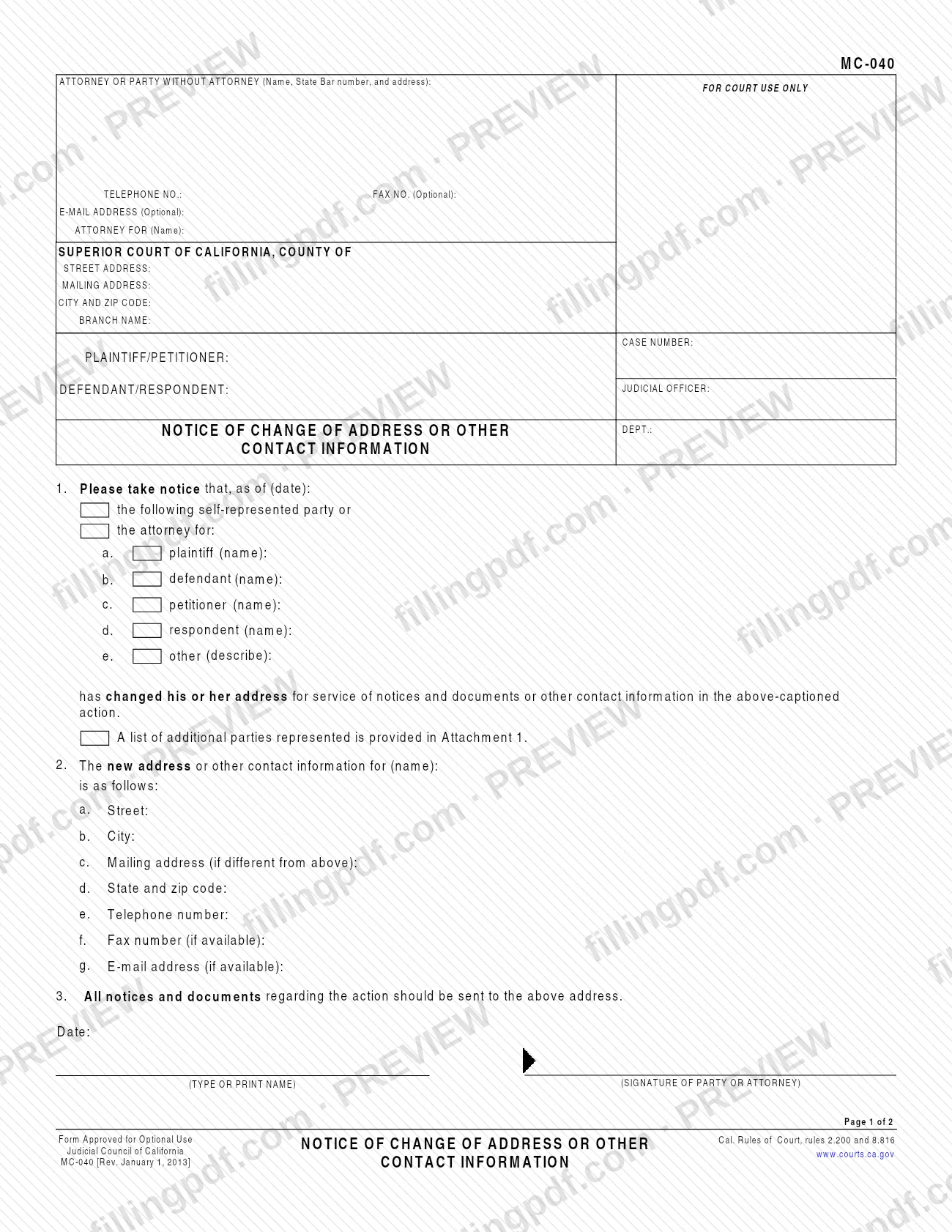
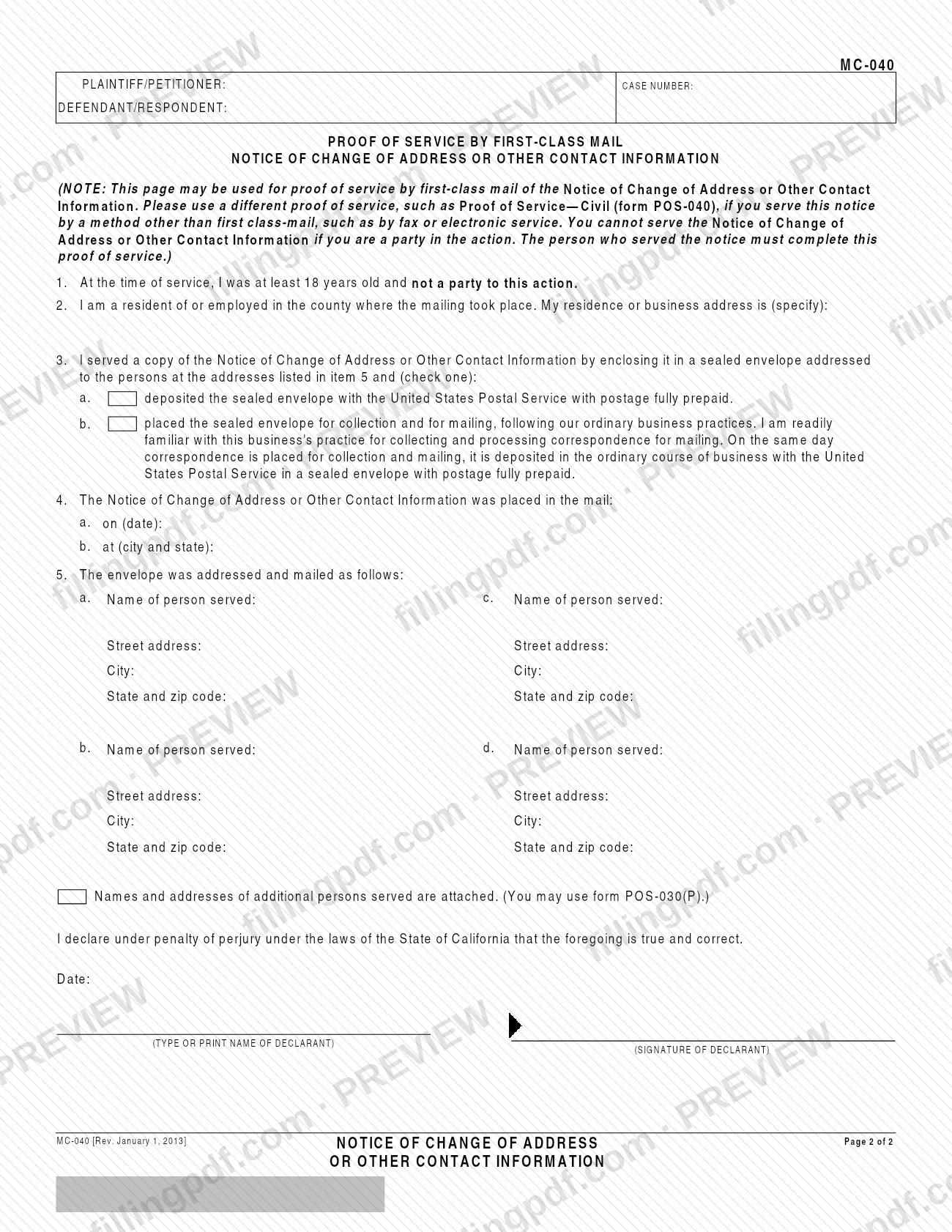
MC-040 is the Notice of Change of Address or Other Contact Information, a form of the Judicial Council of California that a self-represented party or an attorney uses to give notice of a new address for service or new contact details in a court case. Page 1 is the notice; page 2 is a proof of service by first-class mail. On this page you can fill out the form online on FillingPDF and download or print the completed PDF; the form is published by the Judicial Council at courts.ca.gov.
Last updated
What is MC-040?
Form MC-040, Notice of Change of Address or Other Contact Information, is the Judicial Council of California form on which a self-represented party, or an attorney for a party, announces a changed address for service of notices and documents, or other changed contact information, in a pending court action.
The form is captioned for the Superior Court of California and carries the county, branch name, case number, the plaintiff/petitioner and defendant/respondent, the judicial officer and the department. Item 1 gives the date as of which the change takes effect and names the party or parties concerned: plaintiff, defendant, petitioner, respondent or another party you describe. Item 2 gives the new street, city, mailing address if different, state and ZIP code, telephone number, and, if available, fax number and e-mail address. Item 3 states that all notices and documents regarding the action should be sent to the new address.
Page 2 is a separate Proof of Service by First-Class Mail of the notice. It is completed by the person who mailed the notice, not by a party. The form is marked "Form Approved for Optional Use" under California Rules of Court, rules 2.200 and 8.816. It updates contact details in an existing case; it does not start a case.
Who needs to file MC-040?
A self-represented party, or an attorney acting for one or more parties, whose address for service or other contact information has changed in a pending court action uses Form MC-040.
- Self-represented parties: check the box for the self-represented party in item 1 and name yourself as plaintiff, defendant, petitioner or respondent, or describe another role under other.
- Attorneys: check the box for the attorney for the party and give the party's name. If you represent more than the parties that fit on the form, list the additional parties in Attachment 1 and check the box that says so.
The form can cover a change of address or of other contact details such as telephone number, fax number or e-mail address.
Who completes the proof of service: the person who mailed the notice, who must be at least 18 years old and not a party to the action. The form states that you cannot serve the notice if you are a party in the action, so a party needs another adult to mail it and sign page 2. Page 2 covers service by first-class mail only; for service by another method, such as fax or electronic service, the form says to use a different proof of service, such as form POS-040.
When to file MC-040
Use Form MC-040 when your address for service or other contact information changes in a pending action. Item 1 asks for the date "as of" which the change applies, so you enter the effective date of the new information. The form prints no separate deadline or filing window.
The notice is served on the other persons in the case, and page 2 records that service: the person who mailed it enters the mailing date and the city and state of mailing in item 4. If you serve by another method than first-class mail, a different proof of service is needed rather than page 2.
Documents you need
- Attachment 1: a list of additional parties represented, only if the attorney represents more parties than fit in item 1 and you check the box saying a list is provided.
- A proof of service for the notice: page 2 of Form MC-040 when the notice is served by first-class mail, completed and signed by the person who mailed it.
- A different proof of service, such as Proof of Service—Civil (form POS-040), when you serve the notice by a method other than first-class mail, such as fax or electronic service.
- Names and addresses of additional persons served, attached only if more than the four spaces in item 5 of page 2 are needed; you may use form POS-030(P).
How to fill out MC-040
Enter your name and contact block
In the box at the top left, enter the attorney or party without attorney: name, State Bar number and address, plus telephone number, and optionally fax number and e-mail address. If you are an attorney, add the party you act for in Attorney for (Name).
Complete the court caption
Enter the county of the Superior Court of California, the street address, mailing address, city and ZIP code and the branch name of the court. Leave the box marked For court use only empty.
Add case number and parties
Enter the Case Number, the plaintiff/petitioner and the defendant/respondent, and the judicial officer and department if you know them.
Complete item 1 date and filer
Enter the date as of which the change applies. Check whether the notice comes from the self-represented party or from the attorney for the party, then give the party's name on the matching line: a plaintiff, b defendant, c petitioner, d respondent or e other (describe).
Note additional parties if needed
If you represent more parties than the lines allow, check the box stating that a list of additional parties represented is provided in Attachment 1 and attach the list.
Enter the new contact information
In item 2, write the name of the person whose information changed, then complete a Street, b City, c Mailing address (if different from above), d State and zip code, e Telephone number, f Fax number and g E-mail address (the last two if available).
Date and sign the notice
Under item 3, enter the date, type or print your name and sign as the party or attorney.
Complete the proof of service header
On page 2, the person who mails the notice completes items 1 and 2 by confirming they were at least 18 and not a party, and entering their residence or business address in the county where the mailing took place.
Describe how the notice was mailed
In item 3 check a or b to show how the sealed envelope was mailed. In item 4 enter the date of mailing and the city and state where it was placed in the mail.
List the persons served
In item 5, enter name, street address, city, state and zip code for each person served, in spaces a to d. If there are more, check the box and attach their names and addresses, using form POS-030(P) if you wish.
Review, sign and download the PDF
The declarant enters the date, types or prints their name and signs the declaration under penalty of perjury. Check every item, then download or print the completed PDF from FillingPDF.
How to submit MC-040
The form names no filing address, portal or office. Its caption identifies the court, branch and case number, and page 2 documents how the notice is served.
- Service by first-class mail: a person who is at least 18 and not a party seals a copy of the notice in an envelope addressed to each person served (the addresses go in item 5 of page 2) and either deposits it with the United States Postal Service with postage fully prepaid, or places it for collection and mailing under ordinary business practice. That person completes and signs page 2.
- Service by fax or electronic service: page 2 does not apply; use a different proof of service, such as Proof of Service—Civil (form POS-040).
- More than four persons served: attach their names and addresses; you may use form POS-030(P).
Check the court handling your case for how it receives the notice. FillingPDF lets you fill out and download the PDF; submission and service follow the channels above.
Common mistakes to avoid
- Mailing the notice yourself when you are a party in the action; the form says a party cannot serve it, and the server must be at least 18 and not a party.
- Using page 2 as the proof of service when you serve by fax or electronic service; the form calls for a different proof, such as POS-040.
- Leaving item 1 without the "as of" date or without checking whether you are the self-represented party or the attorney for a party.
- Forgetting Attachment 1 when you represent additional parties and checking no box for the list.
- Having the proof of service signed by someone other than the person who actually mailed the notice; the person who served must complete it.
- Omitting the mailing date or the city and state of mailing in item 4 of the proof of service.
- Listing the new address in item 2 without entering a separate mailing address in item 2c when it differs from the street address.
- Not pressing the Clear This Form button after printing, which the form recommends for your protection and privacy.
Frequently asked questions
What is Form MC-040 used for?
MC-040 is the Judicial Council of California Notice of Change of Address or Other Contact Information. A self-represented party or an attorney uses it to give notice of a new address for service, or of a new telephone, fax or e-mail, in a pending court action.
Who can serve the MC-040 notice?
Someone who is at least 18 and not a party to the action. The form states that you cannot serve the notice if you are a party, so another adult must mail it and complete and sign the proof of service on page 2.
Can I use page 2 if I serve the notice by e-mail or fax?
No. Page 2 is only a proof of service by first-class mail. If you serve by another method, such as fax or electronic service, the form says to use a different proof of service, such as Proof of Service—Civil (form POS-040).
What if I represent more than one party?
Check the box in item 1 stating that a list of additional parties represented is provided in Attachment 1, and attach that list. Item 1 has lines for plaintiff, defendant, petitioner, respondent and other.
Is there a deadline to file the MC-040?
The form prints no deadline. Item 1 asks for the date as of which the change takes effect, so enter the effective date of the new address or contact information.
Is Form MC-040 mandatory?
The form is marked "Form Approved for Optional Use" under California Rules of Court, rules 2.200 and 8.816. It is the Judicial Council's approved format for this notice.
Can I fill out Form MC-040 online?
Yes. You can fill out the PDF online on FillingPDF and download or print it. FillingPDF is an independent service and does not file or serve the notice; you do that through the court and the mailing steps on the form.
What do I enter in item 2 of the MC-040?
Enter the name of the person whose information changed, then the new street, city, mailing address if different, state and zip code, and telephone number. Fax number and e-mail address are entered only if available.
Ready to fill out MC-040?
Fill out MC-040 now