
Form B-113A, Supplemental Schedule to Form 571-L for Bowling Centers, is issued by the Los Angeles County Office of the Assessor and replaces Schedule A of the Business Property Statement, Form 571-L. It is one of the Los Angeles County property tax forms that business owners attach when they report equipment cost. You use it to list the cost of bowling center equipment by year of acquisition. On this page you can fill out the form online on FillingPDF and download or print the completed PDF; the original is published by the Assessor.
Last updated
What is B-113A?
Form B-113A, Supplemental Schedule to Form 571-L for Bowling Centers, is the Los Angeles County Office of the Assessor schedule on which a bowling center reports the cost of its owned equipment, grouped by calendar year of acquisition, in place of Schedule A on the preprinted Business Property Statement, Form 571-L.
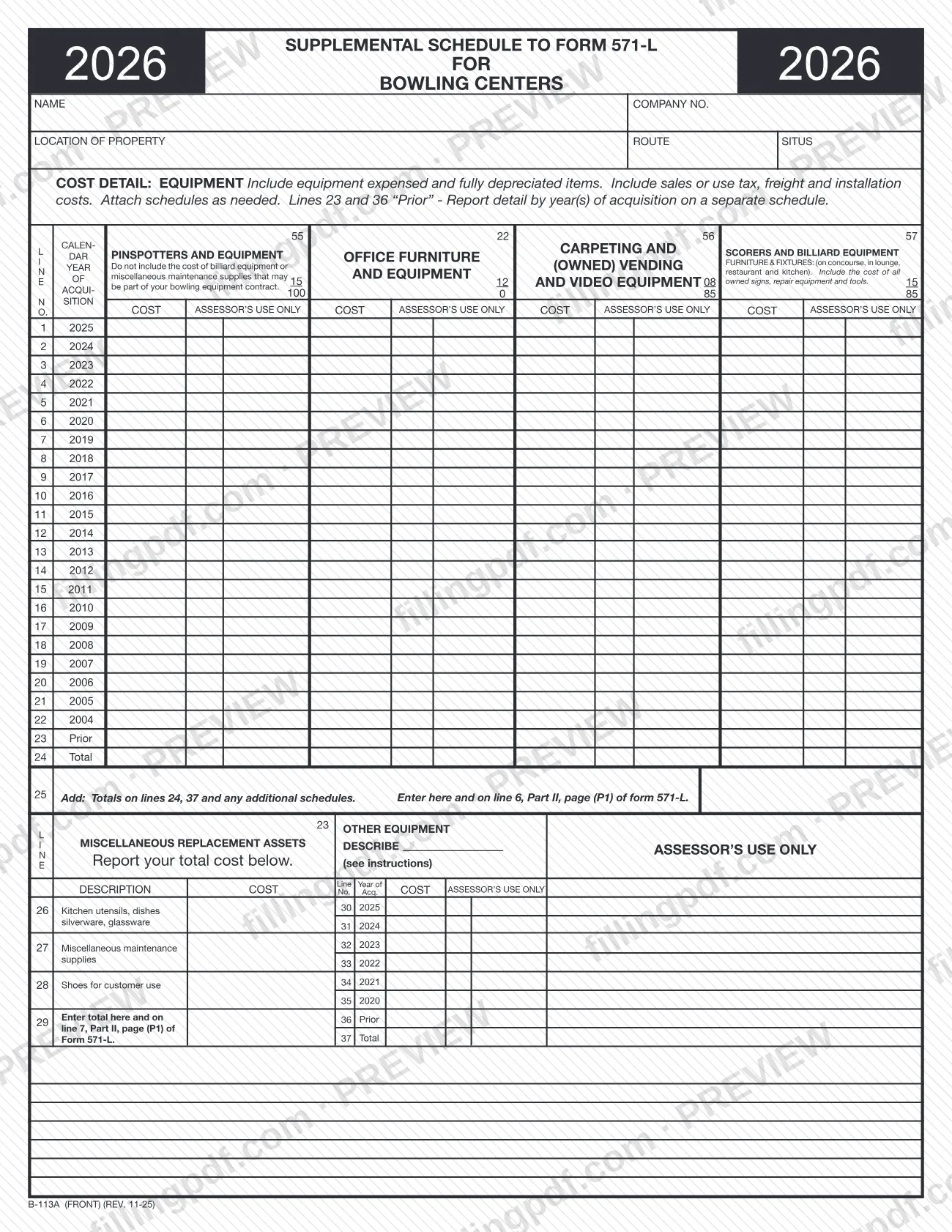
The two-page form (front and back instructions, revision REV. 11-25, printed with the year 2026) is designed for the bowling business. The front has columns for pinspotters and equipment, scorers and vending and video equipment, billiard equipment (owned), and furniture and fixtures on the concourse, in the lounge, restaurant and kitchen, including owned signs, repair equipment and tools. Lines 1 to 22 list acquisition years 2025 back to 2004, line 23 is "Prior" and line 24 is the column total.
The lower part reports miscellaneous replacement assets (lines 26 to 29) and other equipment such as ball shelves, a player's bench or computerized scorers (lines 30 to 37). The Assessor uses the cost information to help determine fair market value.
Building and leasehold improvements are not reported here: they go on Schedule B, page (P2) of Form 571-L. Do not use Schedule A on the preprinted Form 571-L when you use this schedule.
Who needs to file B-113A?
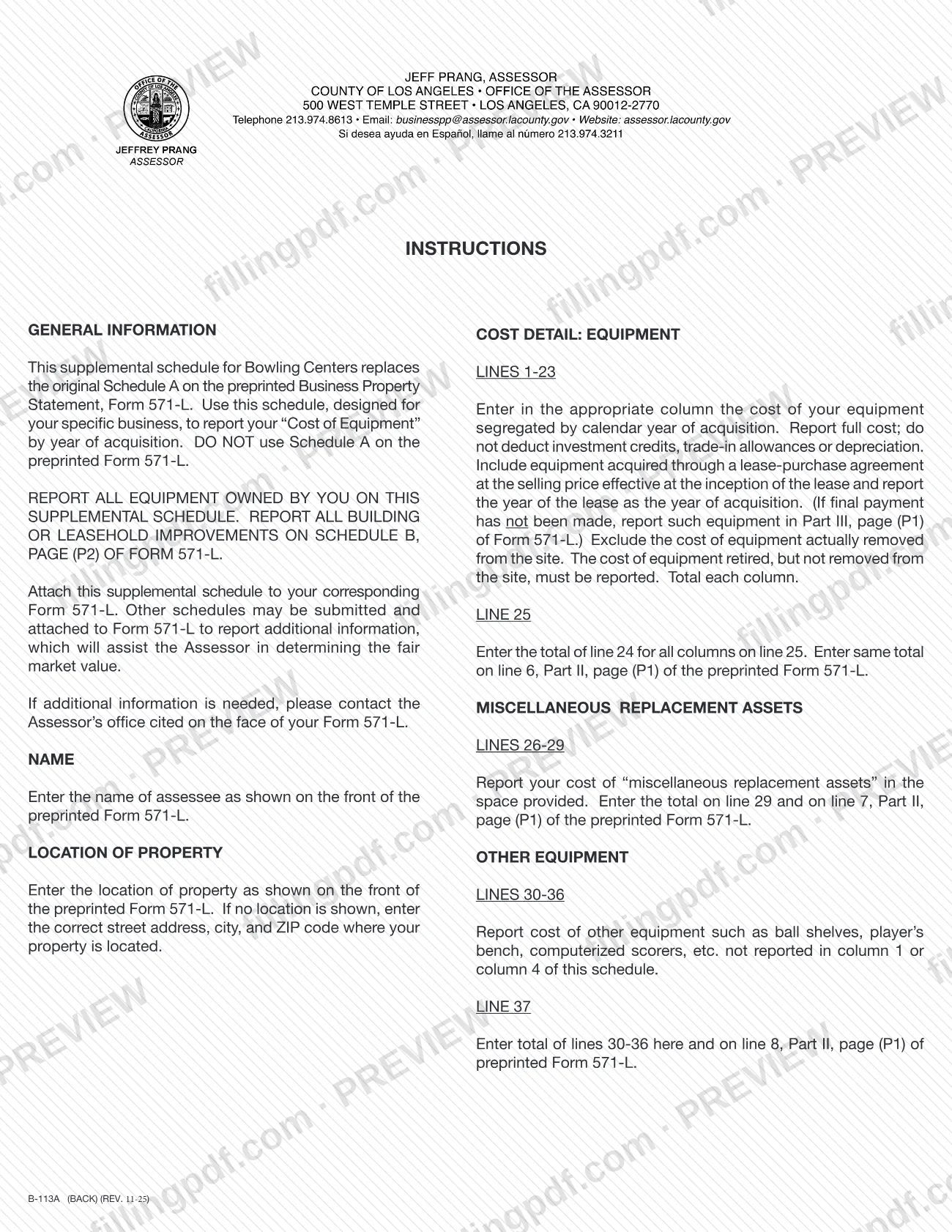
Bowling center owners who file the preprinted Business Property Statement, Form 571-L, use this schedule to report the cost of all equipment they own. The instructions say to report all owned equipment on this supplemental schedule and not to use Schedule A on Form 571-L.
Points that decide what goes on it:
- Equipment acquired through a lease-purchase agreement is reported here at the selling price effective at the inception of the lease, using the year of the lease as the year of acquisition. If the final payment has not been made, report that equipment in Part III, page (P1) of Form 571-L instead.
- Equipment actually removed from the site is excluded. Equipment retired but not removed from the site must be reported.
- Building or leasehold improvements are reported on Schedule B, page (P2) of Form 571-L, not on this form.
- Billiard equipment is reported in its own column and not in the pinspotter column, and miscellaneous maintenance supplies that may be part of the bowling equipment contract are not included in the equipment cost columns.
The form does not say who may sign or file for the owner. For other questions, contact the Assessor's office named on the face of your Form 571-L.
When to file B-113A
Form B-113A is completed whenever you complete the Business Property Statement, Form 571-L, because the instructions say to attach this schedule to your corresponding Form 571-L. It has no due date of its own printed on it, so it follows the filing date of Form 571-L.
Have your acquisition records ready before you start: costs are entered by calendar year of acquisition, with a separate schedule for the "Prior" lines (23 and 36). The form is printed with the year 2026, so use the current revision (REV. 11-25) that the Assessor publishes. For the filing deadline of Form 571-L itself, contact the Assessor's office cited on the face of that form.
Documents you need
- Form 571-L, the preprinted Business Property Statement: this schedule is attached to your corresponding Form 571-L.
- A separate schedule showing the detail by year(s) of acquisition for the "Prior" amounts on lines 23 and 36.
- Additional schedules, only if you want to give the Assessor more information on fair market value; the instructions allow them to be attached to Form 571-L.
How to fill out B-113A
Enter name and property location
Enter the assessee name as shown on the front of the preprinted Form 571-L, and the location of property as shown there. If no location is shown, enter the street address, city and ZIP code where the property is located.
Complete the company and route boxes
The header also has COMPANY NO., ROUTE and SITUS boxes. Fill in the ones that appear on your Form 571-L.
Report cost by year, lines 1-22
In each column, enter the full cost of equipment acquired in each calendar year, 2025 down to 2004. Include equipment expensed and fully depreciated items, sales or use tax, freight and installation.
Enter the Prior amounts on line 23
Enter the cost of equipment acquired before the listed years on line 23 "Prior". Report the detail by year(s) of acquisition on a separate schedule.
Total each column on line 24
Total each column. Do not deduct investment credits, trade-in allowances or depreciation, and exclude equipment actually removed from the site.
Add the totals on line 25
Add the totals on lines 24, 37 and any additional schedules, and enter the result on line 25. Enter the same total on line 6, Part II, page (P1) of Form 571-L.
Report replacement assets, lines 26-29
Enter your cost of kitchen utensils, dishes, silverware and glassware (line 26), miscellaneous maintenance supplies (line 27) and shoes for customer use (line 28). Enter the total on line 29 and on line 7, Part II, page (P1) of Form 571-L.
Report other equipment, lines 30-36
Enter the cost of other equipment, such as ball shelves, a player's bench or computerized scorers, by year of acquisition from 2025 to 2020, with line 36 for Prior. Do not repeat items already reported in column 1 or column 4.
Total other equipment on line 37
Enter the total of lines 30-36 on line 37 and on line 8, Part II, page (P1) of Form 571-L.
Review and download the PDF
Check that every total matches the amounts carried to Form 571-L. Download or print the completed PDF from FillingPDF and attach it to your Form 571-L as described under How to submit.
How to submit B-113A
Form B-113A is not filed on its own: you attach it to your corresponding Form 571-L, and the package goes to the Los Angeles County Office of the Assessor through the channels that apply to Form 571-L. The schedule prints no mailing address, portal or appointment rule of its own.
- Attach to Form 571-L: include the completed schedule, and any extra schedules you add, with the Business Property Statement. The instructions allow other schedules to be attached to Form 571-L to help the Assessor determine fair market value.
- Carry the totals over: the line 25 total goes on line 6, Part II, page (P1) of Form 571-L; the line 29 total goes on line 7; the line 37 total goes on line 8.
- Questions: contact the Assessor's office cited on the face of your Form 571-L.
FillingPDF lets you fill out and download the PDF; submission follows the channels above.
Common mistakes to avoid
- Using Schedule A on the preprinted Form 571-L instead of this supplemental schedule; the instructions say not to use Schedule A when you use Form B-113A.
- Reporting building or leasehold improvements here; they belong on Schedule B, page (P2) of Form 571-L.
- Deducting investment credits, trade-in allowances or depreciation; the instructions require full cost.
- Leaving out equipment that is expensed or fully depreciated, or omitting sales or use tax, freight and installation costs from the cost.
- Dropping equipment that was retired but not removed from the site; only equipment actually removed is excluded.
- Entering "Prior" totals on lines 23 or 36 without a separate schedule detailing them by year of acquisition.
- Not carrying totals to Form 571-L: line 25 to line 6, line 29 to line 7 and line 37 to line 8, all in Part II, page (P1).
- Putting equipment bought through a lease-purchase with no final payment on this schedule; it goes in Part III, page (P1) of Form 571-L.
Frequently asked questions
What is Form B-113A used for?
Form B-113A is the Los Angeles County Assessor's supplemental schedule for bowling centers. It replaces Schedule A on Form 571-L and lists the cost of owned equipment by calendar year of acquisition, so the Assessor can determine fair market value.
Do I attach Form B-113A to Form 571-L?
Yes. The instructions say to attach this supplemental schedule to your corresponding Form 571-L. Do not use the preprinted Schedule A on Form 571-L when you use B-113A; building and leasehold improvements go on Schedule B, page (P2).
Where do the totals from Form B-113A go on Form 571-L?
The line 25 total goes on line 6, Part II, page (P1) of Form 571-L. The line 29 total (miscellaneous replacement assets) goes on line 7, and the line 37 total (other equipment) goes on line 8, all in Part II, page (P1).
What cost do I report on Form B-113A?
Report full cost: do not deduct investment credits, trade-in allowances or depreciation. Include expensed and fully depreciated items and sales or use tax, freight and installation costs. Exclude equipment actually removed from the site, but report equipment retired and left on site.
How do I report equipment bought under a lease-purchase agreement?
Report it at the selling price effective at the inception of the lease, with the year of the lease as the year of acquisition. If the final payment has not been made, report that equipment in Part III, page (P1) of Form 571-L instead of on B-113A.
What goes on the Prior lines 23 and 36?
Enter the cost of equipment acquired before the years printed on the form. The form also requires you to report the detail by year(s) of acquisition for these Prior amounts on a separate schedule, which you attach.
Can I fill out Form B-113A online?
Yes. You can fill out the PDF online on FillingPDF and download or print it. FillingPDF is an independent service and does not file the form with the Assessor; you submit it with Form 571-L through the Assessor's channels.
Ready to fill out B-113A?
Fill out B-113A now