
Form B-43, Supplemental Schedule to Form 571-L Water Softener Service Industry Report, is the schedule the Los Angeles County Office of the Assessor provides for water softener service businesses to list their rental units out in service on the January 1 lien date. It is one of the Los Angeles County property tax forms attached to a business's Form 571-L. On this page you can fill out Form B-43 online on FillingPDF and download or print the completed PDF; the form itself is published by the Assessor at the official link below.
Last updated
What is B-43?
Form B-43, Supplemental Schedule to Form 571-L Water Softener Service Industry Report is the Los Angeles County Office of the Assessor schedule on which a water softener service business reports the cost details of its rental units that are out in service on the January 1 lien date.
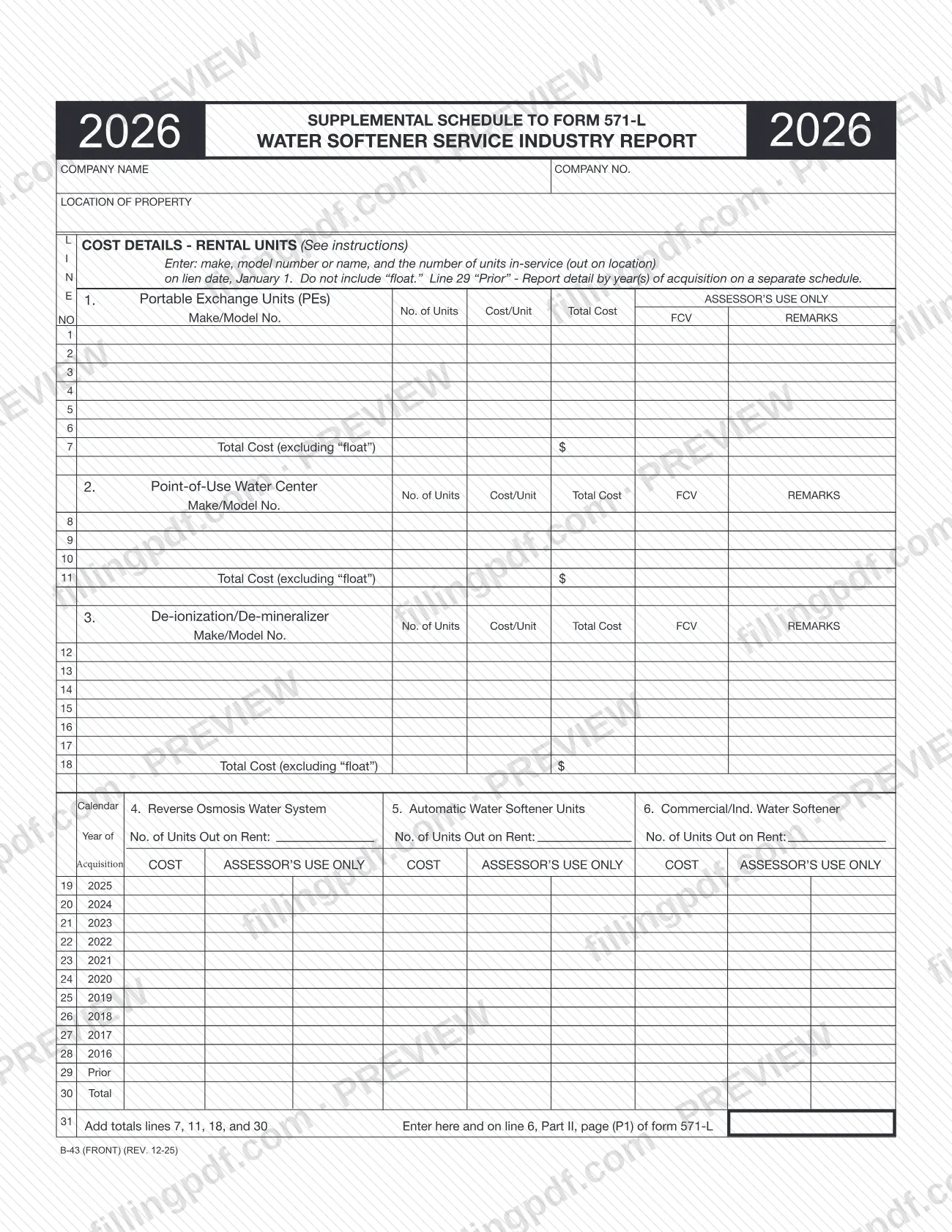
The copy reviewed is the 2026 schedule, printed Rev. 12-25. Page one asks for the company name, company number and location of property, then splits the rental units into six categories:
- Categories 1 to 3 (Portable Exchange Units, Point-of-Use Water Center, De-ionization/De-mineralizer): listed unit by unit on lines 1 to 18, with make or model, number of units, cost per unit and total cost, and totals on lines 7, 11 and 18.
- Categories 4 to 6 (Reverse Osmosis Water System, Automatic Water Softener Units, Commercial/Ind. Water Softener): reported by calendar year of acquisition on lines 19 to 29, with totals on line 30.
Line 31 adds the totals from lines 7, 11, 18 and 30. That sum is entered on line 31 and on line 6, Part II, page (P1) of Form 571-L. The form excludes "float" from every cost.
B-43 is not a stand-alone return. It supplements Form 571-L, and it covers only rental units. The Assessor also publishes other industry schedules to Form 571-L, such as B-41 for the cable television industry and B-17 for hotels and motels.
Who needs to file B-43?
Water softener service businesses file Form B-43 when they have rental units out in service on the January 1 lien date. The form's instructions say the schedule is required for reporting those units, and that it is designed for this specific business type.
Conditions and limits printed on the form:
- Attach it to the corresponding Form 571-L. The instructions tell you to read all instructions accompanying Form 571-L before completing it.
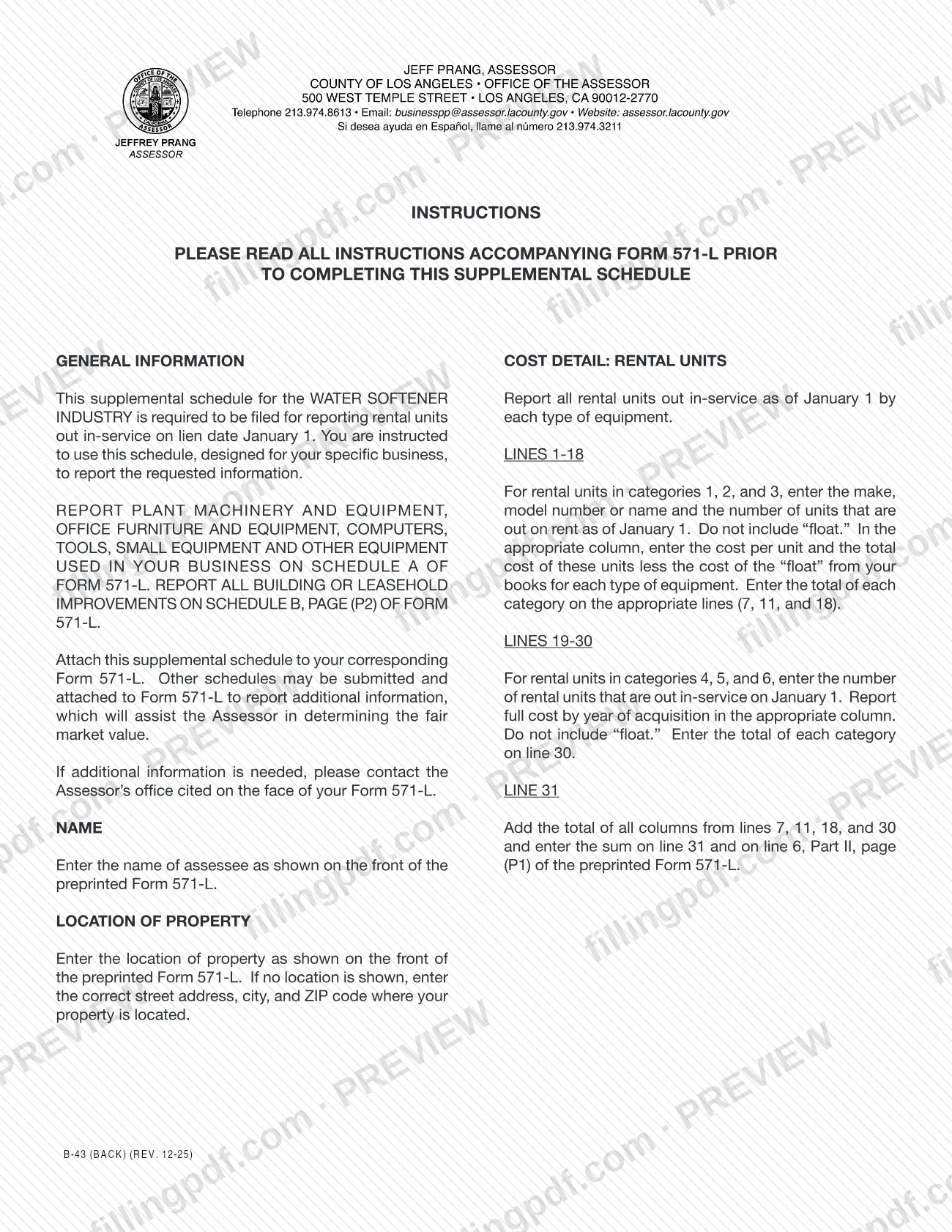
- Report only rental units here. Plant machinery and equipment, office furniture and equipment, computers, tools, small equipment and other equipment used in the business go on Schedule A of Form 571-L. Building or leasehold improvements go on Schedule B, page (P2) of Form 571-L.
- Do not include "float" in the units or costs reported.
The assessee named on the preprinted Form 571-L is the name entered on this schedule. The form does not describe who may sign for a business or file as a representative; if you need more information, the instructions say to contact the Assessor's office cited on the face of your Form 571-L.
When to file B-43
The triggering event is the January 1 lien date: the schedule reports rental units that are out in service on that date. Form B-43 has no separate due date printed on it, because it is attached to your Form 571-L and goes in with it. The 2026 schedule is labeled for 2026, and its cost-by-year grid on lines 19 to 29 runs from 2025 back to 2016, with a line 29 "Prior" row for older acquisitions. For the filing deadline that applies to Form 571-L, check the instructions that come with that form or contact the Assessor's office cited on its face.
Documents you need
- Form 571-L, the business property statement, to which Form B-43 is attached; the schedule must go in with the corresponding Form 571-L.
- A separate schedule with detail by year of acquisition for line 29 "Prior", used when you report rental units acquired before the years printed on lines 19 to 28.
How to fill out B-43
Enter company name and number
At the top, enter the assessee name exactly as shown on the front of the preprinted Form 571-L, and your company number.
Enter the location of property
Copy the location of property from the front of Form 571-L. If none is shown there, enter the correct street address, city and ZIP code where your property is located.
Report Portable Exchange Units
On lines 1 to 6, enter the make/model number or name, number of units out on rent as of January 1, cost per unit and total cost, without "float." Enter the category total on line 7.
Report Point-of-Use Water Centers
On lines 8 to 10, enter make/model, number of units, cost per unit and total cost for units in service on January 1. Enter the category total on line 11.
Report De-ionization/De-mineralizer units
On lines 12 to 17, list make/model, number of units, cost per unit and total cost. Enter the category total on line 18.
Report categories 4, 5 and 6 by year
On lines 19 to 29, enter the number of units out on rent and the full cost by calendar year of acquisition, in the column for Reverse Osmosis Water System, Automatic Water Softener Units or Commercial/Ind. Water Softener. Put detail for line 29 "Prior" on a separate schedule.
Total each column on line 30
Enter the total of each of categories 4, 5 and 6 on line 30, excluding "float."
Add the totals on line 31
Add the totals from lines 7, 11, 18 and 30 and enter the sum on line 31 and on line 6, Part II, page (P1) of Form 571-L.
Review and download the completed PDF
Check that every category is reported as of January 1 and that no "float" is included. Download or print the completed PDF from FillingPDF and attach it to Form 571-L.
How to submit B-43
Form B-43 has no separate channel of its own: you attach it to your corresponding Form 571-L and submit the two together.
- With Form 571-L: attach the completed schedule to the preprinted Form 571-L and send it the way that form directs. The schedule prints no mailing address, portal or appointment rule.
- Additional schedules: the instructions allow other schedules to be attached to Form 571-L to give the Assessor more information on fair market value. Line 29 "Prior" detail by year of acquisition goes on a separate schedule.
- Questions: contact the Assessor's office cited on the face of your Form 571-L.
Carry the line 31 total to line 6, Part II, page (P1) of Form 571-L before you assemble the package. The Los Angeles County Office of the Assessor lists this schedule with its other forms at https://assessor.lacounty.gov/forms. FillingPDF lets you fill out and download the PDF; submission follows the channels above.
Common mistakes to avoid
- Including "float" in the number of units or in the costs on lines 1 to 30; the form says not to include it.
- Submitting Form B-43 without attaching it to the corresponding Form 571-L.
- Listing plant machinery, office furniture, computers, tools or other business equipment here instead of on Schedule A of Form 571-L.
- Reporting building or leasehold improvements on this schedule instead of Schedule B, page (P2) of Form 571-L.
- Putting the line 29 "Prior" detail on the form itself rather than on a separate schedule by year of acquisition.
- Entering a name other than the assessee name shown on the front of the preprinted Form 571-L.
- Leaving out the line 31 sum on line 6, Part II, page (P1) of Form 571-L after adding lines 7, 11, 18 and 30.
- Counting units that were not out in service on January 1 in categories 1 to 6.
Frequently asked questions
What is Form B-43 used for?
Form B-43 is the Los Angeles County Office of the Assessor's supplemental schedule to Form 571-L for the water softener service industry. It reports rental units that are out in service on the January 1 lien date, with their costs.
Do I file Form B-43 by itself?
No. The instructions say to attach this schedule to your corresponding Form 571-L. It prints no separate address or due date, so it is submitted with that form.
What does "float" mean on Form B-43?
The form tells you not to include "float" in the units or costs. For lines 1 to 18 you report the cost of units less the cost of float from your books, and you leave float out of lines 19 to 30 as well.
Where does the line 31 total go?
Add the totals from lines 7, 11, 18 and 30. Enter the sum on line 31 of Form B-43 and also on line 6, Part II, page (P1) of the preprinted Form 571-L.
Where do I report my other business equipment?
Not on Form B-43. Plant machinery and equipment, office furniture and equipment, computers, tools, small equipment and other equipment go on Schedule A of Form 571-L. Building or leasehold improvements go on Schedule B, page (P2).
How do I report older rental units on line 29 "Prior"?
Report the detail by year or years of acquisition on a separate schedule. The instructions allow other schedules to be attached to Form 571-L to give the Assessor additional information.
Can I fill out Form B-43 online?
You can fill out the PDF online on FillingPDF and download or print it. FillingPDF is an independent service and does not file the schedule with the Assessor; you submit it with Form 571-L through the Assessor's channels.
Who do I contact with questions about Form B-43?
Contact the Assessor's office cited on the face of your Form 571-L. The instructions for this schedule direct you there if you need additional information.
Ready to fill out B-43?
Fill out B-43 now