
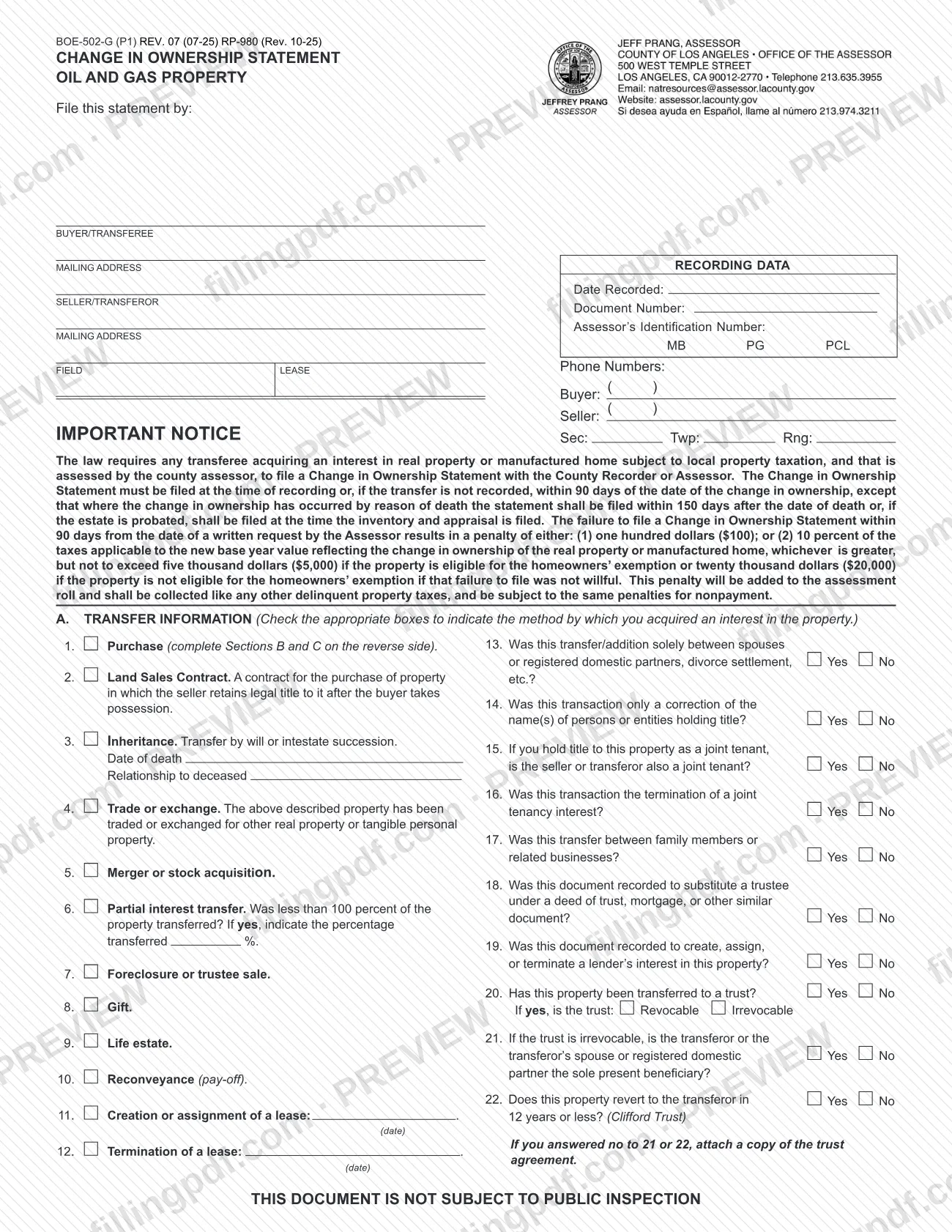
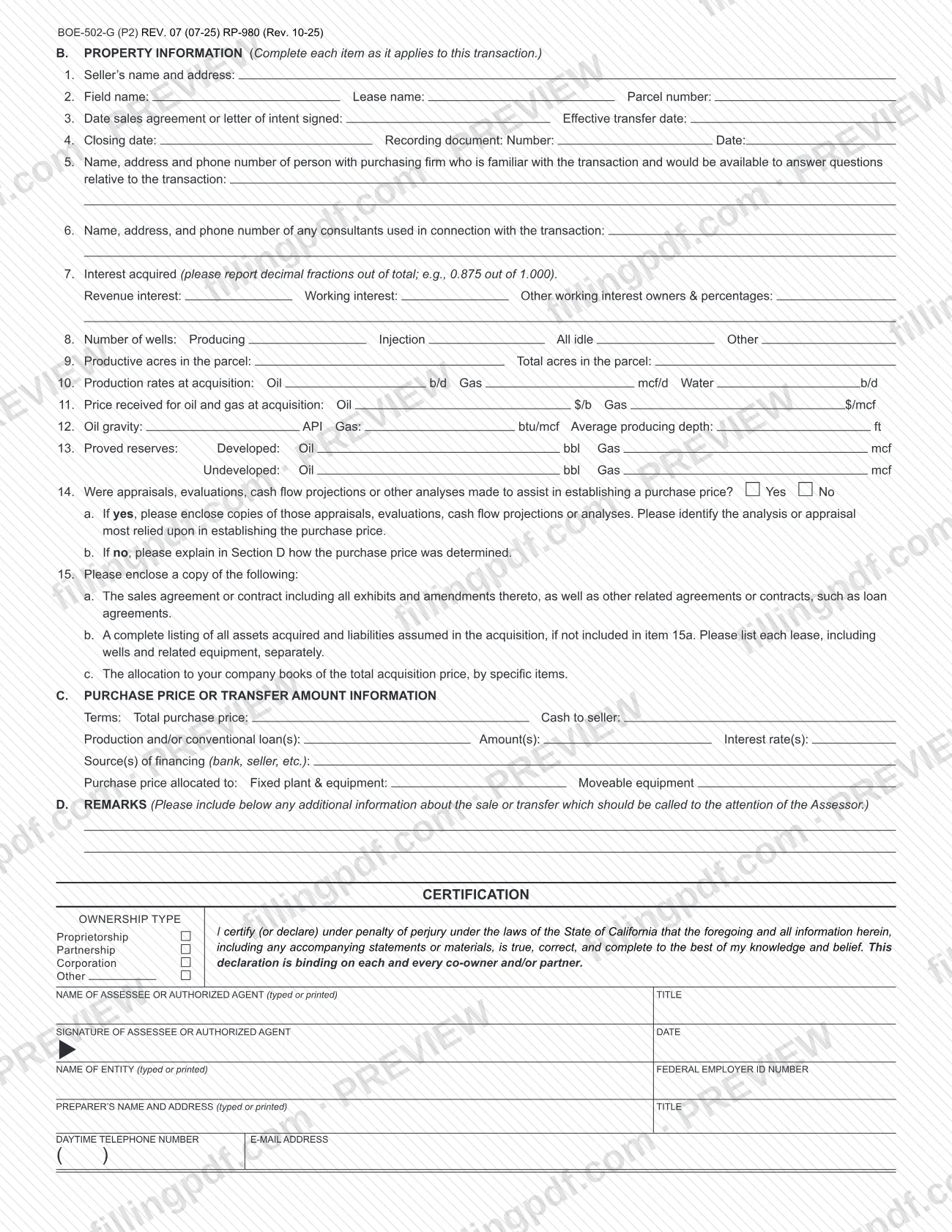
Form BOE-502-G, Change in Ownership Statement Oil and Gas Property, is the statement a buyer or transferee files when acquiring an interest in oil and gas property, and it is one of the Los Angeles County property tax forms published by the Los Angeles County Office of the Assessor. It reports how the interest was acquired, the wells, production and reserves involved, and the purchase price, and it ends with a certification under penalty of perjury. On this page you can fill out the form online on FillingPDF and download or print the completed PDF; the original form is published by the Assessor.
Last updated
What is BOE-502-G?
Change in Ownership Statement Oil and Gas Property (Form BOE-502-G) is the statement a buyer or transferee files to report the acquisition of an interest in oil and gas property, with transfer, property and price details.
The form has four parts. Section A records the method by which the interest was acquired (purchase, land sales contract, inheritance, trade or exchange, merger or stock acquisition, partial interest transfer, foreclosure or trustee sale, gift, life estate, reconveyance, or creation or termination of a lease) and answers yes/no questions about the type of transfer. Section B collects property information specific to oil and gas: field and lease name, interest acquired, number of wells, acreage, production rates, prices, oil gravity, proved reserves and whether appraisals or cash flow analyses were used. Section C covers the purchase price and its financing. Section D is for remarks to the Assessor.
The form states that the law requires any transferee acquiring an interest in real property or a manufactured home that is subject to local property taxation and assessed by the county assessor to file a Change in Ownership Statement with the County Recorder or Assessor. The form is marked "This document is not subject to public inspection."
The Assessor's forms page lists other change-of-ownership forms separately, including BOE-502-A (Preliminary Change of Ownership Report), BOE-502-AH (Change of Ownership Statement) and BOE-502-D (Change in Ownership Statement Death of Real Property Owner). BOE-502-G is the version built for oil and gas property.
Who needs to file BOE-502-G?
The transferee, meaning the buyer or other person who acquires an interest in oil and gas property that is subject to local property taxation and assessed by the county assessor, files Form BOE-502-G. The form lists the ways the interest may have been acquired, so it applies to purchases, land sales contracts, inheritances, trades or exchanges, mergers or stock acquisitions, partial interest transfers, foreclosures or trustee sales, gifts, life estates, reconveyances, and the creation, assignment or termination of a lease.
The form is signed by the assessee or an authorized agent, who gives a title and, for a business, the name of the entity and its Federal Employer ID Number. The ownership type is marked as proprietorship, partnership, corporation or other. The certification states that it is binding on each and every co-owner and/or partner.
If the transfer was inherited, Section A, item 3 asks for the date of death and the relationship to the deceased. A separate Assessor form, BOE-502-D, covers the death of a real property owner.
When to file BOE-502-G
File the statement at the time the transfer document is recorded. If the transfer is not recorded, file it within 90 days of the date of the change in ownership.
Where the change in ownership occurred by reason of death, the form requires filing within 150 days after the date of death or, if the estate is probated, at the time the inventory and appraisal is filed.
The form also warns of a penalty. If you do not file within 90 days of a written request from the Assessor, a penalty applies: the greater of a fixed amount or a percentage of the taxes on the new base year value, up to a cap that is higher when the property is not eligible for the homeowners' exemption. The penalty applies when the failure to file was not willful. It is added to the assessment roll and collected like other delinquent property taxes.
Documents you need
- Copies of the appraisals, evaluations, cash flow projections or other analyses made to help set the purchase price, if you answered Yes to Section B, item 14. Identify the one most relied upon.
- A copy of the sales agreement or contract, including all exhibits and amendments, and related agreements or contracts such as loan agreements (Section B, item 15a).
- A complete listing of all assets acquired and liabilities assumed, with each lease, wells and related equipment listed separately, if not already included in the item 15a documents (item 15b).
- The allocation to your company books of the total acquisition price, by specific items (item 15c).
- A copy of the trust agreement, if you answered No to Section A question 21 or 22 about an irrevocable trust or a trust that reverts to the transferor in 12 years or less.
How to fill out BOE-502-G
Enter buyer, seller and recording data
At the top, enter the buyer/transferee and seller/transferor names and mailing addresses, the recording data (date recorded and document number), the Assessor's Identification Number, MB PG PCL, field lease, Sec/Twp/Rng and the buyer and seller phone numbers.
Select how you acquired the interest
In Section A, check the box that matches the transfer, items 1 to 12. For inheritance enter the date of death and relationship to the deceased; for a partial interest enter the percentage transferred; for a lease enter the date.
Answer the transfer questions
Answer Yes or No to questions 13 to 22 in Section A, including whether the transfer was between spouses or registered domestic partners, a name correction, between family members or related businesses, or to a trust. For a trust, mark Revocable or Irrevocable.
Describe the property and dates
In Section B, items 1 to 4, enter the seller's name and address, field name, lease name, parcel number, the dates of the sales agreement or letter of intent, effective transfer date and closing date, and the recording document number and date.
List contacts and consultants
Items 5 and 6: give the name, address and phone number of the person at the purchasing firm familiar with the transaction and of any consultants used.
Report interest, wells and acreage
Item 7: enter revenue and working interest as decimal fractions of the total, such as 0.875 out of 1.000, and other working interest owners and percentages. Items 8 and 9: enter the number of wells by type and the productive and total acres.
Enter production, price and reserves
Items 10 to 13: enter production rates, prices received, oil gravity, gas btu/mcf, average producing depth, and developed and undeveloped proved reserves of oil and gas.
Answer appraisal and attachment questions
Item 14: mark Yes or No for appraisals or analyses. If No, explain in Section D how the price was determined. Item 15: prepare copies of the agreements, asset and liability listing and price allocation.
Complete purchase price information
Section C: enter the terms, total purchase price, cash to seller, loans with amounts and interest rates, sources of financing, and the price allocated to fixed plant and equipment and to moveable equipment.
Add remarks and certify
Use Section D for anything the Assessor should know. In the certification, mark the ownership type, type or print the assessee or agent name and title, sign and date, and add the entity name, Federal Employer ID Number, preparer, daytime telephone and e-mail.
Review and download the completed PDF
Check every section and the attachments, then download or print the completed PDF from FillingPDF and file it as described under How to submit.
How to submit BOE-502-G
The form is filed with the County Recorder or the Assessor. The form names no mailing address or portal of its own.
- With the County Recorder: file it at the time the transfer document is recorded.
- With the Assessor: file it directly when the transfer is not recorded, within 90 days of the change in ownership. The Los Angeles County Office of the Assessor lists the form at https://assessor.lacounty.gov/forms.
Sign the certification and enclose the copies the form requests (see the required documents). The form is not subject to public inspection. Use the Assessor's forms page for current contact and delivery details.
FillingPDF lets you fill out and download the PDF; submission follows the channels above.
Common mistakes to avoid
- Filing after the transfer is recorded when it was recorded: the form says to file at the time of recording, or within 90 days of the change in ownership if the transfer is not recorded.
- Missing the 150-day or inventory-and-appraisal timing when the change in ownership happened by reason of death.
- Not answering the Assessor's written request within 90 days, which triggers the penalty the form describes.
- Answering No to Section B, item 14 without explaining in Section D how the purchase price was determined.
- Reporting interests as percentages instead of decimal fractions of the total, such as 0.875 out of 1.000, in item 7.
- Leaving out the sales agreement, asset and liability listing or price allocation requested in item 15.
- Answering No to question 21 or 22 on a trust transfer without attaching a copy of the trust agreement.
- Submitting the form without the signature and date of the assessee or authorized agent.
Frequently asked questions
What is Form BOE-502-G used for?
Form BOE-502-G, Change in Ownership Statement Oil and Gas Property, reports to the assessor a transfer of an interest in oil and gas property. It collects the type of transfer, property data such as wells, production and reserves, and purchase price information.
Who has to file the BOE-502-G?
The transferee, meaning the person acquiring an interest in real property subject to local property taxation and assessed by the county assessor. The form is signed by the assessee or an authorized agent under penalty of perjury.
What is the deadline for the BOE-502-G?
File it when the transfer document is recorded or, if the transfer is not recorded, within 90 days of the change in ownership. If the change occurred by reason of death, file within 150 days after death, or when the inventory and appraisal is filed if the estate is probated.
Where do I file the BOE-502-G?
Files go to the County Recorder or the Assessor. The form prints no address of its own; for Los Angeles County, the Office of the Assessor lists the form at assessor.lacounty.gov/forms, where you can find current contact details.
What do I attach to the BOE-502-G?
Enclose the sales agreement with exhibits and amendments, a listing of assets acquired and liabilities assumed, and the allocation of the acquisition price (item 15). Add appraisals or analyses if you answered Yes to item 14, and the trust agreement if required.
What is the penalty for not filing the BOE-502-G?
If you do not file within 90 days of the Assessor's written request, the form says a penalty applies: the greater of a fixed amount or a percentage of taxes on the new base year value, capped. It is collected like delinquent property taxes.
Is the BOE-502-G a public document?
No. The form is marked "This document is not subject to public inspection."
Can I fill out Form BOE-502-G online on FillingPDF?
Yes. You can fill out the PDF online on FillingPDF and download or print it. FillingPDF is an independent service and does not file the form; you submit it to the County Recorder or Assessor.
Ready to fill out BOE-502-G?
Fill out BOE-502-G now