
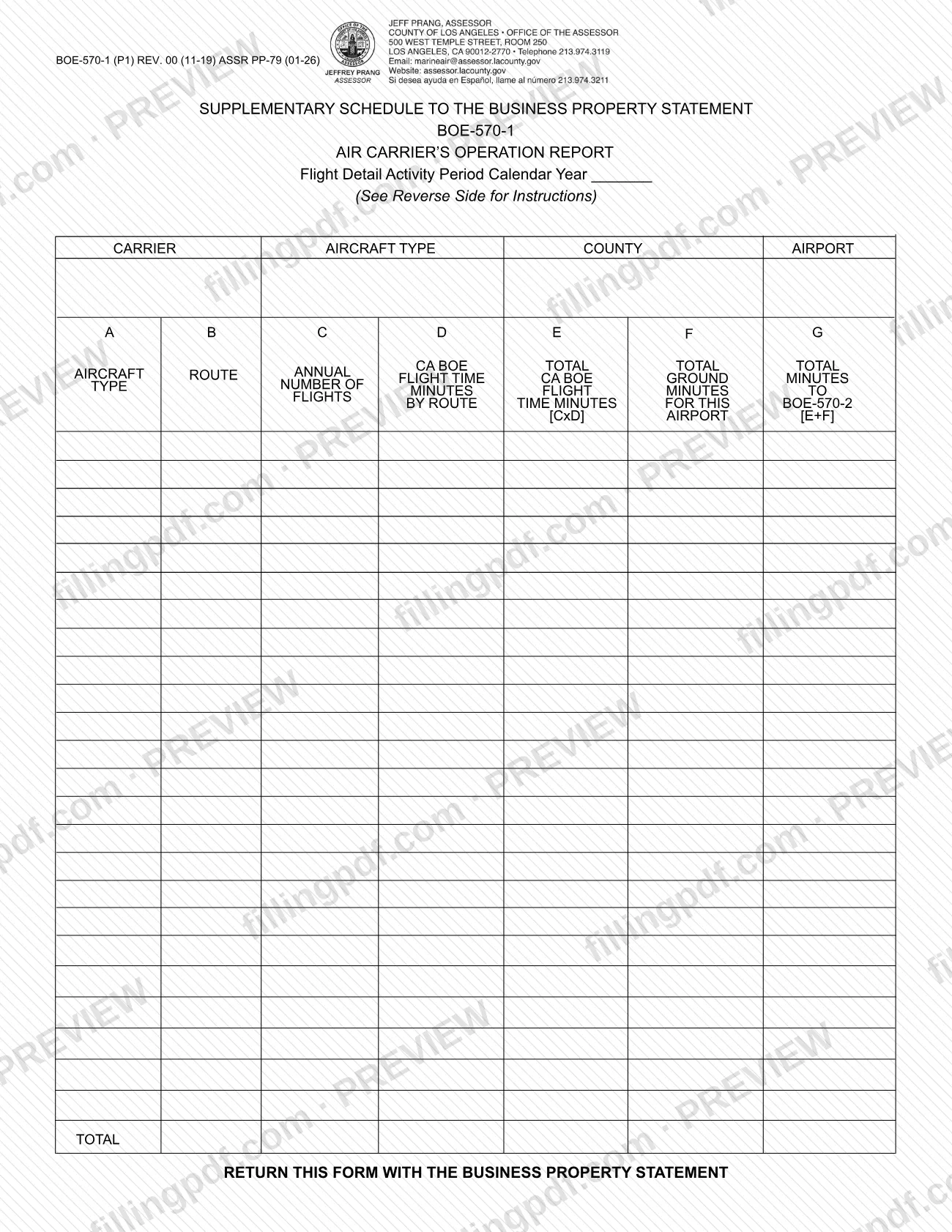
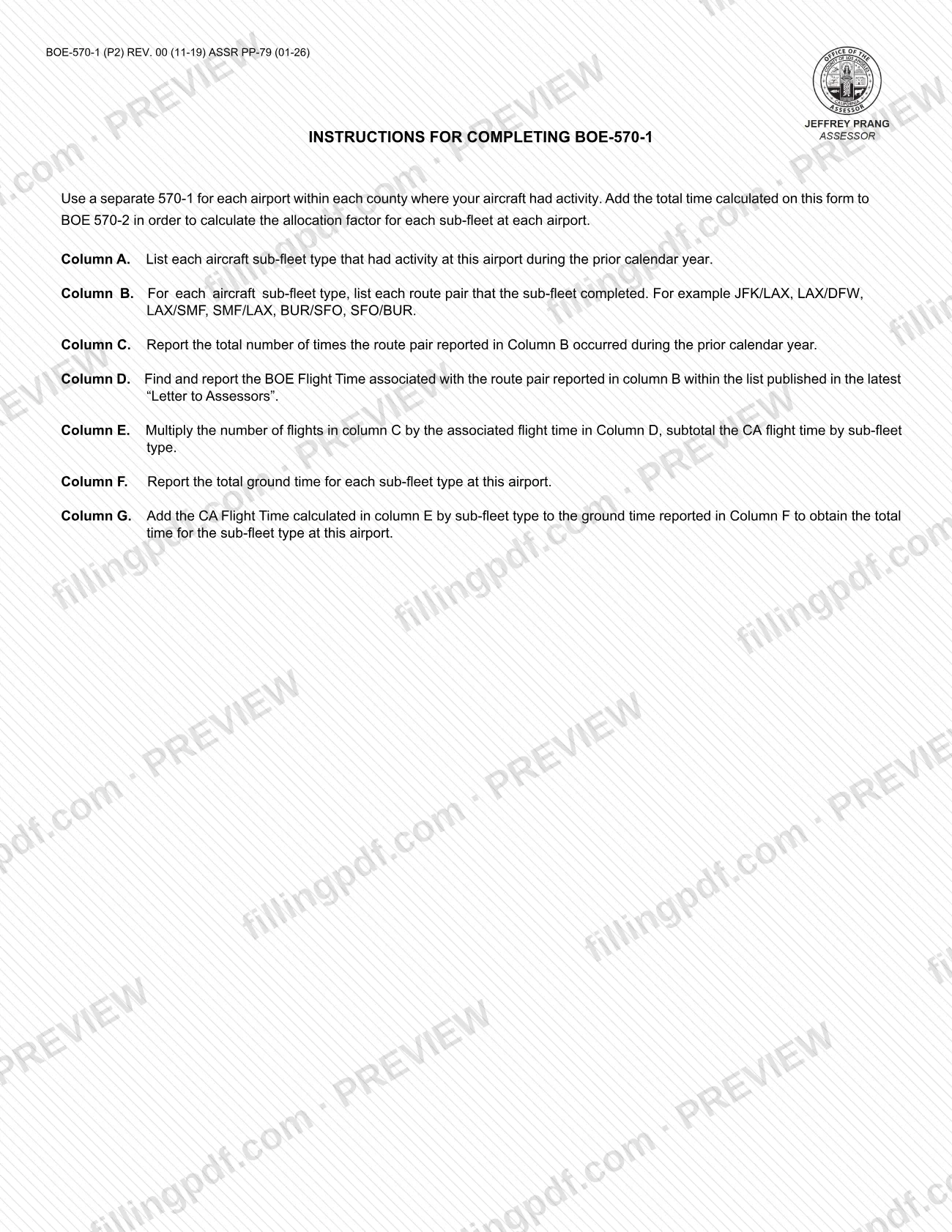
Form BOE-570-1, Supplementary Schedule to Form 571-L - Air Carriers Operation Report, is the flight-detail schedule that an air carrier returns with its Business Property Statement to the Los Angeles County Office of the Assessor. It is one of the Los Angeles County property tax forms for air carriers: it lists each aircraft sub-fleet type and route pair at one airport for one calendar year, and its totals feed Form BOE 570-2. On this page you can fill out the form online on FillingPDF and download or print the completed PDF; the Assessor publishes the original PDF on its forms page.
Last updated
What is BOE-570-1?
Form BOE-570-1, Supplementary Schedule to Form 571-L - Air Carriers Operation Report, is the schedule on which an air carrier reports flight detail for one airport during a calendar year: aircraft sub-fleet types, route pairs, number of flights, BOE flight time and ground time.
The printed title on the form is "Supplementary Schedule to the Business Property Statement, Air Carrier's Operation Report," and its heading reads "Flight Detail Activity Period Calendar Year." The form is issued through the Los Angeles County Office of the Assessor and is returned with the Business Property Statement.
The schedule has seven columns, A through G. They run from aircraft sub-fleet type and route pair, through the number of flights and the BOE flight time for each route, to the annual California BOE flight time in minutes, the total ground minutes, and the total minutes for the airport. A TOTAL line closes the table.
The result is not a standalone figure. The instructions say to add the total time calculated on this form to Form BOE 570-2 in order to calculate the allocation factor for each sub-fleet at each airport.
The Assessor's forms page lists several related air-carrier schedules, including BOE-570-2 (Flight Equipment Value Computation), BOE-570-3 (Air Carrier's Operation Report), BOE-570-FO-1 (Aircraft Cost) and BOE-570-FO-2 (Aircraft Value Computation), and the Business Property Statement itself as BOE-571-L.
Who needs to file BOE-570-1?
Air carriers whose aircraft had activity at an airport during the prior calendar year use this schedule. The instructions on the form direct you to use a separate BOE-570-1 for each airport within each county where your aircraft had activity.
That means:
- one form per airport, even when the same carrier flew the same sub-fleet at several airports;
- one form per county where you had activity, because the form has its own COUNTY and AIRPORT entries;
- every aircraft sub-fleet type that had activity at that airport listed on the same form, in column A.
The form is a supplementary schedule to the Business Property Statement, so it is completed by the same carrier that files that statement. The form names no separate signer or representative, and it contains no signature block.
When to file BOE-570-1
Form BOE-570-1 is returned with the Business Property Statement, so it is completed whenever you prepare that statement. The bottom of the form says "Return this form with the Business Property Statement," and no separate due date is printed on it.
The schedule reports activity from the prior calendar year: column A asks for sub-fleet types that had activity at the airport during that year, and column C counts the flights in that year. The Activity Period line at the top is where you enter the calendar year.
Have the latest "Letter to Assessors" at hand before you start, because column D takes its BOE flight times from the list published there. For the due date of the Business Property Statement itself, check the Los Angeles County Office of the Assessor's forms page at https://assessor.lacounty.gov/forms.
Documents you need
- The Business Property Statement (listed by the Assessor as BOE-571-L): the form says to return BOE-570-1 together with it.
- The latest "Letter to Assessors": the list published there gives the BOE flight time for each route pair entered in column D. Use it as your reference; the form does not say to attach it.
- Form BOE 570-2: the total time calculated on BOE-570-1 is added there to compute the allocation factor for each sub-fleet at each airport.
How to fill out BOE-570-1
Enter carrier, county and airport
At the top, fill in the carrier, the county and the airport the form covers. Use a separate form for each airport in each county where your aircraft had activity.
Enter the activity calendar year
On the Flight Detail Activity Period line, enter the calendar year being reported. The instructions refer to the prior calendar year.
List sub-fleet types in Column A
Enter each aircraft sub-fleet type that had activity at this airport during the prior calendar year.
List route pairs in Column B
For each sub-fleet type, list every route pair it completed, such as JFK/LAX, LAX/DFW, LAX/SMF, SMF/LAX, BUR/SFO or SFO/BUR.
Report annual flights in Column C
For each route pair in Column B, enter the total number of times it occurred during the prior calendar year.
Look up BOE flight time in Column D
Find the BOE Flight Time for the route pair in Column B in the list published in the latest "Letter to Assessors," and enter it.
Calculate CA flight time in Column E
Multiply the flights in Column C by the flight time in Column D (C x D). Subtotal the CA flight time by sub-fleet type.
Enter ground time in Column F
Report the total ground time, in minutes, for each sub-fleet type at this airport.
Total the minutes in Column G
Add the CA flight time from Column E to the ground time from Column F (E+F) to get the total time for the sub-fleet type at this airport.
Complete the TOTAL line
Complete the TOTAL line at the bottom for the columns that carry totals, so the form shows the total minutes for this airport.
Carry the total to BOE 570-2
Add the total time calculated on this form to Form BOE 570-2 so the allocation factor for each sub-fleet at each airport can be calculated. Repeat this form for every other airport and county.
Review and download the completed PDF
Check that each route pair has its flights, flight time and ground time, and that the column totals add up. Download or print the completed PDF from FillingPDF and return it with the Business Property Statement.
How to submit BOE-570-1
There is one route printed on the form: return it together with the Business Property Statement. BOE-570-1 gives no mailing address, portal or appointment rule of its own, so it follows the channels that apply to the Business Property Statement.
- With the Business Property Statement: attach the completed BOE-570-1 to the statement and send them as one package. The Los Angeles County Office of the Assessor lists the statement on its forms page at https://assessor.lacounty.gov/forms as BOE-571-L / ASSR-49.
- One form per airport: if your aircraft had activity at more than one airport, or in more than one county, include a separate BOE-570-1 for each.
- Companion schedule: add the total time calculated on BOE-570-1 to BOE 570-2 before you assemble the package.
FillingPDF lets you fill out and download the PDF; submission follows the channels above.
Common mistakes to avoid
- Using one BOE-570-1 for several airports or counties; the instructions call for a separate form for each airport within each county where your aircraft had activity.
- Reporting activity from a year other than the prior calendar year, or leaving the Calendar Year line in the Activity Period blank.
- Entering a flight time in column D that is not the BOE Flight Time for that route pair in the latest "Letter to Assessors."
- Leaving out column E multiplication: the number of flights in column C must be multiplied by the flight time in column D, then subtotaled by sub-fleet type.
- Omitting ground time in column F, so the column G total (E+F) does not show the total time for the sub-fleet type at this airport.
- Not adding the total time from this form to BOE 570-2, which is how the allocation factor for each sub-fleet at each airport is calculated.
- Sending BOE-570-1 alone instead of returning it with the Business Property Statement.
Frequently asked questions
What is Form BOE-570-1?
Form BOE-570-1 is the Air Carrier's Operation Report, a supplementary schedule to the Business Property Statement. It records, for one airport and one calendar year, each aircraft sub-fleet type, its route pairs, flights, BOE flight time and ground time.
Do I need a separate BOE-570-1 for each airport?
Yes. The instructions on the form say to use a separate BOE-570-1 for each airport within each county where your aircraft had activity. Each form has its own county and airport entries, with all sub-fleet types for that airport listed on it.
Where do I find the flight time for column D?
Column D takes the BOE Flight Time for each route pair from the list published in the latest "Letter to Assessors." The instructions do not give the times on the form itself, so use that list for each route pair you entered in column B.
How do I calculate columns E and G?
Column E is the number of flights in column C multiplied by the flight time in column D, subtotaled by sub-fleet type. Column G is column E plus the ground time in column F, giving the total time for that sub-fleet type at the airport.
What do I do with the totals from BOE-570-1?
Add the total time calculated on BOE-570-1 to Form BOE 570-2. The instructions say that is how the allocation factor for each sub-fleet at each airport is calculated.
Where do I send Form BOE-570-1?
Return it with the Business Property Statement, as printed at the bottom of the form. The form lists no separate address or portal, so it follows the way you submit the statement; the Assessor's forms page is at https://assessor.lacounty.gov/forms.
Can I fill out BOE-570-1 online on FillingPDF?
Yes. You can fill out the PDF online on FillingPDF and download or print it. FillingPDF is an independent service and does not file the form with the Los Angeles County Office of the Assessor; you return it with your Business Property Statement.
Ready to fill out BOE-570-1?
Fill out BOE-570-1 now