
Form BOE-570-2 is a supplementary schedule to the Business Property Statement, titled Flight Equipment Value Computation, published by the Los Angeles County Office of the Assessor. It is one of the Los Angeles County property tax forms for air carriers: it turns the time a carrier's aircraft spend at one airport into an allocation factor, one sheet per airport. On this page you can fill out the form online on FillingPDF and download or print the completed PDF; the official PDF and the Assessor's forms list are published by the county.
Last updated
What is BOE-570-2?
Form BOE-570-2, Supplementary Schedule to Form 571-L - Flight Equipment Value Computation, is the Los Angeles County Office of the Assessor schedule on which an air carrier computes, for each airport, the share of its fleet time allocated to that airport, returned with the Business Property Statement.
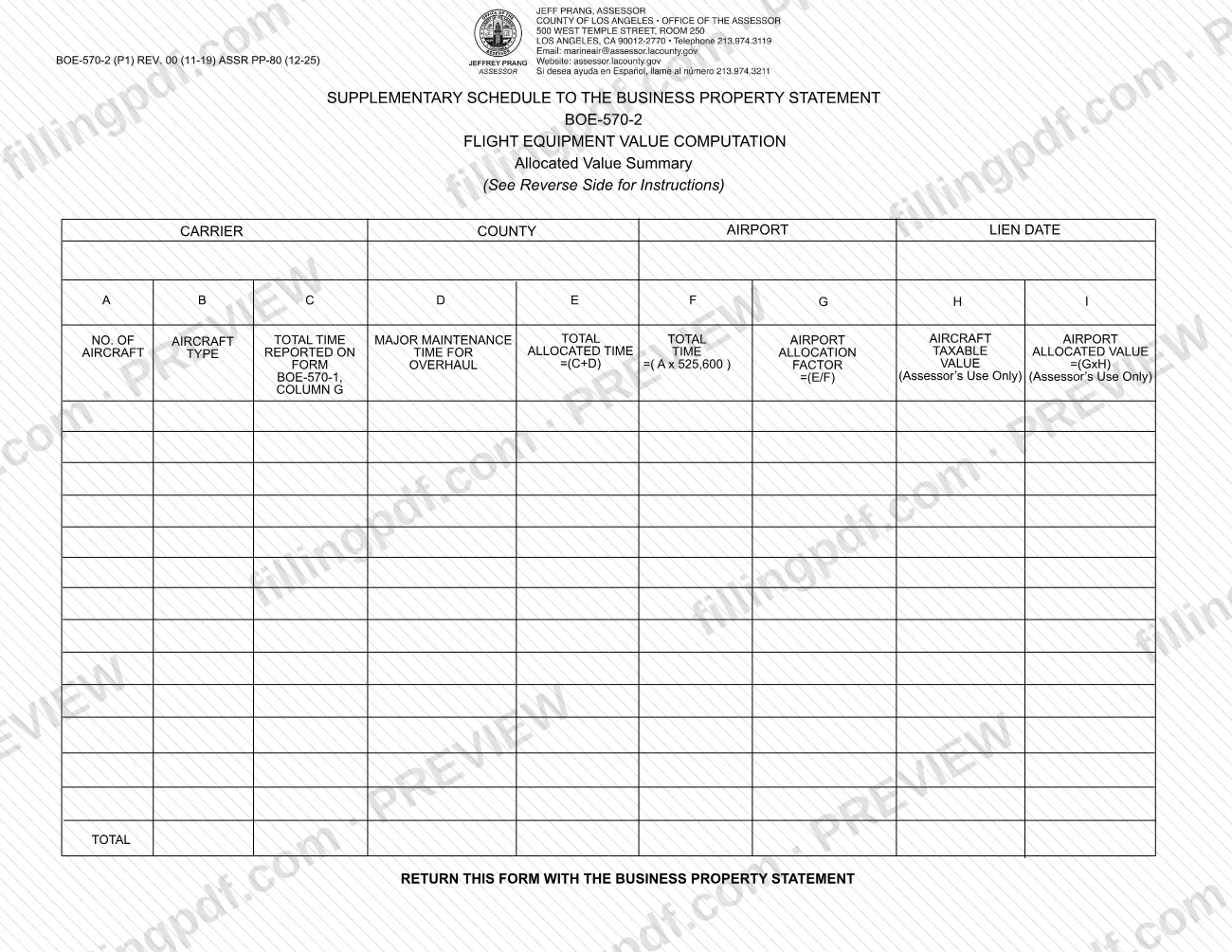
The form is headed "Supplementary Schedule to the Business Property Statement" and "Allocated Value Summary". It has a header for the carrier, county, airport and lien date, followed by a table with columns A through I and a TOTAL line. The carrier enters the number of aircraft in each sub-fleet, the sub-fleet type, the total time allocated to the airport, major maintenance time, and the resulting totals. Total available time is the number of aircraft multiplied by 525,600, the number of minutes in one year, and the airport allocation factor is the airport time divided by that available time.
Two columns are not completed by the carrier. In Column H the Assessor enters the taxable value of the carrier's entire fleet of each aircraft type, and in Column I the Assessor multiplies the total factor in Column G by that value. Both are marked "Assessor's Use Only".
The schedule draws on another supplementary schedule: Column C takes its figure from Column G of form BOE-570-1, which the Assessor lists as the Air Carriers Operation Report. The form is revision REV. 00 (11-19) and carries the reference ASSR PP-80 (12-25).
Who needs to file BOE-570-2?
Air carriers that report flight equipment to the Los Angeles County Assessor with their Business Property Statement use this schedule. The form is headed with a carrier, a county, an airport and a lien date, and its instructions speak of the carrier's fleet and sub-fleet types, so it is aimed at carriers reporting aircraft allocated to airports.
Points the form makes explicit:
- Complete one sheet for each airport. A carrier with time allocated to several airports uses a separate sheet for each.
- The time entered in Column C is the total time allocated to that airport as shown in Column G of form BOE-570-1, so that schedule is completed first.
- The carrier does not fill in Columns H and I. The Assessor determines the taxable value of each aircraft type and does the final multiplication.
The form does not name who may sign or act for the carrier, and it contains no signature block.
When to file BOE-570-2
The form is returned with the Business Property Statement, so it is submitted whenever that statement is submitted; no separate due date is printed on it. The instructions tie one entry to a date: Column A is the number of aircraft in each sub-fleet as of the lien date for the reporting year, which is also written in the header of the form. Have the BOE-570-1 figures ready before you start, because Column C copies the total time allocated to the airport from Column G of that form. For the filing deadline of the Business Property Statement itself, check the Los Angeles County Office of the Assessor, which lists its forms at https://assessor.lacounty.gov/forms.
Documents you need
- Form BOE-570-1: the total time allocated to the airport shown in its Column G is the figure you enter in Column C of this form.
- The Business Property Statement (Form 571-L): this schedule is returned with it and is not filed alone.
- Records of the number of aircraft in each sub-fleet as of the lien date for the reporting year, needed for Column A.
- Records of major maintenance time by sub-fleet type, only for maintenance that required the aircraft to be taken out of revenue service, needed for Column D.
How to fill out BOE-570-2
Complete the header
Enter the carrier, the county, the airport and the lien date at the top of the form. Use a separate sheet for each airport.
Enter aircraft counts in Column A
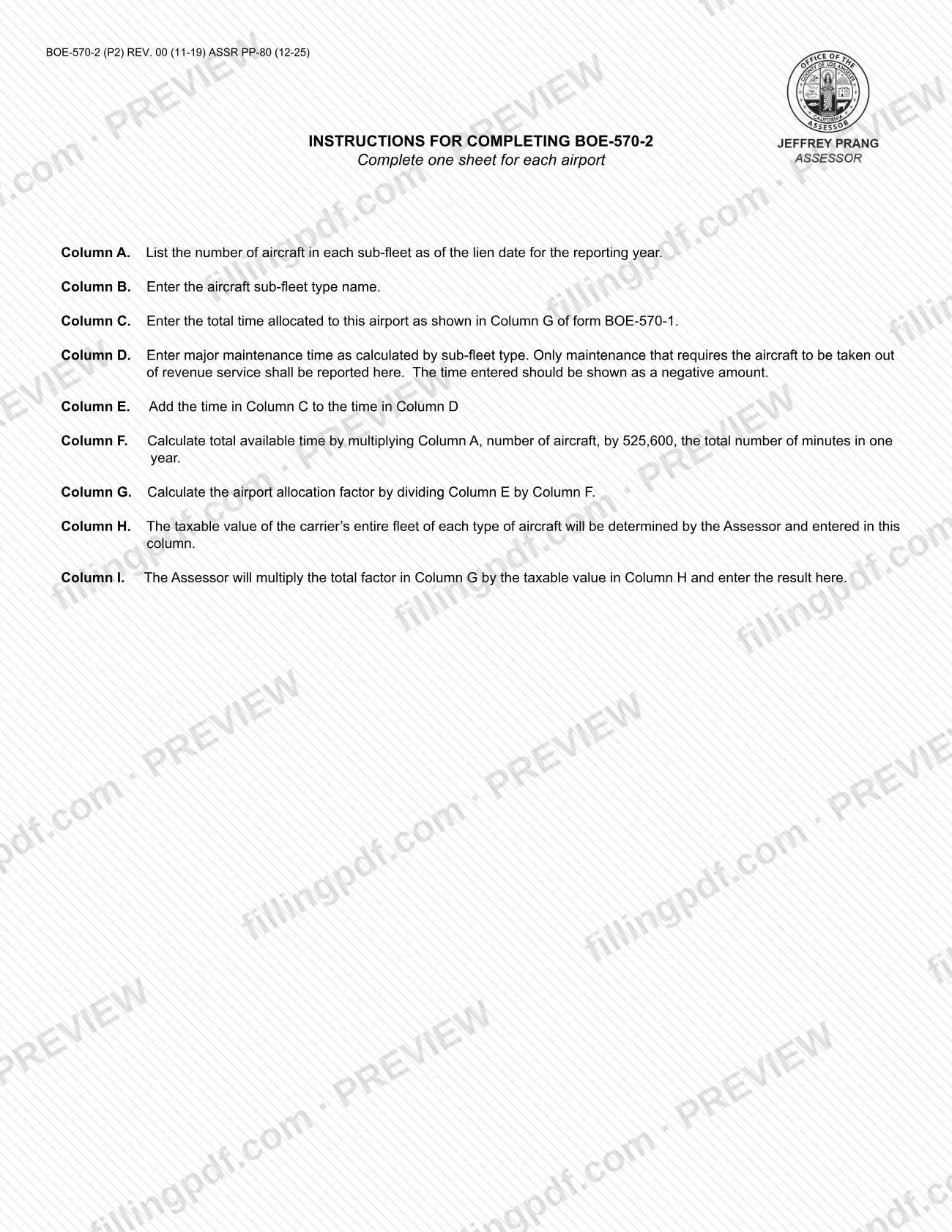
List the number of aircraft in each sub-fleet as of the lien date for the reporting year, one row per sub-fleet.
Name the sub-fleet type in Column B
Enter the aircraft sub-fleet type name on the same row as its count in Column A.
Carry time over to Column C
Enter the total time allocated to this airport as shown in Column G of form BOE-570-1.
Report maintenance in Column D
Enter major maintenance time by sub-fleet type, only for maintenance that takes the aircraft out of revenue service. Show it as a negative amount.
Add Columns C and D in Column E
Column E is total time, equal to the time in Column C plus the time in Column D.
Compute available time in Column F
Multiply the number of aircraft in Column A by 525,600, the total number of minutes in one year.
Compute the factor in Column G
Divide Column E by Column F to get the airport allocation factor for each sub-fleet row.
Leave Columns H and I blank
The Assessor enters the taxable value of each aircraft type in Column H and the result of multiplying Column G by Column H in Column I.
Review and download the PDF
Check each row, the negative sign in Column D and the one-sheet-per-airport rule, then download or print the completed PDF from FillingPDF to return with the Business Property Statement.
How to submit BOE-570-2
The form gives one instruction: Return this form with the Business Property Statement. It prints no separate mailing address, portal or appointment rule.
- With the Business Property Statement: attach each completed BOE-570-2 sheet, one per airport, to the Business Property Statement (Form 571-L) and send the package the way you submit that statement to the Los Angeles County Office of the Assessor.
- Forms list: the Assessor publishes this schedule, Form BOE-570-1 and the Business Property Statement (BOE-571-L) at https://assessor.lacounty.gov/forms.
Leave Columns H and I blank: they are for the Assessor's use only. FillingPDF lets you fill out and download the PDF; submission follows the Assessor's channels for the Business Property Statement.
Common mistakes to avoid
- Combining several airports on one sheet; the instructions say to complete one sheet for each airport.
- Entering major maintenance time in Column D as a positive number; the instructions say it must be shown as a negative amount.
- Including maintenance that did not take the aircraft out of revenue service; only that kind of maintenance is reported in Column D.
- Counting aircraft as of a date other than the lien date for the reporting year in Column A.
- Entering a figure in Column C that does not match Column G of form BOE-570-1 for the same airport.
- Multiplying the number of aircraft by something other than 525,600, the minutes in one year, when computing Column F.
- Filling in Columns H or I, which the Assessor completes.
- Sending this schedule on its own instead of returning it with the Business Property Statement.
Frequently asked questions
What is Form BOE-570-2 used for?
Form BOE-570-2 is the Flight Equipment Value Computation, a supplementary schedule to the Business Property Statement. An air carrier uses it to compute, for one airport, the allocation factor that the Assessor then applies to the taxable value of each aircraft type.
Do I need a separate BOE-570-2 for each airport?
Yes. The instructions say to complete one sheet for each airport. Each sheet takes its Column C time from Column G of form BOE-570-1 for that airport.
How do I calculate Column F on Form BOE-570-2?
Multiply Column A, the number of aircraft, by 525,600, the total number of minutes in one year. The result is the total available time for that sub-fleet, which you divide into Column E to get the Column G factor.
Should maintenance time be positive or negative in Column D?
Negative. The instructions say the time entered for major maintenance should be shown as a negative amount, and only maintenance that requires the aircraft to be taken out of revenue service is reported there.
Do I fill in Columns H and I?
No. Both are marked for the Assessor's use only. The Assessor determines the taxable value of each aircraft type for Column H and multiplies it by the Column G factor to produce Column I.
Where do I send Form BOE-570-2?
Return it with the Business Property Statement; the form says so and prints no separate address. The Los Angeles County Office of the Assessor lists its forms at https://assessor.lacounty.gov/forms.
Can I fill out BOE-570-2 online on FillingPDF?
Yes. You can fill out the PDF online on FillingPDF and download or print it. FillingPDF is independent of the Los Angeles County Office of the Assessor and does not file the form; you return it with the Business Property Statement.
Ready to fill out BOE-570-2?
Fill out BOE-570-2 now