
Form BOE-570-3, Supplementary Schedule to Form 571-L - Air Carrier's Operation Report, is a schedule published by the Los Angeles County Office of the Assessor for the aircraft value computations of an air carrier. It is one of the Los Angeles County property tax forms that travels with the Business Property Statement: the form says to return it with that statement. On this page you can fill out the form online on FillingPDF and download or print the completed PDF; the original is published by the Assessor.
Last updated
What is BOE-570-3?
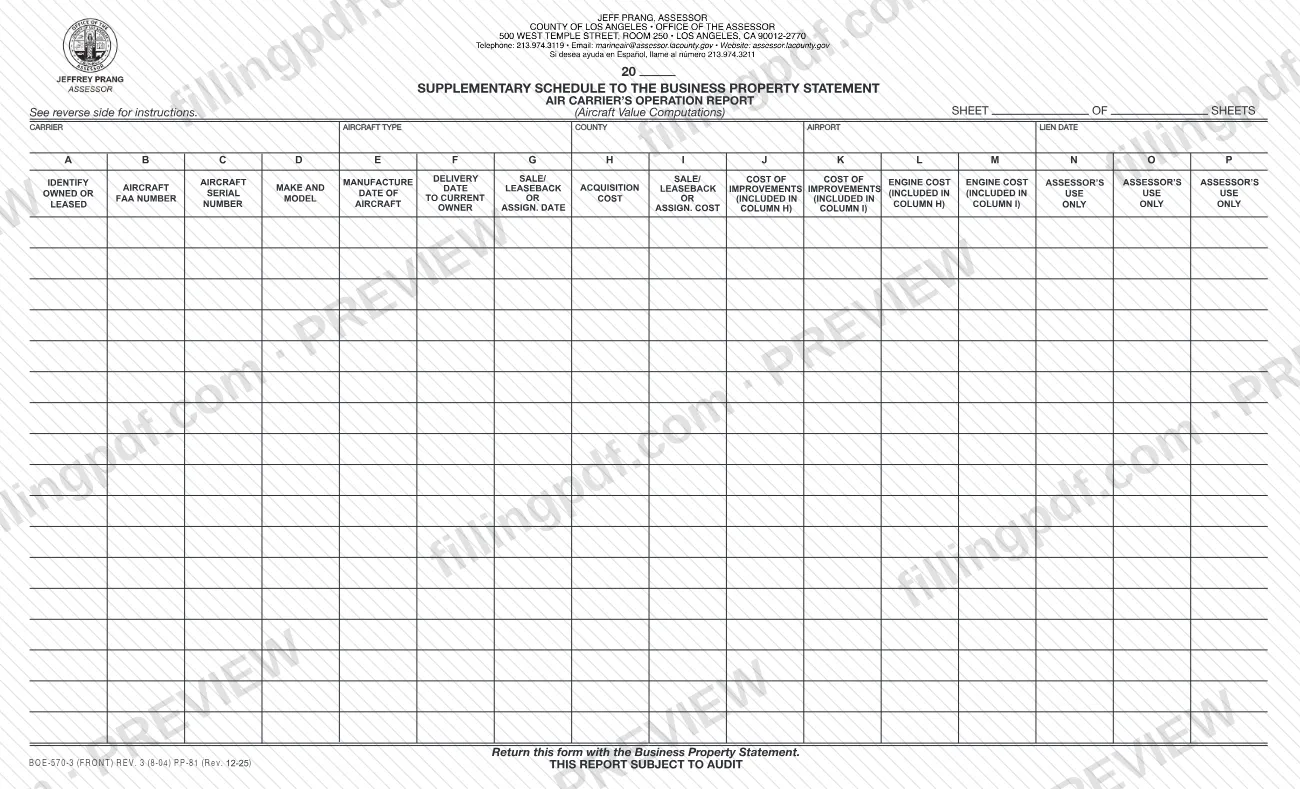
Form BOE-570-3, Supplementary Schedule to Form 571-L - Air Carrier's Operation Report, is the schedule on which an air carrier lists each aircraft's ownership or lease type, identifying numbers, key dates and costs, so that aircraft values can be computed for the Business Property Statement.
The printed title reads "Supplementary Schedule to the Business Property Statement, Air Carrier's Operation Report (Aircraft Value Computations)." Its back side gives the instructions. You use a separate sheet for each aircraft type, as described in California Code of Regulations, Title 18, section 202, and you enter the name of the carrier, the county in which the airport is located, the airport name, the number of sheets and the lien date.
Each aircraft gets one row. Columns A through M are completed by the carrier: ownership code, FAA number, serial number, make and model, manufacture, delivery and sale/leaseback or assignment dates, the taxpayer's cost or the sale/leaseback cost, and the improvement and engine costs segregated from each. Columns N, O and P are for the Assessor's use only. The form carries the note that the report is subject to audit.
The Los Angeles County Office of the Assessor lists several related aircraft schedules on its forms page, each with its own name: BOE-570-1, BOE-570-2, BOE-570-FO-1 and BOE-570-FO-2. BOE-570-3 is the one titled Air Carrier's Operation Report.
Who needs to file BOE-570-3?
Air carriers that file a Business Property Statement (Form 571-L) with the Los Angeles County Office of the Assessor and need to report their aircraft on this schedule complete it. The form asks for the carrier's name, the county in which the airport is located and the airport name, and it applies to aircraft that are owned or held under capital leases, operating leases, sale/leasebacks or cross border transactions, the five ownership types coded in Column A.
Use a separate sheet for each aircraft type, and fill the number of sheets in the "Sheet of Sheets" box if you need more than one.
The form is a supplement, not a stand-alone return: it says to return it with the Business Property Statement. Columns N, O and P are reserved for the Assessor, so the carrier leaves them blank. The form does not say who may sign for a carrier or who else may complete it, so refer questions about eligibility to the Assessor's office.
When to file BOE-570-3
Complete Form BOE-570-3 whenever you file the Business Property Statement that it supplements, because the form says to return it with that statement. It prints no due date of its own, so the timing follows the Business Property Statement.
The reporting date you enter on the form is the lien date, which goes at the top of the sheet along with the carrier, county, airport and sheet count. Have the manufacture, delivery and sale/leaseback or assignment dates and the cost records for each aircraft ready before you start. The form is marked as subject to audit.
How to fill out BOE-570-3
Enter carrier, airport and lien date
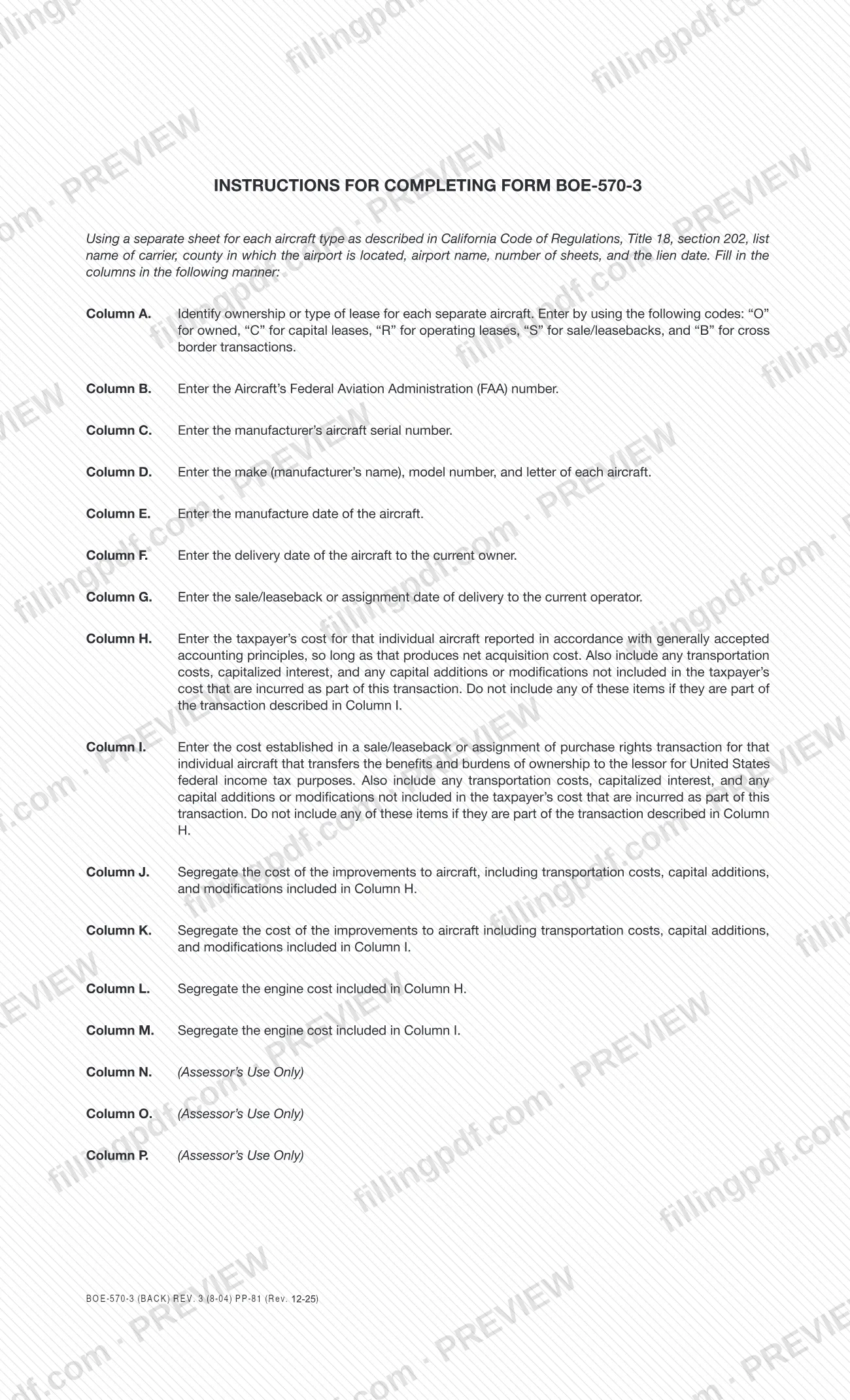
Using a separate sheet for each aircraft type, list the name of the carrier, the county in which the airport is located, the airport name, the number of sheets and the lien date at the top of the form.
Code ownership in Column A
For each aircraft, enter "O" for owned, "C" for capital leases, "R" for operating leases, "S" for sale/leasebacks or "B" for cross border transactions.
Enter FAA and serial numbers
Column B takes the aircraft's Federal Aviation Administration (FAA) number. Column C takes the manufacturer's aircraft serial number.
Identify make, model and letter
In Column D, enter the make (the manufacturer's name), the model number and the letter of each aircraft.
Enter the aircraft's key dates
Column E is the manufacture date. Column F is the delivery date to the current owner. Column G is the sale/leaseback or assignment date of delivery to the current operator.
Report the taxpayer's cost in Column H
Enter the taxpayer's cost for that aircraft under generally accepted accounting principles, so long as that produces net acquisition cost. Add transportation costs, capitalized interest and capital additions or modifications not already included, unless they are part of the Column I transaction.
Report sale/leaseback cost in Column I
Enter the cost established in a sale/leaseback or assignment of purchase rights transaction that transfers the benefits and burdens of ownership to the lessor for U.S. federal income tax purposes, with the same added costs, unless they are part of the Column H transaction.
Segregate improvement costs
Column J: the cost of improvements, including transportation costs, capital additions and modifications, included in Column H. Column K: the same items included in Column I.
Segregate engine costs
Column L is the engine cost included in Column H. Column M is the engine cost included in Column I.
Leave Assessor columns blank
Columns N, O and P are marked Assessor's Use Only. Do not enter anything in them.
Review, download and attach
Check each aircraft row and the sheet count, then download or print the completed PDF from FillingPDF and return it with the Business Property Statement as described under How to submit.
How to submit BOE-570-3
The form names one channel: return it with the Business Property Statement. Details:
- With the Business Property Statement: attach the completed BOE-570-3 sheets, one for each aircraft type, to the Business Property Statement (Form 571-L) and send them together. The form prints no separate address, portal or appointment rule.
- Forms and questions: the Los Angeles County Office of the Assessor publishes its business property forms at https://assessor.lacounty.gov/forms. Contact the Assessor for filing addresses and any fee or deadline tied to the statement.
FillingPDF lets you fill out and download the PDF; submission follows the Assessor's channels for the Business Property Statement.
Common mistakes to avoid
- Listing more than one aircraft type on the same sheet; the instructions call for a separate sheet for each aircraft type.
- Using codes other than "O", "C", "R", "S" or "B" in Column A for owned, capital lease, operating lease, sale/leaseback or cross border transactions.
- Entering the same cost in both Column H and Column I; each excludes items that are part of the transaction described in the other.
- Putting improvement or engine costs in Columns J and L when the aircraft cost sits in Column I; those belong in Columns K and M.
- Writing in Columns N, O or P, which are for the Assessor's use only.
- Leaving out the carrier name, county, airport name, number of sheets or lien date that the instructions ask you to list.
- Submitting the schedule alone instead of returning it with the Business Property Statement.
- Omitting transportation costs, capitalized interest or capital additions that the Column H and I instructions say to include.
Frequently asked questions
What is Form BOE-570-3?
Form BOE-570-3 is the Los Angeles County Assessor's Supplementary Schedule to Form 571-L - Air Carrier's Operation Report. Air carriers use it to list each aircraft's ownership type, numbers, dates and costs for aircraft value computations, and it is returned with the Business Property Statement.
Is Form BOE-570-3 a Los Angeles County property tax form?
Yes. It is one of the forms the Los Angeles County Office of the Assessor lists on its forms page, and it supplements the Business Property Statement, Form 571-L. It is not filed alone; the form says to return it with that statement.
Do I need one sheet per aircraft?
No, one sheet per aircraft type. The instructions call for a separate sheet for each aircraft type, as described in California Code of Regulations, Title 18, section 202, with each individual aircraft entered on its own row and the number of sheets noted.
What codes go in Column A of BOE-570-3?
Use "O" for owned, "C" for capital leases, "R" for operating leases, "S" for sale/leasebacks and "B" for cross border transactions. Enter one code for each separate aircraft.
What is the difference between Column H and Column I?
Column H holds the taxpayer's cost for the aircraft under generally accepted accounting principles. Column I holds the cost established in a sale/leaseback or assignment of purchase rights transaction. Items counted in one column are not repeated in the other.
What do I leave blank on Form BOE-570-3?
Columns N, O and P, which are for the Assessor's use only. The instructions tell you to fill in the other columns as described and give no direction to complete these three.
Where do I send Form BOE-570-3?
Return it with the Business Property Statement. The form says "Return this form with the Business Property Statement" and prints no separate address. Check the Los Angeles County Office of the Assessor's forms page at https://assessor.lacounty.gov/forms for filing details.
Can I fill out Form BOE-570-3 online?
Yes. You can fill out the PDF online on FillingPDF and download or print it. FillingPDF is an independent service and does not submit the schedule to the Assessor; you return it with the Business Property Statement.
Ready to fill out BOE-570-3?
Fill out BOE-570-3 now