
Form BOE-570-FO-1, Supplementary Schedule to Form 571-L - Aircraft Cost, is a schedule of the Business Property Statement that the Los Angeles County Office of the Assessor publishes for aircraft managed within a Fractional Ownership Program. It is one of the Los Angeles County property tax forms that business property filers return together with the Business Property Statement. On this page you can fill out the form online on FillingPDF and download or print the completed PDF; the form is published by the Assessor, and the schedule is returned with the Business Property Statement.
Last updated
What is BOE-570-FO-1?
Form BOE-570-FO-1, Supplementary Schedule to Form 571-L - Aircraft Cost is the schedule on which a Fractional Ownership Program's management company lists each aircraft it manages, with identifying details and acquisition costs, as an attachment to the Business Property Statement.
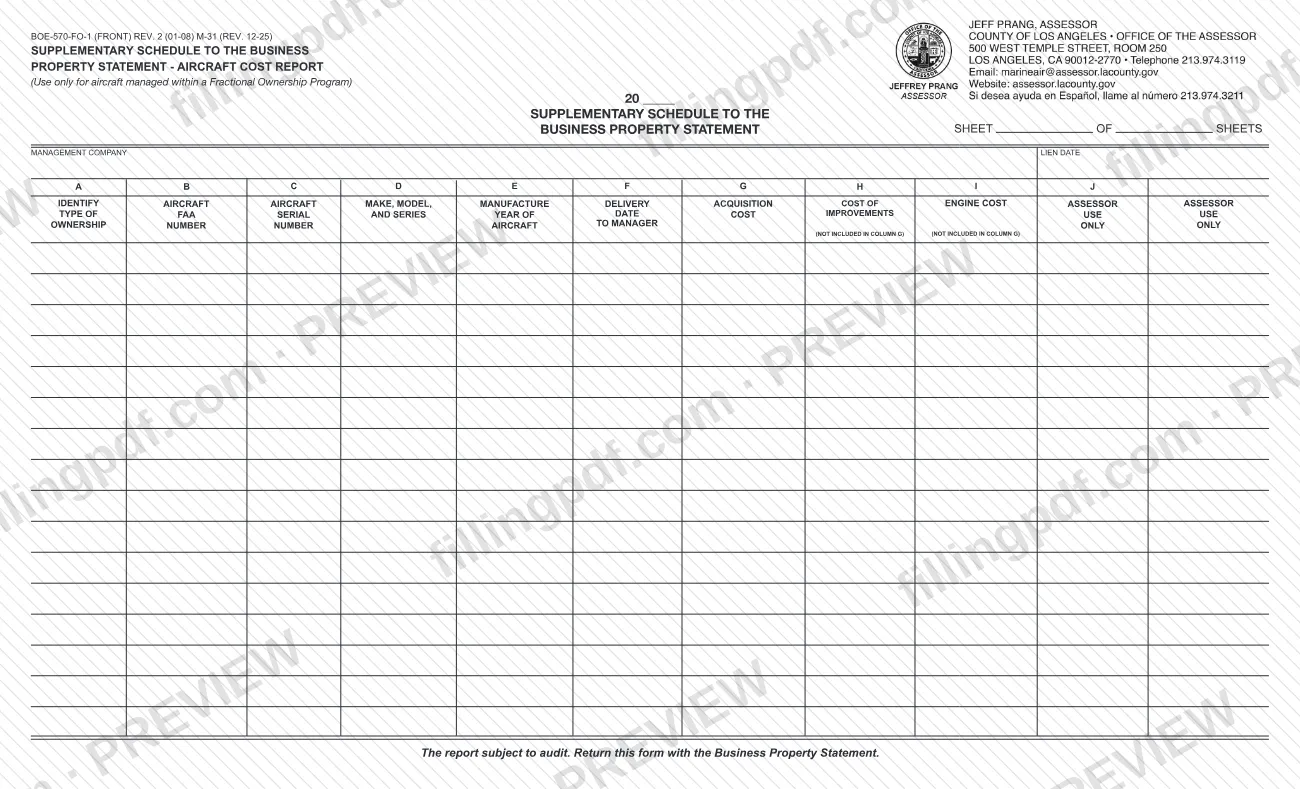
The form is printed as the "Supplementary Schedule to the Business Property Statement - Aircraft Cost Report" and carries the note "Use only for aircraft managed within a Fractional Ownership Program." It is completed on a separate sheet for each aircraft type, as described in California Code of Regulations, Title 18, section 202. The top of the sheet asks for the year, the sheet number out of the total number of sheets, the name of the management company and the lien date.
Each aircraft occupies one row of lettered columns: ownership type, FAA number, manufacturer's serial number, make, model and series, manufacture year, delivery date to the manager, acquisition cost, and the segregated cost of improvements and other costs not included in the acquisition cost. The last two columns are for the Assessor's use only.
The form states that the report is subject to audit. The Assessor's forms list also shows a companion schedule, BOE-570-FO-2, Supplementary Schedule to Form 571-L - Aircraft Value Computation.
Who needs to file BOE-570-FO-1?
The management company of a Fractional Ownership Program uses this schedule to report the aircraft it manages. The form says to use it only for aircraft managed within a Fractional Ownership Program, and it asks for the name of the management company at the top.
Details that shape who reports what:
- Every aircraft managed in the program is listed, whether it is fractionally owned or not. Column A separates the two with a code: "O" for fractionally owned and "M" for all other aircraft managed in a Fractional Ownership Program.
- Aircraft of different types go on different sheets: the instructions call for a separate sheet for each aircraft type, following California Code of Regulations, Title 18, section 202.
- The delivery date in column F is the date the aircraft was delivered to the manager of the program or to a delegatee.
The form is not for aircraft outside a Fractional Ownership Program. It is a supplement, not a stand-alone return: the form says to return it with the Business Property Statement. It does not describe who may sign or act for the management company.
When to file BOE-570-FO-1
The schedule is returned whenever the Business Property Statement is returned, because the form says to return it with that statement. No separate due date is printed on it.
The reporting date is the lien date, which you write at the top of each sheet together with the year (printed as 20 __) and the management company's name. The form also states that the report is subject to audit, so keep the records behind the acquisition costs you enter. For the deadline that applies to the Business Property Statement itself, check that form and the Los Angeles County Assessor's forms page at https://assessor.lacounty.gov/forms.
How to fill out BOE-570-FO-1
Enter the year and sheet count
At the top, write the year after "20" and complete "Sheet __ of __ sheets". Use a separate sheet for each aircraft type.
Enter management company and lien date
Write the name of the management company and the lien date in the boxes provided at the top of the sheet.
Code the ownership type in Column A
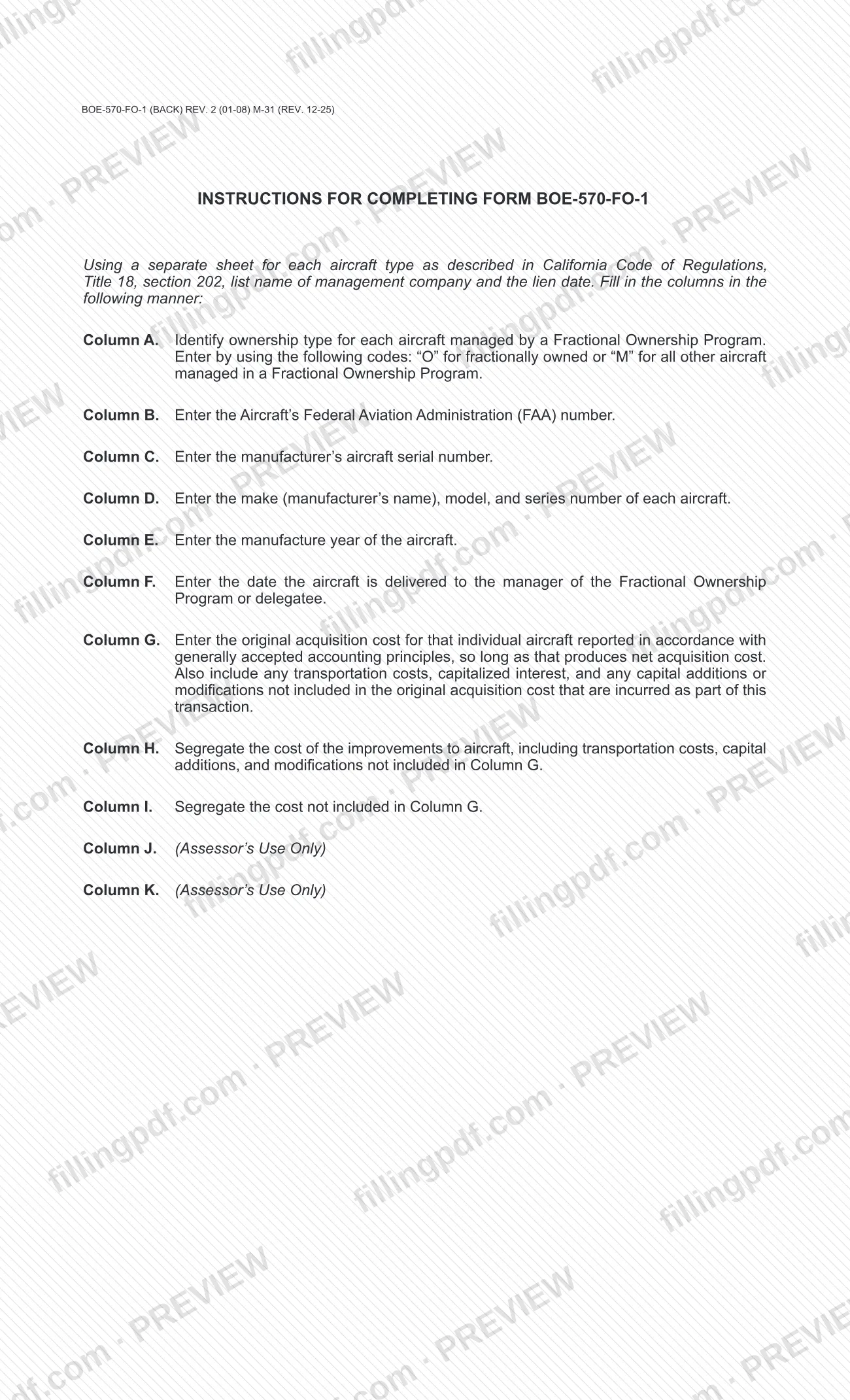
For each aircraft, enter "O" for a fractionally owned aircraft or "M" for all other aircraft managed in a Fractional Ownership Program.
Identify the aircraft in Columns B to D
Column B: the aircraft's FAA number. Column C: the manufacturer's aircraft serial number. Column D: the make (manufacturer's name), model and series number.
Enter the manufacture year
In Column E, write the year the aircraft was manufactured.
Enter the delivery date
In Column F, enter the date the aircraft was delivered to the manager of the Fractional Ownership Program or delegatee.
Enter the acquisition cost
In Column G, enter the original acquisition cost of that individual aircraft, reported under generally accepted accounting principles so long as that produces net acquisition cost. Include transportation costs, capitalized interest and capital additions or modifications not already in the cost.
Segregate improvements and other costs
Column H: the cost of improvements to the aircraft, including transportation costs, capital additions and modifications not included in Column G. Column I: the cost not included in Column G, kept separate.
Leave Assessor columns blank
The last two columns, J and K in the instructions, are for the Assessor's use only. Do not enter anything in them.
Review, download and attach
Check each row against your records, since the report is subject to audit. Download or print the completed PDF from FillingPDF and return it with the Business Property Statement as described under How to submit.
How to submit BOE-570-FO-1
Form BOE-570-FO-1 has one stated channel: it is returned with the Business Property Statement, so it follows whatever channel you use for that statement. The form itself prints no mailing address, portal or office hours.
- With the Business Property Statement: attach the completed sheets, one for each aircraft type, to the Business Property Statement (Form 571-L) and return them together, as the form directs.
- Where to look for the statement and other forms: the Los Angeles County Office of the Assessor lists its forms, including the Business Property Statement (BOE-571-L / ASSR-49) and the companion BOE-570-FO-2, at https://assessor.lacounty.gov/forms.
Leave the columns marked "Assessor's Use Only" blank. The report is subject to audit. FillingPDF lets you fill out and download the PDF; submission follows the Assessor's channels for the Business Property Statement.
Common mistakes to avoid
- Using the schedule for aircraft that are not managed within a Fractional Ownership Program; the form says to use it only for those aircraft.
- Listing different aircraft types on one sheet instead of using a separate sheet for each aircraft type.
- Entering something other than "O" or "M" in column A; "O" is for fractionally owned aircraft and "M" for all other aircraft managed in the program.
- Reporting in column G a cost that leaves out transportation costs, capitalized interest or capital additions and modifications incurred as part of the transaction.
- Entering improvement costs in column G instead of segregating them in column H, which is for costs not included in column G.
- Writing in the columns marked "Assessor's Use Only" (the last two columns).
- Entering the delivery date in column F as the date of purchase rather than the date the aircraft was delivered to the manager or delegatee.
- Sending the schedule alone instead of returning it with the Business Property Statement.
Frequently asked questions
What is Form BOE-570-FO-1?
Form BOE-570-FO-1 is the Los Angeles County Assessor's Supplementary Schedule to Form 571-L - Aircraft Cost. It lists the aircraft managed within a Fractional Ownership Program with their identifying details and acquisition costs, and it is returned with the Business Property Statement.
Who should use the Aircraft Cost schedule?
Use it only for aircraft managed within a Fractional Ownership Program; the form names the management company at the top. It is not for other aircraft. The form does not describe who signs or who may file on the company's behalf.
What do the codes O and M mean in Column A?
Enter "O" for an aircraft that is fractionally owned and "M" for all other aircraft managed in a Fractional Ownership Program. Column A identifies the ownership type for each aircraft managed by the program.
Do I need a separate sheet for each aircraft?
You need a separate sheet for each aircraft type, not for each individual aircraft. The instructions follow California Code of Regulations, Title 18, section 202, and each sheet shows the management company's name and the lien date.
What goes in Column G of BOE-570-FO-1?
The original acquisition cost of that individual aircraft, reported under generally accepted accounting principles so long as that produces net acquisition cost. Add transportation costs, capitalized interest and capital additions or modifications incurred in the transaction and not already included.
Where do I send Form BOE-570-FO-1?
Return it with the Business Property Statement. The form prints no separate address or portal, so it goes through the channel you use for that statement. The Assessor lists its forms at https://assessor.lacounty.gov/forms.
Is there a separate deadline for this schedule?
No separate due date is printed on it. The form says to return it with the Business Property Statement, so it is due when that statement is. The sheet is dated by the lien date and year you write at the top.
Can I fill out BOE-570-FO-1 online on FillingPDF?
Yes. You can fill out the PDF online on FillingPDF and download or print it. FillingPDF is an independent service, not the Assessor, and does not file the schedule; you return it with the Business Property Statement through the Assessor's channels.
Ready to fill out BOE-570-FO-1?
Fill out BOE-570-FO-1 now