
Form BOE-571-P, the Pipeline Property Statement, is the declaration of pipeline costs and related property information that the Los Angeles County Office of the Assessor asks for each year, as of 12:01 a.m. on January 1. It is one of the Los Angeles County property tax forms for business property, and it is aimed at owners and operators of pipeline segments located in the county. On this page you can fill out the form online on FillingPDF and download or print the completed PDF; the Assessor publishes the original form and its instructions, and the statement goes back to the Assessor's Office.
Last updated
What is BOE-571-P?
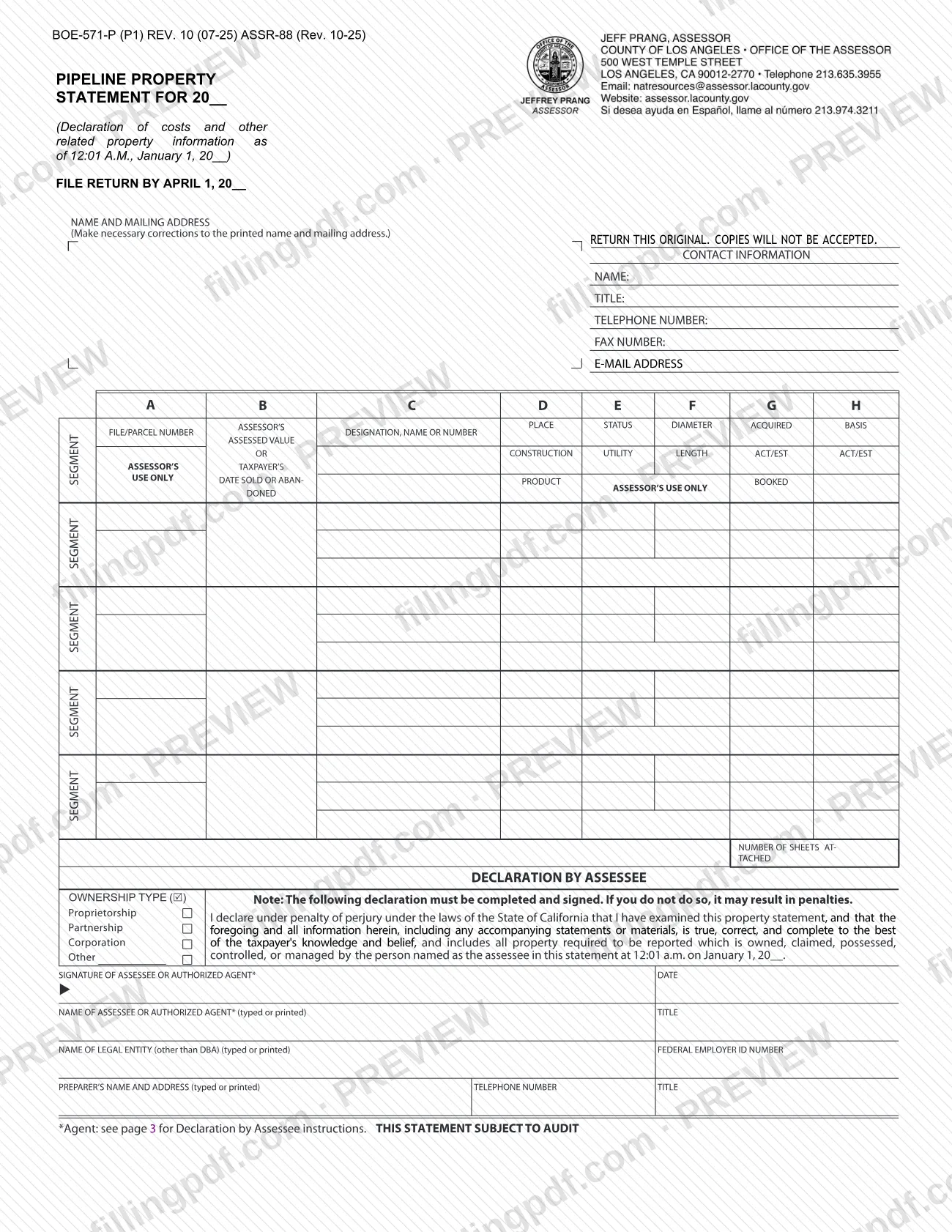
Form BOE-571-P, Pipeline Property Statement, is the property statement on which an assessee declares the costs and other related information for pipelines situated in the county, as of 12:01 a.m. on January 1, the tax lien date, so the Assessor can value them for the yearly ad valorem tax.
California law sets a yearly ad valorem tax on property as it exists on that date. The form is the Assessor's official request that you declare all assessable business property in the county that you owned, claimed, possessed, controlled or managed on the tax lien date, sign the declaration under penalty of perjury and return it by the date printed on its face.
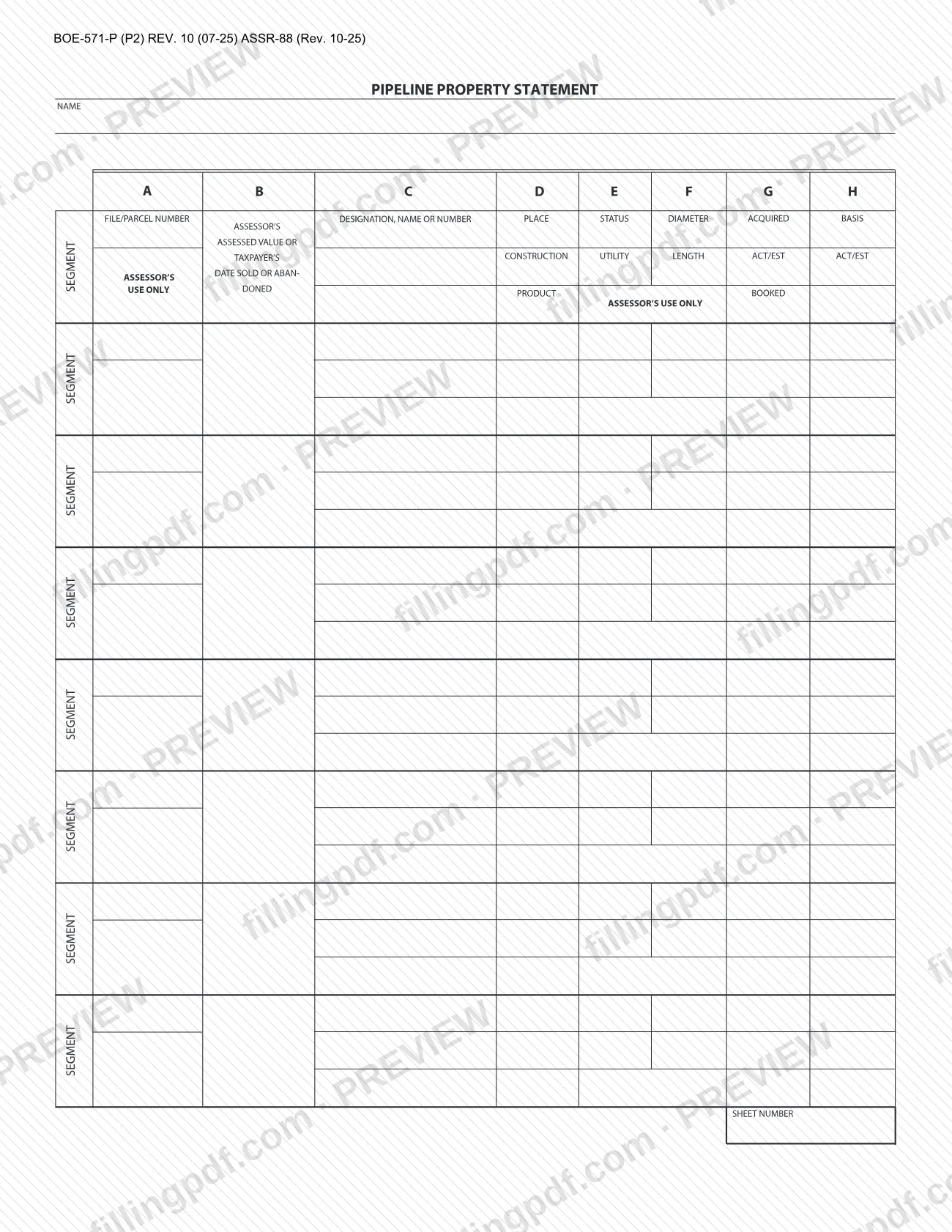
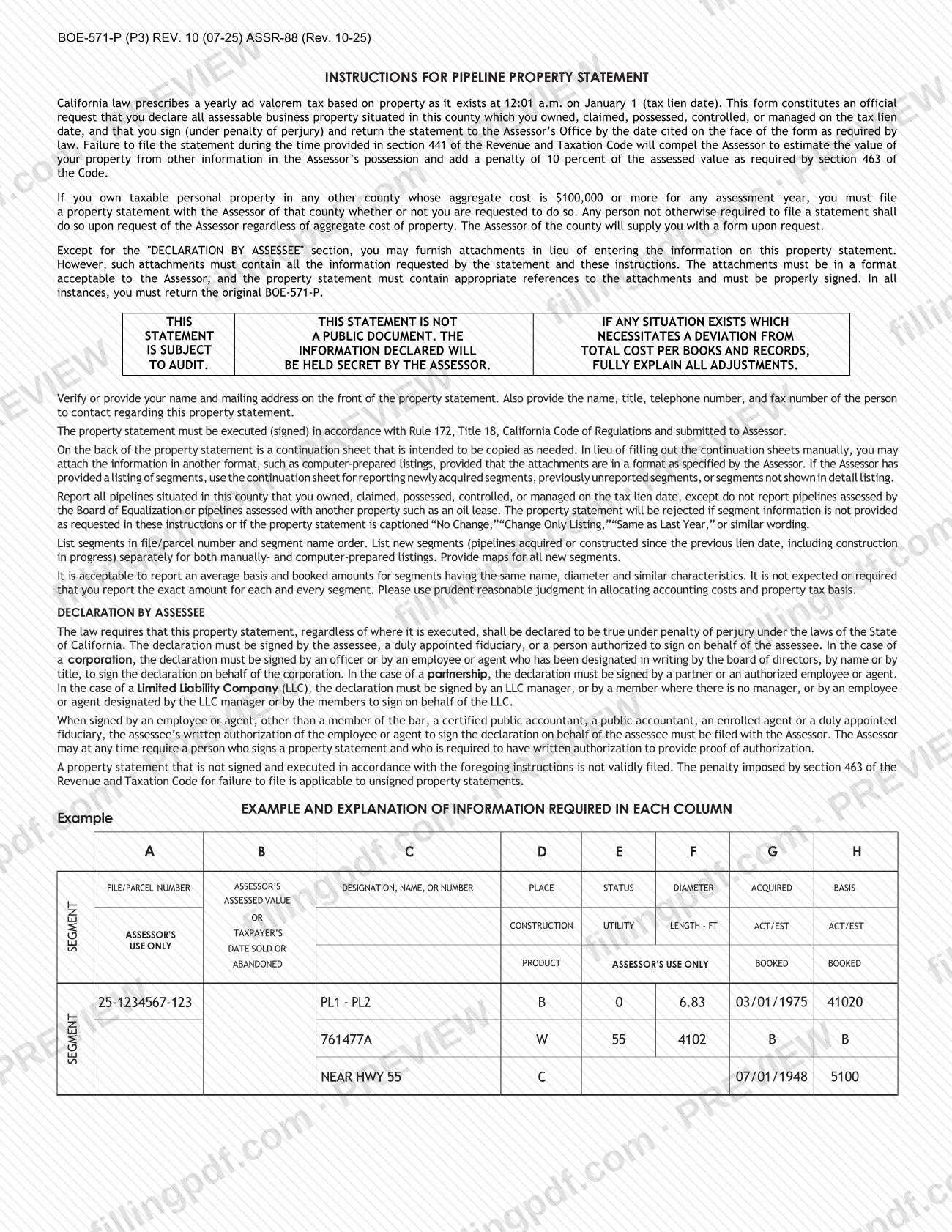
The statement is built around pipeline segments. Each row records a segment's file or parcel number, designation, place of installation, construction material, product carried, status and utility, diameter and length, acquired date, and property tax basis and booked amount. Page 2 is a continuation sheet that may be copied as needed, and pages 3 to 5 hold the instructions, an example row and an explanation of every column.
The statement is not a public document: the instructions say the information declared will be held secret by the Assessor, and that the statement is subject to audit. Pipelines assessed by the Board of Equalization, or assessed with another property such as an oil lease, are not reported on it. For other kinds of business property the Assessor lists separate statements, such as BOE-571-L, Business Property Statement, and BOE-571-C, Power Plant Property Statement.
Who needs to file BOE-571-P?
Assessees who owned, claimed, possessed, controlled or managed pipelines situated in Los Angeles County on the January 1 tax lien date need to report them on this statement. The Assessor's instructions also say that any person not otherwise required to file a statement must do so on the Assessor's request.
Exclusions: do not report pipelines assessed by the Board of Equalization, or pipelines assessed with another property such as an oil lease.
Who may sign the declaration under penalty of perjury:
- The assessee, a duly appointed fiduciary, or a person authorized to sign for the assessee.
- For a corporation, an officer, or an employee or agent designated in writing by the board of directors, by name or by title.
- For a partnership, a partner or an authorized employee or agent.
- For a limited liability company (LLC), an LLC manager, or a member where there is no manager, or an employee or agent designated by the manager or members.
An employee or agent who is not a member of the bar, a certified public accountant, a public accountant, an enrolled agent or a duly appointed fiduciary needs the assessee's written authorization, which must be filed with the Assessor. The ownership type boxes on the form are Proprietorship, Partnership, Corporation and Other.
When to file BOE-571-P
The statement is due by April 1 of the statement year, the date printed on its face as "File return by April 1, 20__". It reports pipeline property as of 12:01 a.m. on January 1 of that year, the tax lien date.
The instructions explain what happens if the statement is not filed within the time provided in section 441 of the Revenue and Taxation Code: the Assessor must estimate the value of your property from other information in the Assessor's possession and add a penalty under section 463 of the Code. That penalty also applies to unsigned property statements, because a statement that is not signed and executed as the instructions require is not validly filed.
New segments, meaning pipelines acquired or constructed since the previous lien date, including construction in progress, are reported on the statement for the year in which they appear. The form sets no renewal cycle beyond this yearly request.
Documents you need
- Maps for all new segments, meaning pipelines acquired or constructed since the previous lien date, including construction in progress.
- Written authorization from the assessee, filed with the Assessor, when an employee or agent signs the declaration and is not a member of the bar, CPA, public accountant, enrolled agent or duly appointed fiduciary.
- Attachments or computer-prepared listings in place of the form's columns or continuation sheets, only if they contain all the information requested and are in a format acceptable to the Assessor.
- An explanation of all adjustments, if any situation requires a deviation from total cost per your books and records.
- Corporate designation in writing, if an employee or agent of a corporation signs and the board of directors designated that person by name or title.
How to fill out BOE-571-P
Verify name and mailing address
On the front, make any necessary corrections to the printed name and mailing address. Then enter the contact person's name, title, telephone number, fax number and e-mail address.
List segments in order
List segments in file/parcel number and segment name order, and list new segments separately. Report only pipelines in this county that you owned, claimed, possessed, controlled or managed on January 1.
Enter file or parcel number (A)
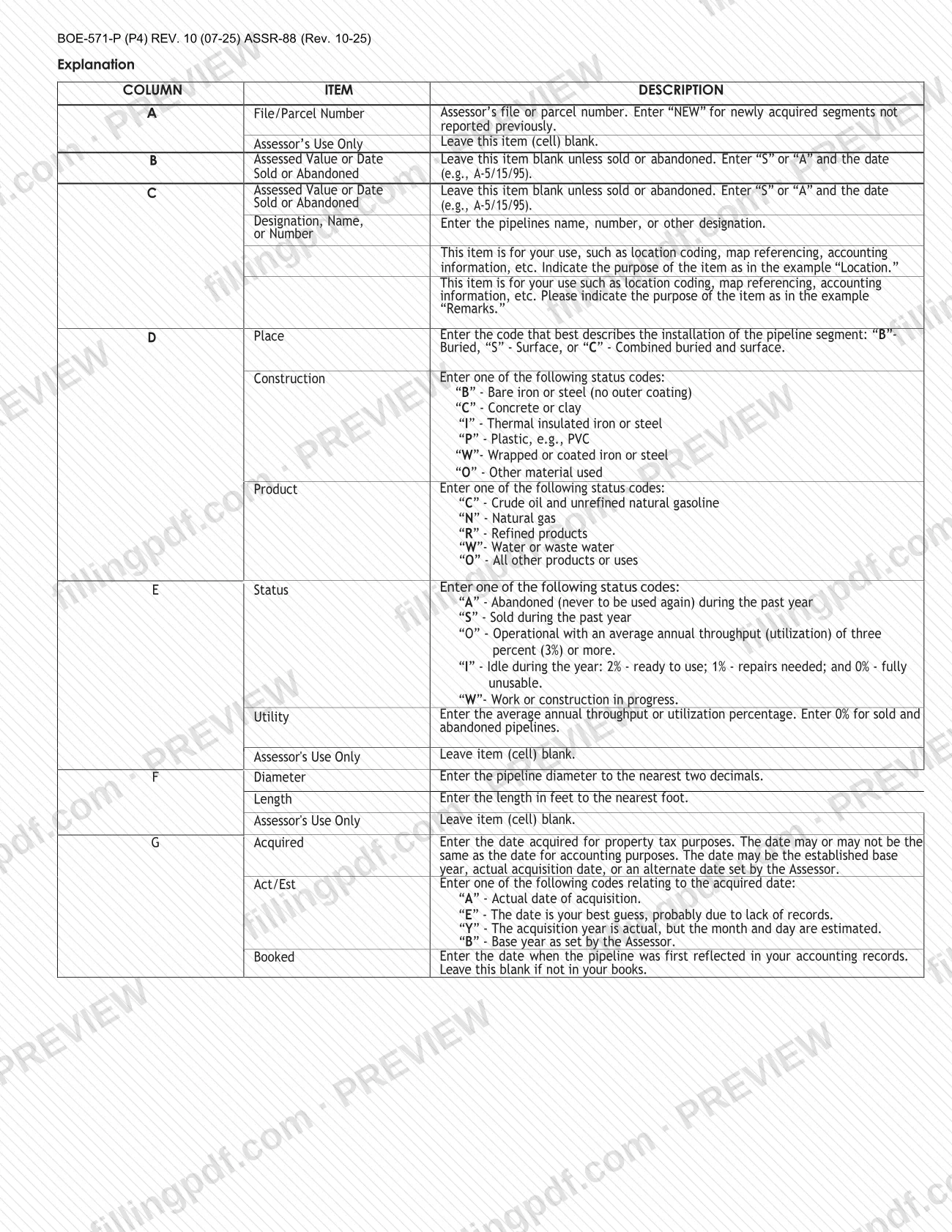
In column A, enter the Assessor's file or parcel number. Enter "NEW" for newly acquired segments not reported previously, and leave the Assessor's Use Only cell blank.
Complete columns B and C
Leave column B blank unless the segment was sold or abandoned; then enter "S" or "A" and the date, as in A-5/15/95. In column C, enter the pipeline's name, number or other designation, plus your own reference item such as "Location" if you use it.
Enter place, construction and product
In column D, enter the place code: B (buried), S (surface) or C (combined). Then enter one construction code (B, C, I, P, W or O) and one product code (C, N, R, W or O) from the instructions' lists.
Enter status and utility
In column E, enter the status code: A, S, O, I or W. Enter the average annual throughput or utilization percentage, and 0% for sold and abandoned pipelines.
Enter diameter and length
In column F, enter the diameter to the nearest two decimals and the length in feet to the nearest foot. Leave the Assessor's Use Only cell blank.
Enter acquired date and its code
In column G, enter the date acquired for property tax purposes, then the code A, E, Y or B, and the date the pipeline was first booked in your accounting records. Leave booked blank if it is not in your books.
Enter the property tax basis
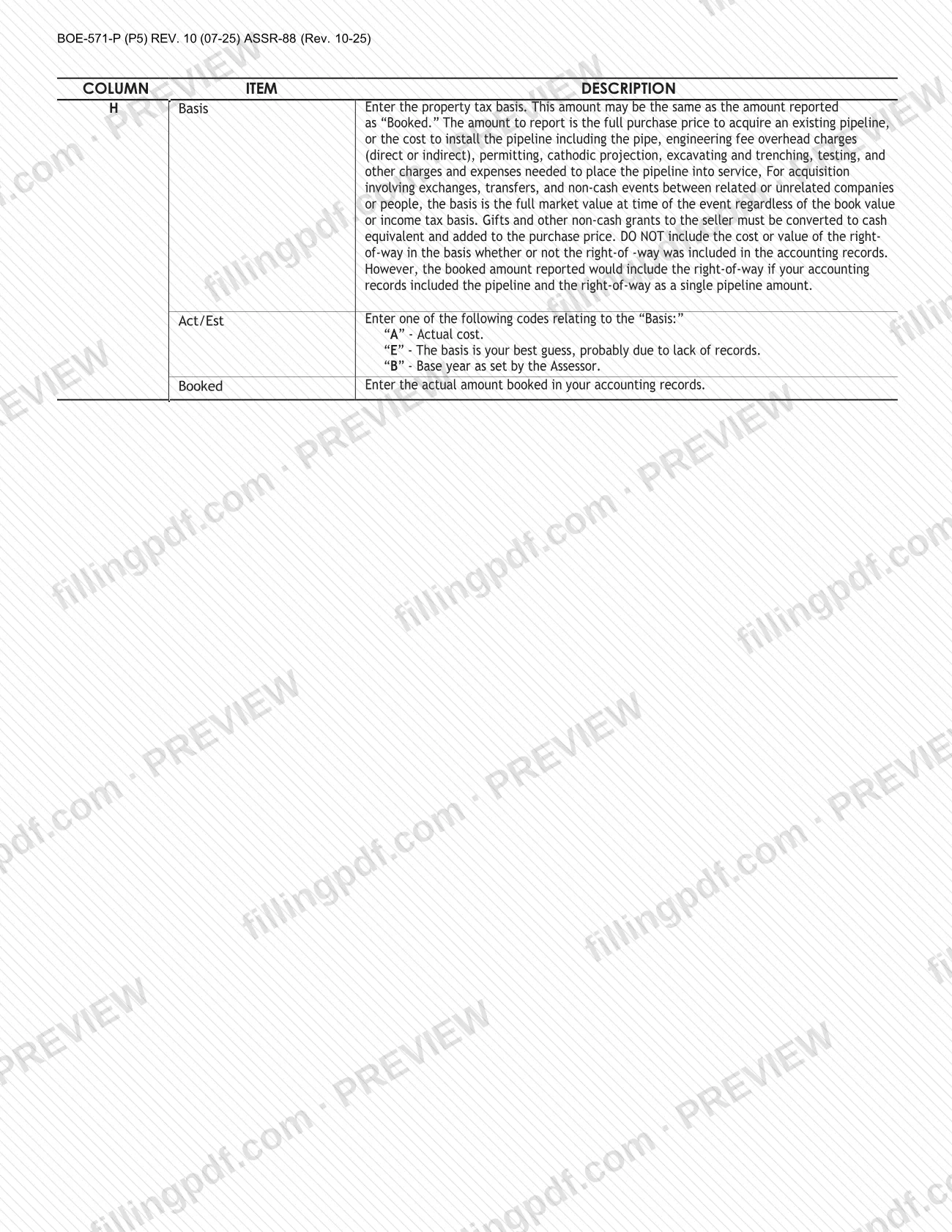
In column H, enter the basis, either the purchase price of an existing pipeline or the cost to install it, without the right-of-way. Add the code A, E or B and the amount actually booked.
Use continuation sheets and attachments
Copy the continuation sheet as needed and enter the sheet number, or attach listings in a format acceptable to the Assessor. Enter the number of sheets attached on the front, and attach maps for new segments.
Complete the declaration block
Check the ownership type (Proprietorship, Partnership, Corporation or Other). Enter the date, the name and title of the assessee or authorized agent, the legal entity name other than DBA, the Federal Employer ID Number and the preparer's details.
Review, sign and download the PDF
Check that the statement is signed by a person authorized under the instructions, then download or print the completed PDF from FillingPDF. Return the original to the Assessor as described under How to submit.
How to submit BOE-571-P
The form's instructions direct you to sign the statement and return it to the Assessor's Office by the date printed on its face. The form prints no portal, fax submission or separate delivery address of its own, so use the name and mailing address shown on your copy, and see the Assessor's forms page at https://assessor.lacounty.gov/forms for the office's resources.
What the package must contain:
- The original BOE-571-P. The form states "Return this original. Copies will not be accepted," and the instructions repeat that you must return the original in all instances.
- Corrections to the name and mailing address printed on the front, plus the contact name, title, telephone and fax number.
- Attachments, if used. You may attach information in lieu of filling in the statement or continuation sheets, except for the Declaration by Assessee. Attachments must contain everything requested, be in a format acceptable to the Assessor, and be referenced on the statement.
- Maps for all new segments.
- Written authorization filed with the Assessor if an employee or agent who needs it signs for the assessee.
FillingPDF lets you fill out and download the PDF; submission follows the Assessor's channels described above.
Common mistakes to avoid
- Returning a copy of the statement; the form says to return the original and that copies will not be accepted.
- Leaving the Declaration by Assessee unsigned; an unsigned statement is not validly filed and the section 463 penalty still applies.
- Captioning the statement "No Change," "Change Only Listing," "Same as Last Year" or similar wording, which causes the statement to be rejected.
- Omitting segment information the instructions request, which also leads to rejection.
- Filling in Assessor's Use Only cells, or column B, when the segment was not sold or abandoned; these are to be left blank.
- Including the cost or value of the right-of-way in the basis in column H, which the instructions say not to do.
- Listing new segments mixed in with older ones instead of separately, or not providing maps for new segments.
- Having an employee or agent sign without the assessee's written authorization on file, when that authorization is required.
- Reporting a pipeline assessed by the Board of Equalization or assessed with another property such as an oil lease.
Frequently asked questions
What is Form BOE-571-P?
Form BOE-571-P is the Pipeline Property Statement, the Los Angeles County Office of the Assessor's request that assessees declare pipelines in the county, with costs and related details, as of 12:01 a.m. on January 1, signed under penalty of perjury.
When is the Pipeline Property Statement due?
By April 1 of the statement year, as printed on the form face (File return by April 1, 20__). Failing to file in the time provided in section 441 of the Revenue and Taxation Code means the Assessor estimates your property's value and adds a penalty under section 463.
Which pipelines do I report on BOE-571-P?
All pipelines situated in the county that you owned, claimed, possessed, controlled or managed on the January 1 tax lien date. Do not report pipelines assessed by the Board of Equalization or assessed with another property such as an oil lease.
Can I send a photocopy of BOE-571-P?
No. The form states that you must return the original and that copies will not be accepted. You may attach listings in place of filling in the columns, but the original BOE-571-P with a signed declaration must still be returned.
Who can sign the declaration for a corporation or LLC?
A corporation's officer, or an employee or agent the board of directors designated in writing, can sign. For an LLC, an LLC manager, or a member if there is no manager, or an employee or agent they designate. The written authorization goes to the Assessor unless the agent is a lawyer, CPA, public accountant, enrolled agent or fiduciary.
Can I write "Same as Last Year" on the statement?
No. The instructions say the statement will be rejected if it is captioned "No Change," "Change Only Listing," "Same as Last Year" or similar wording, or if segment information is not provided as requested.
Is the information on the statement public?
No. The form says the statement is not a public document and that the Assessor will hold the declared information secret. It does state that the statement is subject to audit.
Can I fill out BOE-571-P online on FillingPDF?
Yes. You can fill out the PDF online on FillingPDF and download or print it. FillingPDF is an independent service and does not file the statement with the Assessor; you return the signed original through the Assessor's channels.
Ready to fill out BOE-571-P?
Fill out BOE-571-P now