
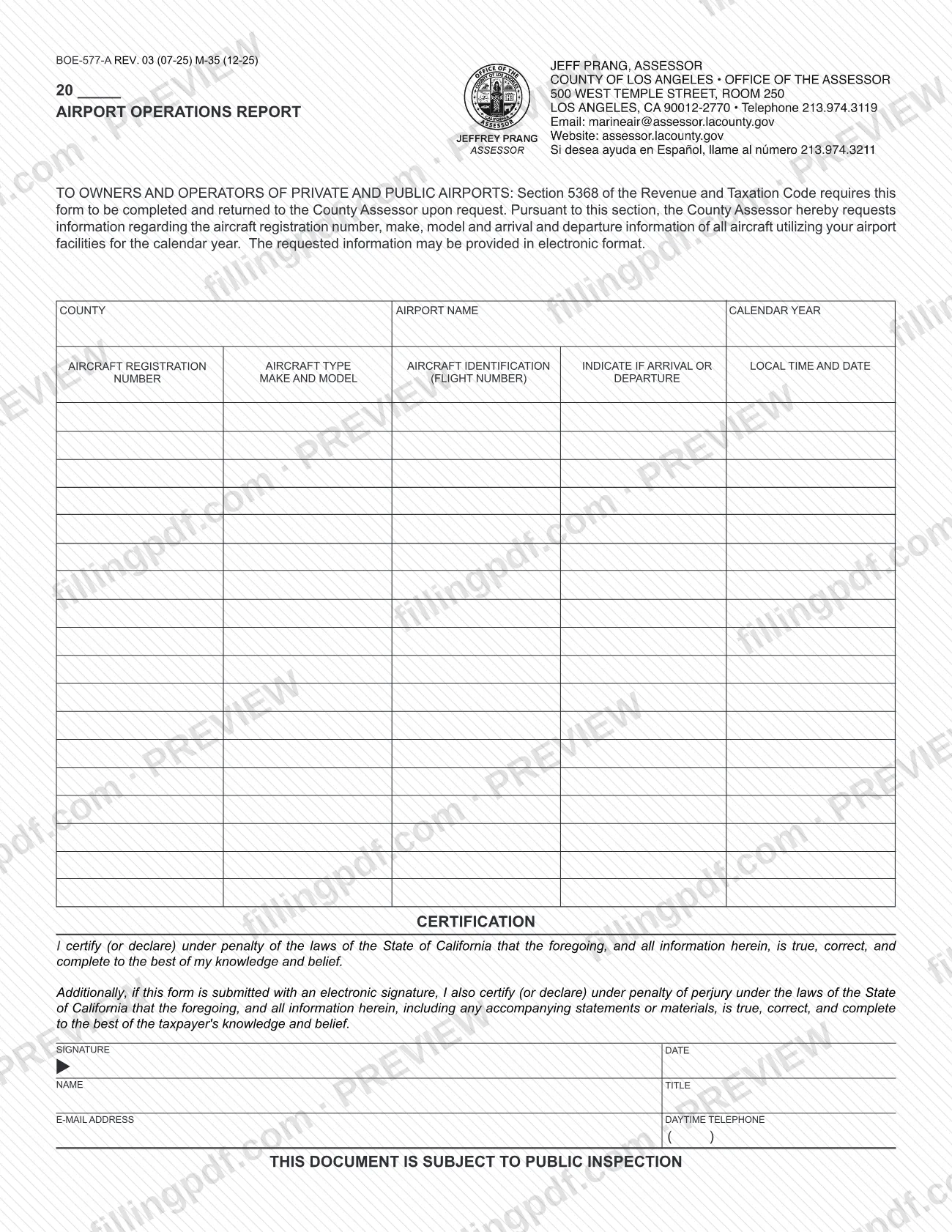
Form BOE-577-A, Aircraft Operations Report, is the form the Los Angeles County Office of the Assessor requests from owners and operators of private and public airports when it asks which aircraft used their facilities during a calendar year. It is one of the Los Angeles County property tax forms the Assessor publishes, and the form itself cites Section 5368 of the Revenue and Taxation Code as the requirement to complete and return it on request. On FillingPDF you can fill out the form online and download or print the completed PDF; the original is published by the Assessor at the official link on this page.
Last updated
What is BOE-577-A?
Form BOE-577-A, Aircraft Operations Report, is the form on which an airport owner or operator lists the aircraft that used the airport during a calendar year, so the County Assessor receives registration, make, model, and arrival and departure information.
The form states that Section 5368 of the Revenue and Taxation Code requires it to be completed and returned to the County Assessor upon request. Under that section the Assessor asks for the aircraft registration number, make, model and the arrival and departure information of all aircraft using the airport facilities for the calendar year.
The report is a table. Each row records the aircraft registration number, the aircraft type (make and model), the aircraft identification (flight number), whether the entry is an arrival or a departure, and the local time and date. The page header gives the county, the airport name and the calendar year. A certification block with signature, date, name, title, e-mail address and daytime telephone closes the form.
The title printed on the PDF reads "Airport Operations Report", while the Assessor's forms page lists the document as Aircraft Operations Report under the number BOE-577-A. The same forms page lists a separate form, BOE-577, Aircraft Property Statement. The PDF also carries the notice that the document is subject to public inspection.
Who needs to file BOE-577-A?
The form is addressed to owners and operators of private and public airports. An airport owner or operator completes it when the County Assessor requests the information; the form says it is completed and returned to the County Assessor upon request.
The report covers all aircraft using the airport facilities for the calendar year named on the form, not only some aircraft or some flights.
The person who completes it signs the certification and gives a name, title, e-mail address and daytime telephone. The certification is made under penalty of the laws of the State of California, and a second paragraph applies if the form is submitted with an electronic signature. The form does not describe who else may sign on behalf of an airport owner or operator, so confirm any question about a representative with the Assessor's office.
The form does not name any exclusions. It does not ask aircraft owners to complete it; its audience is stated as the owners and operators of airports.
When to file BOE-577-A
Complete and return Form BOE-577-A when the County Assessor asks for it. The form states that Section 5368 of the Revenue and Taxation Code requires it to be completed and returned upon request, so the request is the triggering event.
The report covers one calendar year, which you enter in the Calendar Year field, and it lists the aircraft that used your airport facilities during that year. The form prints no separate due date or return deadline of its own, so follow any date given in the Assessor's request.
How to fill out BOE-577-A
Enter the year at the top
Complete the year blank printed at the top of the form (20 followed by a blank), as the form prints it.
Enter the county and airport name
Write the county and the name of your airport in the County and Airport Name fields.
Enter the calendar year reported
In the Calendar Year field, enter the year for which the Assessor requested aircraft information.
List each aircraft registration number
In the Aircraft Registration Number column, enter one aircraft per row for all aircraft that used your airport facilities during that year.
Enter the aircraft make and model
In the Aircraft Type column, enter the make and model of each aircraft.
Enter the aircraft identification
In the Aircraft Identification column, enter the flight number for each entry.
Mark arrival or departure
In the column headed Indicate if Arrival or Departure, state whether each entry is an arrival or a departure.
Enter the local time and date
In the Local Time and Date column, enter the local time and the date of each arrival or departure.
Read the certification and sign
Read the Certification block, then sign and date it. The form includes an additional paragraph that applies if you submit it with an electronic signature.
Enter your contact details
Print your name and title, then enter your e-mail address and daytime telephone number.
Review and download the completed PDF
Check that every row is complete and the calendar year is correct. Download or print the completed PDF from FillingPDF and return it to the County Assessor as described under How to submit.
How to submit BOE-577-A
The form is returned to the County Assessor when the Assessor requests it. The form prints no mailing address, portal or appointment rule of its own.
- Return to the County Assessor: the form says it is to be completed and returned to the County Assessor upon request, under Section 5368 of the Revenue and Taxation Code.
- Electronic format: the form states that the requested information may be provided in electronic format.
- Electronic signature: the certification includes a paragraph that applies if the form is submitted with an electronic signature.
- Finding the office: the Assessor publishes its forms at https://assessor.lacounty.gov/forms; use the contact details in the Assessor's request for delivery instructions.
The form notes that the document is subject to public inspection. FillingPDF lets you fill out and download the PDF; submission follows the channels above.
Common mistakes to avoid
- Listing only some of the aircraft: the Assessor requests the information for all aircraft using the airport facilities for the calendar year.
- Leaving out the make and model when giving the aircraft registration number; the form asks for both.
- Not marking each row as an arrival or a departure in the column that asks for it.
- Entering times that are not local time; the last column asks for local time and date.
- Leaving the Calendar Year field blank or entering a year other than the one the Assessor asked about.
- Sending the report without signing and dating the certification, which is made under penalty of the laws of the State of California.
- Omitting the name, title, e-mail address or daytime telephone beneath the signature.
- Treating the report as confidential; the form states that it is subject to public inspection.
Frequently asked questions
What is Form BOE-577-A?
Form BOE-577-A is the Aircraft Operations Report published by the Los Angeles County Office of the Assessor. Airport owners and operators use it to list the aircraft that used their facilities during a calendar year, with registration number, make, model and arrival or departure details.
Who has to complete the Aircraft Operations Report?
The form is addressed to owners and operators of private and public airports. It is completed and returned to the County Assessor upon request, under Section 5368 of the Revenue and Taxation Code, as the form itself states.
When is Form BOE-577-A due?
It is due when the County Assessor requests it. The form prints no separate deadline, so follow the date given in the Assessor's request. The report covers the calendar year entered in the Calendar Year field.
Why does the PDF say Airport Operations Report?
The title printed on the PDF is Airport Operations Report, while the Assessor's forms page lists the same form number, BOE-577-A, as Aircraft Operations Report. Both names refer to this report of aircraft using an airport during a calendar year.
Can I provide the aircraft information electronically?
Yes. The form states that the requested information may be provided in electronic format. It also includes a certification paragraph that applies if the form is submitted with an electronic signature.
Is the Aircraft Operations Report public?
The form carries the notice that the document is subject to public inspection, so do not assume what you enter will stay confidential. Ask the Assessor's office about any specific concern.
Is Form BOE-577-A the same as Form BOE-577?
No. The Assessor's forms page lists them separately: BOE-577 is the Aircraft Property Statement, and BOE-577-A is the Aircraft Operations Report. This page covers BOE-577-A only.
Can I fill out Form BOE-577-A online on FillingPDF?
Yes. You can fill out the PDF online on FillingPDF and download or print it. FillingPDF is an independent service and does not send the report to the Assessor; you return it through the Assessor's channels.
Ready to fill out BOE-577-A?
Fill out BOE-577-A now