
Form EXM-137 is the supplemental worksheet that the Los Angeles County Office of the Assessor uses to collect household income from people claiming the low-income version of the disabled veterans' property tax exemption. It is one of the Los Angeles County property tax forms the Assessor publishes, and it must be filed every year on or before February 15. On this page you can fill out the form online on FillingPDF and download or print the completed PDF; the Assessor publishes the original PDF at the official source link.
Last updated
What is EXM-137?
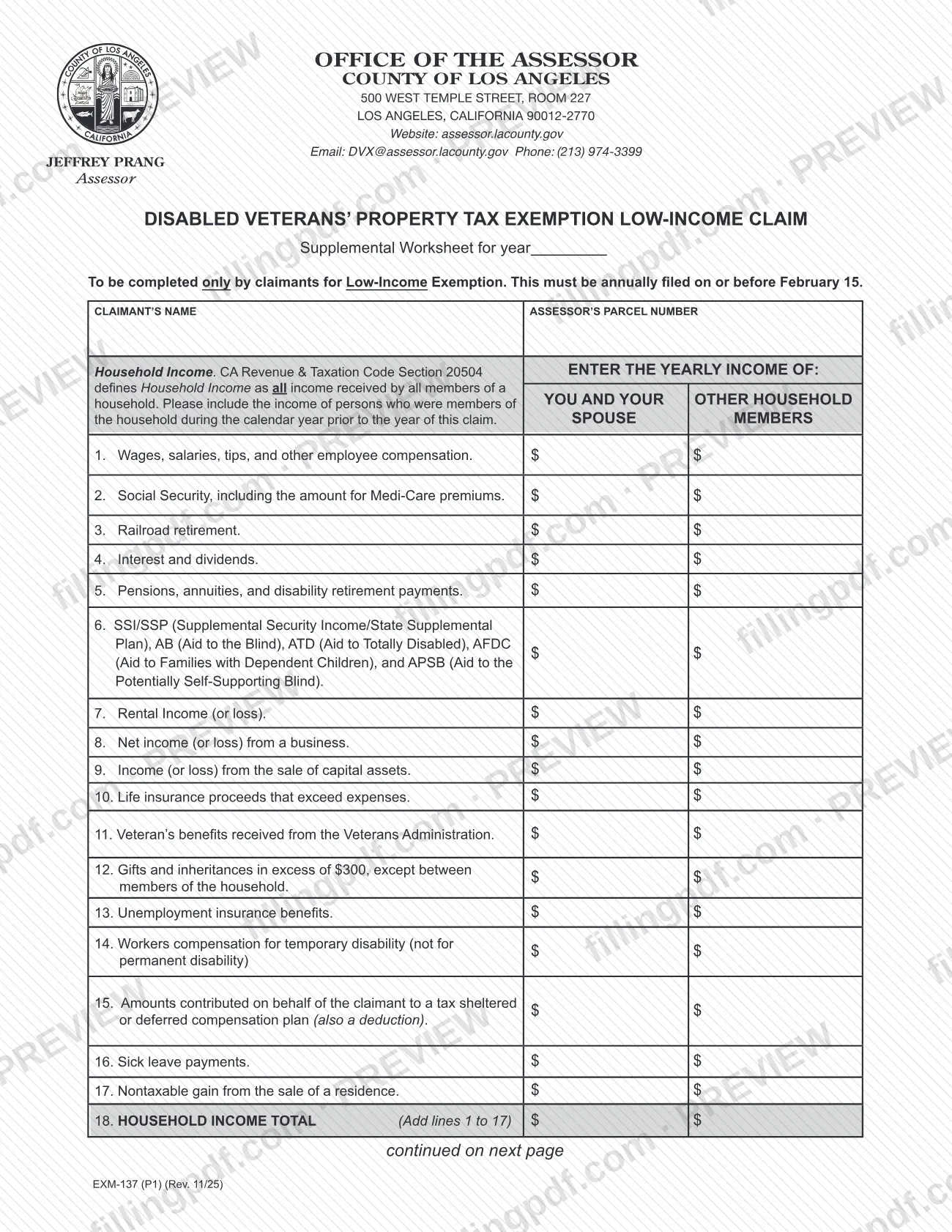
Form EXM-137, Claim for Disabled Veterans' Property Tax Exemption Claim Year (Low-Income Supplement) is the Los Angeles County Office of the Assessor worksheet on which a claimant reports household income and adjustments to income, ending in a figure called net household income, for the low-income disabled veterans' exemption.
The printed title of the two-page form is "Disabled Veterans' Property Tax Exemption Low-Income Claim, Supplemental Worksheet for year." It is a worksheet that supplements a claim; the Assessor's forms page lists the Claim for Disabled Veterans' Property Tax Exemption (BOE-261-G / EXM-32) as a separate form.
The worksheet has three parts:
- Household Income, lines 1 to 18. Seventeen income categories, entered in two columns (you and your spouse; other household members), then totaled on line 18. The form cites California Revenue & Taxation Code Section 20504, which defines household income as all income received by all members of a household.
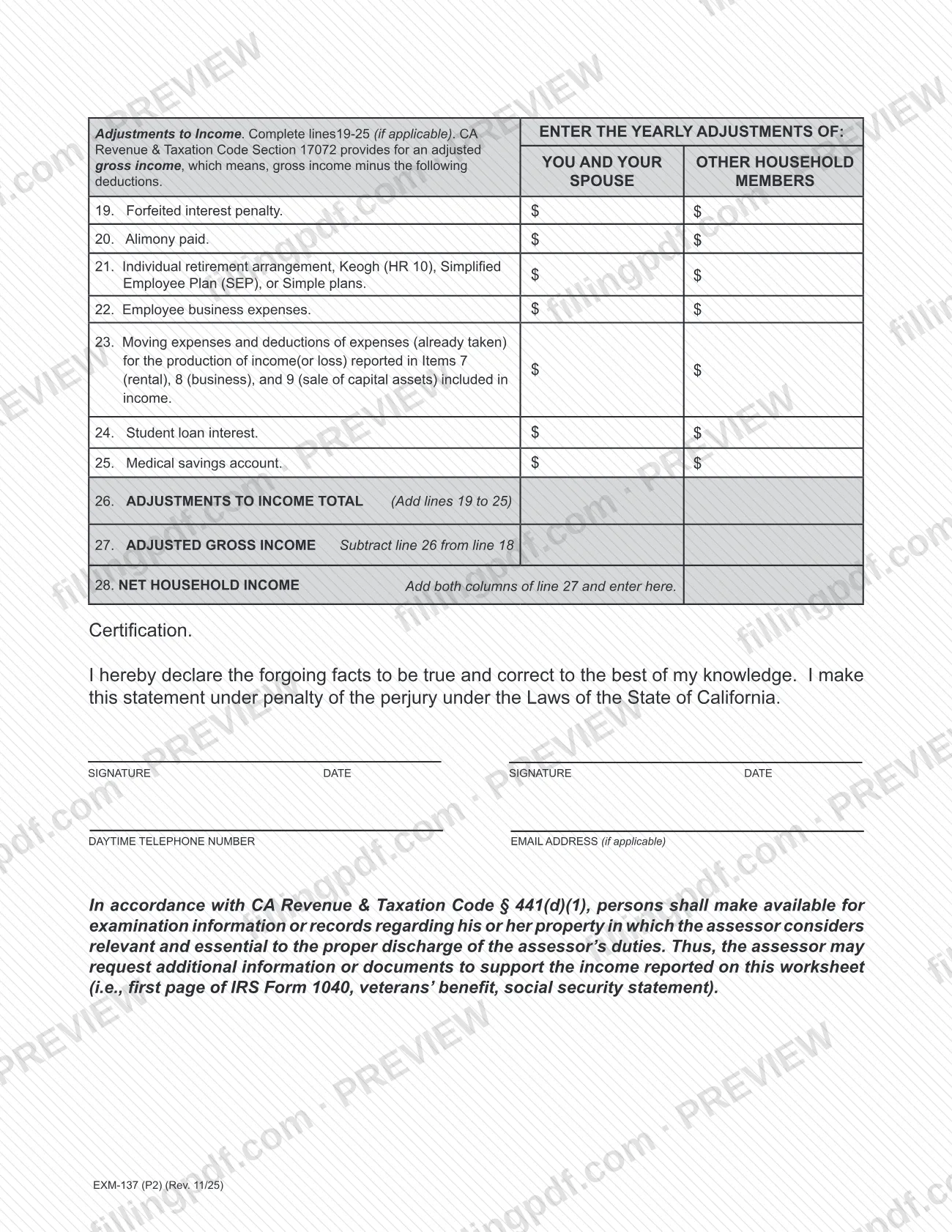
- Adjustments to Income, lines 19 to 26. Seven deduction categories, totaled on line 26. The form cites Revenue & Taxation Code Section 17072 for adjusted gross income, which is gross income minus these deductions.
- Lines 27 and 28. Adjusted gross income (line 18 minus line 26) and net household income (both columns of line 27 added together).
The page ends with a certification signed under penalty of perjury under the laws of the State of California. The form is for claimants for the low-income exemption only.
Who needs to file EXM-137?
The form says it is to be completed only by claimants for the Low-Income Exemption under the Disabled Veterans' Property Tax Exemption. If you are not claiming the low-income exemption, the worksheet is not for you.
The worksheet asks for the income of two groups, in separate columns:
- You and your spouse.
- Other household members. The form tells you to include persons who were members of the household during the calendar year before the year of the claim.
Both columns feed the final net household income on line 28, so everyone who counts as a household member for that prior calendar year belongs on the worksheet. The certification has two signature and date blocks. The form does not say who may sign on a claimant's behalf; for questions about signatures or eligibility, contact the Assessor at [email protected] or (213) 974-3399, the email and phone printed on the form.
When to file EXM-137
File Form EXM-137 on or before February 15; the form states that it must be filed annually, so the worksheet is completed again for each claim year. The blank beside "Supplemental Worksheet for year" is where the claim year is identified.
Income is reported for the calendar year prior to the year of the claim, and the household members counted are those who belonged to the household during that prior calendar year. The form prints no processing time and no separate renewal rule beyond the annual February 15 filing. For questions about timing, the Assessor's disabled veterans contact printed on the form is [email protected] or (213) 974-3399.
Documents you need
- First page of IRS Form 1040: the Assessor may ask for it to support the income reported on the worksheet; it is not listed as a required attachment.
- Veterans' benefit statement: the Assessor may request it to support the veterans' benefits reported on line 11.
- Social Security statement: the Assessor may request it to support the Social Security income reported on line 2.
- Other records of income: the Assessor may request additional information or documents relevant to the income reported, under Revenue & Taxation Code § 441(d)(1) as cited on the form.
How to fill out EXM-137
Enter claimant name and parcel number
At the top, enter the CLAIMANT'S NAME and the ASSESSOR'S PARCEL NUMBER, and fill in the claim year on the "Supplemental Worksheet for year" line.
Identify the household and income year
Report the yearly income of you and your spouse in the first column and of other household members in the second. Include persons who were household members during the calendar year prior to the year of this claim.
Enter earnings and benefits, lines 1-6
Line 1 wages, salaries, tips and other employee compensation; line 2 Social Security, including Medicare premium amounts; line 3 railroad retirement; line 4 interest and dividends; line 5 pensions, annuities and disability retirement payments; line 6 SSI/SSP, AB, ATD, AFDC and APSB.
Enter business and asset income, lines 7-11
Line 7 rental income (or loss); line 8 net income (or loss) from a business; line 9 income (or loss) from the sale of capital assets; line 10 life insurance proceeds that exceed expenses; line 11 veteran's benefits received from the Veterans Administration.
Enter remaining income, lines 12-17
Line 12 gifts and inheritances in excess of the amount printed, except between household members; line 13 unemployment insurance; line 14 workers compensation for temporary disability only; line 15 amounts contributed to a tax sheltered or deferred compensation plan; line 16 sick leave payments; line 17 nontaxable gain from the sale of a residence.
Total household income on line 18
Add lines 1 to 17 in each column and enter the totals on line 18, HOUSEHOLD INCOME TOTAL.
Enter adjustments to income, lines 19-25
Complete only the lines that apply: 19 forfeited interest penalty, 20 alimony paid, 21 IRA, Keogh (HR 10), SEP or Simple plans, 22 employee business expenses, 23 moving expenses and expenses already taken for income reported on lines 7, 8 and 9, 24 student loan interest, 25 medical savings account.
Compute lines 26, 27 and 28
Line 26: add lines 19 to 25. Line 27, ADJUSTED GROSS INCOME: subtract line 26 from line 18. Line 28, NET HOUSEHOLD INCOME: add both columns of line 27 and enter the result.
Sign the certification
Sign and date in both signature blocks, then add a daytime telephone number and, if applicable, an email address. The certification is made under penalty of perjury under the laws of the State of California.
Review and download the completed PDF
Check that every total matches the lines above it, that the income year is the prior calendar year and that the form is signed. Download or print the completed PDF from FillingPDF and send it to the Assessor on or before February 15.
How to submit EXM-137
The form does not name a filing channel, mailing instruction or portal. It prints the contact details of the Los Angeles County Office of the Assessor:
- Address: Office of the Assessor, County of Los Angeles, 500 West Temple Street, Room 227, Los Angeles, California 90012-2770.
- Email: [email protected].
- Phone: (213) 974-3399.
- Website: assessor.lacounty.gov, where the Assessor lists its forms at https://assessor.lacounty.gov/forms.
Because the form itself gives no delivery method, confirm with the Assessor how to submit the completed worksheet before the February 15 deadline. The Assessor may also request additional information or documents to support the income you report, such as the first page of IRS Form 1040, a veterans' benefit statement or a Social Security statement, so keep those records available. FillingPDF lets you fill out and download the PDF; submission follows the Assessor's channels.
Common mistakes to avoid
- Filing after February 15; the form states the worksheet must be filed annually on or before that date.
- Completing the worksheet when you are not claiming the Low-Income Exemption; the form is only for claimants for that exemption.
- Reporting income from the wrong year instead of the calendar year prior to the year of the claim.
- Leaving out income of persons who were household members during that prior calendar year, or putting their income in your own column.
- Omitting a loss on lines 7, 8 or 9; the form asks for rental, business and capital asset sale income "(or loss)."
- Entering line 18 without adding lines 1 to 17, or line 26 without adding lines 19 to 25.
- Calculating line 27 by any method other than subtracting line 26 from line 18, or skipping the step of adding both columns on line 28.
- Submitting the certification unsigned or undated; the form has two signature and date blocks.
- Assuming no support is needed; the assessor may request documents such as the first page of IRS Form 1040.
Frequently asked questions
What is Form EXM-137?
Form EXM-137 is the Los Angeles County Office of the Assessor's supplemental worksheet for the low-income version of the disabled veterans' property tax exemption. It totals household income and adjustments to income and ends in a net household income figure on line 28.
When is Form EXM-137 due?
On or before February 15, every year. The form states that the low-income worksheet must be filed annually by that date. It also tells you to report income for the calendar year prior to the year of the claim.
Who has to complete the EXM-137 worksheet?
Only claimants for the Low-Income Exemption. The form says it is to be completed only by those claimants. It covers you, your spouse and other household members who belonged to the household during the prior calendar year.
What counts as household income on Form EXM-137?
All income received by all members of the household, as defined in California Revenue & Taxation Code Section 20504 and cited on the form. Lines 1 to 17 list the categories, including wages, Social Security, pensions, rental and business income, and veterans' benefits.
Do I need to attach documents to Form EXM-137?
The form lists no required attachments. It says the assessor may request additional information or documents to support the income reported, such as the first page of IRS Form 1040, a veterans' benefit statement or a Social Security statement.
Where do I send Form EXM-137?
The form names no delivery method. It prints the Office of the Assessor's address, 500 West Temple Street, Room 227, Los Angeles, California 90012-2770, plus [email protected] and (213) 974-3399. Confirm the filing method with the Assessor before February 15.
Can I fill out Form EXM-137 online?
You can fill out the PDF online on FillingPDF and download or print it. FillingPDF is an independent service, not affiliated with the Assessor, and does not file the worksheet; you submit it through the Assessor's channels.
How is net household income calculated on Form EXM-137?
Add lines 1 to 17 for line 18, add lines 19 to 25 for line 26, subtract line 26 from line 18 for line 27 (adjusted gross income), then add both columns of line 27 to get net household income on line 28.
Ready to fill out EXM-137?
Fill out EXM-137 now