
Form OWN-48, Property Owner's Declaration, is issued by the Los Angeles County Office of the Assessor (Ownership Services) and is one of the Los Angeles County property tax forms tied to a change in ownership. Its printed instructions say it must be completed before a reversal of the reappraisal of your property can be processed. On this page you can fill out the form online on FillingPDF and download or print the completed PDF; the form is returned to the Assessor at the address printed at the top of the form.
Last updated
What is OWN-48?
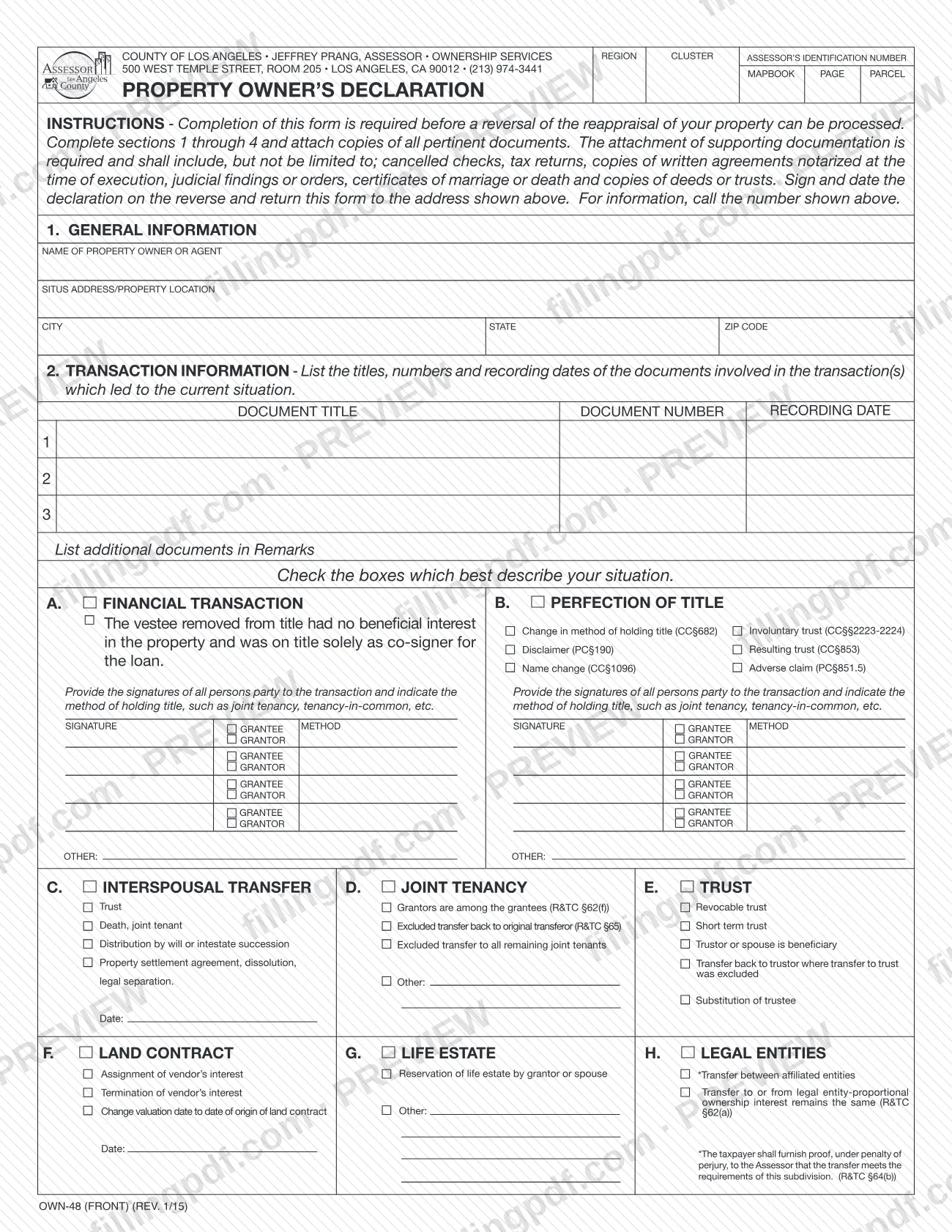
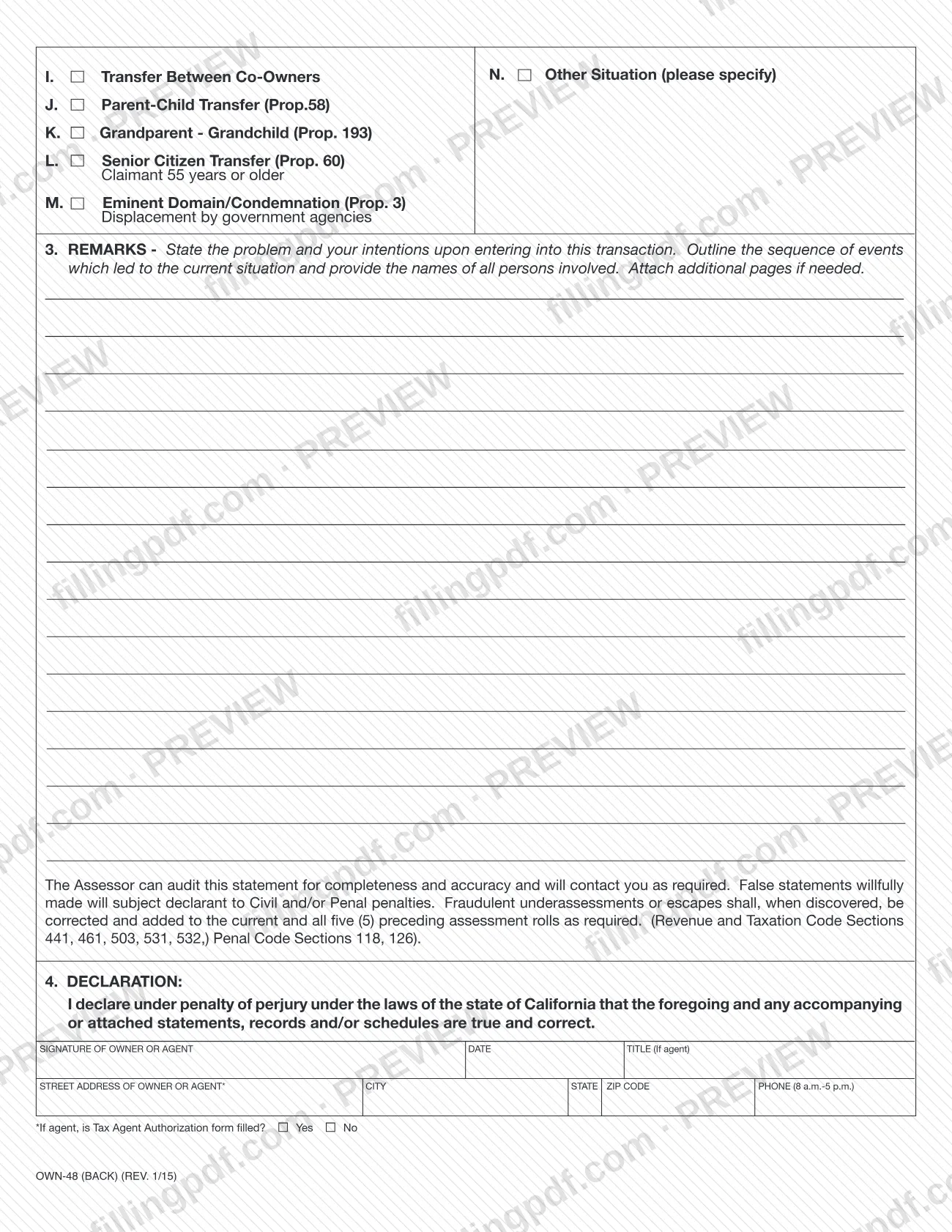
Property Owner's Declaration (Form OWN-48) is the Los Angeles County Office of the Assessor form on which a property owner or agent explains a transaction and declares, under penalty of perjury, that the facts are true, so that a reappraisal of the property can be reversed.\n\nThe form is issued by the Ownership Services office of the Assessor. Its printed instructions state that completing it is required before a reversal of the reappraisal can be processed. It has four sections: 1. General Information, 2. Transaction Information, 3. Remarks and 4. Declaration.\n\nIn section 2 you list the title, number and recording date of each document involved, then check the boxes that best describe your situation. The choices are lettered A through N:\n- A. Financial transaction and B. Perfection of title (for example name change, disclaimer, resulting trust or adverse claim);\n- C. Interspousal transfer, D. Joint tenancy and E. Trust;\n- F. Land contract, G. Life estate and H. Legal entities;\n- I. Transfer between co-owners, J. Parent-child transfer (Prop. 58), K. Grandparent-grandchild (Prop. 193), L. Senior citizen transfer (Prop. 60) and M. Eminent domain/condemnation (Prop. 3);\n- N. Other situation, which you specify.\n\nThe Assessor's forms page lists separate claim forms for some of these situations, such as BOE-58-AH / OWN-88 for transfers between parent and child. Form OWN-48 is the declaration that explains the transaction and its supporting records.
Who needs to file OWN-48?
The owner of a property whose reappraisal the Assessor made, and who asks for it to be reversed, completes Form OWN-48. The printed instructions say the form is required before the reversal can be processed.\n\n- Property owners. You describe the transaction and sign the declaration in section 4.\n- Agents. The form allows an agent to complete and sign it for the owner, entering the title in the signature block. The form asks whether a Tax Agent Authorization form has been filled, with Yes or No boxes. The Assessor's forms page lists EXM-202, Authorization of Tax Agent or Agency Substitution.\n- Other parties to the transaction. If you check a box under A (Financial Transaction) or B (Perfection of Title), the form asks for the signatures of all persons party to the transaction, each marked as grantor or grantee, with the method of holding title, such as joint tenancy or tenancy-in-common.\n\nThe form does not name any group that is exempt from it. For legal entities (box H), the form says the taxpayer must give the Assessor proof, under penalty of perjury, that the transfer meets the requirements of that subdivision.
When to file OWN-48
Submit Form OWN-48 when you are asking the Assessor to reverse a reappraisal of your property, because the Assessor cannot process the reversal until the form is completed. No separate due date is printed on the form.\n\nGather the recording information for each document involved in the transaction before you start, since section 2 asks for the document title, number and recording date. Attach the supporting documents at the same time: the instructions say they are required.\n\nFor questions about timing or your case, call the number printed on the form, (213) 974-3441.
Documents you need
- Copies of all pertinent documents supporting your situation; the instructions say attachments are required and are not limited to the examples below.
- Cancelled checks, if they document the transaction.
- Tax returns, if they document the transaction.
- Copies of written agreements notarized at the time of execution.
- Judicial findings or orders.
- Certificates of marriage or death.
- Copies of deeds or trusts.
- Additional pages for the Remarks section, if the space in section 3 is not enough.
- If an agent signs: the form asks, with Yes and No boxes, whether a Tax Agent Authorization form has been filled.
How to fill out OWN-48
Enter the property identifiers
At the top right, write the Assessor's Identification Number and the Region, Cluster, Mapbook, Page and Parcel numbers for the property, if you have them.
Complete section 1, General Information
Enter the name of the property owner or agent, the situs address or property location, and the city, state and ZIP code.
List the transaction documents
In section 2, enter the document title, document number and recording date for each document involved in the transaction that led to the current situation. Rows 1 to 3 are provided; list any additional documents in Remarks.
Check your situation
Check the boxes, A through N, that best describe your situation, such as financial transaction, perfection of title, trust, land contract, life estate or parent-child transfer. If none fits, use N and specify. Where a box shows a Date line, enter the date.
Add signatures and holding method
For boxes A and B, provide the signatures of all persons party to the transaction. Mark each as grantor or grantee and give the method of holding title, such as joint tenancy or tenancy-in-common.
Write the Remarks
In section 3, state the problem and your intentions in the transaction, outline the sequence of events and name all persons involved. Attach additional pages if needed.
Read the penalty statement
Section 3 warns that the Assessor can audit the statement for completeness and accuracy, and that willfully false statements carry civil and/or penal penalties. Check your entries against your documents.
Complete section 4, Declaration
On the back, the owner or agent signs and dates the declaration made under penalty of perjury. An agent also enters the title, street address, city, state, ZIP code and a phone number for 8 a.m.-5 p.m.
Answer the tax agent question
If an agent signs, mark Yes or No for whether a Tax Agent Authorization form is filled.
Review, sign and download the PDF
Check that sections 1 through 4 are complete and that the signatures are in place. Download or print the completed PDF from FillingPDF, attach copies of your supporting documents and return the package as described under How to submit.
How to submit OWN-48
The form names one channel: return the completed form to the address printed at the top of Form OWN-48.\n\n- Return address: County of Los Angeles, Assessor, Ownership Services, 500 West Temple Street, Room 205, Los Angeles, CA 90012.\n- Questions: call (213) 974-3441, the number shown on the form.\n\nSign and date the declaration on the back before returning it, and include copies of all pertinent documents; the instructions say that supporting documentation is required. The form prints no portal, email address or appointment rule, and does not state whether the Assessor accepts delivery in person or by mail. Ask the office at the number above if you need to confirm. FillingPDF lets you fill out and download the PDF; submission follows the channel above.
Common mistakes to avoid
- Returning the form without copies of supporting documents; the instructions say attaching them is required.
- Completing only some of sections 1 through 4 instead of all four.
- Leaving the declaration unsigned or undated; the instructions say to sign and date it on the reverse.
- Checking box A or B but leaving out the signatures of all persons party to the transaction, or the method of holding title.
- Listing more than three documents in section 2 without noting the extra ones in Remarks.
- Choosing box H, legal entities, without proof under penalty of perjury that the transfer meets the requirements of that subdivision.
- Signing as an agent without answering whether a Tax Agent Authorization form is filled.
- Making a statement you know is false; the form warns that willfully false statements carry civil and/or penal penalties.
Frequently asked questions
What is Form OWN-48, Property Owner's Declaration?
Form OWN-48 is a Los Angeles County Office of the Assessor form that explains a transaction and declares it true under penalty of perjury. Its instructions say it must be completed before a reversal of the reappraisal of your property can be processed.
How does Form OWN-48 relate to Los Angeles County property tax?
It is one of the Assessor's Ownership Services forms. It supports a request to reverse a reappraisal, which affects how the property is assessed. The form does not state any tax amount; call (213) 974-3441 with questions about your case.
What do I attach to Form OWN-48?
Attach copies of all pertinent documents. The instructions list, without limiting, cancelled checks, tax returns, written agreements notarized at the time of execution, judicial findings or orders, marriage or death certificates, and copies of deeds or trusts.
Where do I return Form OWN-48?
Return it to the address printed at the top of the form: Assessor, Ownership Services, 500 West Temple Street, Room 205, Los Angeles, CA 90012. The form names no other channel; for information call (213) 974-3441.
Can an agent sign Form OWN-48 for the owner?
Yes. Section 4 has a signature line for the owner or agent, with a title line for an agent. The form also asks whether a Tax Agent Authorization form has been filled, with Yes and No boxes.
Is there a deadline to file Form OWN-48?
No deadline is printed on the form. It must be completed before the Assessor can process a reversal of the reappraisal, so submit it with the supporting documents when you request the reversal.
What happens if I make a false statement on Form OWN-48?
The form warns that false statements willfully made subject the declarant to civil and/or penal penalties. It also says fraudulent underassessments are corrected and added to the current and all five preceding assessment rolls.
Can I fill out Form OWN-48 online?
You can fill out the PDF online on FillingPDF and download or print it. FillingPDF is an independent service and does not file the form with the Assessor; you return it to the address on the form.
Ready to fill out OWN-48?
Fill out OWN-48 now