
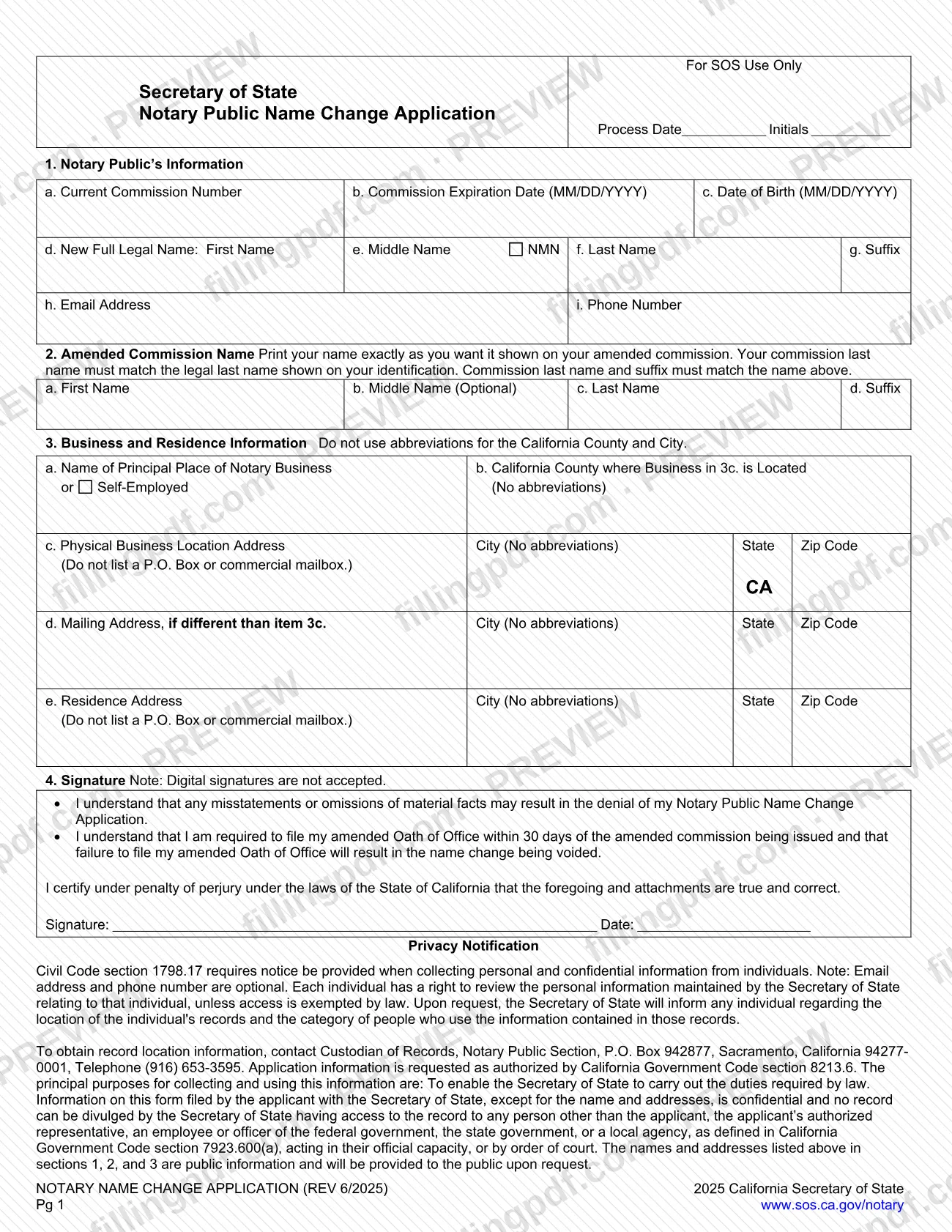
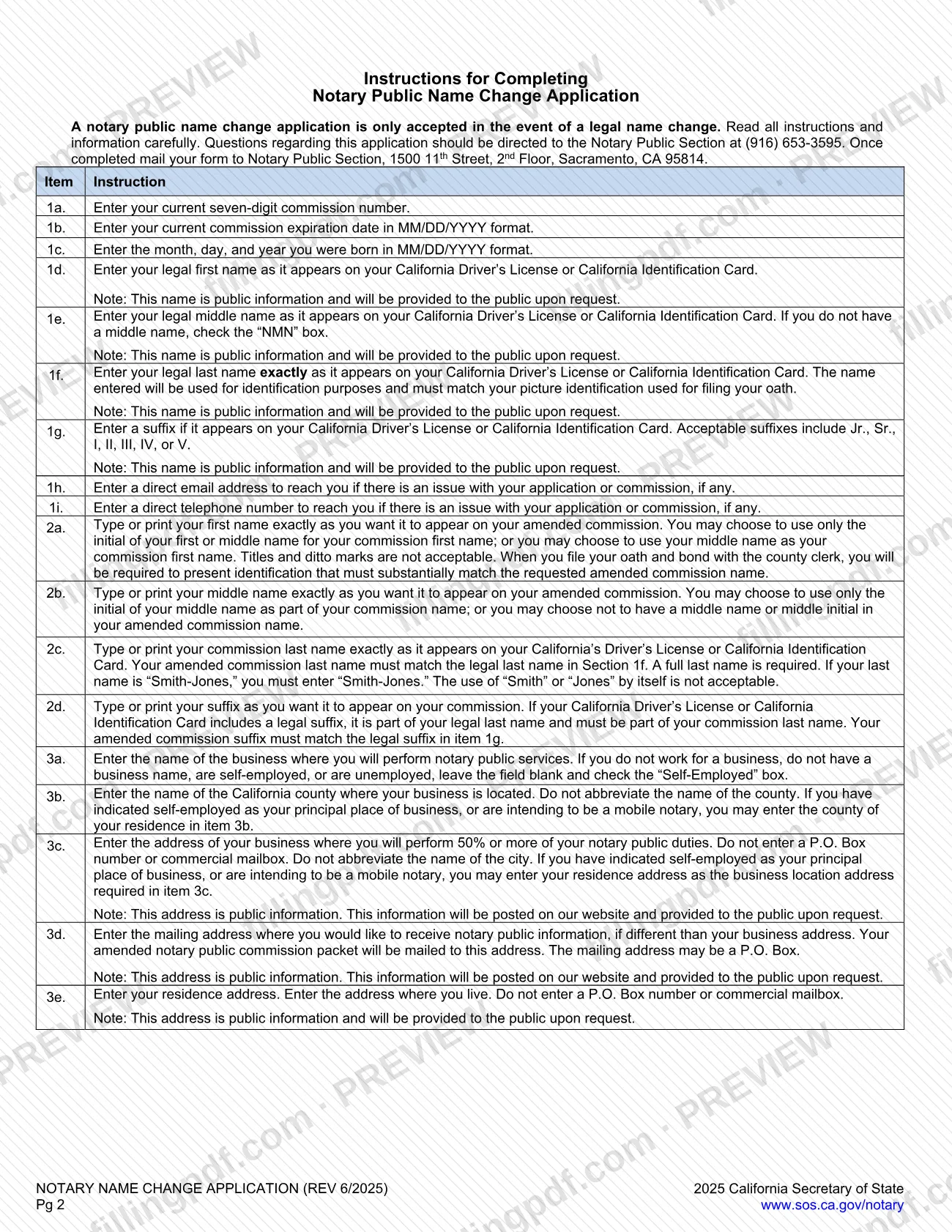
The Notary Public Name Change Application is the California Secretary of State (SOS) form that a commissioned notary public uses to have a commission amended after a legal name change. The form is accepted only when the name change is legal, and it asks for your current commission number, your new legal name and the name you want printed on the amended commission. On FillingPDF you can fill out this name change application online and download or print the completed PDF. The SOS publishes the original form and the mailing instructions for its Notary Public Section.
Last updated
What is Notary Public Name Change Application – California?
The Notary Public Name Change Application is the California Secretary of State form a notary public submits to the Notary Public Section to amend the name on a notary commission after the notary's legal name has changed.
The form has four parts. Item 1 records your current seven-digit commission number, commission expiration date, date of birth and new full legal name. Item 2 sets the name exactly as you want it on the amended commission. Item 3 gives the business and residence information. Item 4 is the signature block, where you certify under penalty of perjury that the information is true and correct.
The SOS instructions state that the application is accepted only in the event of a legal name change. The commission last name must match the legal last name on your California Driver's License or California Identification Card, and a suffix on that identification must carry over to the commission.
The Secretary of State's forms page lists the Name Change Application with no fee. The same page lists separate forms for other changes, such as the Address Change Form, the Seal Authorization Request Form and the Notary Resignation Form, so this application is not the one for changing an address or resigning.
Names and addresses entered in items 1, 2 and 3 are public information. The rest of the information on the form is confidential, and the email address and phone number are optional.
Who needs to file Notary Public Name Change Application – California?
A California notary public whose legal name has changed and who needs the commission to show the new name files this application. The form asks for your current commission number and expiration date, so it is meant for an existing commission.
Points the form and the SOS instructions attach to the application:
- The application is accepted only in the event of a legal name change; it is not a way to change a commission name for other reasons.
- The name in item 1 must appear on your California Driver's License or California Identification Card, and the commission last name in item 2 must match the legal last name in item 1f.
- Notaries who are self-employed, unemployed, have no business name or work as mobile notaries can check the Self-Employed box in item 3 and may use their residence county and address as the business location.
The form does not describe filing on behalf of someone else. The signature block carries the applicant's own certification, and digital signatures are not accepted. Notaries who only need to change an address use the separate Address Change Form listed on the SOS forms page.
When to file Notary Public Name Change Application – California
Submit the application after your legal name has changed and you want your notary commission amended to the new name. The form prints no deadline for the application itself.
Timing matters after the amended commission is issued. By signing item 4 you acknowledge that you must file your amended Oath of Office within 30 days of the amended commission being issued, and that failing to file it will result in the name change being voided. When you file your oath and bond with the county clerk, you must present identification that substantially matches the amended commission name you requested in item 2.
For questions about an application in progress, the instructions give the Notary Public Section phone number, (916) 653-3595. The sources state no processing time.
How to fill out Notary Public Name Change Application – California
Enter commission and birth details
Item 1a: your current seven-digit commission number. Items 1b and 1c: your commission expiration date and date of birth, both in MM/DD/YYYY format.
Enter your new legal name
Items 1d, 1e, 1f and 1g: first, middle, last name and suffix exactly as they appear on your California Driver's License or California Identification Card. If you have no middle name, check the NMN box; an accepted suffix is Jr., Sr., I, II, III, IV or V.
Add contact information
Item 1h: a direct email address. Item 1i: a direct phone number. The form says both are optional and used to reach you if there is an issue with your application or commission.
Set your amended commission name
Item 2: print the first name, middle name (optional), last name and suffix exactly as you want them on the amended commission. The last name must match item 1f in full, and a suffix must match item 1g.
Describe your principal place of business
Item 3a: the business name, or leave it blank and check the Self-Employed box if you have none. Item 3b: the California county of the business, with no abbreviation; a self-employed or mobile notary may use the county of residence.
Enter the business location address
Item 3c: the address where you perform 50% or more of your notary duties, with the city written out. Do not enter a P.O. Box or commercial mailbox; a self-employed or mobile notary may enter a residence address.
Add mailing and residence addresses
Item 3d: a mailing address only if it differs from 3c; it may be a P.O. Box and receives your amended commission packet. Item 3e: the address where you live, with no P.O. Box or commercial mailbox.
Read, sign and date item 4
Read the acknowledgments about misstatements and the 30-day amended Oath of Office, then sign by hand and enter the date. Digital signatures are not accepted.
Review and download the completed PDF
Check that names match your identification and that no county or city is abbreviated. Download or print the completed PDF from FillingPDF and send it as described under How to submit.
How to submit Notary Public Name Change Application – California
The instructions tell you to mail the completed form to the Notary Public Section. The SOS forms page lists the Name Change Application as a fillable PDF to print and submit by mail or in person, and shows no online submission for it.
- By mail: Notary Public Section, 1500 11th Street, 2nd Floor, Sacramento, CA 95814.
- In person: the SOS forms page says the form can be submitted in person; the instructions give the same 1500 11th Street address and the phone number (916) 653-3595 for questions.
Sign the form by hand: digital signatures are not accepted. The forms page lists no fee for this application. Your amended commission packet is mailed to the mailing address in item 3d, or to your business address if you leave 3d blank. The SOS may contact you at the email address or phone number in items 1h and 1i if there is a problem with the application.
FillingPDF lets you fill out and download the PDF; submission follows the channels above.
Common mistakes to avoid
- Signing with a digital signature; the form states that digital signatures are not accepted.
- Applying for a reason other than a legal name change; the instructions say the application is accepted only for a legal name change.
- Entering a commission last name that does not match the legal last name in item 1f, or shortening a hyphenated name such as "Smith-Jones" to "Smith" or "Jones".
- Leaving out a suffix that appears on the driver's license or ID card; it is part of the legal last name and must match item 1g in item 2d.
- Abbreviating the California county or city in item 3, where the form says no abbreviations.
- Listing a P.O. Box or commercial mailbox as the business location in 3c or the residence in 3e; only the mailing address in 3d may be a P.O. Box.
- Leaving the middle name blank in item 1e without checking the NMN box.
- Leaving 3a blank without checking the Self-Employed box when you have no business name or are self-employed or unemployed.
- Not filing the amended Oath of Office within 30 days of the amended commission being issued, which voids the name change.
Frequently asked questions
What is the Notary Public Name Change Application?
It is the California Secretary of State form a notary uses to amend a notary commission after a legal name change. It records your commission number, new legal name, the name wanted on the amended commission, and your business and residence information.
Can I use this name change application for any name change?
No. The SOS instructions say the application is accepted only in the event of a legal name change. The new name you enter in item 1 must match your California Driver's License or California Identification Card.
Is there a fee for the notary name change application?
The Secretary of State's forms page lists the Name Change Application with no fee. If you have questions about your application, call the Notary Public Section at (916) 653-3595.
Where do I mail the notary name change application?
Mail it to Notary Public Section, 1500 11th Street, 2nd Floor, Sacramento, CA 95814. The SOS forms page also lists in-person submission for this form, and shows no online submission.
Can I sign the form electronically?
No. Item 4 states that digital signatures are not accepted. Print the completed PDF and sign and date it by hand before sending it to the Notary Public Section.
What happens after my amended commission is issued?
You must file your amended Oath of Office within 30 days of the amended commission being issued. The form states that failing to do so will result in the name change being voided. Bring identification that substantially matches your new commission name.
Can I fill out the Notary Public Name Change Application online?
Yes. You can fill out the PDF online on FillingPDF and download or print it. FillingPDF does not submit it to the Secretary of State; you send the signed form through the SOS channels.
What do I enter for business address if I am a mobile notary?
If you are self-employed or intend to be a mobile notary, check the Self-Employed box in item 3a and enter your residence county in 3b and residence address as the business location in 3c. No P.O. Box or commercial mailbox is allowed.
Ready to fill out Notary Public Name Change Application – California?
Fill out Notary Public Name Change Application – California now