
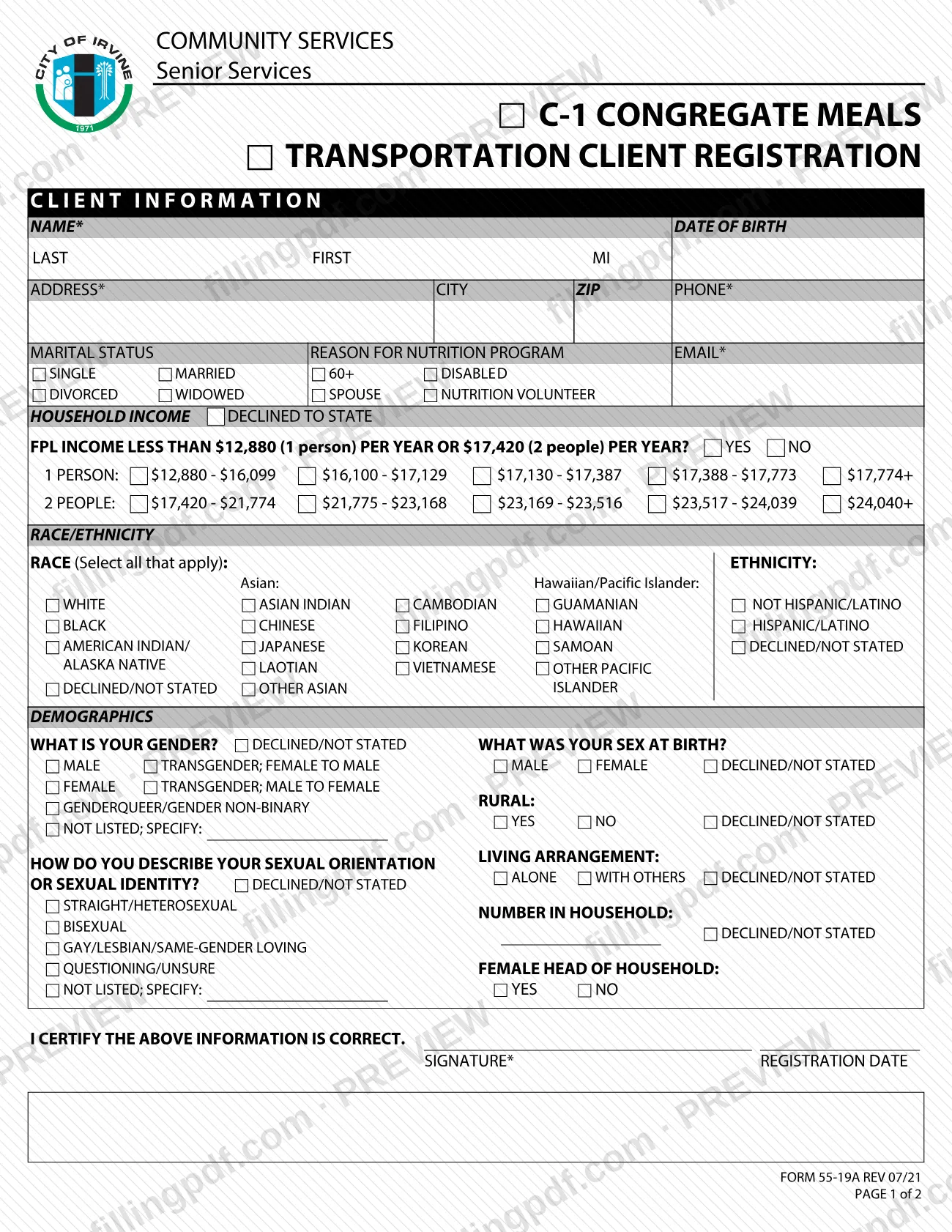
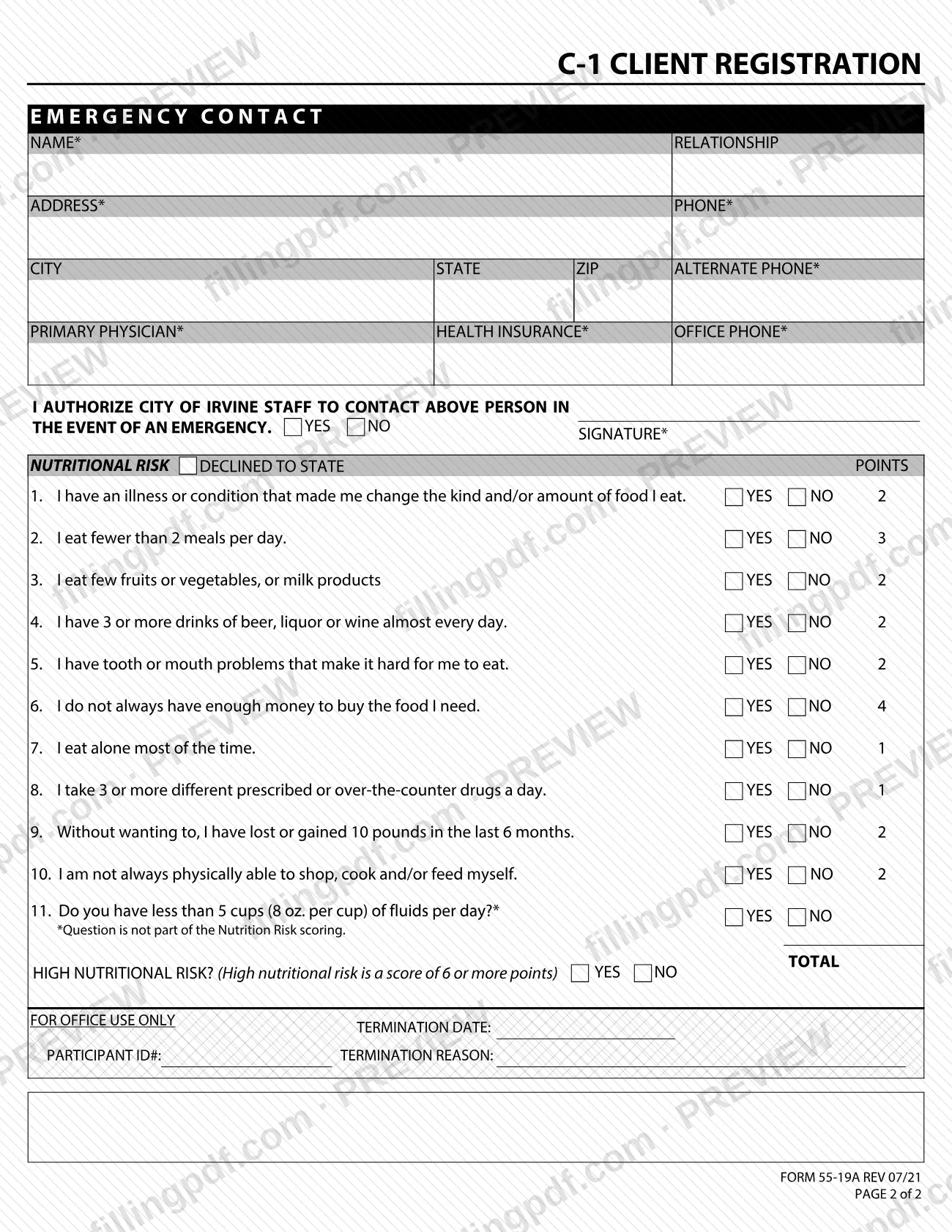
Form 55-19A, C1 Client Registration (Congregate Meals, Transportation), is the two-page registration form that City of Irvine Community Services, Senior Services uses for its congregate meals and transportation clients. It collects your contact details, an emergency contact, optional demographic answers and an 11-question nutritional risk screen. On FillingPDF you can fill out the form online and download or print the completed PDF; the City of Irvine publishes the original at cityofirvine.gov. It is a Senior Services registration, not a tax document.
Last updated
What is 55-19A?
C1 Client Registration (Congregate Meals, Transportation), Form 55-19A, is the City of Irvine Community Services, Senior Services registration form that records client information, an emergency contact and a nutritional risk screening for people enrolling in congregate meals and transportation.
The form is printed as "C-1 Congregate Meals Transportation Client Registration" and runs two pages. Page 1 holds the client information block: name, date of birth, address, phone, email, marital status, the reason for the nutrition program (60+, disabled, spouse or nutrition volunteer), household income, race and ethnicity, demographics, and the client's signature and registration date. Page 2 holds the emergency contact, the primary physician and health insurance entries, an authorization for City of Irvine staff to contact the emergency contact, and the Nutritional Risk questions.
The Nutritional Risk section lists ten scored questions, each with a point value printed beside it, plus an eleventh question about fluids that the form says is not part of the scoring. A total of 6 or more points is marked as high nutritional risk. The block at the bottom of page 2, FOR OFFICE USE ONLY, holds the participant ID number, termination date and termination reason and is for City staff.
The form is part of the City of Irvine's forms collection, which the City Clerk's Office of Records and Information manages. Several answers carry a "declined to state" option.
Who needs to file 55-19A?
People who are registering as clients of the City of Irvine Senior Services congregate meals and transportation services complete Form 55-19A. The form places the audience in the Community Services, Senior Services division and asks you to state the reason for the nutrition program by checking one of these:
- 60+
- Disabled
- Spouse
- Nutrition Volunteer
Other points from the form:
- The client signs the certification on page 1 that the information is correct.
- An emergency contact is named on page 2, and a separate YES/NO authorization and signature let City of Irvine staff contact that person in an emergency.
- Household income, race, ethnicity, gender, sex at birth, sexual orientation or identity, and the rural and living-arrangement questions each offer a declined or not-stated choice.
- The FOR OFFICE USE ONLY block is not completed by the client.
The form does not say who may sign for a client who cannot sign, so ask Senior Services or the City at 949-724-6281 about that.
When to file 55-19A
Complete Form 55-19A when you register as a client for the City of Irvine Senior Services congregate meals and transportation services. The form prints no deadline or renewal date of its own.
Page 1 asks for a Registration Date next to the client's signature, so date it when you sign. Page 2 holds an emergency-contact authorization with its own signature line, which is completed at the same time. The Termination Date and Termination Reason in the FOR OFFICE USE ONLY block are filled in by City staff, not by you.
How to fill out 55-19A
Enter your client information
On page 1, write your name (last, first, MI), date of birth, address, city, ZIP, phone and email. The name, address, phone and email items carry an asterisk on the form.
Select marital status and program reason
Check one marital status: Single, Married, Divorced or Widowed. Under Reason for Nutrition Program, check 60+, Disabled, Spouse or Nutrition Volunteer.
Answer the household income questions
Check Declined to State if you prefer not to answer. Otherwise answer YES or NO to the FPL income question and, if you choose, mark the income range for a 1-person or 2-person household.
Complete race and ethnicity
Select all races that apply, including the Asian and Hawaiian/Pacific Islander options, then mark one ethnicity: Not Hispanic/Latino, Hispanic/Latino or Declined/Not Stated.
Complete the demographics block
Answer gender, sex at birth, sexual orientation or sexual identity, rural (YES, NO or Declined/Not Stated), living arrangement (Alone or With Others), number in household and female head of household. Each question offers a declined option.
Sign and date page 1
Under I CERTIFY THE ABOVE INFORMATION IS CORRECT, sign in the Signature box and enter the Registration Date.
Enter your emergency contact
On page 2, write the contact's name, relationship, address, city, state, ZIP, phone and alternate phone. Those items are starred on the form.
Enter physician and insurance details
Fill in Primary Physician, Health Insurance and Office Phone. All three items carry an asterisk.
Authorize emergency contact
Check YES or NO to authorize City of Irvine staff to contact the person above in an emergency, and sign on the starred signature line.
Answer the Nutritional Risk questions
Answer YES or NO to questions 1 through 10, or check Declined to State. Question 11, about fluids, is answered too but is not scored.
Total the score
Enter the TOTAL of the points printed beside the questions, then check YES or NO for High Nutritional Risk, which the form defines as 6 or more points. Leave FOR OFFICE USE ONLY blank.
Review, sign and download the PDF
Check both pages for blank asterisked items and both signatures. Download or print the completed PDF from FillingPDF and deliver it as described under How to submit.
How to submit 55-19A
The form itself prints no mailing address, drop-off location, email address or portal, so confirm the delivery method with the City of Irvine before you send it.
- City forms website: the City of Irvine's forms site, managed by the City Clerk's Office of Records and Information, says forms in its directory may be printed, saved or submitted by email or online. It names Adobe Reader (Windows or Mac), Microsoft Word or Microsoft Excel as the applications needed to use the forms. The directory is at https://cityofirvine.gov/forms-directory.
- By phone for questions: the forms site lists 949-724-6281 for questions or additional information.
- Senior Services: the form is headed Community Services, Senior Services, which is the division the registration belongs to.
Complete both pages, sign page 1 and the emergency-contact authorization on page 2, and leave the FOR OFFICE USE ONLY block empty. FillingPDF lets you fill out and download the PDF; submission follows the City of Irvine's channels above.
Common mistakes to avoid
- Leaving blank the items marked with an asterisk, such as name, address, phone, email and signature on page 1, and the emergency contact, physician, health insurance and signature items on page 2.
- Submitting only page 1; the emergency contact, authorization and Nutritional Risk questions are on page 2.
- Counting question 11, the fluids question, in the Nutritional Risk total; the form says it is not part of the scoring.
- Marking High Nutritional Risk as YES with a total below 6; the form defines high risk as a score of 6 or more points.
- Writing in the FOR OFFICE USE ONLY block, which holds the participant ID number, termination date and termination reason.
- Skipping the page 2 YES/NO authorization or its signature, which lets City of Irvine staff contact the emergency contact.
- Checking more than one box for marital status or for the reason for the nutrition program, where the form shows a single set of choices.
- Using the household income ranges without answering the FPL question, or leaving income blank when you meant to choose Declined to State.
Frequently asked questions
What is Form 55-19A?
Form 55-19A is the City of Irvine's C1 Client Registration (Congregate Meals, Transportation) form from Community Services, Senior Services. It records client details, an emergency contact and a nutritional risk screening for people enrolling in those services. The revision printed is REV 07/21.
Is this an Irvine property tax form?
No. Form 55-19A is a Senior Services client registration for congregate meals and transportation. It has no tax fields. The City of Irvine publishes it in its general forms collection, which the City Clerk's Office of Records and Information manages.
Can I fill out Form 55-19A online?
Yes. You can fill out the PDF online on FillingPDF and download or print it. FillingPDF is an independent service and does not submit the form; delivery follows the City of Irvine's own channels, and the City forms line is 949-724-6281.
Where do I send the C1 Client Registration form?
The form prints no address, email or portal. The City of Irvine forms website says forms may be printed, saved or submitted by email or online, and lists 949-724-6281 for questions. Confirm the delivery method for Senior Services with the City.
What counts as high nutritional risk on Form 55-19A?
A score of 6 or more points. Each of questions 1 through 10 has a point value printed beside it, you enter the sum in TOTAL, and then check YES or NO for High Nutritional Risk. Question 11 is not part of the score.
Do I have to answer the income, race and gender questions?
The form offers a declined option for them: Declined to State for household income, and Declined/Not Stated for race, ethnicity, gender, sex at birth, sexual orientation, rural and living arrangement. Items marked with an asterisk, such as name, address, phone, email and signature, are starred.
Who needs to sign Form 55-19A?
The client signs page 1 under the certification that the information is correct and enters the registration date. A second signature on page 2 goes with the YES/NO authorization letting City of Irvine staff contact your emergency contact.
What is the FOR OFFICE USE ONLY section?
It is the block at the bottom of page 2 with the participant ID number, termination date and termination reason. City staff complete it, so leave it blank when you fill out the form.
Ready to fill out 55-19A?
Fill out 55-19A now