
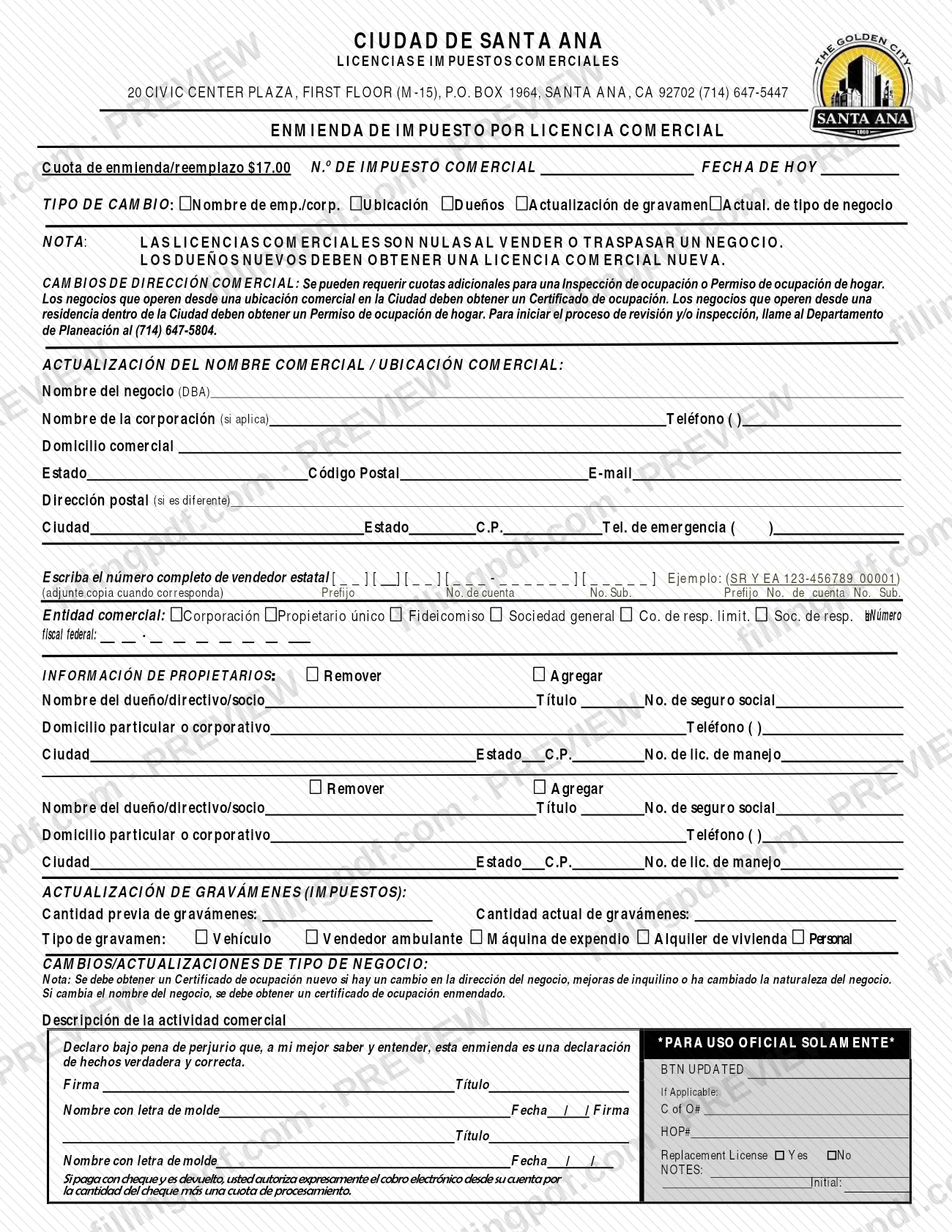
The Business License Tax Amendment 3 Esp 2025 is the Spanish-language form (Enmienda de Impuesto por Licencia Comercial) that the City of Santa Ana uses to change the details of an existing business license tax account. It is one of the forms behind a Santa Ana business license: you use it when the business name, location, owners, tax types or business activity change. On this page you can fill out the form online on FillingPDF and download or print the completed PDF; the form is published by the City of Santa Ana at the official URL below.
Last updated
What is Business License Tax Amendment 3 Esp 2025 – Santa Ana, CA?
Business License Tax Amendment 3 Esp 2025 is the City of Santa Ana form, printed in Spanish as Enmienda de Impuesto por Licencia Comercial, that a business uses to change information on its existing business license tax account.
The City of Santa Ana Finance Department issues it through its Licencias e Impuestos Comerciales (business licenses and taxes) office. At the top, the form asks for the business tax number (N.o DE IMPUESTO COMERCIAL) and today's date, and you mark the type of change (TIPO DE CAMBIO): business or corporation name, location, owners, update of levies (taxes), or update of business type.
The body of the form has four blocks: the update of the business name and location, the owner information (each owner, officer or partner marked Remover or Agregar), the update of levies (taxes), and the change or update of business type. A declaration under penalty of perjury and two signature blocks close the form.
A fee line (Cuota de enmienda/reemplazo) is printed in the header, and the official-use box includes a Replacement License Yes/No option. The form is not a new business license application: a printed note says business licenses are void when a business is sold or transferred, and new owners must obtain a new business license.
Who needs to file Business License Tax Amendment 3 Esp 2025 – Santa Ana, CA?
The form is for a business that already has a City of Santa Ana business license tax account and needs to change what the account shows. The type-of-change boxes on the form list the situations it covers:
- a change of business name or corporation name;
- a change of business location or address;
- a change of owners, officers or partners (add or remove);
- an update of levies (taxes) by type: Vehículo, Vendedor ambulante, Máquina de expendio, Alquiler de vivienda or Personal, with the previous and current quantity;
- a change or update of the type of business, with a description of the business activity.
Do not use the form to carry a license over to a new owner. The form states that business licenses are void when a business is sold or transferred, and that new owners must obtain a new business license.
Businesses that move should note that operating from a commercial location in the City requires a Certificate of Occupancy, and operating from a residence in the City requires a Home Occupancy Permit. Both are handled by the Planning Department, not by this form. The form has two signature blocks for the person or people signing the declaration; it does not describe representatives.
When to file Business License Tax Amendment 3 Esp 2025 – Santa Ana, CA
Complete this form when something on your existing business license tax account changes: the business or corporation name, the location, the owners, the levy types and quantities, or the type of business activity. The form prints no separate deadline.
Timing matters in two cases the form describes. If the business is sold or transferred, the license is void and the new owners must obtain a new business license, so an amendment is not the right form. If the business address changes, additional fees may be required for an Occupancy Inspection or Home Occupancy Permit, and the Planning Department, at (714) 647-5804, starts the review or inspection process.
A new Certificate of Occupancy must be obtained if the business address changes, tenant improvements are made or the nature of the business changes. If only the business name changes, an amended Certificate of Occupancy must be obtained.
Documents you need
- A copy of your state seller's permit, attached where applicable; the form asks for the full state seller number (prefix, account number and sub number) and says to attach a copy when it applies.
How to fill out Business License Tax Amendment 3 Esp 2025 – Santa Ana, CA
Enter tax number and today's date
At the top, write your business tax number in N.o DE IMPUESTO COMERCIAL and the date in FECHA DE HOY. Leave the PARA USO OFICIAL SOLAMENTE box to the City.
Mark the type of change
Under TIPO DE CAMBIO, check each change you are making: name of business or corporation, location, owners, update of levies, or update of business type.
Update the business name
Under ACTUALIZACIÓN DEL NOMBRE COMERCIAL / UBICACIÓN COMERCIAL, enter the business name (DBA) and, if applicable, the corporation name, plus the phone number.
Update the business location
Enter the business address, state, ZIP code and e-mail. Add a mailing address only if it is different, and give an emergency phone number.
Enter the state seller's number
Write the full state seller number in the boxes for prefix, account number and sub number, following the printed example (SR Y EA 123-456789 00001). Attach a copy when it applies.
Select the business entity
Check Corporación, Propietario único, Fideicomiso, Sociedad general, Co. de resp. limit. or Soc. de resp. limitada, and enter the federal tax number.
Add or remove owners
In INFORMACIÓN DE PROPIETARIOS, mark Remover or Agregar for each person. Enter the owner, officer or partner name, title, Social Security number, home or corporate address, phone and driver's license number.
Update the levies (taxes)
In ACTUALIZACIÓN DE GRAVÁMENES (IMPUESTOS), enter the previous and current quantity of levies and check the type: vehicle, peddler, vending machine, residential rental or personal.
Describe the business activity change
Under CAMBIOS/ACTUALIZACIONES DE TIPO DE NEGOCIO, write the description of the business activity. Keep in mind the printed note about a new or amended Certificate of Occupancy.
Sign the declaration
Sign, print your name, enter your title and write the date (the form shows the format / /). A second signature block is available for another signer.
Review and download the completed PDF
Check every block, the marked boxes and the attached seller's permit copy if it applies. Download or print the completed PDF from FillingPDF and deliver it as described under How to submit.
How to submit Business License Tax Amendment 3 Esp 2025 – Santa Ana, CA
The form names one office and no separate submission channel: the City of Santa Ana business licenses and taxes office (Licencias e Impuestos Comerciales). Its details as printed in the form header:
- Address: 20 Civic Center Plaza, First Floor (M-15), P.O. Box 1964, Santa Ana, CA 92702.
- Phone: (714) 647-5447.
- Planning Department (occupancy review or inspection): (714) 647-5804.
Call the office to confirm how it accepts the completed form, since the form itself does not say.
A fee applies to an amendment or replacement; the form prints it in the header, and the amount is not repeated here, so confirm it with the office. The form also contains a notice about payment by check: if a check is returned, you expressly authorize an electronic charge to your account for the check amount plus a processing fee. FillingPDF lets you fill out and download the PDF; submission follows the City's channels above.
Common mistakes to avoid
- Using the amendment after a business is sold or transferred; the form says the license is void and new owners must obtain a new business license.
- Changing the business address without checking occupancy requirements: a Certificate of Occupancy (commercial location) or Home Occupancy Permit (residence) is required, and extra fees may apply.
- Changing only the business name and not obtaining an amended Certificate of Occupancy, which the form says is required.
- Leaving the Remover or Agregar box unmarked next to an owner, so the City cannot tell whether the person is being added or taken off.
- Omitting the state seller's permit copy when it applies, or writing the number without its prefix, account number and sub number.
- Entering levy quantities without marking the levy type (Vehículo, Vendedor ambulante, Máquina de expendio, Alquiler de vivienda or Personal).
- Submitting the form without a signature, printed name, title and date; the declaration is made under penalty of perjury.
- Paying with a check that is later returned; the form authorizes an electronic charge for the amount plus a processing fee.
Frequently asked questions
What is the Santa Ana Business License Tax Amendment form?
It is the City of Santa Ana's Spanish-language form, Enmienda de Impuesto por Licencia Comercial, for changing the details of an existing business license tax account: name, location, owners, levies or business type. It supports a Santa Ana business license already in place; it does not create a new one.
Can I use this form if I sold my business?
No. The form states that business licenses are void when a business is sold or transferred, and that new owners must obtain a new business license. The amendment is for changes to an account that stays with the same business.
Do I need a Certificate of Occupancy when I change my business address?
Yes, for a business at a commercial location in the City; a business operating from a residence needs a Home Occupancy Permit instead. Additional fees may apply. Call the Planning Department at (714) 647-5804 to start the review or inspection.
Is there a fee to amend my Santa Ana business license tax account?
Yes. The form prints an amendment/replacement fee in its header. Call the office at (714) 647-5447 to confirm the current amount. If you pay by check and it is returned, you authorize an electronic charge for the check amount plus a processing fee.
Where do I send the Business License Tax Amendment form?
The form lists the City's business licenses and taxes office at 20 Civic Center Plaza, First Floor (M-15), P.O. Box 1964, Santa Ana, CA 92702, phone (714) 647-5447. It names no separate channel, so call to confirm how the office accepts the completed form.
How do I add or remove an owner on the amendment?
In the owner information block, check Remover or Agregar for each person, then enter the name, title, Social Security number, address, phone and driver's license number. The block has room for two owners, officers or partners.
Can I fill out the Santa Ana business license amendment online?
Yes. You can fill out the PDF online on FillingPDF and download or print it. FillingPDF is an independent service and does not file the form or issue licenses; you deliver it to the City of Santa Ana through its own channels.
Ready to fill out Business License Tax Amendment 3 Esp 2025 – Santa Ana, CA?
Fill out Business License Tax Amendment 3 Esp 2025 – Santa Ana, CA now