
The General Business License Tax Review Form is the form the City of Santa Ana's Business Tax Office uses to review a business license tax notice that the recipient believes was sent in error or does not apply to them. It is one of the Santa Ana business license documents published by the City of Santa Ana Finance Department, and it lets you give facts showing that you or your business is not subject to the City's business license tax. On FillingPDF you can fill out the form online and download or print the completed PDF; the original PDF is published by the City, and the completed form is returned to the City.
Last updated
What is General Business License Tax Review Form – Santa Ana, CA?
The General Business License Tax Review Form is a City of Santa Ana form on which someone who received a business license notice can show it was sent in error or that they are not subject to the City's business license tax.
The City's Business Tax Office (M-15) issues the form, which is printed under the title "Business License Tax Review Form." It is a response to a notice, not an application for a license. After reviewing your answers, the City either contacts you for more information or removes your name from its database. A box at the bottom of page 2, marked for official use only, records the determination: registration notice upheld or dismissed.
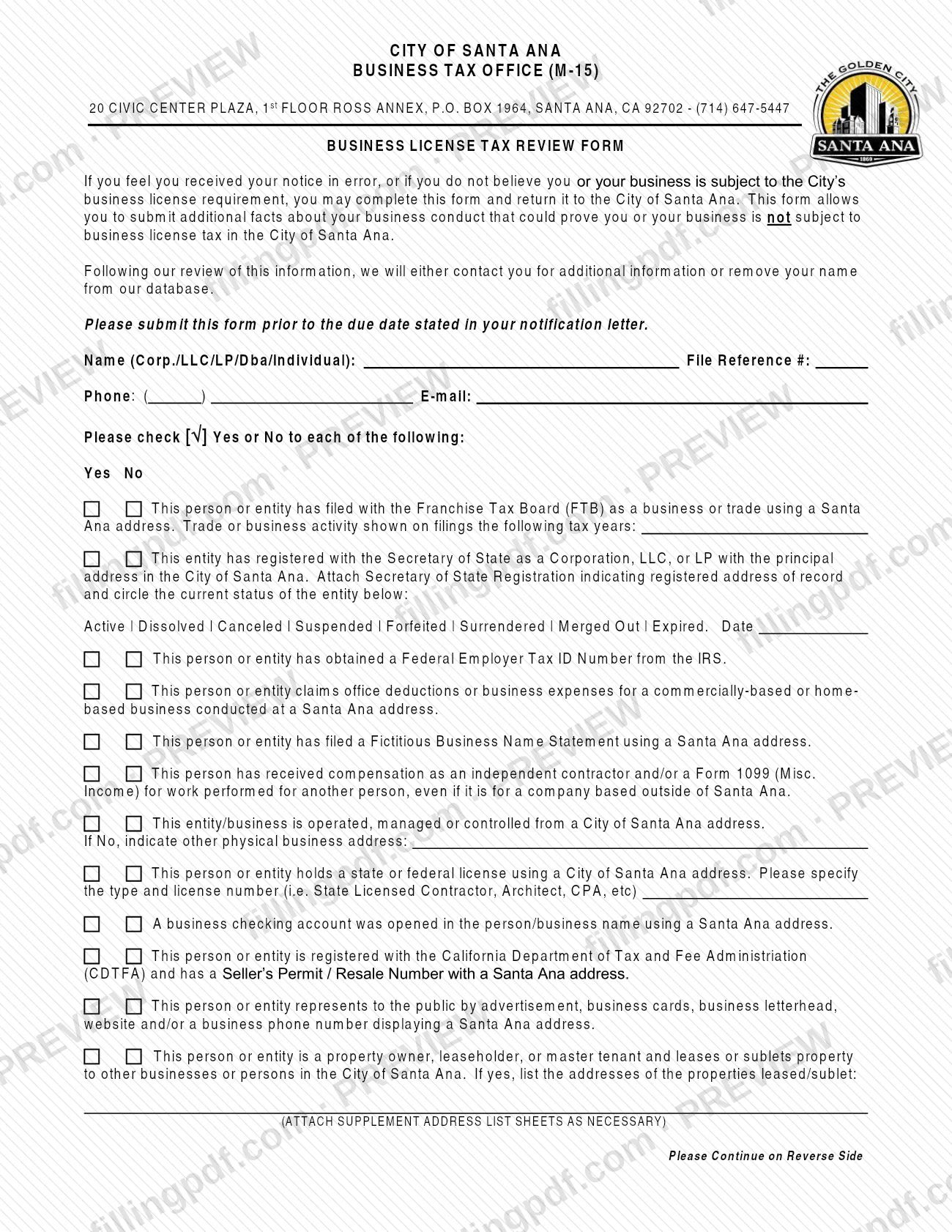
Page 1 asks you to check Yes or No for a series of connections to Santa Ana:
- filings with the Franchise Tax Board (FTB) using a Santa Ana address;
- registration with the Secretary of State as a Corporation, LLC, or LP with its principal address in Santa Ana;
- a Federal Employer Tax ID Number from the IRS;
- office deductions or business expenses for a business conducted at a Santa Ana address;
- a Fictitious Business Name Statement, 1099 compensation, and operation, management or control from a Santa Ana address;
- a state or federal license, a business checking account, a California Department of Tax and Fee Administration (CDTFA) Seller's Permit / Resale Number, or advertising that shows a Santa Ana address;
- leasing or subletting property to others in Santa Ana.
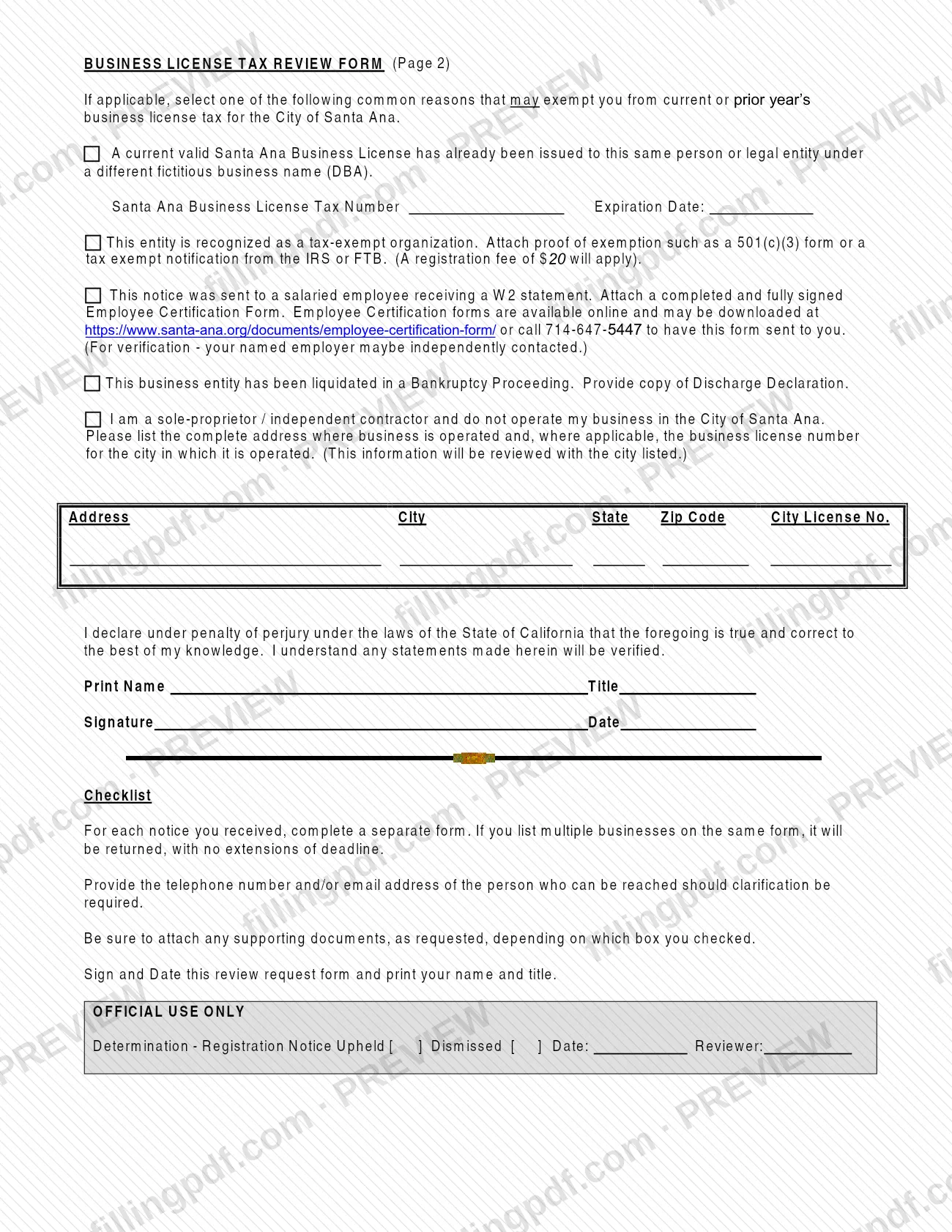
Page 2 lists common reasons that may exempt you from the current or a prior year's tax: an existing Santa Ana business license under a different DBA, tax-exempt organization status, a salaried employee who receives a W2, a business liquidated in bankruptcy, or a sole proprietor or independent contractor who does not operate in the City. It ends with a declaration under penalty of perjury.
Who needs to file General Business License Tax Review Form – Santa Ana, CA?
Anyone who received a notice from the City of Santa Ana about its business license requirement and feels it was sent in error, or does not believe they or their business are subject to the City's business license tax, may complete this form.
The exemption section on page 2 describes who typically uses it:
- an owner who already holds a current valid Santa Ana Business License under a different fictitious business name (DBA);
- a tax-exempt organization;
- a salaried employee who receives a W2 statement;
- a business entity liquidated in a Bankruptcy Proceeding;
- a sole proprietor or independent contractor who does not operate the business in the City of Santa Ana.
Complete a separate form for each notice you received. If you list multiple businesses on one form, the City returns it with no extension of the deadline. The form asks for the telephone number or email address of the person who can be reached for clarification, and for the printed name, title and signature of the person making the declaration. The form says nothing about who may sign for someone else.
When to file General Business License Tax Review Form – Santa Ana, CA
Submit the form before the due date stated in the notification letter you received from the City. The form sets no other deadline.
Complete one form for each notice. A form that lists several businesses is returned to you, and the form states that no extension of the deadline is given in that case, so use a separate form for each notice from the start.
The form does not give a review time. It says that after reviewing the information the City will either contact you for additional information or remove your name from its database. Keep the contact phone number or email address on the form current so the City can reach you.
Documents you need
- Secretary of State Registration showing the registered address of record: attach it if you answer Yes to the Secretary of State registration question for a Corporation, LLC, or LP.
- Proof of tax-exempt status, such as a 501(c)(3) form or a tax exempt notification from the IRS or FTB: attach it if you select the tax-exempt organization reason.
- A completed and fully signed Employee Certification Form: attach it if the notice was sent to a salaried employee receiving a W2 statement. The City may contact your named employer to verify.
- A copy of the Discharge Declaration: provide it if the business entity was liquidated in a Bankruptcy Proceeding.
- Supplement address list sheets, as necessary: attach them if you answer Yes to being a property owner, leaseholder or master tenant who leases or sublets property in Santa Ana, listing every property address.
- Other supporting documents requested for the box you checked: the form's checklist says to attach any such documents depending on which box you checked.
How to fill out General Business License Tax Review Form – Santa Ana, CA
Enter your name and contact details
At the top, write the Name (Corp./LLC/LP/Dba/Individual), the File Reference #, your phone number and your e-mail. Give the number or address of the person who can be reached if the City needs clarification.
Answer the FTB filing question
Check Yes or No for whether you or your entity filed with the Franchise Tax Board (FTB) as a business or trade using a Santa Ana address. If Yes, enter the trade or business activity shown on the filings for the tax years requested.
Answer the Secretary of State question
Check Yes or No for registration as a Corporation, LLC, or LP with its principal address in Santa Ana. If Yes, attach the Secretary of State Registration, circle the current status (Active, Dissolved, Canceled, Suspended, Forfeited, Surrendered, Merged Out or Expired) and write the date.
Answer the tax ID, expense and DBA questions
Check Yes or No for a Federal Employer Tax ID Number from the IRS, for office deductions or business expenses at a Santa Ana address, and for a Fictitious Business Name Statement filed with a Santa Ana address.
Answer the 1099 and operations questions
Check Yes or No for compensation as an independent contractor or a Form 1099 (Misc. Income), even for a company outside Santa Ana. For the question on operation, management or control from a Santa Ana address, write the other physical business address if you check No.
Answer the license, bank and advertising questions
Check Yes or No for a state or federal license (specify the type and license number), a business checking account, a CDTFA Seller's Permit / Resale Number, and public advertising showing a Santa Ana address.
List leased or sublet properties
Check Yes or No for being a property owner, leaseholder or master tenant who leases or sublets property in Santa Ana. If Yes, list the addresses and attach supplement address list sheets as necessary.
Select an exemption reason, if one applies
On page 2, select the reason that fits: an existing Santa Ana business license under a different DBA (enter its Business License Tax Number and expiration date), tax-exempt organization, W2 salaried employee, bankruptcy liquidation, or sole proprietor or independent contractor outside the City. Attach the document each reason requires.
Enter the out-of-city business address
If you selected the sole proprietor or independent contractor reason, fill in the Address, City, State, Zip Code and, where applicable, the City License No. for the city where the business operates. The City will review it with that city.
Complete the declaration
Print your name and title, sign and date the declaration under penalty of perjury. Check the form's checklist: one form per notice, a contact phone or email, and all supporting documents attached.
Review and download the completed PDF
Check every Yes or No answer, the attachments and the signature block, then download or print the completed PDF from FillingPDF and return it as described under How to submit.
How to submit General Business License Tax Review Form – Santa Ana, CA
The form says to complete it and return it to the City of Santa Ana. It prints the Business Tax Office's address in its heading and names no other channel.
- Return address: City of Santa Ana, Business Tax Office (M-15), 20 Civic Center Plaza, 1st Floor Ross Annex, P.O. Box 1964, Santa Ana, CA 92702.
- Phone: (714) 647-5447, the Business Tax Office number printed on the form. The form also gives this number for requesting a copy of the Employee Certification Form.
Before you return it, attach every supporting document that applies to the boxes you checked (see the required documents list), sign and date page 2, and print your name and title. If you check the tax-exempt organization reason, a registration fee applies; the form does not say how it is paid, and the amount is not stated here, so call the Business Tax Office for current details.
FillingPDF lets you fill out and download the PDF; submission follows the City's instructions above.
Common mistakes to avoid
- Listing multiple businesses on one form; the City returns it with no extension of the deadline, and each notice needs its own form.
- Returning the form after the due date stated in the notification letter.
- Checking the Secretary of State registration box without attaching the registration showing the registered address of record, or without circling the entity's current status.
- Selecting the tax-exempt organization reason without proof such as a 501(c)(3) form or an IRS or FTB tax exempt notification.
- Selecting the W2 employee reason without a completed and fully signed Employee Certification Form.
- Claiming a bankruptcy liquidation without providing a copy of the Discharge Declaration.
- Answering No to the question about operation, management or control from a Santa Ana address without writing the other physical business address.
- Leaving out the printed name, title, signature or date on the declaration, or omitting the phone number or email address of a contact person.
Frequently asked questions
What is the General Business License Tax Review Form?
It is a City of Santa Ana form on which you give additional facts about your business conduct to show a business license tax notice was sent in error or does not apply to you. The City then contacts you for more information or removes your name from its database.
Can I dispute a Santa Ana business license notice with this form?
Yes, if you feel you received the notice in error or do not believe you or your business is subject to the City's business license requirement. Complete the form, attach the documents your answers require, and return it to the City before the due date in your notification letter.
When is the review form due?
Before the due date stated in your notification letter from the City. The form gives no other deadline, and a form listing multiple businesses is returned with no extension, so complete a separate form for each notice.
Where do I return the Business License Tax Review Form?
Return it to the City of Santa Ana. The form's heading gives the Business Tax Office (M-15) address: 20 Civic Center Plaza, 1st Floor Ross Annex, P.O. Box 1964, Santa Ana, CA 92702, and the phone number (714) 647-5447. The form names no other channel.
What do I attach if my organization is tax-exempt?
Attach proof of exemption, such as a 501(c)(3) form or a tax exempt notification from the IRS or FTB. The form also says a registration fee applies to this option; call the Business Tax Office at (714) 647-5447 for the current amount.
I am a salaried employee and received a notice. What do I do?
Select the reason for a notice sent to a salaried employee receiving a W2 statement and attach a completed, fully signed Employee Certification Form. The form is at https://www.santa-ana.org/documents/employee-certification-form/ or by calling 714-647-5447. The City may contact your employer to verify.
Can I list several businesses on one form?
No. The checklist says to complete a separate form for each notice you received. A form that lists multiple businesses is returned, and the deadline is not extended.
Can I fill out the Santa Ana review form online?
You can fill out the PDF online on FillingPDF and download or print it. FillingPDF is not affiliated with the City of Santa Ana and does not submit the form; you return it to the City yourself.
Ready to fill out General Business License Tax Review Form – Santa Ana, CA?
Fill out General Business License Tax Review Form – Santa Ana, CA now