
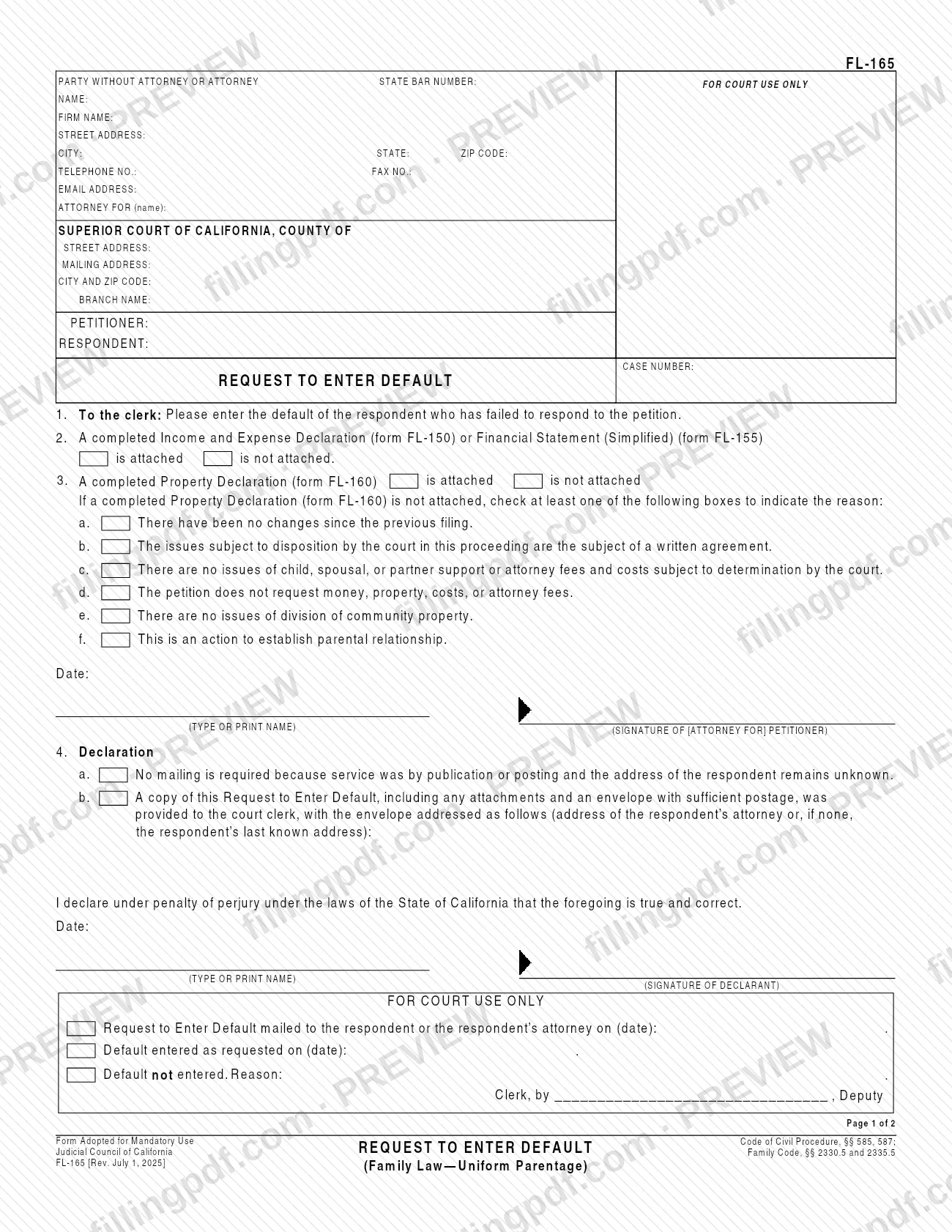
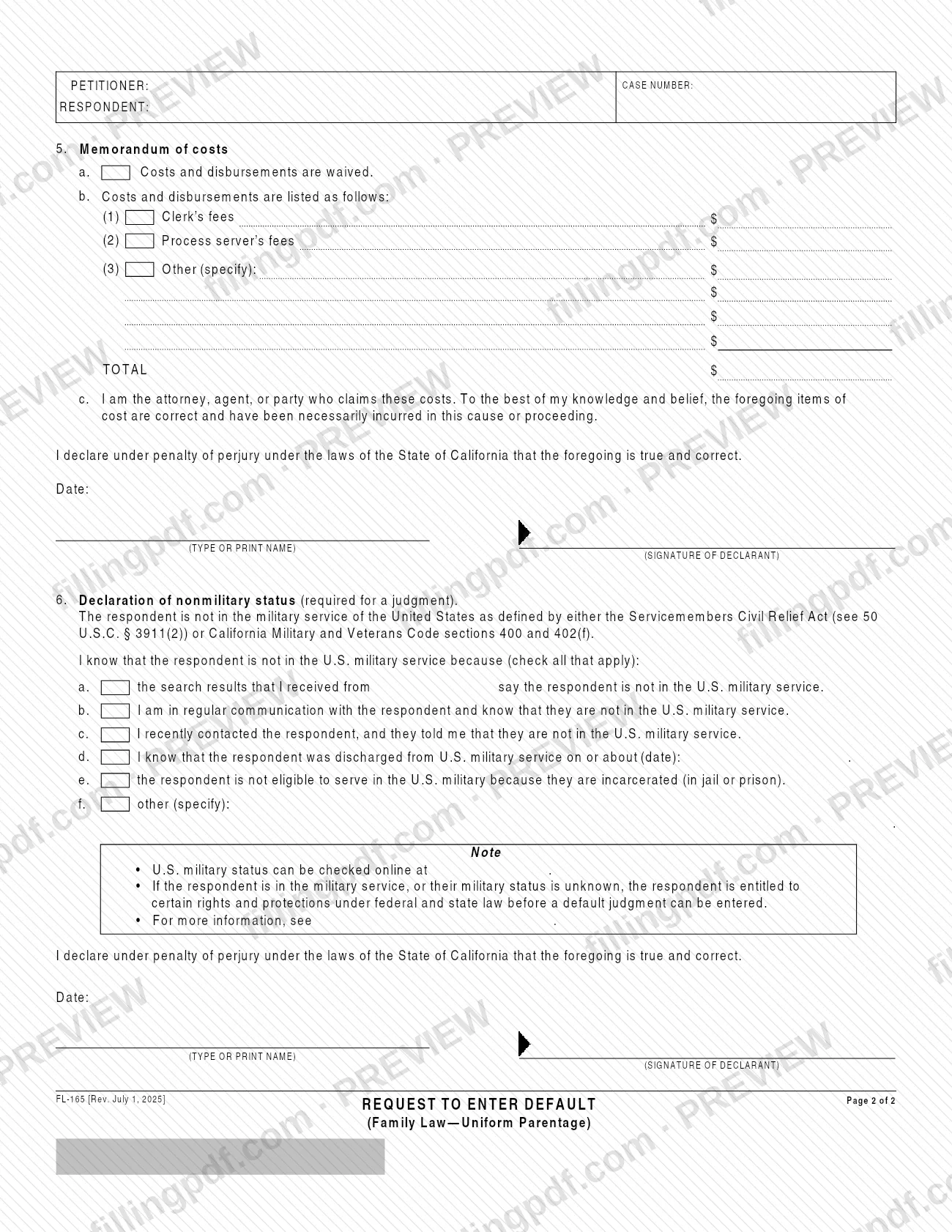
FL-165 is the Request to Enter Default (Family Law—Uniform Parentage), a Judicial Council of California form on which a petitioner asks the court clerk to enter the default of a respondent who has failed to respond to the petition. It also carries the declaration about mailing, the memorandum of costs and the declaration of nonmilitary status that a judgment requires. On this page you can fill out the form online on FillingPDF and download or print the completed PDF; the original is published by the Judicial Council of California at courts.ca.gov.
Last updated
What is FL-165?
Request to Enter Default (Family Law—Uniform Parentage), form FL-165, is the Judicial Council of California form a petitioner files in a Superior Court family law case to ask the clerk to enter the default of a respondent who has not responded to the petition.
According to the California courts self-help page for the form, it asks the court for a decision that time has ended for your spouse or domestic partner to file a response. That lets you ask the court for a judgment based on a signed settlement agreement or, if there is no agreement, on what you asked for in the petition.
The form is adopted for mandatory use and cites Code of Civil Procedure, §§ 585 and 587, and Family Code, §§ 2330.5 and 2335.5. It has two pages with six items:
- Item 1: the request to the clerk to enter the default.
- Items 2 and 3: whether an Income and Expense Declaration (form FL-150) or Financial Statement (Simplified) (form FL-155), and a Property Declaration (form FL-160), are attached.
- Item 4: a declaration about mailing a copy to the respondent.
- Item 5: a memorandum of costs.
- Item 6: a declaration of nonmilitary status, required for a judgment.
The bottom of page 1 is a FOR COURT USE ONLY block where the clerk records the mailing, the entry of default or the reason it was not entered.
Who needs to file FL-165?
The petitioner (or the petitioner's attorney) in a California Superior Court family law or uniform parentage case uses FL-165 when the respondent has failed to respond to the petition and the petitioner wants the clerk to enter the respondent's default.
Points the form itself makes:
- Item 3 is signed by the petitioner or the attorney for the petitioner.
- The declarations in items 4, 5 and 6 are each signed by a declarant under penalty of perjury; item 5 is made by the attorney, agent or party who claims the costs.
- Item 6, the declaration of nonmilitary status, is marked as required for a judgment.
- If the respondent is in the military service, or their military status is unknown, the form notes that the respondent is entitled to certain rights and protections under federal and state law before a default judgment can be entered.
The form is for a respondent who has not responded. It does not apply if the respondent has filed a response.
When to file FL-165
File FL-165 after the respondent has failed to respond to the petition, that is, after the time to file a response has ended. The form names no date or number of days; the deadline to respond comes from the rules of the case, not from this form.
The request is meant to be followed by a judgment: the self-help page says it allows you to ask the court for a judgment based on a signed settlement agreement or on what the petition requested. Because item 6, the declaration of nonmilitary status, is required for a judgment, have the military-status information ready when you complete the form.
The clerk's block on the form records whether the default was entered as requested, with its date, or was not entered, with the reason.
Documents you need
- Income and Expense Declaration (form FL-150) or Financial Statement (Simplified) (form FL-155): item 2 asks whether a completed one is attached or not attached.
- Property Declaration (form FL-160): item 3 asks whether it is attached. If it is not, check at least one reason box, a through f.
- A copy of this Request to Enter Default, with any attachments, plus an envelope with sufficient postage, given to the court clerk under item 4b, unless item 4a applies (service by publication or posting and respondent's address unknown).
- Search results from scra.dmdc.osd.mil/ or another basis listed in item 6, a through f, supporting your declaration of nonmilitary status. The form asks you to check the basis, not to attach it.
How to fill out FL-165
Enter your information and the court
At the top of page 1, enter the party or attorney name, State Bar number, firm name, address, telephone, fax, email and who the attorney is for. Then enter the Superior Court of California county and address, the petitioner and respondent names and the case number.
Confirm the request to the clerk
Item 1 is the printed request asking the clerk to enter the default of the respondent who has failed to respond to the petition. Nothing is entered there.
Indicate the financial declaration
Item 2: check is attached or is not attached for a completed Income and Expense Declaration (form FL-150) or Financial Statement (Simplified) (form FL-155).
Address the Property Declaration
Item 3: check whether the Property Declaration (form FL-160) is attached. If it is not, check at least one reason, a through f, such as no changes since the previous filing or that this is an action to establish parental relationship.
Date and sign item 3
Enter the date, type or print your name and sign as petitioner or attorney for the petitioner below the item 3 reasons.
Complete the mailing declaration
Item 4: check 4a if service was by publication or posting and the respondent's address remains unknown. Otherwise check 4b and enter the address of the respondent's attorney or, if none, the respondent's last known address; then date, print and sign.
Complete the memorandum of costs
Item 5: check 5a if costs and disbursements are waived, or 5b and list the clerk's fees, process server's fees and any other costs with the TOTAL. Date, print and sign the declaration.
Complete the nonmilitary declaration
Item 6: check each basis that applies, a through f, for knowing the respondent is not in U.S. military service. If you check d, enter the discharge date; if you check f, specify.
Date and sign item 6
Enter the date, type or print the declarant's name and sign the declaration under penalty of perjury. Leave the FOR COURT USE ONLY section for the clerk.
Review, sign and download the PDF
Check every item, the page 2 case header and all four dates and signatures, then download or print the completed PDF from FillingPDF and prepare the copy and envelope described under How to submit.
How to submit FL-165
The form is addressed "To the clerk": you present it to the clerk of the Superior Court of California in the county where your case is pending, which is the court you name at the top of page 1.
- Copy and envelope: under item 4b, provide the court clerk with a copy of the Request to Enter Default, including any attachments, and an envelope with sufficient postage. Address the envelope to the respondent's attorney or, if there is none, to the respondent's last known address.
- Publication or posting: if service was by publication or posting and the respondent's address remains unknown, check item 4a instead; no mailing is required.
- Clerk's block: leave the FOR COURT USE ONLY section blank; the clerk completes it.
The form prints no fee, portal address or filing instructions beyond this. Check your court's website or clerk's office for how it accepts filings and what charges apply. FillingPDF lets you fill out and download the PDF; submission follows the court channels above.
Common mistakes to avoid
- Not attaching form FL-160 and then checking none of the reason boxes a through f; the form says to check at least one.
- Leaving out the copy of the request and the postage-paid envelope for the court clerk when item 4a does not apply.
- Addressing the item 4b envelope to the wrong person; it goes to the respondent's attorney or, if there is none, to the respondent's last known address.
- Checking item 4a (no mailing required) when the respondent's address is known or service was not by publication or posting.
- Skipping item 6, the declaration of nonmilitary status, which the form marks as required for a judgment.
- Signing only one place: item 3, item 4, item 5 and item 6 each have their own date and signature line.
- Leaving item 5 incomplete: check either a (costs waived) or b (costs listed), and total the amounts if you list them.
- Writing in the FOR COURT USE ONLY block, which the clerk fills in.
Frequently asked questions
What is the FL-165 form used for?
FL-165 is the Judicial Council of California Request to Enter Default (Family Law—Uniform Parentage). The petitioner uses it to ask the court clerk to enter the default of a respondent who has failed to respond to the petition, which opens the way to asking for a judgment.
Who files form FL-165?
The petitioner, or the petitioner's attorney, files it when the respondent has not responded to the petition. Item 3 is signed by the petitioner or attorney; items 4, 5 and 6 are declarations signed by a declarant under penalty of perjury.
Do I have to attach FL-150 or FL-160 to FL-165?
The form asks you to say whether each is attached. Item 2 covers the Income and Expense Declaration (FL-150) or Financial Statement (Simplified) (FL-155); item 3 covers the Property Declaration (FL-160), and if it is not attached you must check at least one of reasons a through f.
What is the declaration of nonmilitary status in item 6?
It states that the respondent is not in U.S. military service under the Servicemembers Civil Relief Act or California Military and Veterans Code sections 400 and 402(f). It is required for a judgment, and you check how you know, such as search results from scra.dmdc.osd.mil/.
What happens if the respondent is in the military?
The form notes that a respondent in military service, or whose status is unknown, is entitled to certain rights and protections under federal and state law before a default judgment can be entered. See selfhelp.courts.ca.gov/military-defaults.
Do I have to mail a copy of the request to the respondent?
Usually you give the court clerk a copy with any attachments and a postage-paid envelope addressed to the respondent's attorney or last known address (item 4b). No mailing is required if service was by publication or posting and the address remains unknown (item 4a).
Where do I submit the FL-165?
Submit it to the clerk of the Superior Court of California in the county where your case is pending. The form is addressed to the clerk and prints no other channel, so check that court's website or clerk's office for how it accepts filings.
Can I fill out FL-165 online?
Yes. You can fill out the PDF online on FillingPDF and download or print it. FillingPDF is an independent service and does not file the form with the court; you present it to the clerk through the court's channels.
Ready to fill out FL-165?
Fill out FL-165 now