
Form ACR 140, the Counter Drop Off Sheet, is the cover sheet the Riverside County Assessor-County Clerk-Recorder uses when a customer leaves documents at the Recorder's counter. It lists each document by title, the copies requested, the payment and any recording instructions, and it carries the receipt, recorded or rejected status and pick-up signatures that county employees complete. On this page you can fill out the form online on FillingPDF and download or print the completed PDF; the form itself is published by the agency at its website.
Last updated
What is ACR 140?
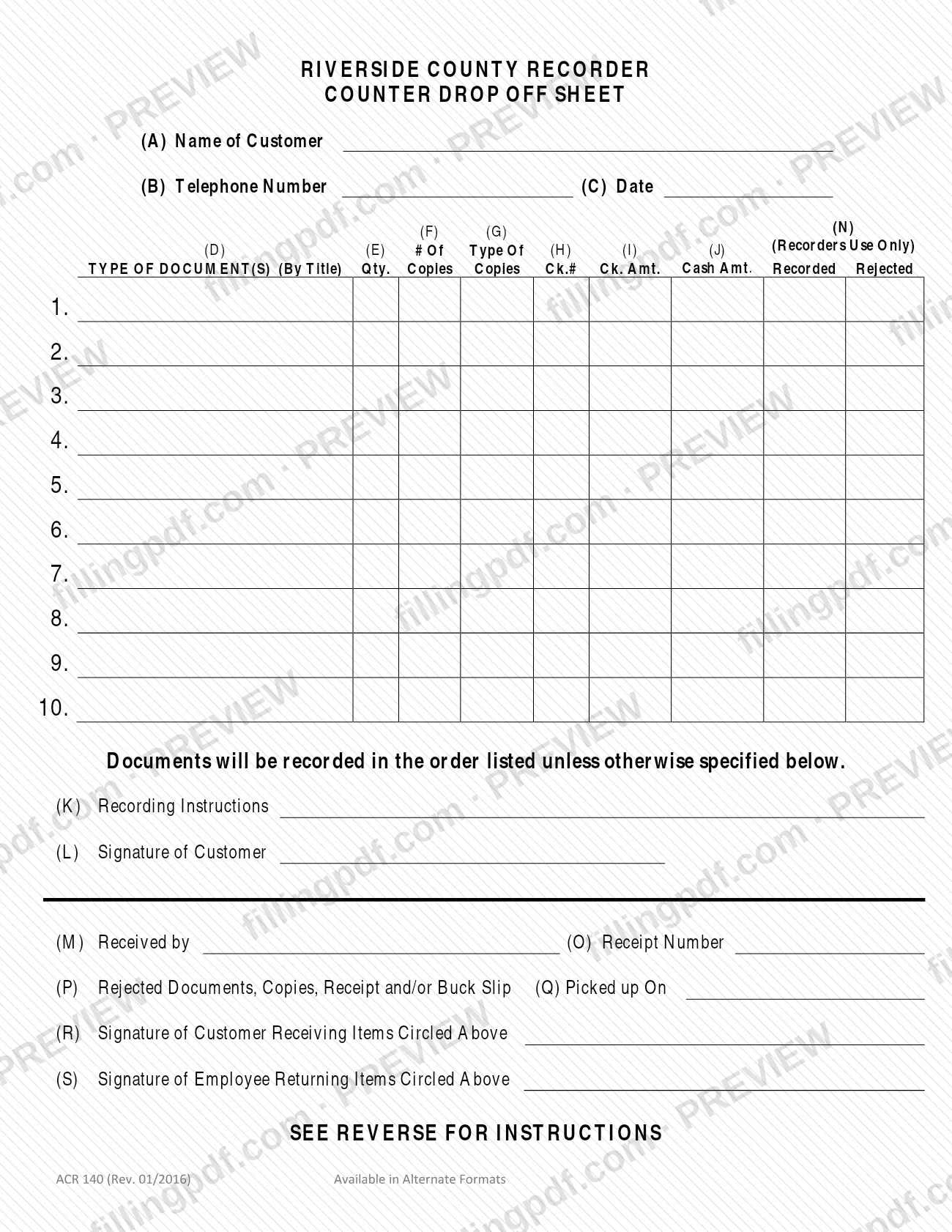
Form ACR 140, Counter Drop Off Sheet, is the Riverside County Recorder form that a customer completes when leaving documents at the counter, and on which county employees then log the receipt, the recorded or rejected result and the return of the items.
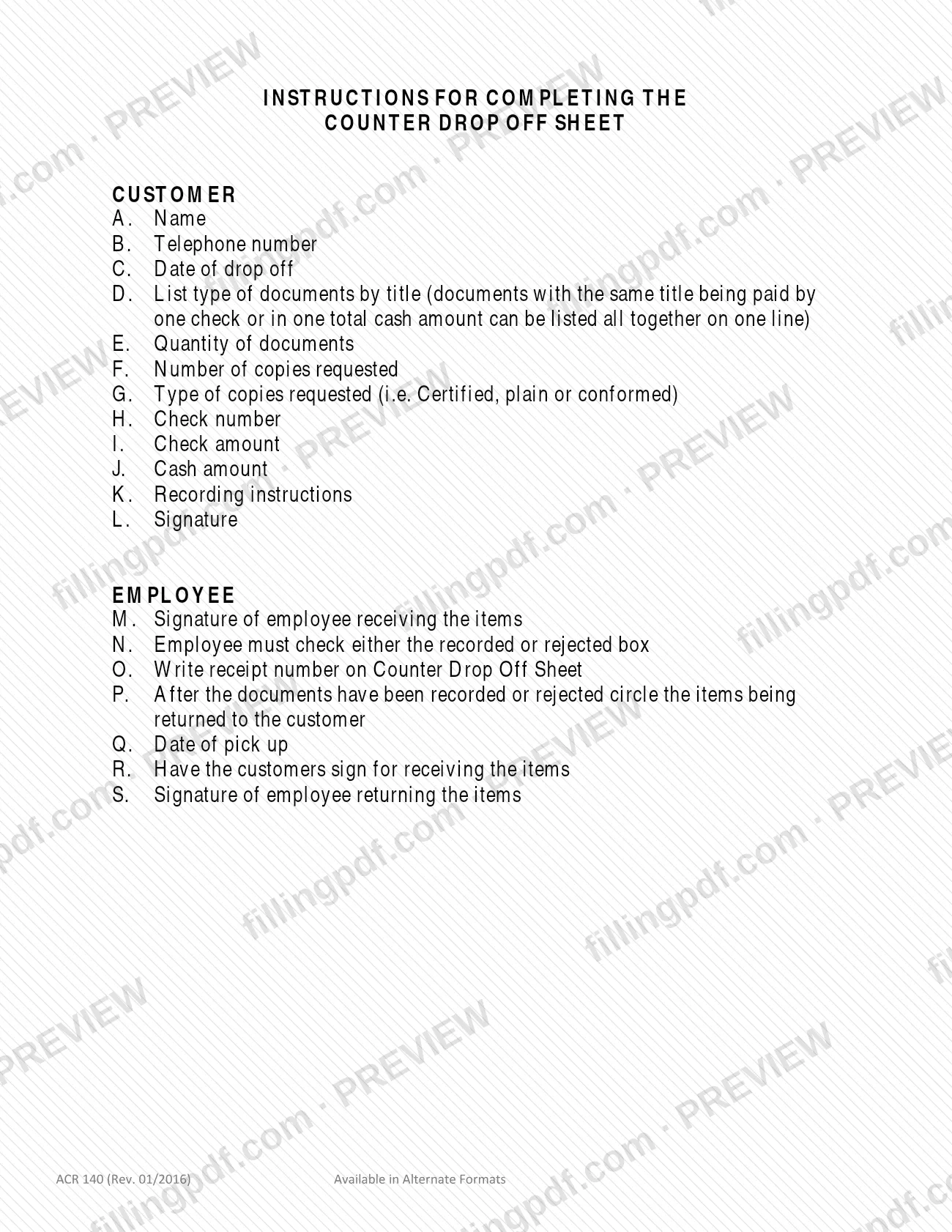
The sheet has two halves. The customer part, boxes A through L, asks for the customer's name (A), telephone number (B), date of drop off (C), the documents listed by title (D), quantity (E), number of copies requested (F), type of copies requested (G), check number (H), check amount (I), cash amount (J), recording instructions (K) and the customer's signature (L). The employee part, boxes M through S, records who received the items, whether each document was recorded or rejected, the receipt number, which items are returned, the pick-up date and the signatures of the customer and the employee when the items are handed back.
Up to ten lines are provided for documents. The sheet states that documents will be recorded in the order listed unless the customer specifies otherwise in the recording instructions.
The form is issued by the Riverside County Assessor-County Clerk-Recorder and the page headed Riverside County Recorder. It is a drop-off record, not a recordable document itself and not an application for any particular service. The printed form is marked "Available in Alternate Formats".
Who needs to file ACR 140?
Customers who deliver documents to the Riverside County Recorder's counter and want them logged for recording, with any copies they request, use Form ACR 140. The sheet is filled out at drop off: it carries the customer's name, telephone number, date and signature.
Two groups complete different parts:
- Customers complete boxes A through L: identity, the document list, copies, payment and recording instructions, and signature.
- County employees complete boxes M through S: receipt, recorded or rejected status, receipt number, items returned, pick-up date and return signatures. The Recorders Use Only columns are not for the customer.
Documents with the same title that are paid for by one check, or in one total cash amount, may be listed together on a single line. Documents with different titles or separate payments need their own lines.
The agency's forms page notes that its employees cannot give legal advice or help prepare legal documents. If you are unsure which document your transaction needs, that page directs you to an attorney or other professional adviser.
When to file ACR 140
You complete Form ACR 140 on the day you drop off documents at the Recorder's counter; box C asks for the date of drop off. The form prints no deadline of its own, so it is used whenever you leave documents for recording.
If you are picking up returned items later, the employee records the pick-up date in box Q, and you sign for what you receive in box R. The sheet sets no time limit for pick up.
Documents you need
- The document or documents to be recorded, listed by title in column D, up to ten lines; documents with the same title paid by one check or one cash total may share a line.
- Payment for recording or copies, if you pay: a check, with its number and amount entered in boxes H and I, or cash, with the total entered in box J.
How to fill out ACR 140
Enter the customer name
In box A, write the name of the customer dropping off the documents.
Add telephone number and date
Enter a telephone number in box B and the date of drop off in box C.
List each document by title
In column D, write the title of each document on lines 1 through 10. Documents with the same title paid by one check or one total cash amount can share a line.
Enter quantity and number of copies
In column E, enter how many documents are on the line. In column F, enter the number of copies requested.
State the type of copies
In column G, write the type of copies requested, such as certified, plain or conformed.
Record your payment
Enter the check number in column H and the check amount in column I, or the cash amount in column J. Ask the agency for the amounts due.
Write recording instructions
In box K, add any instructions, including a different recording order, since documents are recorded in the order listed unless you specify otherwise.
Sign the sheet
Sign in box L as the customer.
Leave the employee boxes blank
Boxes M through S and the Recorders Use Only columns (recorded, rejected, receipt number, items returned, pick-up date) are completed by county staff.
Review, download and print the PDF
Check every box, then download or print the completed PDF from FillingPDF in black ink on 8 1/2" x 11" white paper and bring or mail it with your documents.
How to submit ACR 140
Form ACR 140 is delivered with your documents, in person or by mail, to your local Assessor-County Clerk-Recorder office. The agency says its forms do not allow online submission.
- In person: bring the completed sheet and the documents to the Recorder's counter. An employee signs for the items (box M), marks each as recorded or rejected (box N), writes the receipt number (box O) and later circles the items being returned (box P).
- By mail: the agency's forms page says forms must be delivered by mail or in person to the local office. The form itself prints no mailing address, so confirm the address with the Assessor-County Clerk-Recorder at https://www.rivcoacr.org/-forms.
Print the sheet in black ink on 8 1/2" x 11" white paper. Payment is entered on the sheet by check number and amount or by cash amount; ask the agency for the amounts due. FillingPDF lets you fill out and download the PDF; submission follows the agency's channels above.
Common mistakes to avoid
- Listing documents with different titles, or paid by separate checks or cash amounts, on one line; only same-title documents paid together may share a line.
- Leaving the recording order unspecified when you need a different order; documents are recorded in the order listed unless you say otherwise in box K.
- Filling in the employee boxes M through S or the Recorders Use Only columns, which county staff complete.
- Omitting the type of copies in box G (certified, plain or conformed) when you request copies in box F.
- Leaving out the customer signature in box L or the telephone number in box B.
- Printing the sheet on colored paper, a non-standard size or in a color other than black ink; the agency requires black ink on 8 1/2" x 11" white paper.
- Trying to submit the sheet online; the agency's forms must be delivered by mail or in person.
- Entering the check amount in the cash column, or the reverse, instead of boxes I and J as labeled.
Frequently asked questions
What is Form ACR 140, the Counter Drop Off Sheet?
It is the Riverside County Recorder sheet that lists documents a customer leaves at the counter. The customer enters the document titles, copies, payment and recording instructions, and county employees record the receipt number, recorded or rejected status and the return of items.
Can I submit the Counter Drop Off Sheet online?
No. The Assessor-County Clerk-Recorder says its forms do not allow online submission and must be delivered by mail or in person to your local office. You can complete the PDF beforehand, but delivery follows those channels.
In what order are my documents recorded?
In the order you list them on the sheet, unless you specify otherwise. The form states this, and box K, Recording Instructions, is where you write any different order or other instruction.
Can I list several documents on one line?
Yes, but only documents with the same title that are paid by one check or in one total cash amount. The instructions for box D allow those to be listed together; other documents need their own lines, up to ten.
What types of copies can I request on the sheet?
Box G asks for the type of copies, and the instructions give certified, plain or conformed as examples. Enter the number of copies you want in box F, and the type in box G.
Which boxes do I leave blank?
Leave boxes M through S and the Recorders Use Only columns to county employees. They cover receiving the items, recorded or rejected status, the receipt number, returned items, pick-up date and return signatures.
How must I print Form ACR 140?
Print it in black ink on 8 1/2" x 11" white paper, as the agency's forms page requires for all of its forms. Most of its PDFs can be completed online and printed.
Can I fill out Form ACR 140 online on FillingPDF?
Yes. You can fill out the PDF online on FillingPDF and download or print it. FillingPDF is an independent service, not the agency, and does not submit the sheet; you deliver it to the Recorder in person or by mail.
Ready to fill out ACR 140?
Fill out ACR 140 now