
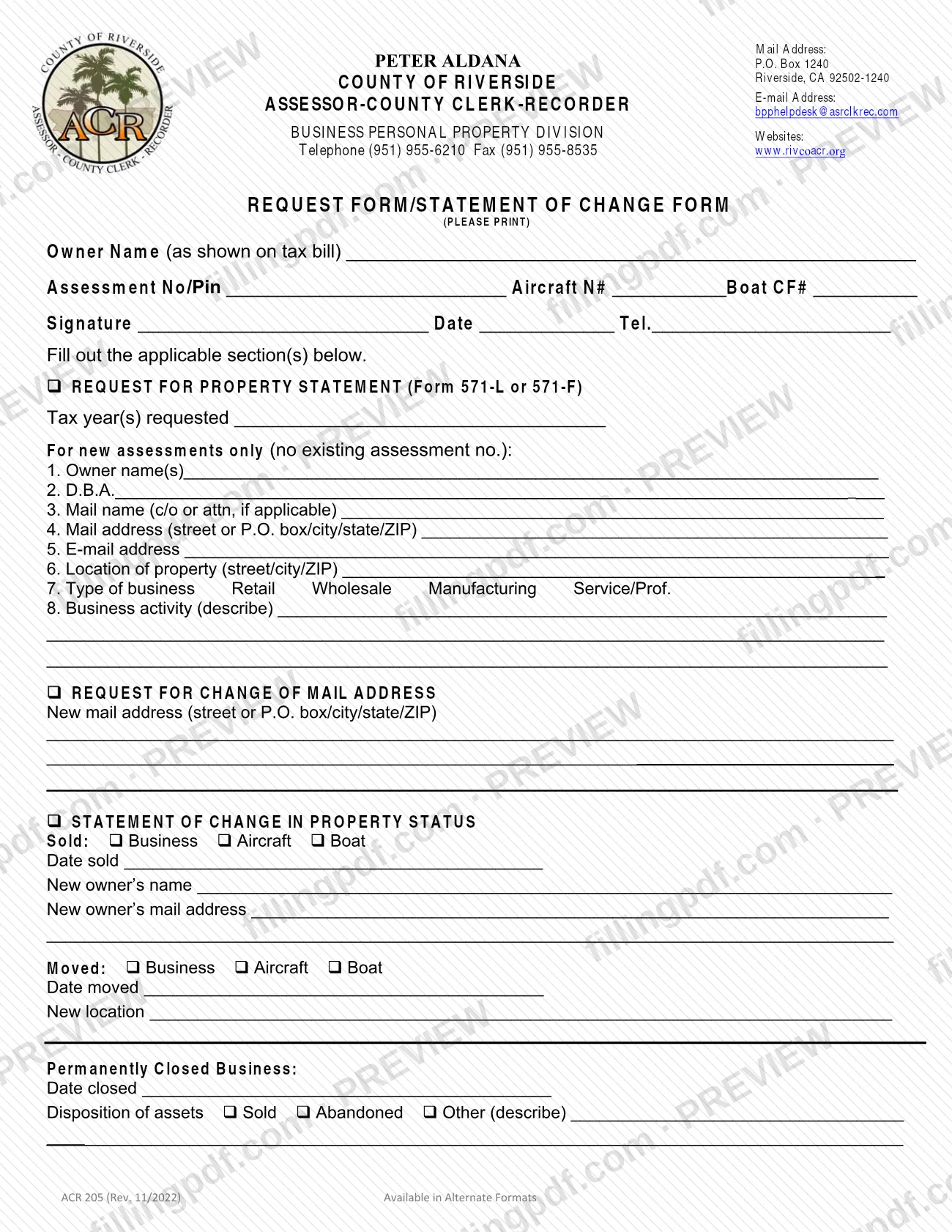
Form ACR 205, Request Form - Statement of Change, is a one-page form of the Business Personal Property Division of the Riverside County Assessor-County Clerk-Recorder. It is one of the Riverside County property tax forms for business personal property, aircraft and boats: you use it to request a property statement, change a mail address, or report that a business, aircraft or boat was sold, moved or closed. On this page you can fill out the form online on FillingPDF and download or print the completed PDF; the county does not accept online submission, so you deliver the printed form by mail or in person.
Last updated
What is ACR 205?
Form ACR 205, Request Form - Statement of Change (printed on the form as "Request Form/Statement of Change Form") is the County of Riverside Assessor-County Clerk-Recorder form, issued by its Business Personal Property Division, for asking for a property statement and for reporting changes to an existing assessment.
The form has three optional sections. You fill out only the ones that apply:
- Request for Property Statement (Form 571-L or 571-F): the tax year(s) requested and, for new assessments only, the owner, mailing and location details and the type and description of the business.
- Request for Change of Mail Address: the new mail address.
- Statement of Change in Property Status: a sale of a business, aircraft or boat, a move of a business, aircraft or boat, or the permanent closing of a business.
At the top, every request identifies the property by owner name as shown on the tax bill, assessment number or PIN, and, where relevant, the aircraft N# or boat CF#. The division's mailing address, telephone, fax, e-mail and website are printed in the form's header. The form is a request and statement only: it is not a property statement itself, and the form does not set out the content of Forms 571-L or 571-F.
Who needs to file ACR 205?
The form is for owners of business personal property, aircraft or boats assessed by the Riverside County Assessor-County Clerk-Recorder who need to do one of the following:
- Request a property statement (Form 571-L or 571-F) for one or more tax years, including owners with a new business that has no assessment number yet.
- Change the mail address where the owner receives assessment mail.
- Report that a business, aircraft or boat was sold, giving the date and the new owner's name and mail address.
- Report that a business, aircraft or boat moved, giving the date and the new location.
- Report that a business was permanently closed, giving the date closed and what happened to the assets.
The lines for new assessments are meant only for properties with no existing assessment number. If you already have an assessment number or PIN, enter it at the top instead. The form has a single signature line and does not describe who else may sign for the owner; the division lists its help desk at [email protected] and (951) 955-6210 for questions.
When to file ACR 205
Use Form ACR 205 when one of the events it covers occurs: you need a property statement for a tax year, you have a new mail address, or a business, aircraft or boat is sold, moved or closed. The form prints no filing deadline of its own, and the Assessor-County Clerk-Recorder's forms page sets none for it. It asks you to enter the date sold, date moved or date closed, so have those dates ready before you start. For timing questions, contact the Business Personal Property Division at (951) 955-6210 or [email protected].
How to fill out ACR 205
Enter the owner and property identifiers
At the top, print the Owner Name (as shown on tax bill) and the Assessment No/Pin. Add the Aircraft N# or Boat CF# if the request concerns an aircraft or boat.
Choose the applicable sections
The form says to fill out the applicable section(s) only: Request for Property Statement, Request for Change of Mail Address, or Statement of Change in Property Status.
Request a property statement
Under Request for Property Statement (Form 571-L or 571-F), enter the tax year(s) requested.
Complete owner and mailing lines
For new assessments only, with no existing assessment number, fill in lines 1 to 6: owner name(s), D.B.A., mail name (c/o or attn, if applicable), mail address, e-mail address and location of the property.
Describe the business
On line 7 mark the type of business: Retail, Wholesale, Manufacturing or Service/Prof. On line 8 describe the business activity.
Change your mail address
Under Request for Change of Mail Address, write the new mail address with street or P.O. box, city, state and ZIP.
Report a sale
Under Sold, mark Business, Aircraft or Boat, then enter the date sold, the new owner's name and the new owner's mail address.
Report a move
Under Moved, mark Business, Aircraft or Boat, then enter the date moved and the new location.
Report a permanent closure
Under Permanently Closed Business, enter the date closed. For Disposition of assets, mark Sold, Abandoned or Other and describe it if you choose Other.
Sign, date and download the PDF
Add your signature, date and telephone number in the header block, then check that the sections match your request. Download or print the completed PDF from FillingPDF in black ink on white letter-size paper.
How to submit ACR 205
The Assessor-County Clerk-Recorder's forms page says its forms do not allow online submission and must be delivered by mail or in person to your local Assessor-County Clerk-Recorder office.
- By mail: Business Personal Property Division, County of Riverside Assessor-County Clerk-Recorder, P.O. Box 1240, Riverside, CA 92502-1240.
- In person: at your local Assessor-County Clerk-Recorder office; the form does not list office addresses, so check www.rivcoacr.org.
The agency says to print the form in black ink on 8 1/2" x 11" white paper. Sign and date it before delivery. The form's header also lists telephone (951) 955-6210, fax (951) 955-8535 and e-mail [email protected] for the division. FillingPDF lets you fill out and download the PDF; submission follows the agency's channels above.
Common mistakes to avoid
- Trying to submit the form online; the agency says its forms do not allow online submission and must be delivered by mail or in person.
- Printing on colored or non-standard paper or in another ink; the agency says forms must be printed in black ink on 8 1/2" x 11" white paper.
- Entering an owner name that differs from the one on the tax bill; the form asks for the owner name as shown on the tax bill.
- Completing the new-assessment lines 1 to 8 when you already have an assessment number; they are for new assessments only, with no existing assessment no.
- Filling out every section instead of only the applicable ones; the form says to fill out the applicable section(s).
- Sending the form unsigned or without a date; the signature, date and telephone number appear in the header block.
- Reporting a sale without the date sold, the new owner's name and the new owner's mail address.
- Reporting a permanently closed business without the date closed and the disposition of assets (Sold, Abandoned or Other).
Frequently asked questions
What is Form ACR 205?
Form ACR 205, Request Form - Statement of Change, is a Riverside County Assessor-County Clerk-Recorder form from the Business Personal Property Division. You use it to request a property statement, change a mail address, or report that a business, aircraft or boat was sold, moved or closed.
Can I submit Form ACR 205 online?
No. The Assessor-County Clerk-Recorder's forms page says its forms do not allow online submission and must be delivered by mail or in person to your local office. You can fill out the PDF online on FillingPDF, but you then print and deliver it yourself.
Where do I mail Form ACR 205?
Mail it to the Business Personal Property Division, County of Riverside Assessor-County Clerk-Recorder, P.O. Box 1240, Riverside, CA 92502-1240. You may instead deliver it in person to your local Assessor-County Clerk-Recorder office.
Do I fill out every section of the form?
No. The form says to fill out the applicable section(s) only. The three sections are the request for a property statement, the change of mail address and the statement of change in property status. The top block applies to every request.
How do I report a sold boat or aircraft?
Under Statement of Change in Property Status, mark Aircraft or Boat next to Sold, then enter the date sold, the new owner's name and the new owner's mail address. At the top, add the Aircraft N# or Boat CF#.
What do I enter if my business has closed?
Under Permanently Closed Business, enter the date closed, then mark the Disposition of assets as Sold, Abandoned or Other. If you mark Other, describe it on the line provided.
How do I contact the division with questions about this form?
The form's header lists the Business Personal Property Division telephone (951) 955-6210, e-mail [email protected] and website www.rivcoacr.org. The county's forms page also says its staff cannot give legal advice.
What paper and ink should I use?
Print the form in black ink on 8 1/2" x 11" white paper. The Assessor-County Clerk-Recorder states that all of its forms must be printed this way, and the form itself says to print.
Ready to fill out ACR 205?
Fill out ACR 205 now