
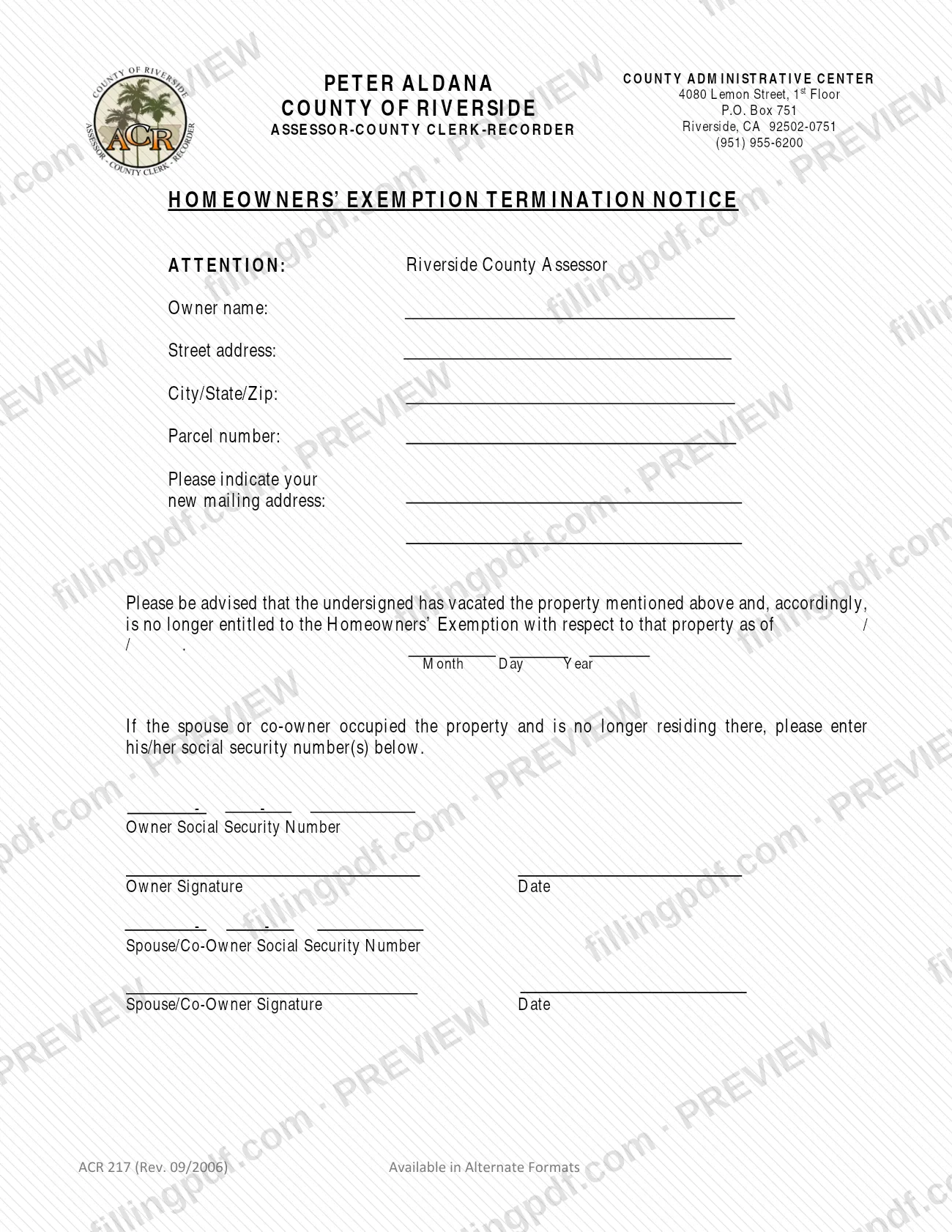
The Homeowners Exemption Termination Notice (Form ACR 217) is the notice the Riverside County Assessor-County Clerk-Recorder uses to learn that an owner has vacated a property and is no longer entitled to the Homeowners' Exemption on it. It is one of the Riverside County property tax forms published by the Assessor, and it is addressed to the Riverside County Assessor. On this page you can fill out the form online on FillingPDF and download or print the completed PDF; the county publishes the original at rivcoacr.org, and the notice must be delivered to the county by mail or in person.
Last updated
What is ACR 217?
The Homeowners Exemption Termination Notice (Form ACR 217) is a one-page notice, addressed to the Riverside County Assessor, in which an owner states that they have vacated a property and are no longer entitled to the Homeowners' Exemption on it as of a date they enter.
The form is issued by the County of Riverside Assessor-County Clerk-Recorder, whose County Administrative Center is at 4080 Lemon Street, 1st Floor, Riverside, CA. It identifies the property by the owner's name, street address, city/state/zip and parcel number, and it collects the owner's new mailing address.
Its core is a single statement: the undersigned has vacated the property and, accordingly, is no longer entitled to the Homeowners' Exemption as of a month, day and year written on the form. A second part deals with co-ownership: if the spouse or co-owner occupied the property and is no longer residing there, the form asks for his or her Social Security number(s). The owner and the spouse or co-owner each have a signature and date line.
The form is printed with the notation ACR 217 (Rev. 09/2006) and says it is available in alternate formats. It ends the exemption on the property; it does not apply for any exemption.
Who needs to file ACR 217?
An owner of a Riverside County property who has vacated it and is therefore no longer entitled to the Homeowners' Exemption on that property uses this form to tell the Assessor.
- The owner: completes the property details, the new mailing address, the date the entitlement ended, and signs and dates the notice.
- A spouse or co-owner who occupied the property and no longer lives there: the form asks for his or her Social Security number(s), and it has a separate signature and date line for the spouse or co-owner.
The form is written from the point of view of someone who has already left the property: it says the undersigned "has vacated" it. It does not describe any other situation, and it does not say that anyone other than the owner or a spouse or co-owner may sign. For questions about which form fits your situation, contact the Assessor-County Clerk-Recorder at (951) 955-6200, the number printed on the form.
When to file ACR 217
The triggering event is moving out: the notice reports that the undersigned has vacated the property and is no longer entitled to the Homeowners' Exemption as of a date you write on the form, so you complete it once that has happened. The form prints no filing deadline and no separate processing time. The date you enter in the Month / Day / Year line is the date the entitlement ended, not a due date. If a spouse or co-owner also stopped living at the property, complete the Social Security number and signature lines for that person at the same time.
How to fill out ACR 217
Enter the owner name
In Owner name, write the name of the owner of the property for which the Homeowners' Exemption applies.
Enter the property address
Fill in Street address and City/State/Zip with the address of the property you have vacated.
Enter the parcel number
Write the property's number in Parcel number.
Give your new mailing address
In Please indicate your new mailing address, enter the address where you now receive mail.
Enter the date your entitlement ended
In the statement that you are no longer entitled to the Homeowners' Exemption, fill in the Month, Day and Year as of which the exemption no longer applies.
Add the spouse or co-owner's number
If a spouse or co-owner occupied the property and is no longer living there, enter his or her Social Security number(s) on the Spouse/Co-Owner line.
Enter the owner's Social Security number
Enter the number on the Owner Social Security Number line, using the format printed on the form.
Sign and date the notice
The owner signs and dates on Owner Signature and Date. A spouse or co-owner who is also leaving signs and dates on the Spouse/Co-Owner Signature line.
Review, download and print
Check every entry, then download or print the completed PDF from FillingPDF in black ink on 8 1/2" x 11" white paper, and deliver it as described under How to submit.
How to submit ACR 217
The Assessor-County Clerk-Recorder says its forms do not allow online submission: a completed form must be delivered by mail or in person to your local Assessor-County Clerk-Recorder office.
- By mail: the letterhead of Form ACR 217 gives the Riverside County Assessor-County Clerk-Recorder mailing address as P.O. Box 751, Riverside, CA 92502-0751.
- In person: deliver it to your local Assessor-County Clerk-Recorder office. The form's letterhead lists the County Administrative Center, 4080 Lemon Street, 1st Floor, Riverside, CA.
- Questions: the form prints the office telephone number (951) 955-6200.
The county asks that all of its forms be printed in black ink on 8 1/2" x 11" white paper, so print the completed PDF that way before signing. The form names no fee or attachment. FillingPDF lets you fill out and download the PDF; submission follows the channels above.
Common mistakes to avoid
- Trying to submit the form online. The Assessor-County Clerk-Recorder says its forms do not allow online submission and must be delivered by mail or in person.
- Printing the completed form on colored paper, in a color other than black ink, or at a size other than 8 1/2" x 11". The county requires black ink on white paper of that size.
- Leaving out the new mailing address when you have vacated the property and mail will no longer reach you there.
- Leaving the Month / Day / Year date blank, so the notice does not say when you stopped being entitled to the Homeowners' Exemption.
- Omitting the spouse or co-owner's Social Security number(s) when that person occupied the property and no longer lives there.
- Submitting the notice without the owner's signature and date, or without the spouse or co-owner's signature and date where that person is also leaving.
- Leaving out the parcel number, which the form asks for along with the owner name and street address to identify the property.
Frequently asked questions
What is Form ACR 217?
Form ACR 217 is the Homeowners Exemption Termination Notice of the Riverside County Assessor-County Clerk-Recorder. An owner uses it to state that they have vacated a property and are no longer entitled to the Homeowners' Exemption on it as of a date written on the form.
Can I fill out the Homeowners Exemption Termination Notice online?
You can complete the PDF online on FillingPDF and download or print it. You cannot submit it online: the county says its forms do not allow online submission and must be delivered by mail or in person. FillingPDF does not file the form with the Assessor.
Where do I send the Homeowners Exemption Termination Notice?
Mail it to the Riverside County Assessor-County Clerk-Recorder at P.O. Box 751, Riverside, CA 92502-0751, the address on the form's letterhead, or deliver it in person to your local Assessor-County Clerk-Recorder office. The County Administrative Center is at 4080 Lemon Street, 1st Floor, Riverside.
Do I need to enter my spouse's or co-owner's Social Security number?
Only if the spouse or co-owner occupied the property and is no longer residing there. In that case the form asks for his or her Social Security number(s) and provides a separate signature and date line for that person.
When do I file the Homeowners Exemption Termination Notice?
You file it after you have vacated the property. The form says the undersigned has vacated it and asks for the date, in Month / Day / Year format, as of which the exemption no longer applies. The form itself prints no filing deadline.
What paper and ink should I use?
Print the completed form in black ink on 8 1/2" x 11" white paper. The Assessor-County Clerk-Recorder states this requirement for all of its forms, including those created as PDFs that allow online completion.
Is the Homeowners Exemption Termination Notice available in other formats?
Yes. The form is printed with the notation "Available in Alternate Formats." To ask about a different format, contact the Assessor-County Clerk-Recorder at (951) 955-6200, the telephone number printed on the form.
Ready to fill out ACR 217?
Fill out ACR 217 now