
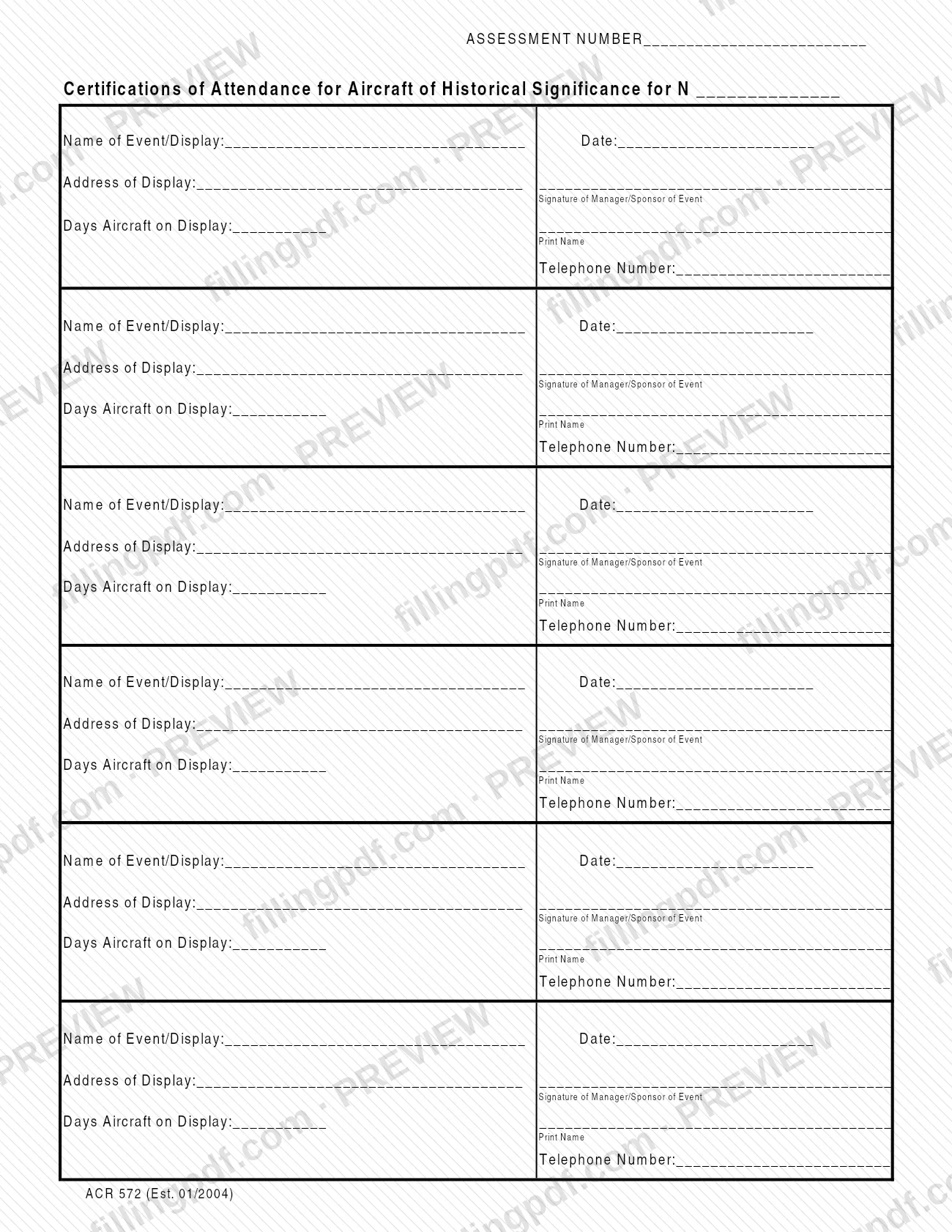
Form ACR 572, Certificate of Attendance for Historical Aircraft, is published by the Riverside County Assessor-County Clerk-Recorder among its exemption and exclusion forms, and it is one of the Riverside County property tax forms the office offers. The printed title reads "Certifications of Attendance for Aircraft of Historical Significance"; each of its six blocks records one event or display at which the aircraft appeared and carries the signature of the event's manager or sponsor. On FillingPDF you can fill out the form online and download or print the completed PDF; the county publishes the original at rivcoacr.org, and the finished form must be delivered by mail or in person.
Last updated
What is ACR 572?
Form ACR 572, Certificate of Attendance for Historical Aircraft, is the Riverside County Assessor-County Clerk-Recorder form on which the manager or sponsor of an event certifies that an aircraft of historical significance was on display, giving the event's name, date, address and number of days.
The form has one page. At the top it asks for an ASSESSMENT NUMBER and for the aircraft's identification on the line that begins with the letter "N". Below that are six identical blocks, one per event or display. Each block asks for the Name of Event/Display, the Date, the Address of Display, the Days Aircraft on Display, the Signature of Manager/Sponsor of Event, the printed name of that person and a telephone number. The edition printed at the foot of the form is ACR 572 (Est. 01/2004).
The Assessor-County Clerk-Recorder keeps the form in its folder of exemption and exclusion forms. The form itself does not state what the office does with it or what legal effect it has, so questions about how it applies to a particular aircraft go to the Assessor's office. The office's forms page also says its staff cannot give legal advice and cannot help prepare legal documents.
Who needs to file ACR 572?
The form is completed for an aircraft of historical significance that has been displayed at one or more events or displays. The owner or the person handling the aircraft's records fills in the assessment number and the aircraft line at the top and the details of each event. The manager or sponsor of each event signs and prints their name in the block for that event, and gives a telephone number.
Each event needs its own block, so one signature cannot cover several events. The form has room for six events on its single page.
The form does not say who qualifies for any exemption or exclusion, and it names no exclusions or representatives. The Assessor-County Clerk-Recorder's forms page tells users that its employees cannot give legal advice. If you are unsure whether this is the right form for your situation, the office directs you to consult an attorney or obtain other professional advice.
When to file ACR 572
The form prints no due date. It is completed after an aircraft has been displayed, because each block asks for the event's date, the number of days the aircraft was on display and the signature of the event's manager or sponsor. You can fill in several events on the same page as they occur, but each block must be signed for its own event. For any deadline that may apply to your aircraft, contact the Riverside County Assessor-County Clerk-Recorder.
How to fill out ACR 572
Enter the assessment number
At the top, write the assessment number in the space after ASSESSMENT NUMBER.
Complete the aircraft line
On the line that reads "Certifications of Attendance for Aircraft of Historical Significance for N", enter the identification that follows the letter N.
Name the event and date
In the first block, enter the Name of Event/Display and the Date on which the aircraft was displayed.
Enter the display address
Write the full Address of Display for that event in the lines provided.
Enter the days on display
In Days Aircraft on Display, enter the number of days the aircraft was shown at that event.
Get the manager or sponsor signature
The manager or sponsor of the event signs on the Signature of Manager/Sponsor of Event line, prints their name beneath it and adds a telephone number.
Repeat for each further event
Use one block for each additional event or display. The page holds six blocks; each is signed for its own event.
Review, download and print
Check every block, then download the completed PDF from FillingPDF and print it in black ink on 8 1/2" x 11" white paper before obtaining the signatures and delivering it as described under How to submit.
How to submit ACR 572
The Riverside County Assessor-County Clerk-Recorder accepts its forms by mail or in person. The office's forms page says its PDF forms allow online completion and printing but do not allow online submission.
- By mail: send the printed, signed form to your local Assessor-County Clerk-Recorder office.
- In person: deliver the printed, signed form to your local Assessor-County Clerk-Recorder office.
The forms page also states that all forms must be printed in black ink on 8 1/2" x 11" white paper. The form itself gives no mailing address, so find your local office through the county's forms page at https://www.rivcoacr.org/-forms. The form names no fee or attachment. FillingPDF lets you fill out and download the PDF; submission follows the channels above.
Common mistakes to avoid
- Printing the form in a color other than black ink or on paper that is not 8 1/2" x 11" white, which the county's forms page requires for all its forms.
- Trying to submit the form online; the county's forms page says its PDF forms must be delivered by mail or in person.
- Leaving the Signature of Manager/Sponsor of Event blank in a block, so that the event is not certified by the person the form names.
- Omitting the printed name or telephone number next to the manager's or sponsor's signature.
- Leaving out the Days Aircraft on Display, the Date or the Address of Display for an event.
- Skipping the assessment number or the "N" line at the top of the form.
- Asking county staff to decide which form fits your situation; the office says its employees cannot give legal advice.
Frequently asked questions
What is Form ACR 572 used for?
Form ACR 572, Certificate of Attendance for Historical Aircraft, records events or displays where an aircraft of historical significance appeared. Each block lists the event, date, address and days on display, and is signed by the event's manager or sponsor. It is issued by the Riverside County Assessor-County Clerk-Recorder.
Is ACR 572 a Riverside County property tax form?
It is one of the forms the Riverside County Assessor-County Clerk-Recorder publishes in its exemption and exclusion forms folder. The form itself does not describe its tax effect, so ask the Assessor's office how it applies to your aircraft.
Can I submit Form ACR 572 online?
No. The Assessor-County Clerk-Recorder says its PDF forms allow online completion and printing but not online submission. Deliver the printed form by mail or in person to your local Assessor-County Clerk-Recorder office.
Can I fill out Form ACR 572 online?
Yes. You can fill out the PDF online on FillingPDF and download or print it. FillingPDF is an independent service and does not file the form with the county; you deliver it to the Assessor-County Clerk-Recorder yourself.
Who signs Form ACR 572?
The manager or sponsor of each event signs the Signature of Manager/Sponsor of Event line in that event's block, then prints their name and gives a telephone number. Every block carries its own signature line.
How many events fit on one ACR 572?
Six. The one-page form has six identical blocks, each asking for the event name, date, address, days on display, and the signature, printed name and telephone number of the manager or sponsor.
How must Form ACR 572 be printed?
In black ink on 8 1/2" x 11" white paper. The Assessor-County Clerk-Recorder's forms page sets this requirement for all of its forms.
Ready to fill out ACR 572?
Fill out ACR 572 now