
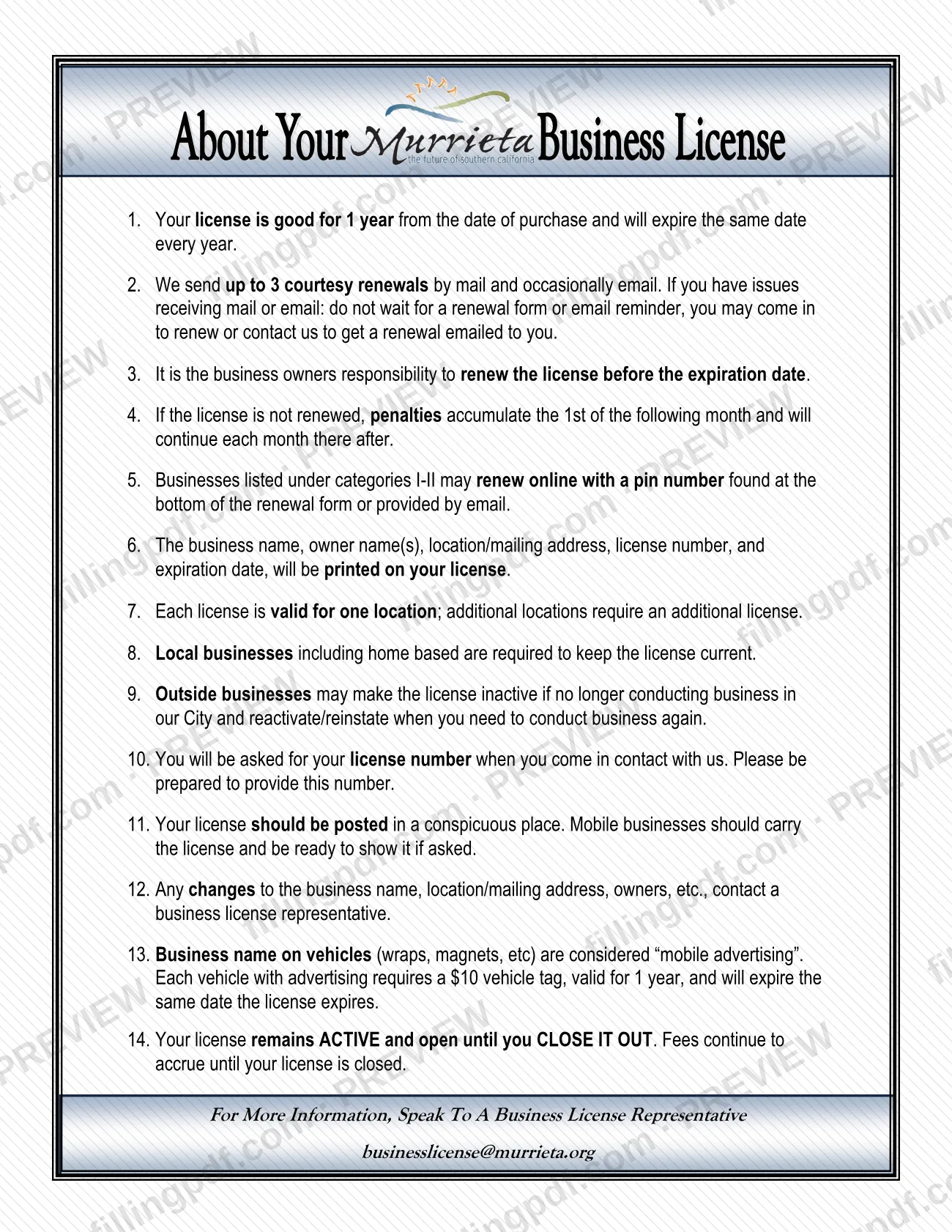
About Your Business License is the City of Murrieta Finance Department's sheet of 14 numbered points for anyone who holds a Murrieta business license. It covers the one-year term, who must renew, how penalties build up, where to post the license and how to close it out. It is one of the resources behind the Murrieta business license process, alongside the city's Business License Information page. On this page you can fill out the form online on FillingPDF and download or print the completed PDF; the original is published by the City of Murrieta.
Last updated
What is About Your Business License – Murrieta, CA?
About Your Business License is the City of Murrieta Finance Department's information sheet that explains how a Murrieta business license works: its one-year term, the owner's renewal duty, monthly penalties, posting rules, vehicle tags and the steps to close a license out.
The sheet is a list of 14 numbered points. It states that a license is good for 1 year from the date of purchase and expires on the same date every year. It says what is printed on the license (business name, owner name(s), location or mailing address, license number and expiration date), that each license is valid for one location, and that additional locations need an additional license.
It also covers practical matters: you will be asked for your license number whenever you contact the city, the license must be posted in a conspicuous place, and mobile businesses carry it and show it if asked. Business names on vehicles, such as wraps or magnets, count as "mobile advertising" and need a vehicle tag.
The sheet is not the application and not the renewal form. The renewal form, which carries the PIN for online renewal, and the Fee Schedule (PDF), which lists categories, license fees and flat rate fees, are separate city documents. The sheet points readers to a business license representative at [email protected] for more information.
Who needs to file About Your Business License – Murrieta, CA?
The main group is owners of local businesses in Murrieta, including home-based businesses, who must keep the license current. The sheet says it is the business owner's responsibility to renew before the expiration date.
Other groups the sheet addresses:
- Owners with more than one location: each license is valid for one location, so each additional location needs an additional license.
- Outside businesses: a business based elsewhere may make its license inactive when it no longer conducts business in the city, and reactivate or reinstate it when it needs to work in the city again.
- Mobile businesses: carry the license and be ready to show it if asked.
- Businesses with vehicle advertising: each vehicle carrying the business name needs a vehicle tag.
- Owners with changes: contact a business license representative about any change to the business name, location or mailing address, or owners.
The city's Business License Information page adds that some businesses, such as firearms dealers, taxi, massage, solicitor, secondhand dealer and ice cream truck sales, need a Police Department review and background check before or after applying.
When to file About Your Business License – Murrieta, CA
The sheet is read when you hold or plan to hold a license, and its key date is the expiration date: a license is good for 1 year from the date of purchase and expires on the same date every year. Renew before that date.
The city sends up to 3 courtesy renewals by mail and occasionally by email, but the sheet says not to wait for a reminder if you have trouble receiving mail or email; you may come in to renew or ask for a renewal to be emailed to you. If a license is not renewed, penalties accumulate on the 1st of the following month and continue each month after.
A license stays active until you close it out, and fees continue to accrue until it is closed. For a new application, the city's Business License Information page says there is a two week processing time period, and that applications can be made online at any time.
Documents you need
- For a new application, updated copies of any that apply: HOP, DBA, seller's permit, Alcoholic Beverage Control (ABC) license and similar; all applicable requirements are due at the time of application.
- For renewal by mail, a completed and signed renewal form together with check payment.
- For renewal in person, the renewal form or your license number.
- For online renewal, the business license number as the account number and the PIN from the renewal email or renewal form.
How to fill out About Your Business License – Murrieta, CA
Check the license term
Points 1 and 7: the license is good for 1 year from the date of purchase and valid for one location. Additional locations need an additional license.
Note the renewal duty
Points 2 and 3: the city sends up to 3 courtesy renewals, but renewing before the expiration date is the owner's responsibility.
Understand penalties and fees
Points 4 and 14: penalties accumulate on the 1st of the following month and continue monthly, and fees accrue until the license is closed out.
Choose how to renew
Point 5 says categories I-II may renew online with the PIN at the bottom of the renewal form or in the email. The city's page also lists in-person and mail renewal.
Check what is printed on the license
Point 6: business name, owner name(s), location or mailing address, license number and expiration date. Point 10: keep the license number ready when you contact the city.
Post or carry the license
Point 11: post it in a conspicuous place. Mobile businesses carry it and show it if asked.
Report changes and vehicle advertising
Point 12: contact a business license representative about changes. Point 13: each vehicle with the business name needs a vehicle tag valid 1 year, expiring with the license.
Decide on inactive or closed status
Point 9: outside businesses may make the license inactive and reinstate it later. Point 14: the license stays active until you close it out.
Review and download the completed PDF
Check every point that applies to your business, then download or print the PDF from FillingPDF and keep it with your license records.
How to submit About Your Business License – Murrieta, CA
The sheet itself is informational and is not filed with the city. The license it describes is handled through these channels, according to the city's Business License Information page:
- Online application: all categories and businesses may apply online at any time, attaching all applicable requirements.
- Public kiosk: if you have no computer, use the kiosk at City Hall and bring the required documents; there may be a wait if it is in use.
- Renew online: enter the account number, which is your business license number, and the PIN from your renewal email and renewal form. The sheet says categories I-II renew online with a PIN; the city's page says all categories may renew online.
- Renew in person: during normal cashier hours, with the renewal form or your license number.
- Renew by mail: send the completed, signed renewal form with a check.
Payment in person: cash, check, Discover, Mastercard, Visa and debit cards. Online: echeck and the same cards. Fees follow annual gross income or receipts unless the business pays a flat rate; see the Fee Schedule (PDF) for amounts. License hard copies are mailed to your mailing address. Questions: [email protected]. FillingPDF lets you fill out and download the PDF; submission follows the channels above.
Common mistakes to avoid
- Waiting for a renewal form or email reminder when you are not receiving mail or email; the sheet says renewal is the owner's responsibility.
- Renewing after the expiration date: penalties accumulate on the 1st of the following month and continue each month.
- Assuming an unused license stops costing money; it stays active and fees accrue until you close it out.
- Using one license for several locations; each license is valid for one location.
- Putting the business name on a vehicle (wrap, magnet) without a vehicle tag, which the sheet treats as mobile advertising.
- Not telling a business license representative about a change of business name, location or mailing address, or owners.
- Mailing a renewal without the completed, signed renewal form or without check payment.
- Leasing or buying a location before checking zoning with the Planning Department.
Frequently asked questions
What is About Your Business License in Murrieta?
It is the City of Murrieta Finance Department's information sheet of 14 points about the city's business license: the one-year term, renewal, penalties, posting, vehicle tags, changes and closing out. It is separate from the application and the renewal form.
How long is a Murrieta business license valid?
One year from the date of purchase. The license expires on the same date every year, and the owner is responsible for renewing it before that expiration date, according to the city's sheet.
What happens if I don't renew my Murrieta business license?
Penalties accumulate on the 1st of the following month and continue each month after. The license also stays active, with fees accruing, until you close it out, so a lapse in use does not end the charges.
Can I renew my Murrieta business license online?
Yes. Enter your license number as the account number and the PIN from the renewal email or the renewal form. The sheet lists categories I-II for online renewal; the city's page says all categories may renew online, in person or by mail.
Do home-based businesses need a Murrieta business license?
Yes. The sheet says local businesses, including home based ones, are required to keep the license current. Fire inspections after applying do not apply to home occupations, according to the city's page.
Does one license cover more than one location?
No. Each license is valid for one location, and additional locations require an additional license. Contact a business license representative about changes to the business name, address or owners.
Do I need a tag for a vehicle with my business name?
Yes. The sheet treats business names on vehicles, such as wraps or magnets, as mobile advertising, and each such vehicle needs a vehicle tag valid 1 year that expires with the license. A fee applies; ask the city for the amount.
Can I fill out About Your Business License on FillingPDF?
You can fill out the PDF online on FillingPDF and download or print it. FillingPDF is independent of the City of Murrieta and does not file, renew or issue a license; use the city's online, in-person or mail channels.
Ready to fill out About Your Business License – Murrieta, CA?
Fill out About Your Business License – Murrieta, CA now