
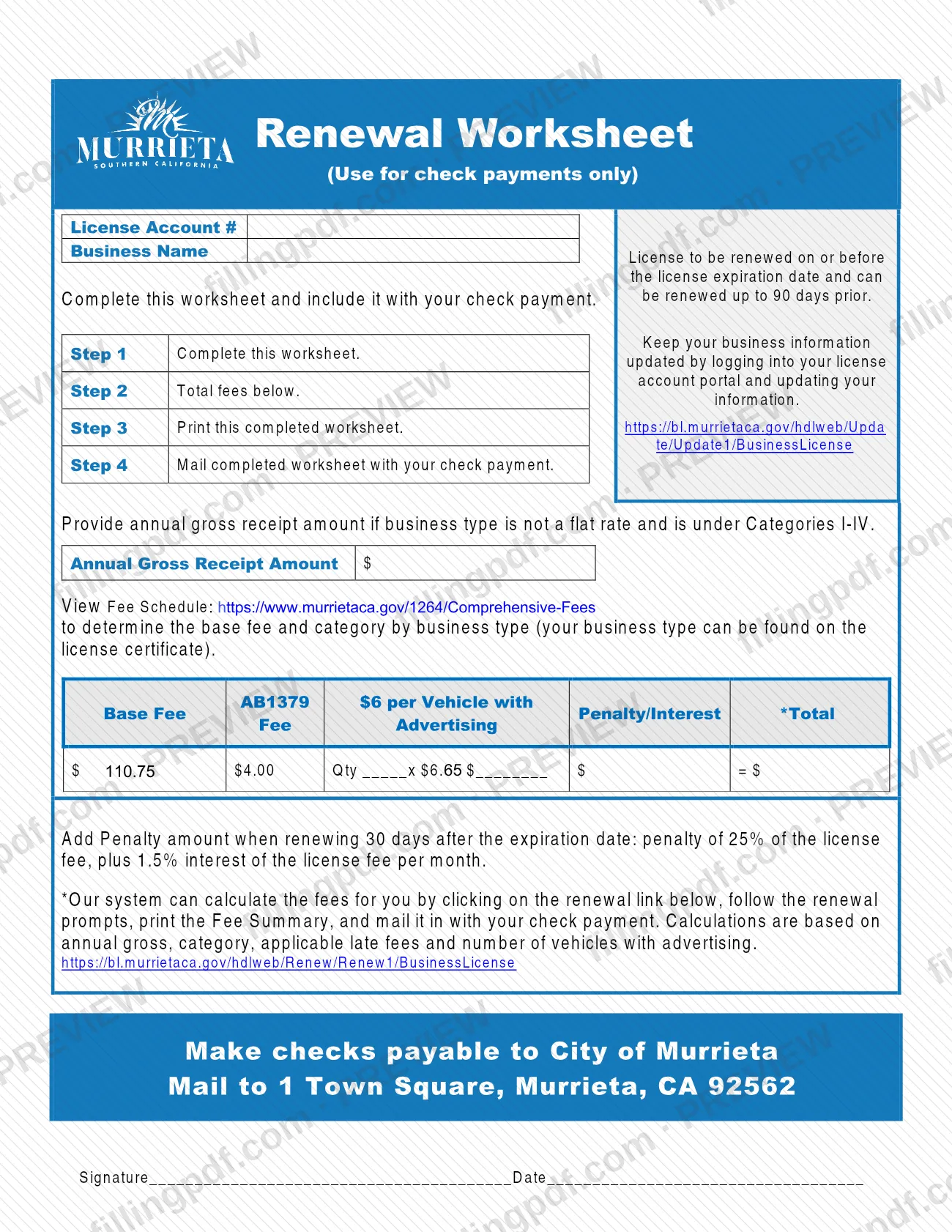
The Renewal Worksheet is the City of Murrieta form that goes in the envelope when you renew a business license and pay by check. It is one of the Murrieta business license documents, and the city prints on it that it is for check payments only: you complete it, total the fees, print it and mail it with your check. On this page you can fill out the form online on FillingPDF and download or print the completed PDF; the worksheet itself is published by the City of Murrieta.
Last updated
What is Renewal Worksheet – Murrieta, CA?
The Renewal Worksheet is the City of Murrieta form that business license holders complete, print and mail with a check to renew a business license, with the fees totaled in one place. It is for check payments only.
The worksheet asks for your License Account # and Business Name, an Annual Gross Receipt Amount when your fee depends on it, and a fee table with the Base Fee, the AB1379 charge for each vehicle with advertising, any Penalty/Interest and the Total. It closes with a signature and date. Four steps are printed at the top: complete the worksheet, total the fees, print it, and mail it with your check payment.
The city states that a license is renewed on or before its expiration date and can be renewed up to 90 days before it. The worksheet points to the city's Fee Schedule to find the base fee and category for your business type, and to the city's renewal link, where the system can calculate the fees for you.
It is a renewal document only. Applying for a license, paying a balance, closing out a license and submitting updates are separate online services listed on the City of Murrieta's Business Licenses page.
Who needs to file Renewal Worksheet – Murrieta, CA?
Holders of a City of Murrieta business license who are renewing it and paying by check use this worksheet. You include it with your check payment; the city prints on it that it is for check payments only.
The city's Business Licenses page explains the requirement behind the renewal: every person (1099) or entity planning to engage in business within city limits, whether or not the business is taxed or carried on for profit, must apply for a license, pay the applicable fees and obtain the appropriate approvals.
Conditions printed on the worksheet:
- Provide the Annual Gross Receipt Amount if your business type is not a flat rate and falls under Categories I-IV.
- Enter the number of vehicles with advertising in the Qty box for the AB1379 charge.
- Add the penalty and interest amount if you renew 30 days after the expiration date.
The worksheet is not the form for other payment methods or for a new license. The city lists Apply, Renew, Pay Balance, Closeout/Inactivate, Search for a Business and Submit an Update/Change of Address Request as online services.
When to file Renewal Worksheet – Murrieta, CA
Renew the license on or before its expiration date; the worksheet states that a license can be renewed up to 90 days before that date. Send the worksheet and your check in the same mailing.
If you renew 30 days after the expiration date, the worksheet says to add a penalty on the license fee plus interest on the license fee for each month. The Penalty/Interest column of the fee table is where that amount goes. The city's Business Licenses page adds that licenses are eligible for online renewal up to 12 months after expiration. The worksheet sets no other deadline.
Documents you need
- A check payable to City of Murrieta for the total on the worksheet; the worksheet is for check payments only and is mailed with the check.
- The printed Fee Summary from the city's renewal portal, only if you use the portal to calculate your fees; the worksheet says to mail it in with your check payment.
How to fill out Renewal Worksheet – Murrieta, CA
Enter License Account # and Business Name
At the top, write your License Account # and Business Name exactly as they appear on your business license.
Check the renewal timing
The license is renewed on or before its expiration date and can be renewed up to 90 days before it. Note whether you are renewing 30 days or more after expiration, since that adds a penalty.
Find your base fee and category
Use the city's fee schedule at https://www.murrietaca.gov/1264/Comprehensive-Fees to determine the base fee and category for your business type, which is shown on your license certificate.
Enter your Annual Gross Receipt Amount
Fill in the Annual Gross Receipt Amount only if your business type is not a flat rate and falls under Categories I-IV.
Complete the Base Fee column
In the fee table, enter the base fee that applies to your business type and category, as shown on the city's fee schedule.
Enter vehicles with advertising
If your business has vehicles with advertising, enter the number in the Qty box for the AB1379 charge per vehicle and write the resulting amount.
Add penalty and interest if late
If you are renewing 30 days after the expiration date, enter the penalty and interest in the Penalty/Interest column; the worksheet describes it as a penalty on the license fee plus monthly interest on the license fee.
Total the fees
Add the base fee, the AB1379 amount and any penalty and interest, and write the sum in the Total box. The city's renewal link can also calculate the fees and produce a Fee Summary.
Sign and date the worksheet
Sign on the Signature line and enter the Date.
Review and download the completed PDF
Check the account number, the totals and your check amount, then download or print the completed PDF from FillingPDF. Mail it with your check as described under How to submit.
How to submit Renewal Worksheet – Murrieta, CA
You return the Renewal Worksheet by mail with your check. The worksheet also points to the city's renewal portal to calculate your fees.
- By mail: Print the completed worksheet and mail it with your check payment to 1 Town Square, Murrieta, CA 92562. Make the check payable to City of Murrieta.
- Fee Summary from the renewal portal: The city's system can calculate the fees for you. Follow the renewal prompts at https://bl.murrietaca.gov/hdlweb/Renew/Renew1/BusinessLicense, print the Fee Summary and mail it in with your check payment. The calculation uses your annual gross, category, applicable late fees and number of vehicles with advertising.
- Questions: call the Business License Main Number, (951) 461-6042, during normal business hours.
Renewal fees apply. The amount depends on your business type and category, so check the city's fee schedule at https://www.murrietaca.gov/1264/Comprehensive-Fees. To keep your business information current, update it through your license account portal. FillingPDF lets you fill out and download the PDF; submission follows the city's channels above.
Common mistakes to avoid
- Using the worksheet with a payment method other than a check; the city prints that it is for check payments only.
- Mailing the check without the completed, printed worksheet; the worksheet says to include it with your check payment.
- Leaving the Annual Gross Receipt Amount blank when your business type is not a flat rate and falls under Categories I-IV.
- Guessing the base fee or category instead of using the city's fee schedule and the business type shown on your license certificate.
- Leaving out the penalty and interest when renewing 30 days after the expiration date.
- Skipping the Qty entry for the AB1379 charge when your business has vehicles with advertising.
- Making the check payable to anyone other than City of Murrieta.
- Mailing the worksheet unsigned or undated; the form ends with a Signature and Date line.
Frequently asked questions
What is the Murrieta Renewal Worksheet for?
It accompanies a business license renewal that you pay by check. You enter your license account number, business name and fees, total them, print the worksheet and mail it with your check to the City of Murrieta. The city prints on it that it is for check payments only.
How do I renew a Murrieta business license by check?
Complete the Renewal Worksheet, total the fees, print it and mail it with your check payable to City of Murrieta to 1 Town Square, Murrieta, CA 92562. Those are the four steps printed on the worksheet. The city's renewal portal can also calculate your fees.
Where do I mail the Renewal Worksheet and who do I make the check out to?
Mail it to 1 Town Square, Murrieta, CA 92562, and make the check payable to City of Murrieta. Send the completed, printed worksheet in the same mailing as the check. For questions, call the Business License Main Number at (951) 461-6042.
How early can I renew my Murrieta business license?
Up to 90 days before the expiration date, according to the worksheet, and it must be renewed on or before the expiration date. The city's Business Licenses page says online renewal is also open up to 12 months after expiration.
What happens if I renew my business license late in Murrieta?
If you renew 30 days after the expiration date, the worksheet says to add a penalty on the license fee plus monthly interest on the license fee. Enter that amount in the Penalty/Interest column and include it in the Total on your check.
Do I have to fill in the Annual Gross Receipt Amount?
Only if your business type is not a flat rate and falls under Categories I-IV. The fee schedule at murrietaca.gov/1264/Comprehensive-Fees shows the base fee and category by business type, and your business type is on your license certificate.
Can the city calculate my renewal fees for me?
Yes. The worksheet says the city's system can calculate them: use the renewal link, follow the prompts, print the Fee Summary and mail it in with your check payment. The calculation uses annual gross, category, applicable late fees and vehicles with advertising.
How much is the renewal fee?
A renewal fee applies, but the amount depends on your business type and category. Look it up in the city's fee schedule at https://www.murrietaca.gov/1264/Comprehensive-Fees, or call the Business License Main Number at (951) 461-6042.
Can I fill out the Murrieta Renewal Worksheet online?
You can fill out the PDF online on FillingPDF and download or print it. FillingPDF is an independent service, not affiliated with the City of Murrieta, and does not file or send the worksheet; you mail it with your check yourself.
Ready to fill out Renewal Worksheet – Murrieta, CA?
Fill out Renewal Worksheet – Murrieta, CA now