
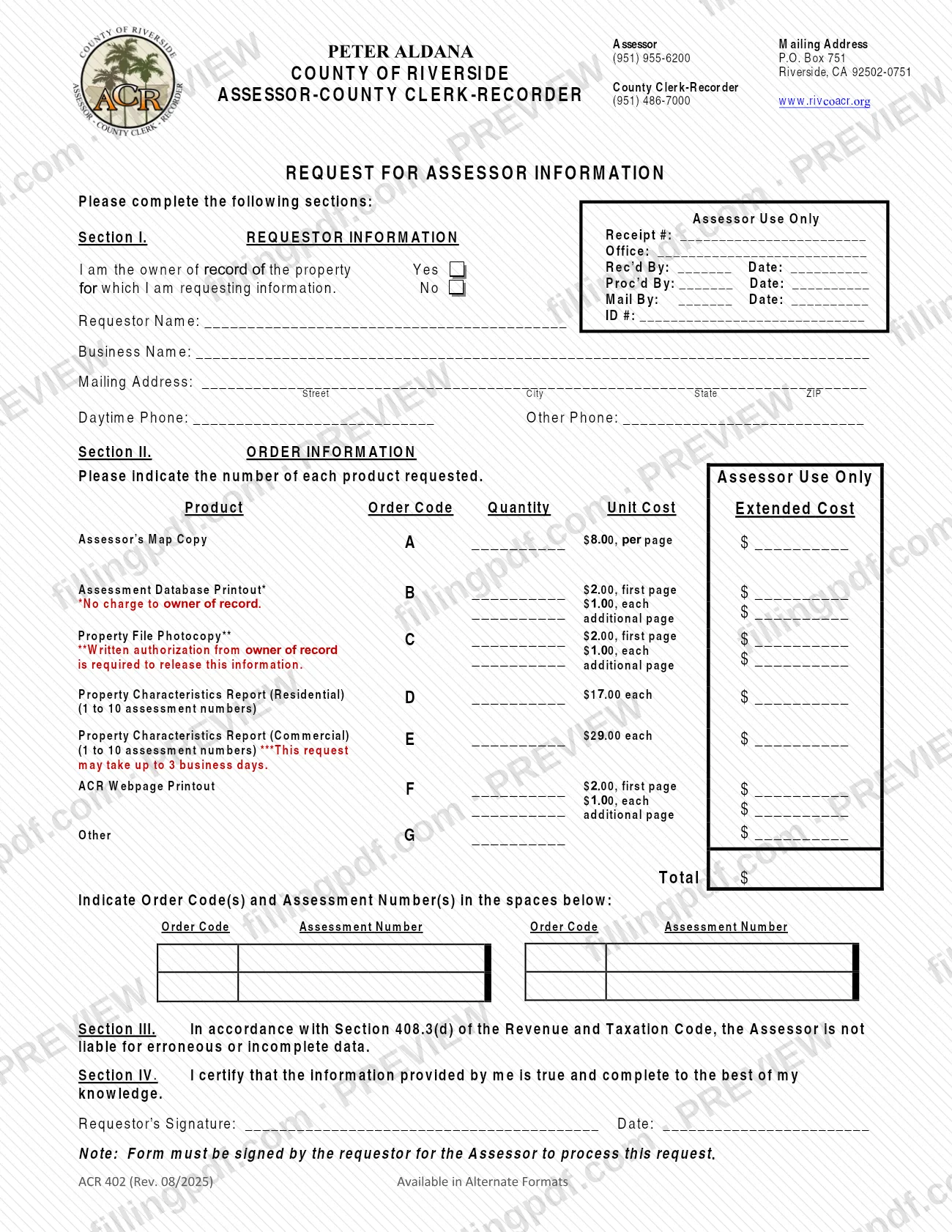
ACR 402, Request for Assessor Information, is the order form you use to ask the Riverside County Assessor-County Clerk-Recorder for assessor records such as map copies, assessment database printouts, property file photocopies and property characteristics reports. It is one of the forms published by the Riverside County Assessor-County Clerk-Recorder, and it must be signed by the requestor. On this page you can fill out the form online on FillingPDF and download or print the completed PDF; the form is delivered to the county by mail or in person, as described below.
Last updated
What is ACR 402?
Request for Assessor Information (ACR 402) is the one-page order form of the County of Riverside Assessor-County Clerk-Recorder on which a requestor lists the assessor products wanted, the quantity of each and the assessment numbers they apply to.
The form has four sections. Section I collects the requestor's information, including whether you are the owner of record of the property. Section II is the order table, where you enter a quantity next to each product's order code:
- A Assessor's Map Copy
- B Assessment Database Printout (no charge to the owner of record)
- C Property File Photocopy (written authorization from the owner of record is required to release this information)
- D Property Characteristics Report (Residential), for 1 to 10 assessment numbers
- E Property Characteristics Report (Commercial), for 1 to 10 assessment numbers
- F ACR Webpage Printout
- G Other
Fees are printed per product on the form, and the cost columns are marked for Assessor use. Section III states that, under Section 408.3(d) of the Revenue and Taxation Code, the Assessor is not liable for erroneous or incomplete data. In Section IV the requestor certifies that the information is true and complete to the best of their knowledge and signs.
Who needs to file ACR 402?
Anyone who wants assessor records from the Riverside County Assessor-County Clerk-Recorder in the form of the products listed on the form uses ACR 402. The form is not limited to property owners: the first item in Section I asks you to answer Yes or No to whether you are the owner of record of the property you are requesting information about.
Your status matters for two products. The Assessment Database Printout (code B) carries no charge to the owner of record. The Property File Photocopy (code C) is released only with written authorization from the owner of record, so a requestor who is not the owner must have that authorization.
The requestor signs the form. The form states that it must be signed by the requestor for the Assessor to process the request. Businesses can enter a business name in Section I in addition to the requestor's name.
When to file ACR 402
Submit ACR 402 whenever you need one of the listed assessor products; the form prints no deadline or filing window. A request is processed only after the requestor has signed it.
Timing is stated for one group of products: the Property Characteristics Reports, residential (code D) and commercial (code E), may take up to 3 business days. The form gives no processing time for the other products.
Documents you need
- Written authorization from the owner of record, required to release a Property File Photocopy (order code C) when the owner of record is not the one requesting it.
How to fill out ACR 402
Answer the owner of record question
In Section I, check Yes or No to indicate whether you are the owner of record of the property for which you are requesting information.
Enter the requestor's details
Fill in Requestor Name, ID #, Business Name (if any) and the Mailing Address by street, city, state and ZIP. Add a Daytime Phone and, if you wish, an Other Phone.
Choose products and quantities
In Section II, write the number you want of each product next to its order code, A through G. Use code G, Other, only for a product not listed.
Check authorization for code C
If you order a Property File Photocopy (code C), make sure you have the written authorization from the owner of record that the form requires to release this information.
List order codes and assessment numbers
In the spaces below the table, write each Order Code with the Assessment Number it applies to. The Property Characteristics Reports cover 1 to 10 assessment numbers each.
Leave Assessor Use Only boxes blank
Do not write in the Assessor Use Only boxes at the top right or in the unit and extended cost columns; the office completes them.
Read Section III
Section III states that, under Section 408.3(d) of the Revenue and Taxation Code, the Assessor is not liable for erroneous or incomplete data.
Sign and date Section IV
The requestor signs and dates the certification that the information is true and complete to the best of their knowledge. The Assessor will not process the request without this signature.
Review and download the completed PDF
Check the order codes, quantities and assessment numbers, then download or print the completed PDF from FillingPDF in black ink on 8 1/2" x 11" white paper and deliver it as described under How to submit.
How to submit ACR 402
The form is delivered to the Assessor-County Clerk-Recorder by mail or in person. The county's forms page says its PDF forms do not allow online submission and must be delivered, by mail or in person, to your local Assessor-County Clerk-Recorder office.
- By mail: the form prints this Assessor mailing address: P.O. Box 751, Riverside, CA 92502-0751.
- In person: take the completed form to your local Assessor-County Clerk-Recorder office.
- Questions: the form lists (951) 955-6200 for the Assessor and (951) 486-7000 for the County Clerk-Recorder. The website is www.rivcoacr.org.
Print the form in black ink on 8 1/2" x 11" white paper, as the county's forms page requires, and sign it. Fees apply to most products; the form prints the unit cost for each, so check it or contact the office for the current charges. FillingPDF lets you fill out and download the PDF; submission follows the channels above.
Common mistakes to avoid
- Submitting the form without the requestor's signature and date in Section IV; the form states it must be signed for the Assessor to process the request.
- Trying to submit the PDF online; the county says its forms do not allow online submission and must be delivered by mail or in person.
- Ordering a Property File Photocopy (code C) without written authorization from the owner of record.
- Printing on colored or non-letter paper or in ink other than black; the county requires black ink on 8 1/2" x 11" white paper.
- Writing in the boxes marked Assessor Use Only (receipt, office, received, processed, mailed, unit and extended costs).
- Listing an order code without the assessment number it applies to in the space provided under Section II.
- Expecting a Property Characteristics Report (code D or E) the same day; the form says these may take up to 3 business days.
- Expecting the no-charge Assessment Database Printout (code B) when you are not the owner of record; the exemption applies to the owner of record.
Frequently asked questions
What is Form ACR 402, Request for Assessor Information?
ACR 402 is the order form of the Riverside County Assessor-County Clerk-Recorder for assessor products: map copies, assessment database printouts, property file photocopies, property characteristics reports, ACR webpage printouts and other items. You list quantities, order codes and assessment numbers, then sign it.
Do I have to own the property to use this form?
No. Section I only asks whether you are the owner of record. Ownership affects two products: the Assessment Database Printout is no charge to the owner of record, and a Property File Photocopy needs written authorization from the owner of record.
Can I submit the Riverside County Assessor request form online?
No. The county says its PDF forms allow online completion and printing but not online submission. Deliver the signed form by mail to P.O. Box 751, Riverside, CA 92502-0751, or in person at your local Assessor-County Clerk-Recorder office.
Is there a fee for the products on ACR 402?
Yes, most products carry a fee printed on the form per product, page or report; the Assessment Database Printout is no charge to the owner of record. Check the form or call (951) 955-6200 for the Assessor to confirm current charges.
How long does a property characteristics report take?
The form says a Property Characteristics Report, residential (code D) or commercial (code E), may take up to 3 business days. It prints no processing time for the other products, so contact the office if you need to confirm timing.
Who must sign Form ACR 402?
The requestor signs and dates Section IV, certifying the information is true and complete to the best of their knowledge. The form states the Assessor cannot process the request unless the requestor has signed it.
Can I get a copy of a property file without the owner's permission?
No. The form states that written authorization from the owner of record is required to release a Property File Photocopy (code C). If you are the owner of record, mark Yes in Section I.
Can I fill out ACR 402 online on FillingPDF?
Yes. You can fill out the PDF online on FillingPDF and download or print it. FillingPDF is independent of Riverside County and does not file or send the form; you deliver it to the Assessor-County Clerk-Recorder by mail or in person.
Ready to fill out ACR 402?
Fill out ACR 402 now