
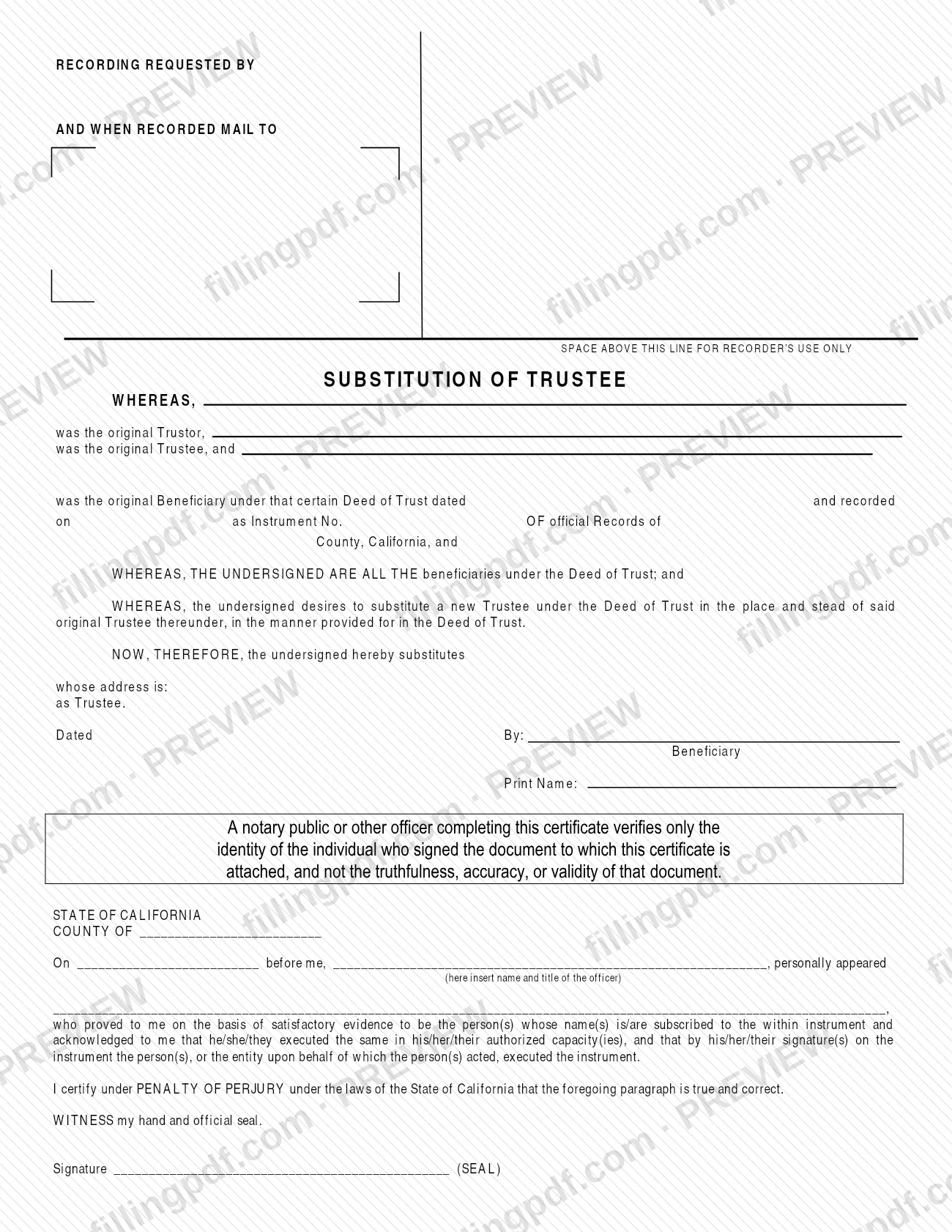
The Substitution of Trustee is a sample document published by the Riverside County Assessor-County Clerk-Recorder for beneficiaries who want to replace the trustee named in a Deed of Trust. The form identifies the original trustor, trustee and beneficiary, names the new trustee with an address, and carries a California notary acknowledgment. On FillingPDF you can fill out the form online and download or print the completed PDF; the county does not accept it online, so it is delivered by mail or in person to your local Assessor-County Clerk-Recorder office.
Last updated
What is Substitution of Trustee – Riverside County, CA?
The Substitution of Trustee is a recording document, published by the Riverside County Assessor-County Clerk-Recorder as one of its Recorder Sample Documents, by which the beneficiaries under a Deed of Trust substitute a new trustee in place of the original trustee.
The printed text works as a series of recitals followed by the substitution itself:
- It names the original Trustor, the original Trustee and the original Beneficiary under a Deed of Trust, and gives the date of that deed, the date it was recorded and its Instrument No. in the Official Records of a named California county.
- It states that the undersigned are all the beneficiaries under the Deed of Trust.
- It states that the undersigned wish to substitute a new Trustee in the place of the original Trustee, in the manner provided in the Deed of Trust.
- It then names the new Trustee and the new Trustee's address.
The beneficiary completes the Dated, By and Print Name lines. A California notary acknowledgment certificate follows, with the county, the date, the officer's name and title, and the names of the people who appeared. The certificate states that the officer verifies only the identity of the person who signed, not the truthfulness, accuracy or validity of the document.
The top of the page has a block for "Recording requested by and when recorded mail to" and a space reserved for the Recorder's use only. The county states that it makes no representation about whether its sample documents suit your purposes, and its employees cannot give legal advice or help prepare legal documents.
Who needs to file Substitution of Trustee – Riverside County, CA?
The main group is the beneficiaries under a Deed of Trust who want to substitute a new trustee in the manner the Deed of Trust provides. The form's own recital says the undersigned are all the beneficiaries, so it is written for a situation in which every beneficiary signs.
Points that follow from the form and the county's forms page:
- You need the details of the existing Deed of Trust: the original trustor, trustee and beneficiary, the date of the deed, the date it was recorded and its Instrument No.
- You need the name and address of the person or entity who will serve as the new Trustee.
- A notary public or other officer completes the acknowledgment certificate on the form.
- The county's Recorder Sample Documents are offered without any representation that they suit your purpose. If you are unsure whether this document fits your transaction, the county advises consulting an attorney or getting other professional advice. County employees cannot advise you or help prepare legal documents.
The form does not say who may sign on a beneficiary's behalf.
When to file Substitution of Trustee – Riverside County, CA
The Substitution of Trustee is used when the beneficiaries under a Deed of Trust decide to replace the original trustee, so that decision is the triggering event. The form prints no deadline of its own. It also asks for the date the Deed of Trust was recorded and the Instrument No. of that recording, so have those details on hand before you begin. Because the form has a block for "Recording requested by and when recorded mail to," it is meant to be delivered to the Recorder's office once it is completed and signed.
How to fill out Substitution of Trustee – Riverside County, CA
Enter the recording request block
At the top, complete the "Recording requested by and when recorded mail to" block with the name and mailing address where the recorded document should be returned. Leave the space marked for Recorder's use only empty.
Name the original parties
In the first recital, enter who was the original Trustor, the original Trustee and the original Beneficiary under the Deed of Trust.
Identify the Deed of Trust
Enter the date of the Deed of Trust, the date it was recorded, the Instrument No., and the California county whose Official Records contain it.
Confirm the beneficiary recital
The form states that the undersigned are all the beneficiaries under the Deed of Trust. Complete the form only if that is true and every beneficiary will sign.
Enter the new Trustee and address
After "the undersigned hereby substitutes," write the name of the new Trustee, then the address on the "whose address is" line.
Date and sign as Beneficiary
Enter the date on the Dated line, sign on the By line as Beneficiary and print the name on the Print Name line.
Leave the notary certificate to the notary
The California acknowledgment block (county, date, officer's name and title, names of the people who appeared, signature and seal) is completed by the notary public or other officer, not by you.
Review, download and print the PDF
Check the names, the recording details and the new Trustee's address, then download or print the completed PDF from FillingPDF in black ink on 8 1/2" x 11" white paper, ready for signing and notarizing.
How to submit Substitution of Trustee – Riverside County, CA
The Riverside County Assessor-County Clerk-Recorder does not accept these forms online. Deliver the completed document by mail or in person to your local Assessor-County Clerk-Recorder office.
- By mail: send the completed, signed and notarized form to your local Assessor-County Clerk-Recorder office. The form itself prints no street or mailing address, so check the county's website at https://www.rivcoacr.org/-forms for office details.
- In person: bring the completed document to your local Assessor-County Clerk-Recorder office.
Print the form in black ink on 8 1/2" x 11" white paper; the county states that all of its forms must be printed this way. Fill in the "Recording requested by and when recorded mail to" block at the top of the page so the recorded document comes back to the right person. The county's forms page does not list a fee for this sample document. FillingPDF lets you fill out and download the PDF; submission follows the channels above.
Common mistakes to avoid
- Printing the form in a color other than black ink or on paper other than 8 1/2" x 11" white; the county requires black ink on white letter-size paper for all its forms.
- Trying to submit the form online. The county's forms cannot be submitted online and must be delivered by mail or in person to a local office.
- Using the form when not every beneficiary signs, since the printed recital states that the undersigned are all the beneficiaries under the Deed of Trust.
- Leaving out the recording date or the Instrument No. of the Deed of Trust, or naming the wrong county in the Official Records line.
- Entering a new Trustee without the address; the form asks for "whose address is" right after the name.
- Treating the notary certificate as proof that the document is accurate; it verifies only the identity of the person who signed.
- Asking county staff to help prepare the document or advise on it; they cannot give legal advice or help prepare legal documents.
Frequently asked questions
What is a Substitution of Trustee?
It is a document by which the beneficiaries under a Deed of Trust name a new trustee in place of the original one. The Riverside County Assessor-County Clerk-Recorder publishes this version as a Recorder Sample Document with a California notary acknowledgment.
Is the Substitution of Trustee a Riverside County property tax form?
No. It is not a tax return or payment form. The Riverside County Assessor-County Clerk-Recorder lists it among its Recorder Sample Documents, and it concerns the trustee named in a Deed of Trust. For tax questions, use the agency's website.
Can I file the Substitution of Trustee online in Riverside County?
No. The county says its forms can be completed and printed online but cannot be submitted online. You must deliver the completed form by mail or in person to your local Assessor-County Clerk-Recorder office.
Does the Substitution of Trustee need to be notarized?
The form includes a California notary acknowledgment certificate that a notary public or other officer completes. The county's forms page does not say more, and it advises asking an attorney if you are unsure what your transaction requires.
What information do I need to fill out the form?
You need the original trustor, trustee and beneficiary, the date and recording date of the Deed of Trust, its Instrument No., the county of the Official Records, and the name and address of the new Trustee.
Can county staff help me complete the Substitution of Trustee?
No. The county says its employees cannot provide legal advice or help prepare legal documents. If you are unsure whether this document fits your transaction, consult an attorney or get other professional advice.
What paper and ink do I use for the printed form?
Print it in black ink on 8 1/2" x 11" white paper. The county states that all of its forms must be printed this way.
Can I fill out the Substitution of Trustee on FillingPDF?
Yes. You can fill out the PDF online on FillingPDF and download or print it. FillingPDF is an independent service, not affiliated with the county, and it does not file or record the document; you deliver it to the county yourself.
Ready to fill out Substitution of Trustee – Riverside County, CA?
Fill out Substitution of Trustee – Riverside County, CA now