
How to Submit a BOP Application is the Customer Public Permit Portal Guide that the City of Sacramento Finance Department publishes for people creating a new Cannabis Business Operating Permit (BOP) application. It walks through six steps in the city's Public Permit Portal, from signing in to choosing a cannabis permit type and completing the application. On this page you can fill out the form online on FillingPDF and download or print the completed PDF; the application itself is created in the city's portal, and the guide and its checklists are published by the city.
Last updated
What is How to Submit a BOP Application – Sacramento, CA?
How to Submit a BOP Application is the City of Sacramento's Customer Public Permit Portal Guide for creating a new Cannabis Business Operating Permit (BOP) application. It lists the six portal steps an applicant follows, from signing in to completing the application.
The guide is the document behind the new-application process in the Public Permit Portal. Its steps are: sign in, open the Operating Permit tab and select Create Application, read and accept the terms, say whether you apply for yourself or another person, pick a cannabis permit type, and complete the application's Steps 1 through 6 in order. Fields marked with a red asterisk are required, and Save and Resume Later lets you pause at the bottom of each step.
The permit types listed on the city's Cannabis Forms and Information page, each with its own step-by-step checklist, are cultivation, delivery, distribution, manufacturing, microbusiness, storefront dispensary, storefront dispensary with a consumption lounge, and testing laboratory.
According to the city's FAQ, a Business Operating Permit is valid for one year from issuance and must be renewed annually, and a cannabis business permit cannot be transferred. A Conditional Use Permit (CUP) from the City Planning Division must be obtained for the property before any cannabis permits can be issued. The guide itself covers new applications only; modifications, renewals and other changes use the separate applications, forms and checklists on the city's page. The printed revision line reads "Revised September 21, 2026".
Who needs to file How to Submit a BOP Application – Sacramento, CA?
People who want to apply for a new Cannabis Business Operating Permit from the City of Sacramento use this guide. You need an existing Public Permit Portal account and your username, password, security question and answer before you start.
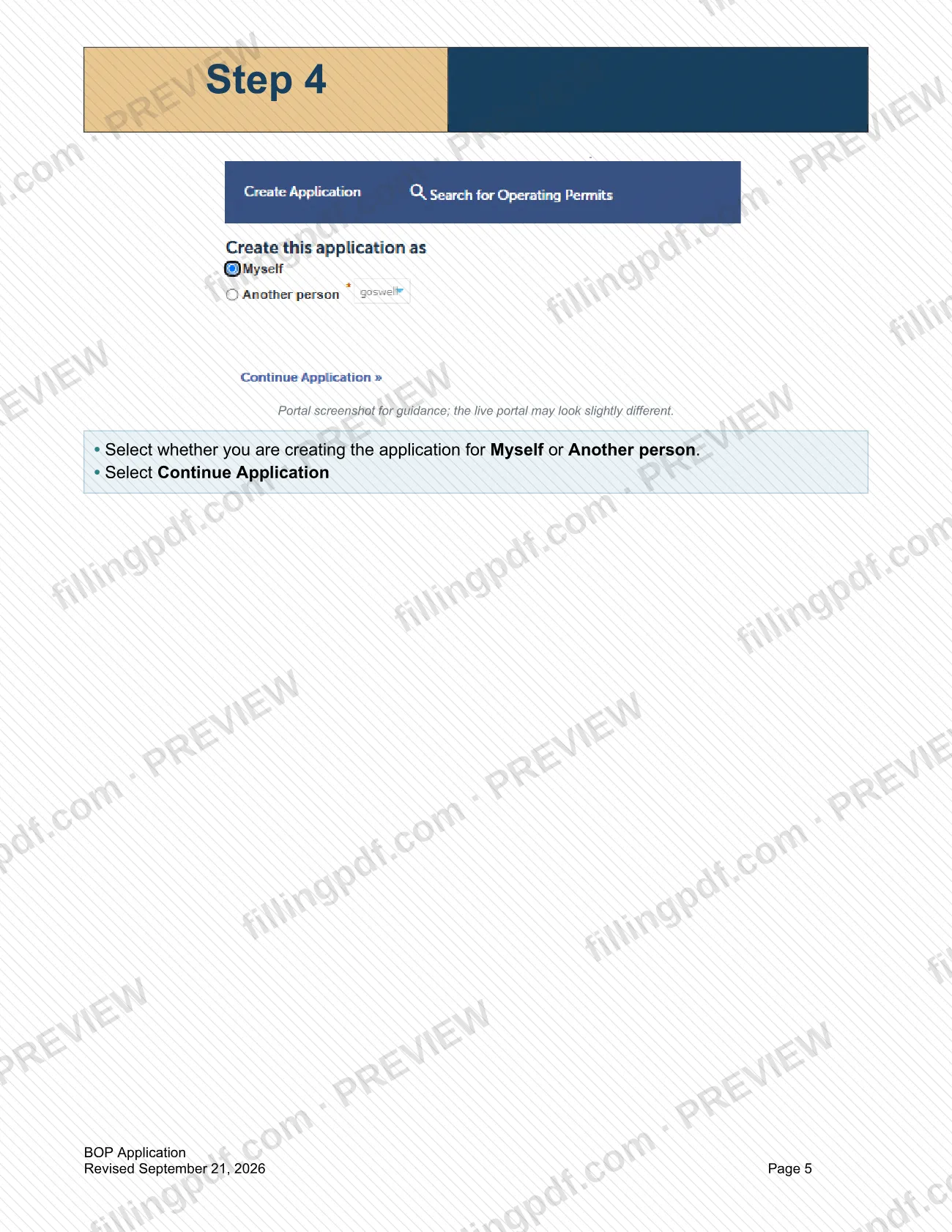
- Applicants for themselves: select Myself when the portal asks who you are creating the application for.
- Applicants acting for someone else: select Another person.
- Delivery applicants: the city's FAQ says you cannot operate as a courier or third-party delivery service; a delivery-only dispensary needs a brick-and-mortar location with a Conditional Use Permit for a dispensary, plus a Business Operating Permit.
- Testing laboratories: the FAQ says a business holding a testing license cannot hold any other cannabis licenses.
This guide is not for permit holders who want a modification, a renewal, a name change or to close their business; the city lists separate applications, forms and checklists for those on its Cannabis Forms and Information page.
When to file How to Submit a BOP Application – Sacramento, CA
The guide sets no deadline of its own: you create the application in the Public Permit Portal when you are ready to apply for a new Cannabis Business Operating Permit. The city's FAQ says a Conditional Use Permit must be obtained for the property before any cannabis permits can be issued, so plan that approval alongside the application.
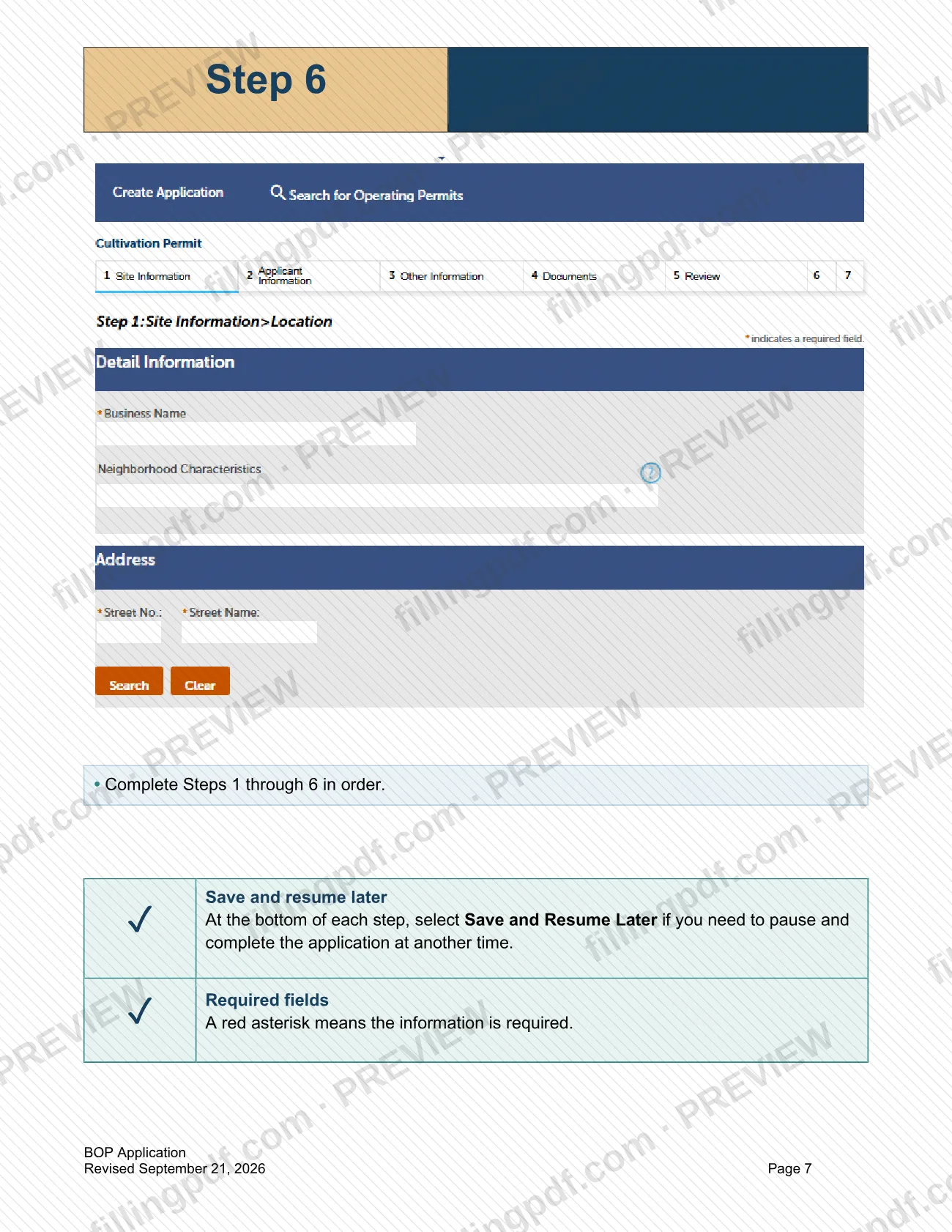
You do not have to finish in one sitting. At the bottom of each of the application's six steps, select Save and Resume Later to pause and come back. The city lists a separate form for extending an application that has been open more than 180 days.
Once issued, a Business Operating Permit is valid for one year and must be renewed annually; renewals use the city's separate renewal checklist and timeline.
How to fill out How to Submit a BOP Application – Sacramento, CA
Prepare your account and checklist
Confirm that you have an existing Public Permit Portal account, and have your username, password, security question and answer ready. Open the checklist for your permit type on the How to Apply for Cannabis BOP webpage.
Sign in to the portal
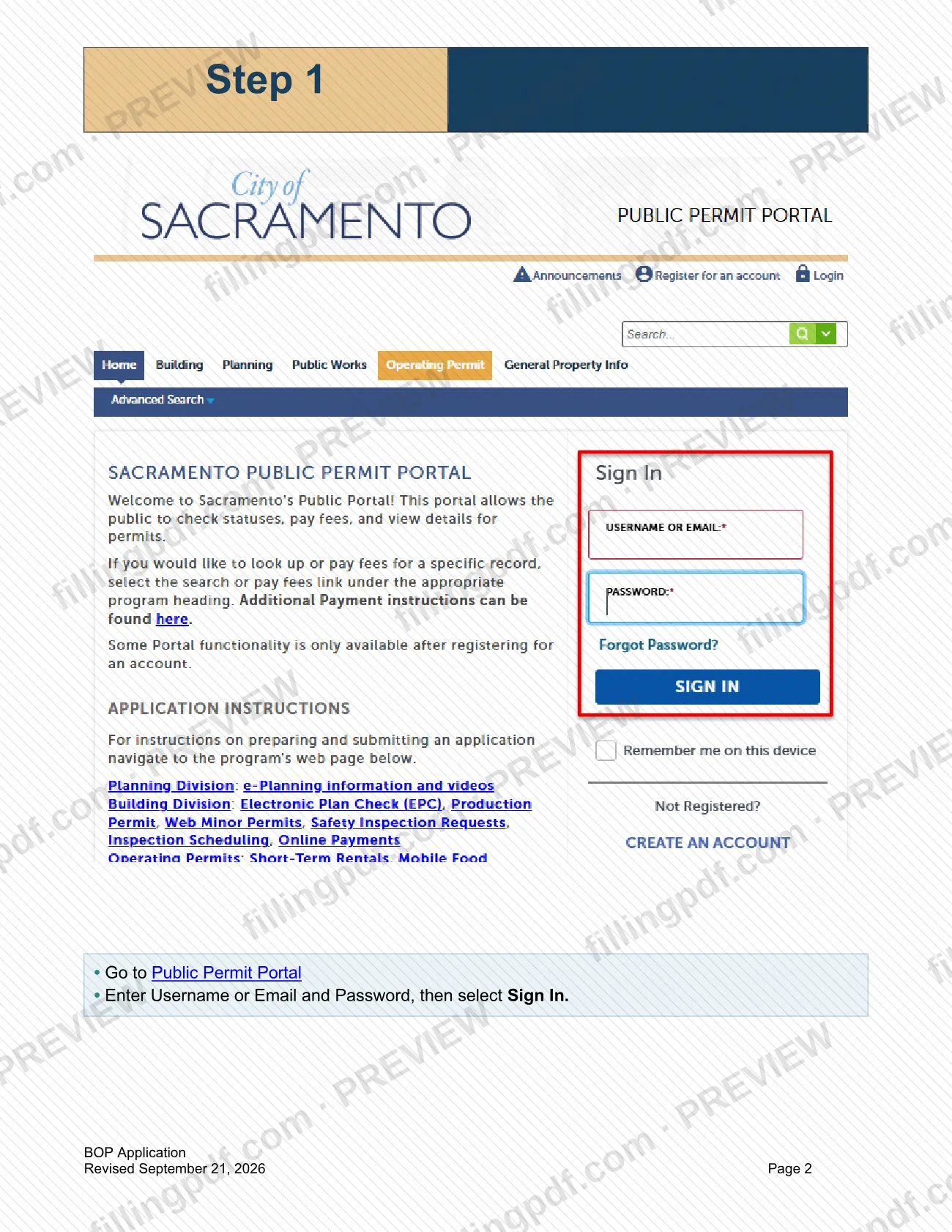
Go to the Public Permit Portal, enter your Username or Email and Password, then select Sign In.
Open the Operating Permit tab
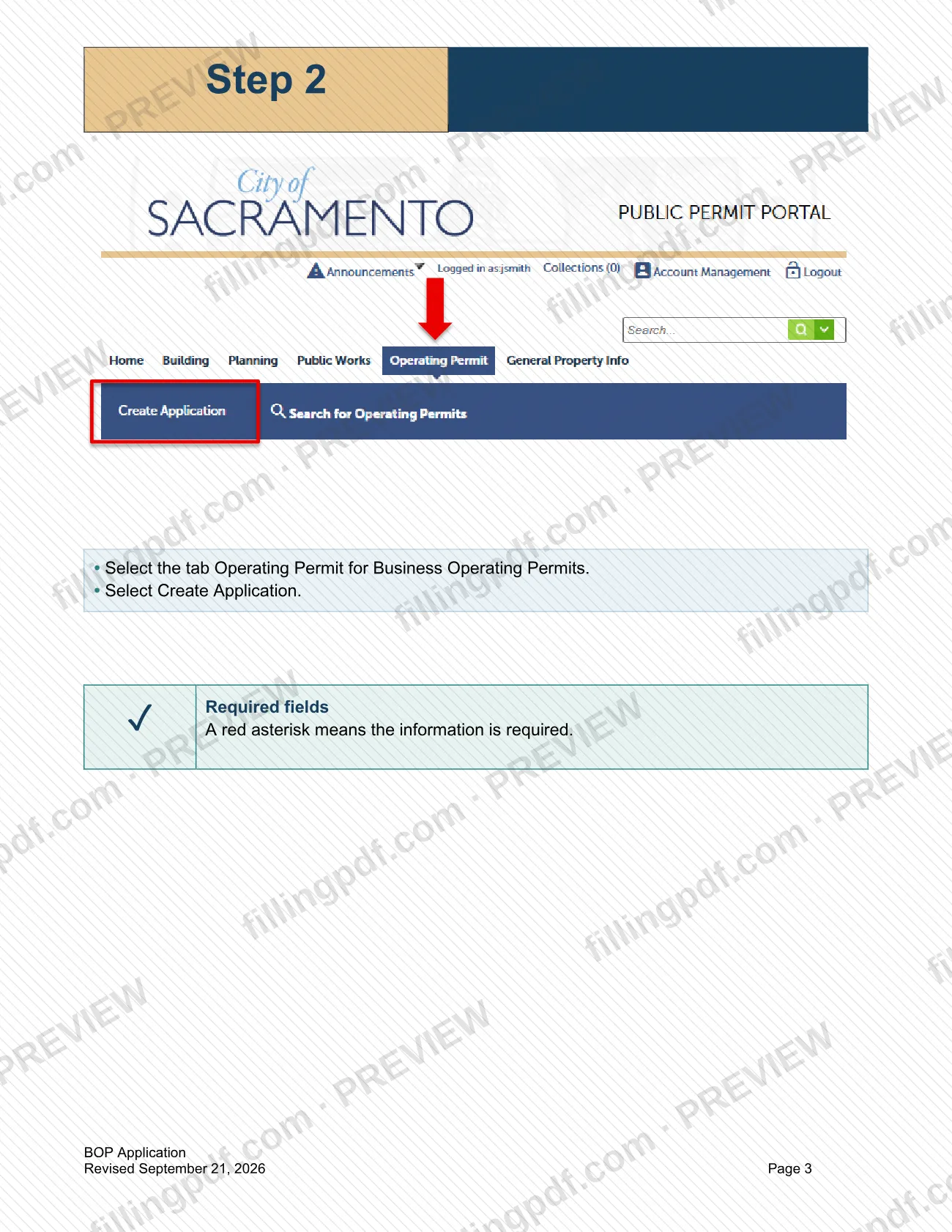
Select the Operating Permit tab for Business Operating Permits, then select Create Application. A red asterisk marks every required field.
Accept the instructions and Notice
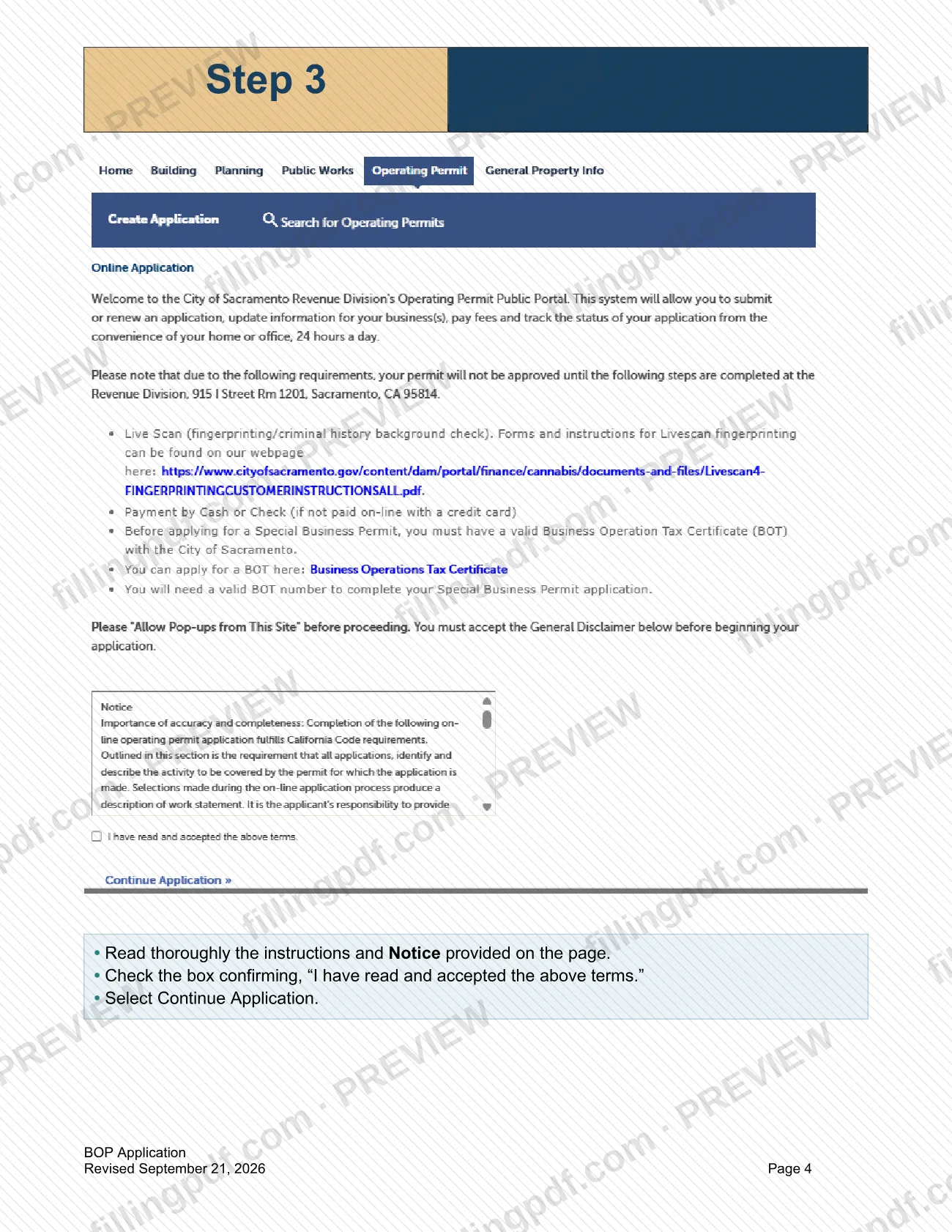
Read the instructions and Notice on the page, check the box "I have read and accepted the above terms," and select Continue Application.
Choose who the application is for
Select whether you are creating the application for Myself or Another person, then select Continue Application.
Select your cannabis permit type
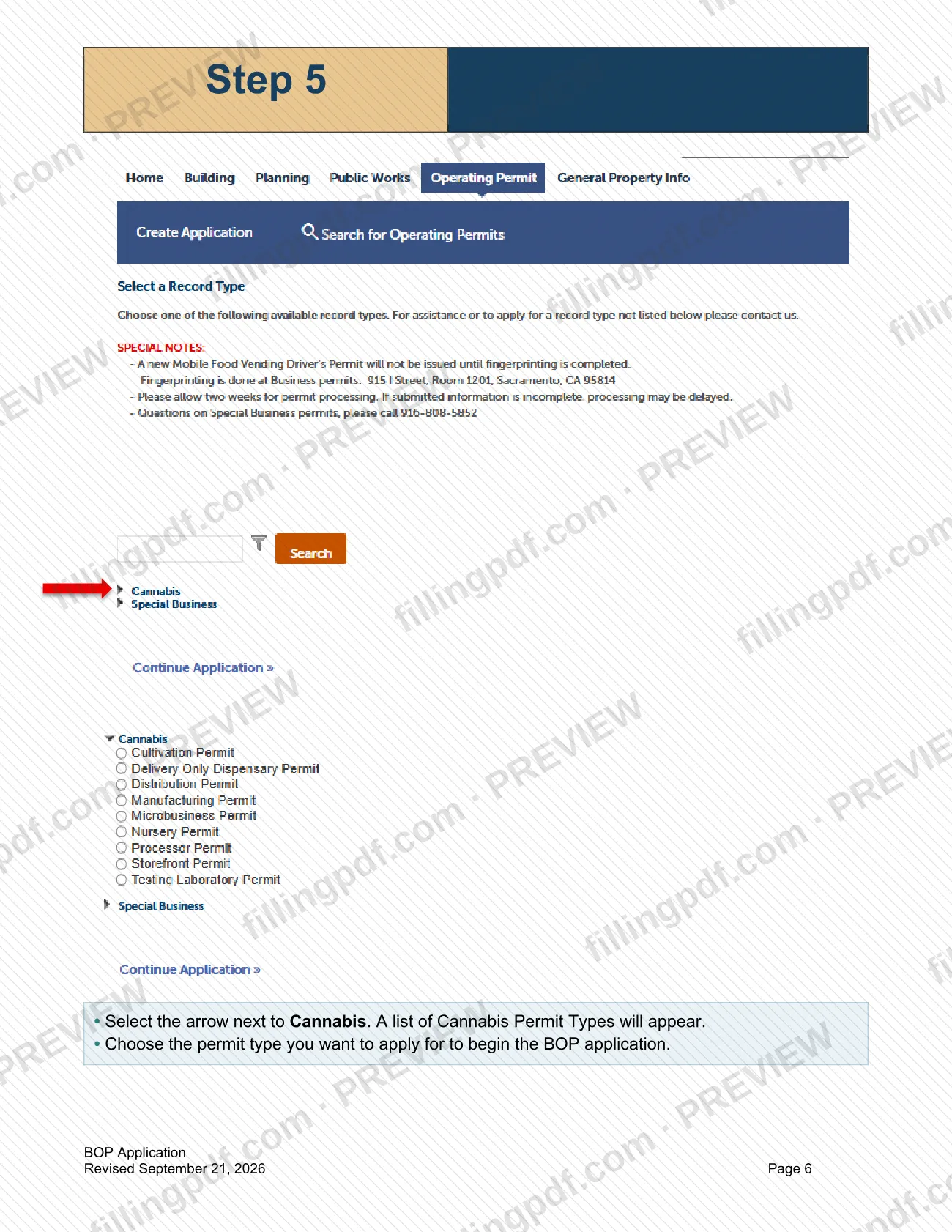
Select the arrow next to Cannabis to display the list of Cannabis Permit Types, then choose the type you want to apply for.
Complete Steps 1 through 6
Fill in the application's Steps 1 through 6 in order. Select Save and Resume Later at the bottom of a step if you need to pause.
Review and download the PDF
Check your entries against the checklist for your permit type, then download or print the completed PDF from FillingPDF. Create and submit the application itself through the Public Permit Portal as described under How to submit.
How to submit How to Submit a BOP Application – Sacramento, CA
The BOP application is created and submitted online in the City of Sacramento's Public Permit Portal; the guide describes no mail or in-person channel.
- Online: sign in to the Public Permit Portal with your username or email and password, open the Operating Permit tab, select Create Application, and complete Steps 1 through 6 in order.
- Checklists: the guide points to the checklist for your permit type on the How to Apply for Cannabis BOP webpage; the city's Cannabis Forms and Information page lists them.
- Fees: the city publishes Business Operating Permit fees by business type on its Cannabis Forms and Information page; the amounts are not repeated here.
FillingPDF lets you fill out and download the PDF; submission follows the channels above.
Common mistakes to avoid
- Starting without an existing Public Permit Portal account; the guide says you must have one and keep your username, password, security question and answer ready.
- Continuing past the terms page without checking "I have read and accepted the above terms."
- Selecting Myself when you are creating the application for Another person, or the reverse.
- Leaving fields marked with a red asterisk blank; the portal treats them as required.
- Skipping ahead instead of completing Steps 1 through 6 of the application in order.
- Closing the portal without selecting Save and Resume Later at the bottom of a step when you need to pause.
- Applying for a delivery-only permit without a brick-and-mortar location; the city says you cannot operate as a courier or third-party delivery service.
- Trying to transfer or sell a cannabis business permit; the city code says such an attempt is unlawful and void.
Frequently asked questions
What is the BOP application in Sacramento?
A BOP is a Business Operating Permit. This guide explains how to create a new Cannabis Business Operating Permit application in the City of Sacramento's Public Permit Portal, in six steps, from signing in to completing the application.
Can I fill out the Sacramento BOP application on FillingPDF?
You can fill out the PDF online on FillingPDF and download or print it. FillingPDF is an independent service, not the city, and does not submit the application; the application is created in the Public Permit Portal.
Do I need an account before I apply?
Yes. The guide says you must have an existing Public Permit Portal account and have your username, password, security question and answer ready before you begin. You sign in with your username or email and password.
Can I save the application and finish later?
Yes. At the bottom of each step, select Save and Resume Later to pause and complete the application at another time. The portal marks required fields with a red asterisk.
Which cannabis permit types can I apply for?
The city's page lists new-application checklists for cultivation, delivery, distribution, manufacturing, microbusiness, storefront dispensary, storefront dispensary with a consumption lounge, and testing laboratory. You choose the type in the portal after selecting Cannabis.
How long is a Business Operating Permit valid?
One year from the time it is issued, and it must be renewed annually, according to the city's FAQ. Renewals use a separate renewal application checklist and timeline listed on the city's Cannabis Forms and Information page.
Do I need a Conditional Use Permit first?
The city's FAQ says a Conditional Use Permit (CUP) from the City Planning Division must be obtained for the property before any cannabis permits can be issued. Check your property's CUP status with the city's lookup tool.
Can someone else create the application for me?
The portal asks whether you are creating the application for Myself or Another person, so an application can be created for another person. Select the matching option before continuing.
Ready to fill out How to Submit a BOP Application – Sacramento, CA?
Fill out How to Submit a BOP Application – Sacramento, CA now