
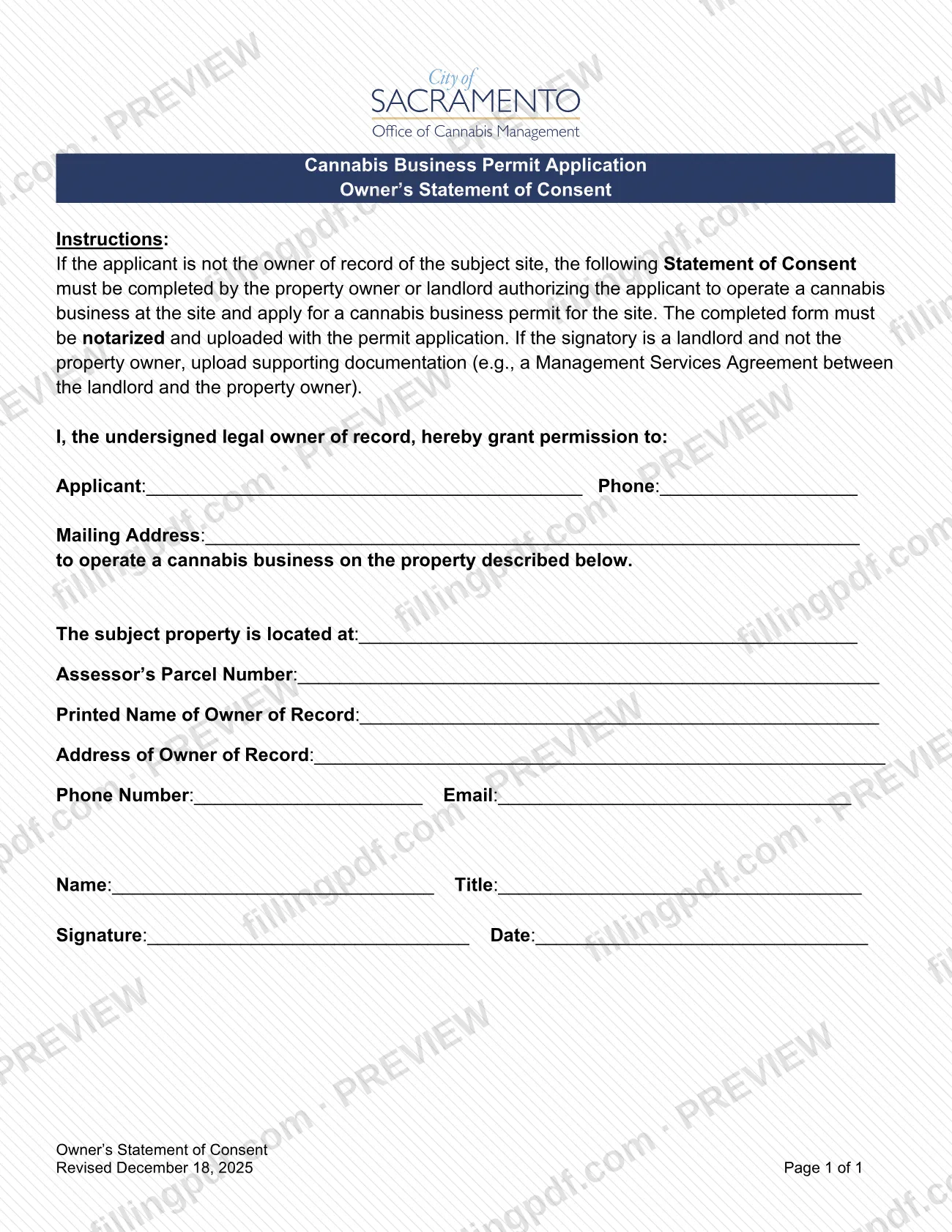
The Owner's Statement of Consent is a one-page form from the City of Sacramento Finance Department, part of the Cannabis Business Permit Application. When the applicant does not own the site, the property owner or landlord completes it to authorize the applicant to operate a cannabis business there and to apply for a cannabis business permit for the site. The form must be notarized and uploaded with the permit application. On this page you can fill out the form online on FillingPDF and download or print the completed PDF; the City publishes the original at cityofsacramento.gov.
Last updated
What is Owner's Statement of Consent – Sacramento, CA?
The Owner's Statement of Consent is the City of Sacramento form on which a property owner of record or landlord authorizes a cannabis business permit applicant to operate a cannabis business at the site and to apply for the permit.
The form is printed under the heading "Cannabis Business Permit Application" and is issued by the City of Sacramento Finance Department. The revision date on the page is December 18, 2025, and the form is one page long. It is not a permit and grants no approval by the City. It is a supporting document: the owner states in writing that the applicant may use the property.
The text reads "I, the undersigned legal owner of record, hereby grant permission to" the applicant, and then collects:
- the applicant's name, phone number and mailing address;
- the address of the subject property and its Assessor's Parcel Number;
- the printed name, address, phone number and email of the owner of record;
- the name and title of the person signing, plus a signature and date.
The City's cannabis forms page lists the form among the Forms as the business operating permit (BOP) application requirement if the applicant is not the property owner. It sits alongside other cannabis forms, such as the ownership and business structure disclosure, but it is a separate document with a separate purpose.
Who needs to file Owner's Statement of Consent – Sacramento, CA?
The main group is the property owner or landlord of a site where someone else wants to operate a cannabis business. The form's instructions say it must be completed by that owner or landlord when the applicant is not the owner of record of the subject site.
- Property owners of record: complete and sign the statement to authorize the applicant to operate at the site and to apply for a cannabis business permit for it.
- Landlords who are not the property owner: may be the signatory, but must also upload supporting documentation, for example a Management Services Agreement between the landlord and the property owner.
- Applicants: need this form from the owner or landlord when they do not own the site. They are named on the form but do not sign it.
An applicant who is the owner of record of the subject site is outside the form's instructions, because it applies only "if the applicant is not the owner of record." The form does not describe signing through an agent or representative other than a landlord.
When to file Owner's Statement of Consent – Sacramento, CA
The form is needed when you apply for a cannabis business permit for a site you do not own. The instructions say the completed form must be notarized and uploaded with the permit application, so it is submitted at the same time as that application and has no separate due date printed on it.
Prepare it before you submit the application: the owner or landlord must complete it, and it has to be notarized first. If the signatory is a landlord rather than the property owner, gather the supporting documentation at the same time so everything can be uploaded together. Check the City's cannabis forms page for the deadlines and steps of the permit application itself.
Documents you need
- Supporting documentation, such as a Management Services Agreement between the landlord and the property owner, only if the person signing is a landlord and not the property owner.
How to fill out Owner's Statement of Consent – Sacramento, CA
Confirm the applicant is not the owner
Use this form only if the applicant is not the owner of record of the subject site. The property owner or landlord completes it, not the applicant.
Enter the applicant's details
After "hereby grant permission to," enter the applicant's name next to Applicant, the applicant's Phone, and the applicant's Mailing Address.
Enter the property address
Write the street address of the site in the line "The subject property is located at."
Enter the Assessor's Parcel Number
Enter the Assessor's Parcel Number for the subject property in the line provided.
Enter the owner of record's details
Write the Printed Name of Owner of Record and the Address of Owner of Record.
Add the owner's phone and email
Enter the owner's Phone Number and Email in the next line.
Identify the person signing
Enter the signer's Name and Title. If the signer is a landlord and not the property owner, the title should show that role.
Sign, date and notarize
The signatory enters Signature and Date. The completed form must then be notarized.
Prepare landlord supporting documents
If the signatory is a landlord, gather supporting documentation such as a Management Services Agreement between the landlord and the property owner.
Review and download the completed PDF
Check that every line is filled and matches the permit application. Download or print the completed PDF from FillingPDF, have it notarized and follow the channels described under How to submit.
How to submit Owner's Statement of Consent – Sacramento, CA
You submit the Owner's Statement of Consent by uploading it with the cannabis business permit application. The form names no mailing address, email address or in-person channel.
- Upload: upload the completed, notarized form together with the permit application. The City's page lists a link to apply for a Cannabis Business Operating Permit, and the form is listed among the forms on the City's Cannabis Forms and Information page.
- Landlord signatories: if the signatory is a landlord and not the property owner, upload the supporting documentation (for example, a Management Services Agreement between the landlord and the property owner) with the form.
Have the notarization done before you upload; the instructions require a notarized form. For questions about the permit application, use the contact information on the City's cannabis page. FillingPDF lets you fill out and download the PDF; submission follows the City's channels described above.
Common mistakes to avoid
- Uploading the form without notarization; the instructions say the completed form must be notarized.
- Having the applicant sign when the applicant is not the owner of record; the property owner or landlord must complete the statement.
- Omitting supporting documentation when the signatory is a landlord and not the property owner, such as a Management Services Agreement with the owner.
- Sending a paper copy instead of uploading the completed form with the permit application.
- Leaving the Assessor's Parcel Number or the subject property address blank or inconsistent with the application.
- Leaving out the signer's Name and Title, or the signature and date, at the bottom of the form.
- Preparing the form when the applicant is the owner of record; it is required only if the applicant is not.
Frequently asked questions
What is the Owner's Statement of Consent in Sacramento?
It is a City of Sacramento form in which a property owner of record or landlord authorizes a cannabis business permit applicant to operate a cannabis business at a site and to apply for a permit for it. It belongs to the Cannabis Business Permit Application.
Do I need this form if I own the property?
No. The instructions apply it only when the applicant is not the owner of record of the subject site. If you are the owner of record and the applicant, the form's instructions do not call for it.
Does the Owner's Statement of Consent have to be notarized?
Yes. The instructions say the completed form must be notarized and uploaded with the permit application. Have the owner or landlord complete and sign it, then notarize it before you upload it.
What if the signer is a landlord, not the property owner?
A landlord may sign, but you must also upload supporting documentation. The form gives a Management Services Agreement between the landlord and the property owner as an example of what to upload.
Where do I submit the Owner's Statement of Consent?
Upload it with the cannabis business permit application. The form prints no mailing address, email address or in-person option. The City's Cannabis Forms and Information page lists the form and links to the permit application.
Is the Owner's Statement of Consent a Sacramento business license form?
No. It is a supporting form for the City's Cannabis Business Permit Application, not a general application for a business license. It only records the owner's permission for the applicant to operate a cannabis business at the site.
Can I fill out the Owner's Statement of Consent online?
You can fill out the PDF online on FillingPDF and download or print it. FillingPDF is an independent service and does not notarize or file the form; you notarize it and upload it with the permit application through the City's channels.
Ready to fill out Owner's Statement of Consent – Sacramento, CA?
Fill out Owner's Statement of Consent – Sacramento, CA now