
The Renewal Application is the City of Sacramento Finance Department's online application for renewing a Cannabis Business Operating Permit (BOP). The city explains it in its Customer Public Permit Portal guide, "How to Submit a BOP Renewal Application", which breaks the process into four steps. It is meant for permit holders who already have a Public Permit Portal account and need to renew a permit. On this page you can fill out the form online on FillingPDF and download or print the completed PDF; the renewal itself is completed in the city's portal, and the guide is published at cityofsacramento.gov.
Last updated
What is Renewal Application – Sacramento, CA?
The Renewal Application is the City of Sacramento application, completed in the Public Permit Portal, used to renew a Cannabis Business Operating Permit (BOP); the city's portal guide, How to Submit a BOP Renewal Application, walks through it in four steps.
The City of Sacramento Finance Department publishes the guide among its cannabis management resources. It covers signing in to the portal, opening the Operating Permit tab, choosing the permit to renew and completing the application screens. The guide marks required information with a red asterisk.
A BOP is valid for one year from the time it is issued and must be renewed annually, according to the city's cannabis forms and information page. That page also lists a Business Operating Permit Renewal Application Checklist and a Business Operating Permit Renewal Timeline, which the guide tells you to use alongside the application.
This is a renewal document. First-time applicants follow the city's separate new application checklists, which are organized by business type (for example cultivation, delivery, distribution, manufacturing, microbusiness, storefront dispensary and testing laboratory). Changes to an existing permit, such as a legal business name or ownership change, use other forms listed on the same page.
Who needs to file Renewal Application – Sacramento, CA?
Holders of an existing Cannabis Business Operating Permit (BOP) issued by the City of Sacramento use the Renewal Application to renew that permit. The guide sets one condition: you must already have a Public Permit Portal account, and you should have your username, password, security question and answer ready.
Who this is not for:
- First-time applicants. The city publishes separate step-by-step checklists for new applications by business type.
- Permit holders who need a change rather than a renewal, such as a DBA name change, a legal business name change, a management company change or a change in ownership structure. The city's forms page lists separate forms for those.
- Permit holders who are permanently closing the business. The city lists a separate form for closures.
The guide does not describe anyone signing or applying on behalf of a permit holder. Questions about who may act for the business should go to the City of Sacramento Finance Department's cannabis management office.
When to file Renewal Application – Sacramento, CA
Renew when your permit's one-year term is ending. The city's cannabis page states that Business Operating Permits are valid for one year from the time they are issued and must be renewed annually. The portal guide sets no separate deadline of its own.
For timing details, the city's cannabis forms and information page lists a Business Operating Permit Renewal Timeline and a Business Operating Permit Renewal Application Checklist. Read both before you start, because the guide itself directs you to use the checklist to complete the renewal.
You can only renew a permit that appears on your Public Permit Portal account. The guide has you scroll to the permit you need to renew and select its Renew Application link.
How to fill out Renewal Application – Sacramento, CA
Confirm you have a portal account
The guide says you must have an existing Public Permit Portal account before you begin. Renewals cannot be started without one.
Gather your sign-in details
Have your username, password, security question and answer ready before you open the portal.
Review the renewal checklist
Use the Business Operating Permit Renewal Application Checklist to help you complete the renewal. It is available on the city's Cannabis Forms and Information webpage.
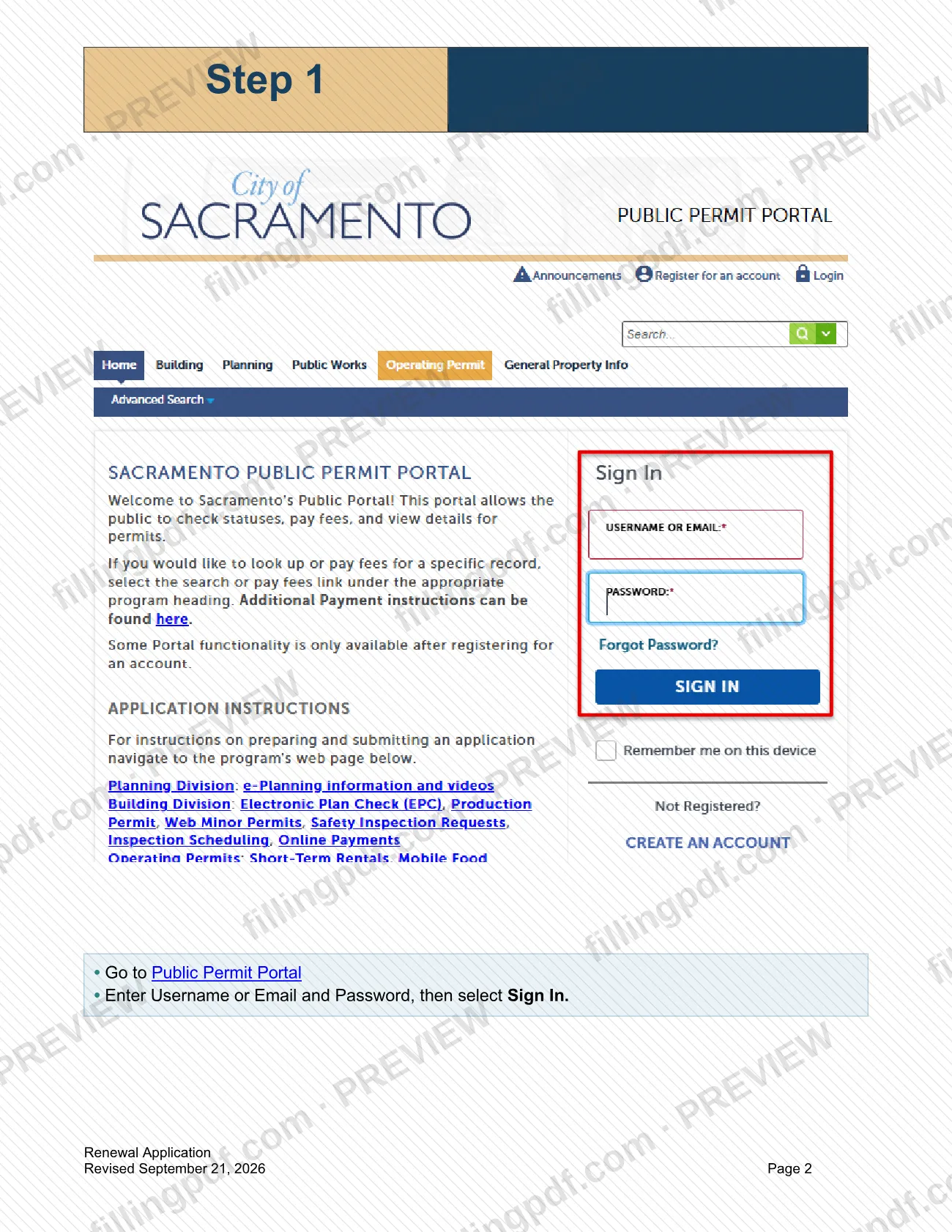
Sign in to the portal (Step 1)
Go to the Public Permit Portal, enter your Username or Email and Password, then select Sign In.
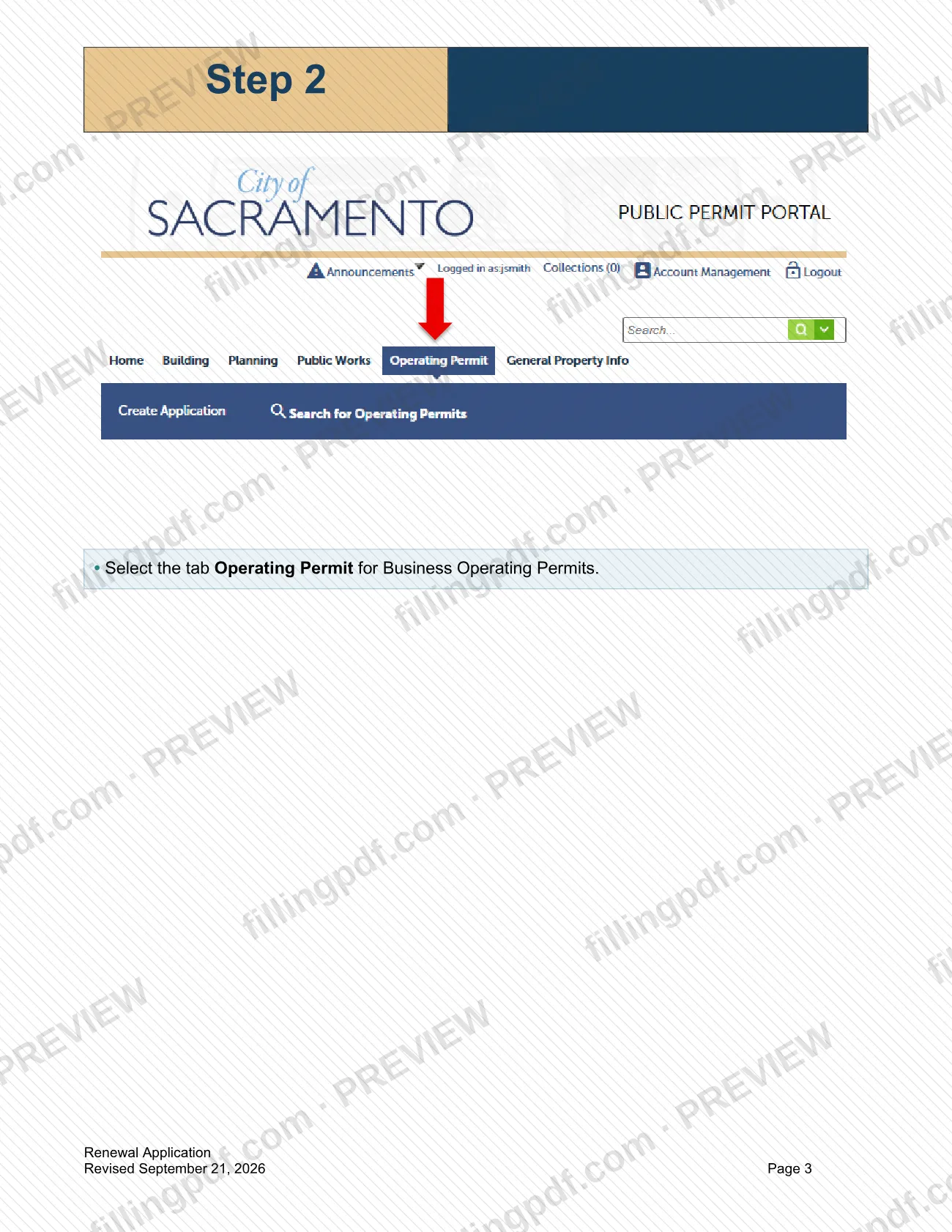
Open the Operating Permit tab (Step 2)
Select the tab Operating Permit, which holds Business Operating Permits.
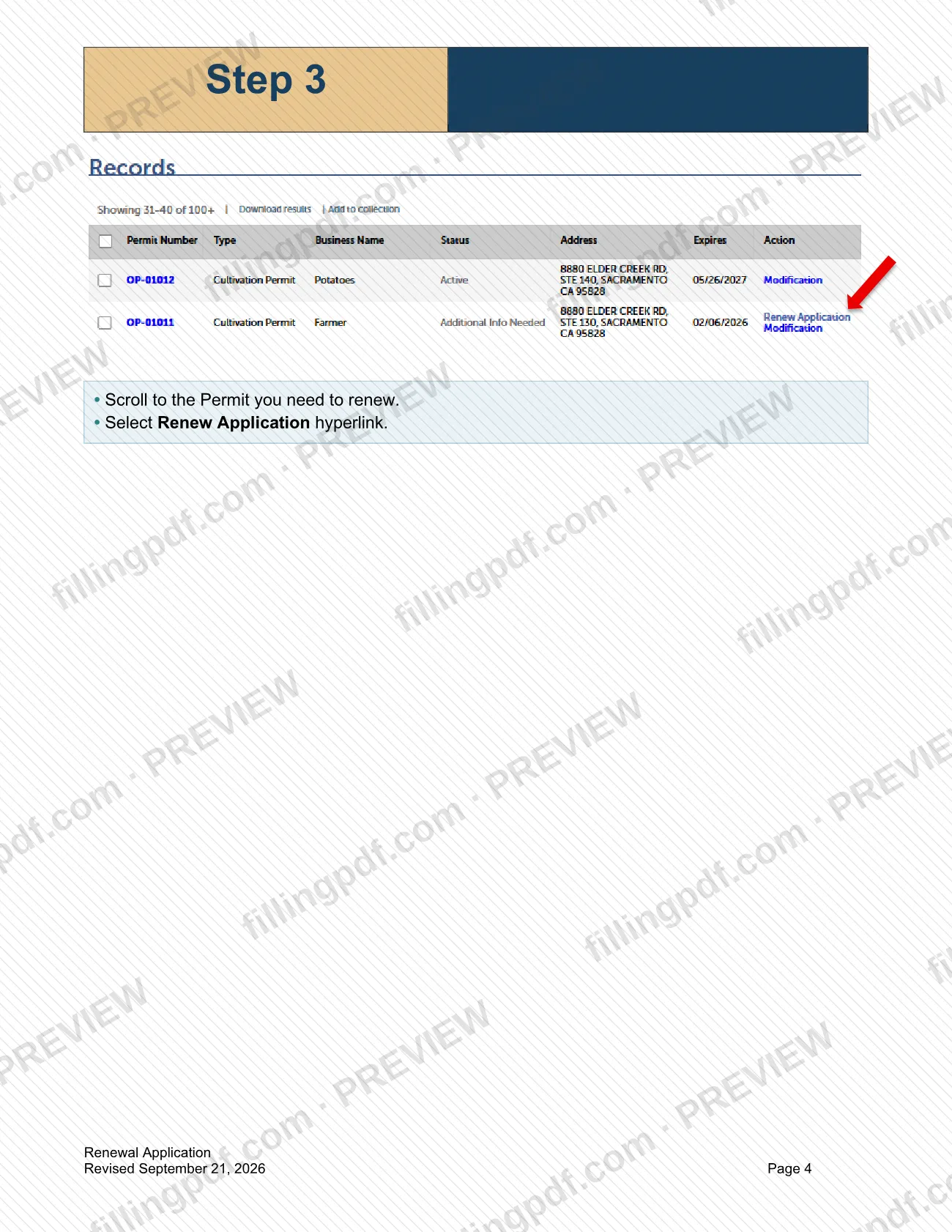
Choose the permit to renew (Step 3)
Scroll to the permit you need to renew and select the Renew Application hyperlink.
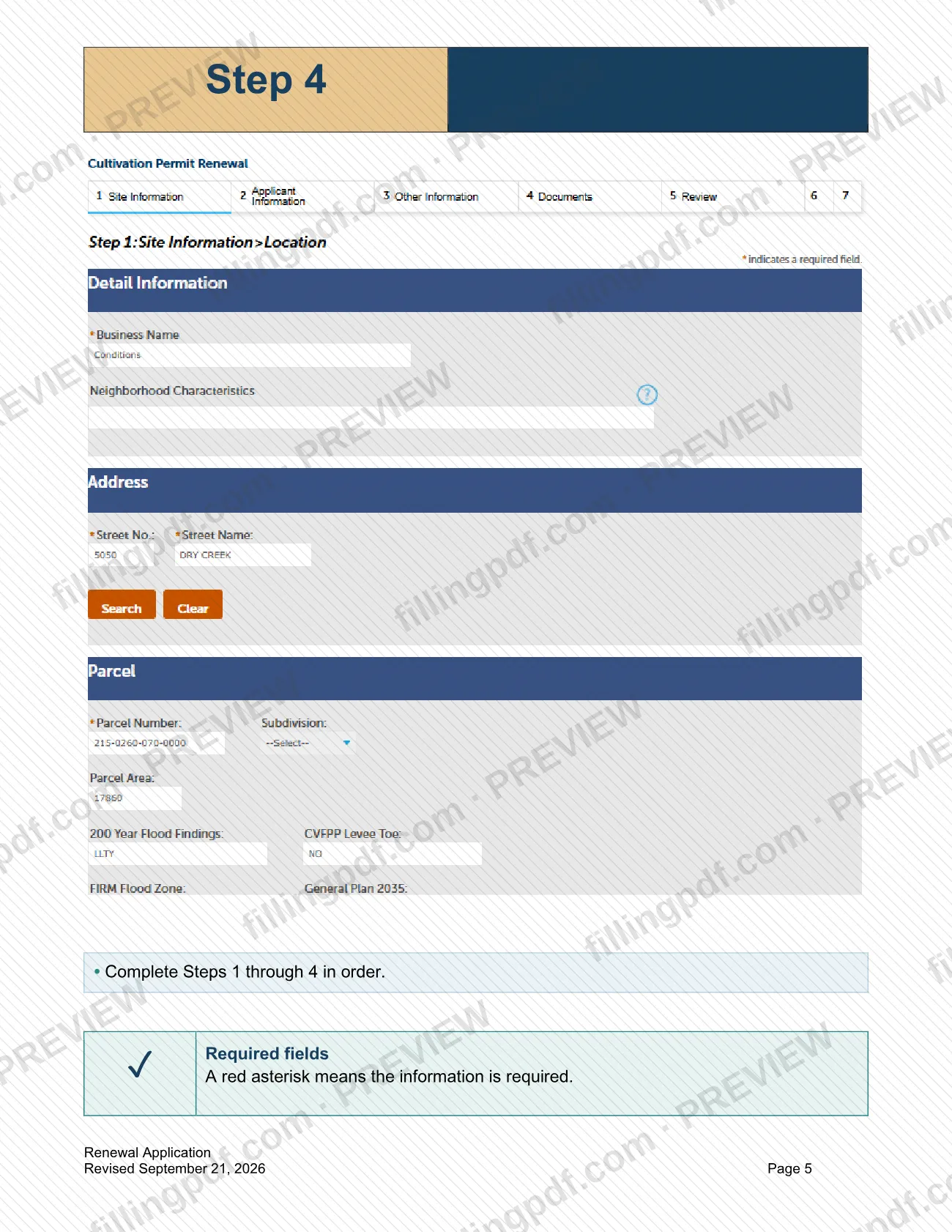
Complete the four application steps (Step 4)
Complete Steps 1 through 4 of the renewal application in order.
Fill every required field
A red asterisk means the information is required, so complete each starred field.
Review and download your PDF
Check each entry against the renewal checklist. On FillingPDF you can fill out the PDF online and download or print it for your records; the renewal itself is completed in the Public Permit Portal.
How to submit Renewal Application – Sacramento, CA
The renewal is completed online in the City of Sacramento's Public Permit Portal; the guide describes no mail, fax or in-person channel.
- Public Permit Portal: go to the portal, enter your username or email and password, and select Sign In. Select the Operating Permit tab for Business Operating Permits, scroll to the permit you need to renew and select the Renew Application link. Then complete Steps 1 through 4 in order.
- Before you start: have your username, password, security question and answer ready, and use the Renewal checklist, which is available on the city's Cannabis Forms and Information page.
- Fees: the city's FAQ says Business Operating Permit fees are listed by business type on that same page under Business Operating Permit Fees; check it for current amounts and how they are paid.
FillingPDF lets you fill out and download the PDF; submission follows the agency's channels above.
Common mistakes to avoid
- Starting a renewal without an existing Public Permit Portal account; the guide says you must already have one.
- Beginning without your username, password, security question and answer, which the guide says to have ready.
- Skipping the Business Operating Permit Renewal Application Checklist that the guide tells you to use.
- Selecting the wrong tab; Business Operating Permits are under the Operating Permit tab.
- Renewing the wrong permit when the account lists several; scroll to the specific permit you need to renew before selecting Renew Application.
- Completing Steps 1 through 4 out of order instead of in sequence.
- Leaving blank a field marked with a red asterisk, which means the information is required.
- Using the renewal for a first-time permit; new applications follow separate checklists by business type.
Frequently asked questions
What is the Renewal Application in Sacramento?
It is the City of Sacramento application for renewing a Cannabis Business Operating Permit (BOP), completed in the Public Permit Portal. The city's guide, How to Submit a BOP Renewal Application, explains the four steps for signing in, finding your permit and completing the application.
Is this the Sacramento business license renewal?
No. The guide covers only the renewal of a Cannabis Business Operating Permit (BOP). If you need another kind of Sacramento business license, check with the City of Sacramento for the application that applies to it.
Do I need a Public Permit Portal account to renew a BOP?
Yes. The guide says you must have an existing Public Permit Portal account and have your username, password, security question and answer ready. You sign in with your username or email and password before opening the Operating Permit tab.
How do I renew my cannabis Business Operating Permit in Sacramento?
Sign in to the Public Permit Portal, select the Operating Permit tab, scroll to the permit you need to renew and select Renew Application. Then complete Steps 1 through 4 in order, filling every field marked with a red asterisk.
How long is a Sacramento cannabis BOP valid?
One year from the time it is issued. The city's cannabis page says Business Operating Permits must be renewed annually. The city also publishes a Business Operating Permit Renewal Timeline on its Cannabis Forms and Information page.
Where do I find the BOP renewal checklist?
The Business Operating Permit Renewal Application Checklist is on the City of Sacramento's Cannabis Forms and Information webpage, under Guidance Documents. The portal guide tells you to use it to help complete the renewal.
Is there a fee to renew a Business Operating Permit?
The city lists Business Operating Permit fees by business type on its Cannabis Forms and Information page, under Business Operating Permit Fees. The guide itself states no amount, so check that page for current fees and payment details.
Can I fill out the BOP Renewal Application online on FillingPDF?
You can fill out the PDF online on FillingPDF and download or print it. FillingPDF is independent of the City of Sacramento and does not submit anything: the renewal is completed by you in the city's Public Permit Portal.
Ready to fill out Renewal Application – Sacramento, CA?
Fill out Renewal Application – Sacramento, CA now