
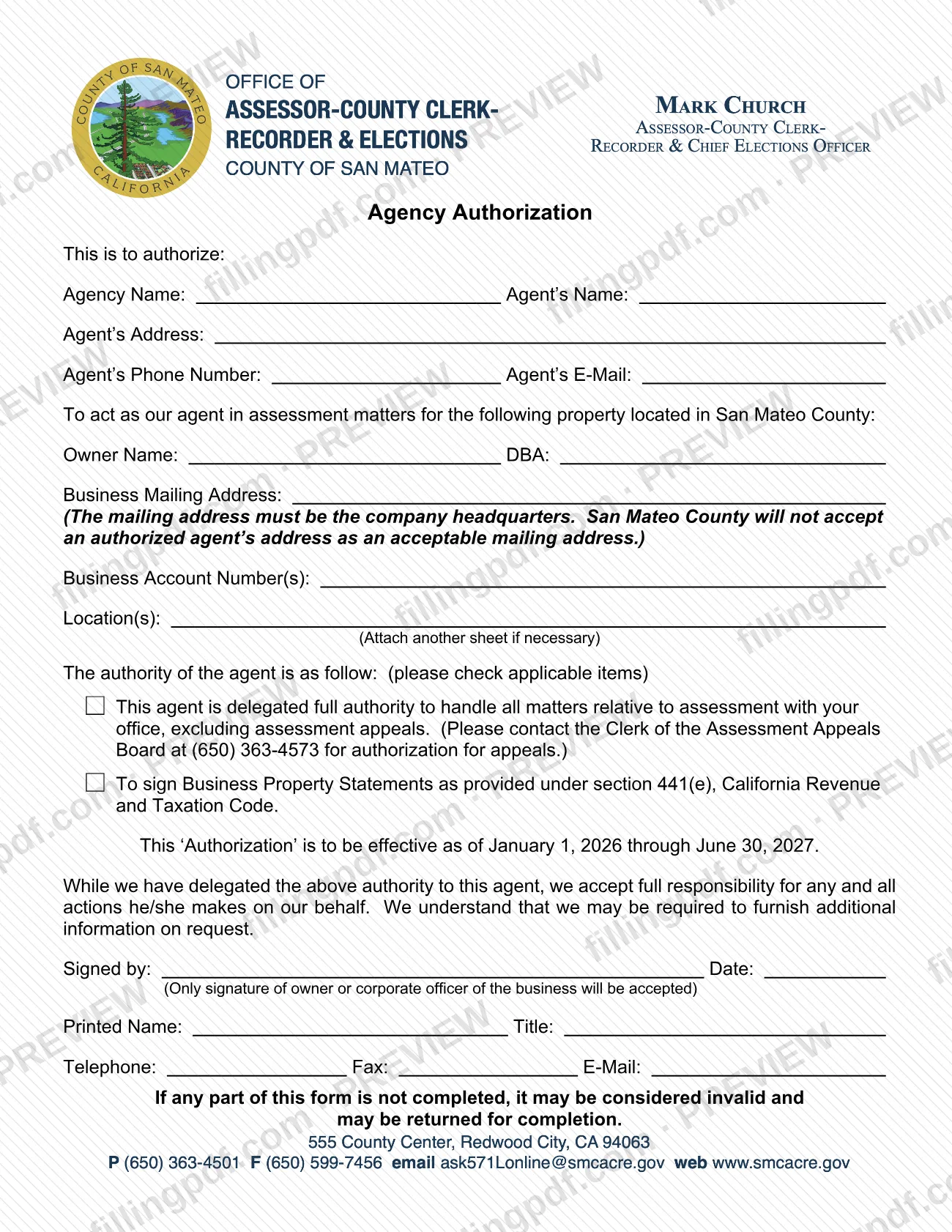
The Agency Authorization Form is the document a business owner signs to authorize an agent to act in assessment matters for business property in San Mateo County. It is one of the forms the San Mateo County Assessor-County Clerk-Recorder publishes for San Mateo County property tax assessment matters, and it can also let the agent sign Business Property Statements. On this page you can fill out the form online on FillingPDF and download or print the completed PDF; the original is published by the county at smcacre.gov.
Last updated
What is Agency Authorization Form – San Mateo County, CA?
The Agency Authorization Form is the San Mateo County Assessor-County Clerk-Recorder form on which the owner of business property names an agent to act on the owner's behalf in assessment matters for property located in San Mateo County.
The form identifies two parties. The agent is listed by agency name, agent's name, address, phone number and e-mail. The owner is listed by owner name, DBA, business mailing address, business account number(s) and the location(s) of the property.
The owner then checks the authority being granted:
- Full authority to handle all matters relative to assessment with the Assessor's office, excluding assessment appeals.
- Authority to sign Business Property Statements as provided under section 441(e) of the California Revenue and Taxation Code.
The form states that the authorization is effective as of January 1, 2026 through June 30, 2027. By signing, the owner accepts full responsibility for every action the agent takes on the owner's behalf and acknowledges that additional information may be required on request.
The form is not an authorization for assessment appeals. For those, it directs the reader to the Clerk of the Assessment Appeals Board at (650) 363-4573.
Who needs to file Agency Authorization Form – San Mateo County, CA?
Owners of business property in San Mateo County who want an agent, such as a tax consultant or an outside firm, to handle their assessment matters with the Assessor's office use this form. The owner completes and signs it; the agent does not sign it.
Conditions printed on the form:
- Only the signature of the owner or of a corporate officer of the business is accepted.
- The business mailing address must be the company headquarters. San Mateo County will not accept an authorized agent's address as the mailing address.
- If the authorization covers more locations than fit on the form, attach another sheet.
Who should not rely on this form: anyone who needs an agent for an assessment appeal. The form excludes appeals from the authority it grants and refers the reader to the Clerk of the Assessment Appeals Board at (650) 363-4573 for authorization for appeals.
The form also says that if any part is not completed, it may be considered invalid and may be returned for completion.
When to file Agency Authorization Form – San Mateo County, CA
The form carries its own period: the authorization is printed as effective as of January 1, 2026 through June 30, 2027. Complete it when you decide to have an agent act for your business in assessment matters during that period. No separate due date is printed on the form. If you are unsure whether it must reach the Assessor's office before a particular filing, ask the office; its business personal property forms page lists (650) 363-4501, with office hours Monday through Friday, 8 to 5 p.m. An incomplete form may be considered invalid and returned for completion, so fill in every part before it is sent.
Documents you need
- Another sheet listing additional business locations, only if the locations do not fit in the Location(s) space on the form; the form says to attach another sheet if necessary.
How to fill out Agency Authorization Form – San Mateo County, CA
Enter the agent's details
Fill in Agency Name, Agent's Name, Agent's Address, Agent's Phone Number and Agent's E-Mail for the person or firm you are authorizing.
Enter the owner name and DBA
Under the property located in San Mateo County, enter the Owner Name and, if the business uses one, the DBA.
Enter the headquarters mailing address
Write the Business Mailing Address. It must be the company headquarters; the county will not accept the agent's address.
List account numbers and locations
Enter the Business Account Number(s) and the Location(s) of the property. If there are more locations than fit, attach another sheet.
Check the authority you are granting
Check the box for full authority over assessment matters (appeals are excluded), the box for signing Business Property Statements under section 441(e), or both if both apply.
Note the effective period
The form prints that the authorization is effective as of January 1, 2026 through June 30, 2027. Confirm this is the period you intend.
Sign and date as owner or officer
Next to Signed by, sign and enter the Date. Only the signature of the owner or a corporate officer of the business is accepted.
Complete the signer's contact details
Enter the signer's Printed Name, Title, Telephone, Fax and E-Mail.
Review, sign and download the PDF
Check that every part is completed, since an incomplete form may be returned. Download or print the completed PDF from FillingPDF and deliver it as described under How to submit.
How to submit Agency Authorization Form – San Mateo County, CA
The form prints no mailing address, portal or other submission channel, so confirm with the San Mateo County Assessor-County Clerk-Recorder how it wants the signed form delivered.
- Phone: the agency's business personal property forms page, at https://smcacre.gov/assessor/business-personal-property-forms, says to call (650) 363-4501 and leave a voicemail message with questions about Business Personal Property forms. Office hours are Monday through Friday, 8 to 5 p.m.
- Appeals: for authorization to handle assessment appeals, call the Clerk of the Assessment Appeals Board at (650) 363-4573; this form does not cover them.
That page describes SDR/e-SDR (a BIN is required) and DocuSign as ways to file Business Property Statement forms. It does not say they apply to this authorization.
Before the form goes out, check that the owner or a corporate officer has signed and dated it, that the business mailing address is the company headquarters, and that no part is blank. FillingPDF lets you fill out and download the PDF; submission follows the agency's channels.
Common mistakes to avoid
- Entering the agent's address as the business mailing address; the form says it must be the company headquarters and San Mateo County will not accept an agent's address.
- Having the agent or another employee sign; only the signature of the owner or a corporate officer of the business is accepted.
- Leaving part of the form blank; the form says an incomplete form may be considered invalid and returned for completion.
- Using this form to authorize an agent for an assessment appeal; appeals are excluded and require contacting the Clerk of the Assessment Appeals Board at (650) 363-4573.
- Not checking the authority box for signing Business Property Statements under section 441(e), California Revenue and Taxation Code, when the agent will sign them.
- Listing more locations than fit in the space without attaching another sheet.
- Checking neither authority box, which leaves the scope of the agent's authority unstated.
Frequently asked questions
What is the San Mateo County Agency Authorization Form for?
It lets a business owner authorize an agent to act in assessment matters for business property in San Mateo County. The owner checks whether the agent has full authority excluding appeals, authority to sign Business Property Statements under section 441(e), or both.
Who has to sign the Agency Authorization Form?
The owner or a corporate officer of the business. The form states that only the signature of the owner or corporate officer will be accepted, so the agent cannot sign it. The signer also prints a name and title and gives a telephone, fax and e-mail.
Does this form let my agent handle an assessment appeal?
No. The full authority on the form excludes assessment appeals. For authorization for appeals, the form tells you to contact the Clerk of the Assessment Appeals Board at (650) 363-4573.
Can I use my agent's address as the business mailing address?
No. The form says the mailing address must be the company headquarters and that San Mateo County will not accept an authorized agent's address as an acceptable mailing address.
How long does the authorization last?
The form prints that the authorization is effective as of January 1, 2026 through June 30, 2027. It prints no separate renewal or filing deadline.
What happens if I leave part of the form blank?
The form says that if any part is not completed, it may be considered invalid and may be returned for completion. Fill in every part, and attach another sheet if the locations do not fit.
Can I fill out the Agency Authorization Form online?
You can fill out the PDF online on FillingPDF and download or print it. FillingPDF is independent of the county and does not file or deliver the form; you send it to the Assessor-County Clerk-Recorder through the agency's channels.
Ready to fill out Agency Authorization Form – San Mateo County, CA?
Fill out Agency Authorization Form – San Mateo County, CA now